
1. Introduction
This manual provides essential information for setting up, operating, maintaining, and troubleshooting your MINISFORUM NAD9 Mini PC. Please read this manual thoroughly before using the device to ensure proper functionality and longevity.
2. Package Contents
Verify that all items are present in your package:
- 1x MINISFORUM NAD9 Mini PC
- 1x HDMI Cable
- 1x US Power Adapter
- 1x User Manual
3. Product Overview
The MINISFORUM NAD9 is a compact yet powerful mini PC designed for various computing tasks. It features a robust Intel Core i9-12900H processor and a comprehensive set of ports for connectivity.

Figure 3.1: Front view of the MINISFORUM NAD9 Mini PC, showcasing its compact design and ventilation.
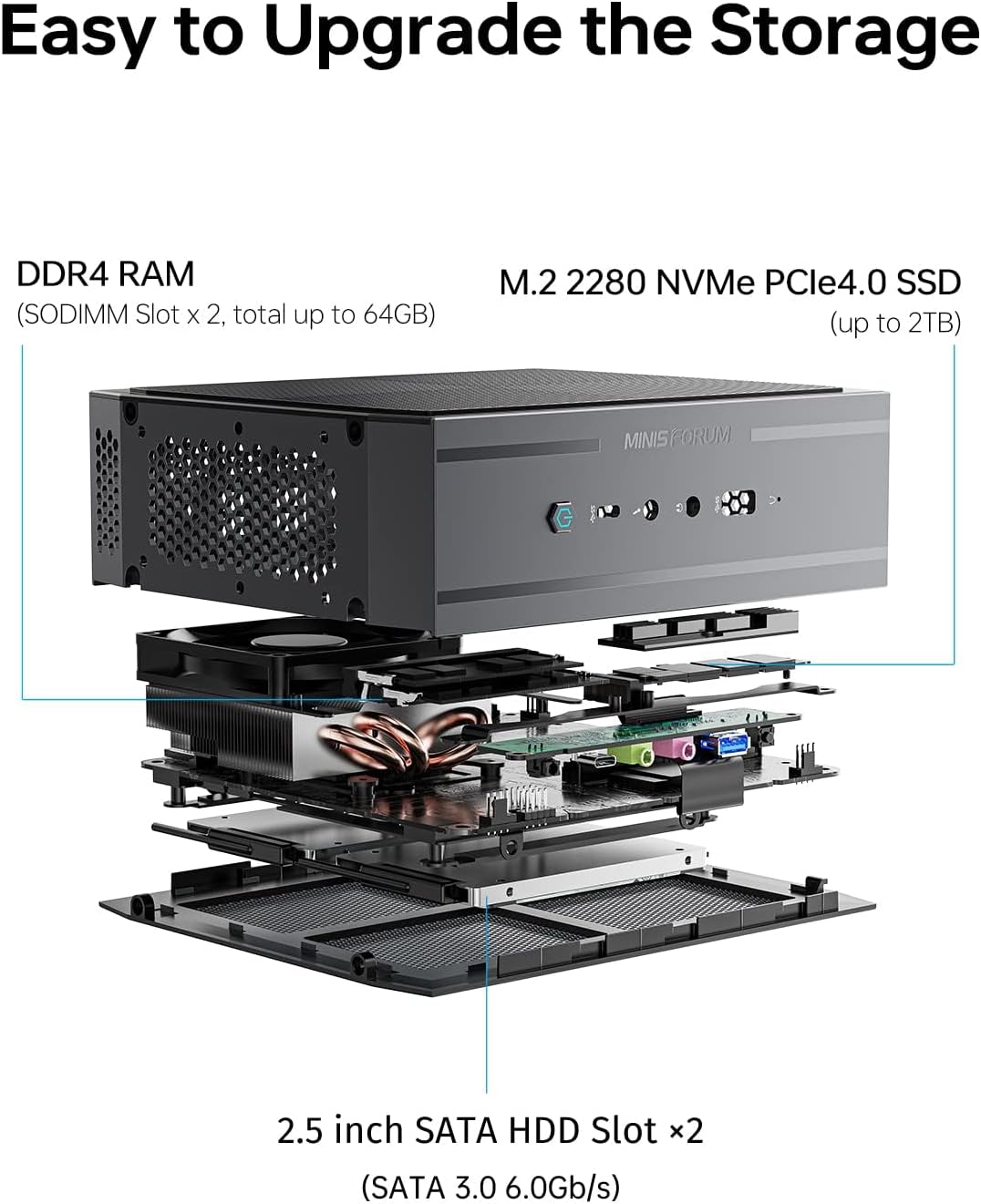
Figure 3.2: Detailed diagram illustrating the various ports available on the MINISFORUM NAD9 Mini PC, including USB, HDMI, and LAN connections.
Front Panel Ports:
- 1x USB 3.2 Gen2 (data only)
- 1x Headphone Jack
- 1x MIC IN Jack
- Power Button
Rear Panel Ports:
- 2x HDMI (4K@60Hz)
- 1x USB 3.2 Gen2 (DP only)
- 1x USB 3.2 Gen2 Type-C (Alt DP and Data)
- 2x USB 3.2 Gen2 Type-A
- 2x USB 2.0 Type-A
- 1x RJ45 2.5 Gigabit Ethernet port
- 1x DC 19V Power Input
- 1x Clear CMOS Button
4. Setup Instructions
- Connect Peripherals: Connect your monitor(s) to the HDMI or USB-C (Alt DP) ports. Connect your keyboard and mouse to the available USB ports.
- Connect Network: For a wired connection, connect an Ethernet cable to the RJ45 2.5 Gigabit Ethernet port. For wireless, ensure your system is configured for Wi-Fi.
- Connect Power: Plug the US Power Adapter into the DC 19V input port on the rear of the Mini PC, then plug the adapter into a power outlet.
- Power On: Press the power button located on the front panel. The system will begin to boot.
5. Operating Instructions
Power On/Off:
- To Power On: Press the power button once.
- To Shut Down: Use the operating system's shutdown procedure. Alternatively, press and hold the power button for 5-7 seconds for a forced shutdown (use only when necessary).
Quad-Screen Display:
The NAD9 Mini PC supports up to four displays simultaneously, utilizing its two HDMI ports and two USB-C ports (one with Alt DP support). This allows for enhanced productivity and multitasking.

Figure 5.1: Illustration of the MINISFORUM NAD9 Mini PC connected to four monitors, demonstrating its quad-screen output capability for improved work efficiency.
6. Storage Expansion
The MINISFORUM NAD9 offers flexible storage expansion options to meet your needs.

Figure 6.1: Exploded view of the MINISFORUM NAD9 Mini PC, highlighting the locations for DDR4 RAM, M.2 2280 NVMe PCIe4.0 SSD, and 2.5-inch SATA HDD slots for easy storage upgrades.
- DDR4 RAM: Two SODIMM slots support up to 64GB of DDR4 memory.
- M.2 2280 NVMe PCIe4.0 SSD: One slot supports up to 2TB NVMe SSD.
- 2.5-inch SATA HDD Slots: Two slots are available for 2.5-inch SATA 3.0 (6.0Gb/s) hard disk drives or solid-state drives.
For detailed instructions on installing or upgrading components, refer to the manufacturer's official support resources or consult a qualified technician.
7. Connectivity
The NAD9 Mini PC provides various connectivity options for networking and peripherals.
Network Connectivity:
The device includes a 2.5 Gigabit Ethernet port for high-speed wired network connections. It also supports wireless connectivity via 802.11ax (Wi-Fi 6).

Figure 7.1: Comparison of network transmission speeds, highlighting the performance benefits of the 2.5 Gbps LAN support on the MINISFORUM NAD9 Mini PC.
USB Ports:
Multiple USB ports are available for connecting various peripherals such as keyboards, mice, external storage, and other USB devices. These include USB 3.2 Gen2 Type-A, USB 3.2 Gen2 Type-C, and USB 2.0 Type-A ports.
8. Maintenance
Regular maintenance helps ensure the longevity and optimal performance of your Mini PC.
- Cleaning: Keep the device free from dust. Use a soft, dry cloth to clean the exterior. For vents, use compressed air to gently remove dust buildup.
- Ventilation: Ensure the Mini PC is placed in a well-ventilated area. Do not block the air vents. The NAD9 features an efficient heat dissipation system with multiple heat pipes and an intelligent fan to maintain optimal operating temperatures.
- Software Updates: Regularly update your operating system and drivers to ensure stability and security.
9. Troubleshooting
If you encounter issues with your MINISFORUM NAD9 Mini PC, refer to the following common troubleshooting steps:
- No Power: Ensure the power adapter is securely connected to both the Mini PC and a working power outlet. Try a different outlet if necessary.
- No Display: Verify that the monitor is powered on and correctly connected to the Mini PC via HDMI or USB-C. Try a different cable or monitor if available.
- System Unresponsive: If the system becomes unresponsive, press and hold the power button for 5-7 seconds to perform a forced shutdown. Then, power it back on.
- Clear CMOS: If you experience boot issues or incorrect BIOS settings, locate the 'Clear CMOS' button on the rear panel and press it (usually with a paperclip) while the device is powered off and disconnected from power. This will reset BIOS settings to default.
- Network Issues: Check your Ethernet cable connection or Wi-Fi settings. Restart your router/modem if other devices are also experiencing network problems.
For persistent issues, contact MINISFORUM support or consult their official website for further assistance.
10. Specifications
Below are the technical specifications for the MINISFORUM NAD9 Mini PC:
| Processor | Intel Core i9-12900H (14 Cores, 20 Threads, up to 5.0 GHz) |
| Graphics | Intel Iris Xe Graphics eligible (Frequency 1.45GHz) |
| RAM | DDR4 (2x SODIMM slots, up to 64GB) |
| Storage | 1x M.2 2280 NVMe PCIe4.0 SSD (up to 2TB), 2x 2.5-inch SATA HDD slots |
| Video Output | 2x HDMI (4K@60Hz), 1x USB 3.2 Gen2 (DP only), 1x USB 3.2 Gen2 Type-C (Alt DP) - Supports Quad-Screen Display |
| Network | 1x RJ45 2.5 Gigabit Ethernet, 802.11ax Wireless (Wi-Fi 6) |
| USB Ports | 1x USB 3.2 Gen2 (front, data only), 1x USB 3.2 Gen2 (rear, DP only), 1x USB 3.2 Gen2 Type-C (rear, Alt DP and Data), 2x USB 3.2 Gen2 Type-A (rear), 2x USB 2.0 Type-A (rear) |
| Operating System | OS (Pre-installed or user-installable) |
| Dimensions | Approximately 9.49 x 6.3 x 6.18 inches (Package Dimensions) |
| Weight | Approximately 4.53 pounds (Item Weight) |
11. Warranty and Support
MINISFORUM products typically come with a manufacturer's warranty. For specific warranty terms, duration, and support procedures, please refer to the warranty card included with your product or visit the official MINISFORUM website. Keep your proof of purchase for warranty claims.
For technical assistance, driver downloads, or further inquiries, please visit the official MINISFORUM support page.


