
1. Introduction
This manual provides essential instructions for the proper installation and maintenance of your DAJDAH AP-1273 True HEPA filter replacements. These filters are designed to maintain the air purification performance of compatible air purifier models.

Image: Two sets of DAJDAH AP-1273 True HEPA filters, ready for installation.
2. Compatibility
The DAJDAH AP-1273 True HEPA filter replacements are compatible with the following air purifier models:
- DeedMo Air Purifier AP-1273 (Part# AP-1273, AP1273-RF)
- Jafanda Air Purifier JF260 (Part# JF-260-RF)
Please verify your air purifier model number to ensure correct filter selection.
3. Product Specifications
The AP-1273 filter features a 3-stage filtration system designed to capture various airborne particles and odors.
3.1. Filtration Stages
- Pre-filter: Captures larger particles such as human hair, fibers, pet fur, and dust. This stage helps protect the True HEPA filter and extends its lifespan.
- H13 True HEPA Filter: Captures fine airborne particles down to 0.3 microns in size, including PM2.5, dust, smoke particles, mold spores, plant spores, and pollen.
- Activated Carbon Filter: Absorbs and eliminates fumes, volatile organic compounds (VOCs), smoke, and common household odors.

Image: Visual representation of the three filtration layers within the AP-1273 filter.
3.2. Dimensions
Each AP-1273 filter measures approximately:
- Height: 10.9 inches
- Width: 7.7 inches
- Depth: 1.2 inches

Image: Diagram indicating the height, width, and depth measurements of the AP-1273 filter.
4. Installation (Filter Replacement)
Follow these steps to replace the filters in your compatible air purifier:
- Prepare the Air Purifier: Turn off and unplug the air purifier. Carefully turn the unit upside down and remove the filter cover from the base.
- Remove Old Filters: Take out the used filters. Note the orientation of the filters as you remove them.
- Insert New Filters: Place the new AP-1273 filters into the air purifier. Ensure the pre-filter layer is facing outwards and the activated carbon layer is facing inwards. The pull tabs on the filters should also face inwards for proper seating.
- Secure Cover and Reset: Return the filter cover to its position and secure it. Turn the air purifier upright. Plug in the unit. Press and hold the 'Replace Filter' indicator button for approximately 3 seconds to reset the filter lifetime counter.
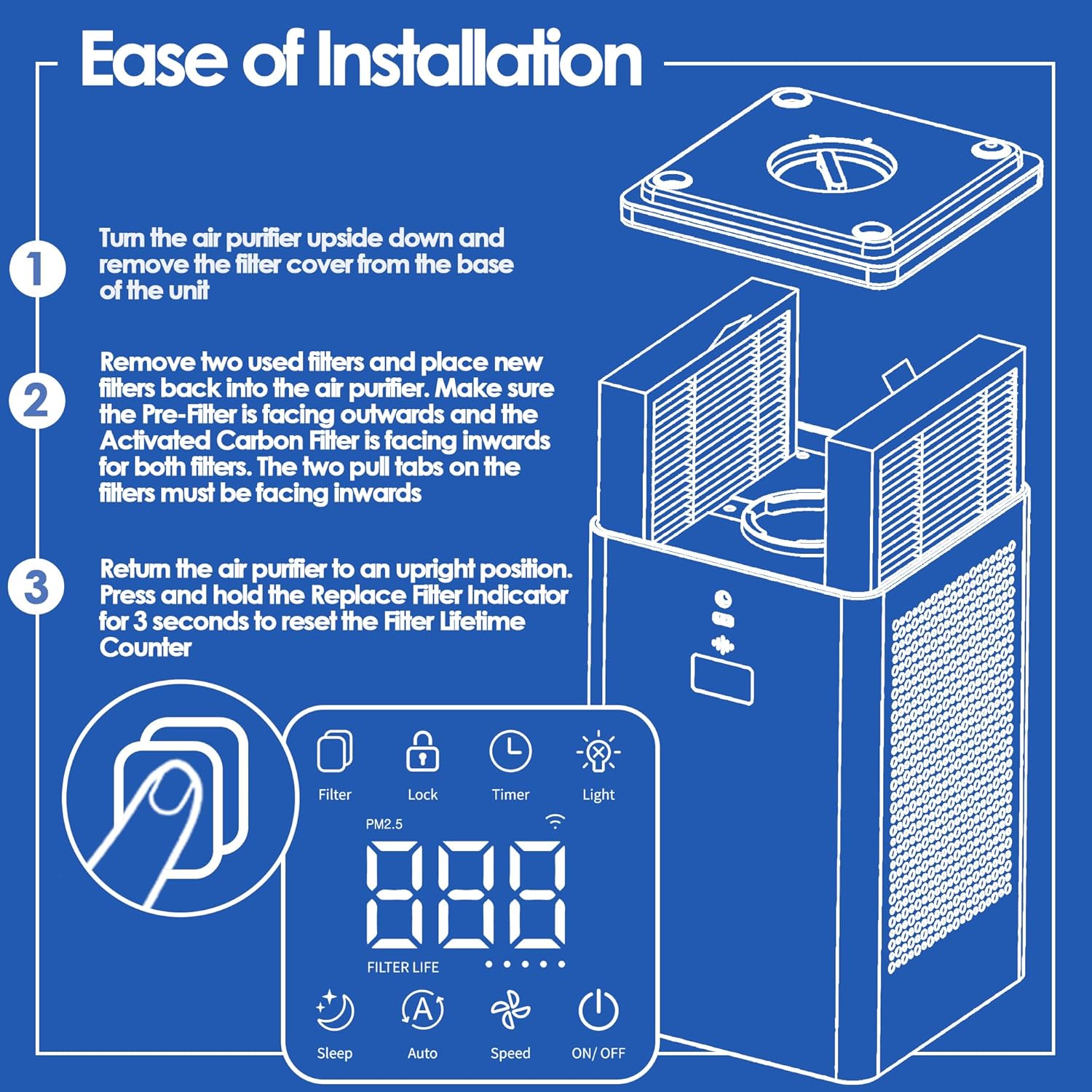
Image: Step-by-step visual guide for replacing the air purifier filters and resetting the filter indicator.
5. Maintenance
Regular maintenance ensures optimal performance and extends the life of your air purifier.
- Pre-filter Cleaning: It is recommended to vacuum the pre-filter layer every month to remove accumulated larger particles. This helps maintain airflow and efficiency.
- Filter Replacement: For best performance, replace the AP-1273 HEPA filter every 3 to 6 months. The exact replacement interval may vary depending on usage frequency, air quality, and environmental conditions.

Image: Illustration of the filter's effectiveness against various particles and a reminder for timely replacement.
6. Troubleshooting
If you experience issues after replacing your filters, consider the following:
- Filter Orientation: Double-check that the filters are installed with the correct orientation (pre-filter outwards, activated carbon inwards, pull tabs inwards).
- Filter Reset: Ensure the filter lifetime counter has been successfully reset by pressing and holding the reset button for the specified duration.
- Air Purifier Malfunction: If issues persist, consult the instruction manual for your specific air purifier model for further troubleshooting steps, as the problem may not be related to the filters.
7. Support
For any questions regarding your DAJDAH AP-1273 replacement filters, please contact the seller or manufacturer for assistance. We are committed to providing support for our products.


