
SIXWIN efb8de8f-5c1b-4d9e-85a8-d53876660c9a
SIXWIN Android 13 Autoradio User Manual for Ford Fiesta 2009-2017
Model: efb8de8f-5c1b-4d9e-85a8-d53876660c9a
1. Introduction
This manual provides comprehensive instructions for the installation, operation, and maintenance of your SIXWIN Android 13 Autoradio. Designed specifically for Ford Fiesta models from 2009 to 2017, this unit integrates advanced features to enhance your in-car experience. Please read this manual thoroughly before installation and use to ensure proper function and safety.

Image 1.1: The SIXWIN Android 13 Autoradio display showing various applications.
2. Product Overview
2.1 Key Features
- Operating System: Android 13
- Memory: 4GB RAM + 64GB ROM
- Display: 9-inch IPS Touch Screen with 2.5D Glass
- Connectivity: Wireless CarPlay, Android Auto, Mirrorlink, Wi-Fi, Bluetooth 5.0, USB, Auxiliary
- Navigation: Built-in GPS with pre-installed maps and support for online navigation
- Audio: Built-in 32-band Equalizer (EQ), FM/RDS Radio
- Additional Features: Support for external AHD rear view camera, hands-free calling, music playback
2.2 Compatibility
This autoradio is designed for Ford Fiesta vehicles manufactured between 2009 and 2017.

Image 2.1: Visual guide for Ford Fiesta dashboard compatibility (2009-2017).
2.3 Included Accessories
The package includes the following components:
- GPS Antenna
- Radio Antenna
- Original USB Cable
- Adapter Cable
- Rear Camera Input Cable
- RCA Cable
- Installation Tool
- Power Cables (various types)
- User Manual
- USB Cable
- Canbus Decoder
- Microphone
- Rear Camera

Image 2.2: All accessories included with the SIXWIN Autoradio.
3. Setup and Installation
Professional installation is recommended. Ensure the vehicle's power is disconnected before beginning installation.
3.1 Pre-Installation Check
Verify that all included accessories are present and undamaged. Confirm your Ford Fiesta model year is between 2009 and 2017 for proper fitment.
3.2 Wiring Instructions
The autoradio comes with specific wiring harnesses. Pay close attention to the steering wheel control interfaces, as they vary by vehicle year.
- For vehicles from 2009 to 2012, use Steering Wheel Control Interface No. 2.
- For vehicles from 2013 onwards, use Steering Wheel Control Interface No. 3.
- Connect the chosen steering wheel control interface to Interface No. 1 on the main wiring harness.

Image 3.1: Wiring diagram with specific instructions for steering wheel control connections based on vehicle year.
3.3 Initial Power-On
After installation, reconnect the vehicle's power. The unit should power on automatically with the car's ignition. If the unit does not power on, refer to the Troubleshooting section.
4. Operating Instructions
4.1 Wireless CarPlay & Android Auto
Connect your compatible smartphone wirelessly to access navigation, music, calls, and messages directly on the autoradio display. Ensure Bluetooth and Wi-Fi are enabled on your phone.
- Navigate to the CarPlay or Android Auto application on the head unit.
- Follow the on-screen prompts to pair your device via Bluetooth, which will then establish a Wi-Fi connection for the service.
4.2 Mirrorlink Function
Mirrorlink allows you to display your smartphone's screen directly onto the autoradio. This feature supports both iOS and Android devices.
- For iOS: Connect via Wi-Fi.
- For Android: Connect via Wi-Fi or USB cable.

Image 4.1: Wireless CarPlay, Android Auto, and Mirrorlink interfaces.
4.3 Built-in GPS Navigation
The unit comes with pre-installed maps for your region. It also supports other online navigation applications like Google Maps when connected to Wi-Fi.
- Access the 'Navigation' application from the main menu.
- Enter your destination to receive turn-by-turn directions.
4.4 Wi-Fi Connection
Connect the autoradio to a Wi-Fi hotspot (e.g., from your smartphone) to access online features, stream media, and download applications.
- Go to 'Settings' > 'Wi-Fi' to connect to an available network.
- Supports popular apps like YouTube, Facebook, TikTok, and more.
4.5 Reversing Function
The included rear camera provides a clear view of the area behind your vehicle when reversing, enhancing safety.
- The display automatically switches to the rear camera view when the vehicle is put into reverse gear.
- The camera features 150° wide angle, waterproof design, night vision, and guide lines.

Image 4.2: GPS navigation, Wi-Fi connectivity, and reversing camera features.
4.6 Built-in 32-Band Equalizer (EQ)
Customize your audio experience with the integrated 32-band equalizer. Adjust sound frequencies to match your preferences or choose from preset sound styles.
- Access the 'EQ' application to adjust sound settings.
- Available sound styles include Flat, Rock, Pop, Jazz, Classic.
4.7 FM/RDS Radio
Enjoy your favorite radio stations with the built-in FM/RDS tuner.
- Supports 18 preset stations.
- FM(3*6) channels for reception.
- Built-in RDS (Radio Data System) receiver displays station information.
4.8 Built-in Bluetooth 5.0
Connect your phone via Bluetooth for hands-free calling and wireless music streaming.
- Supports automatic phone book loading.
- Allows music playback from your paired device.
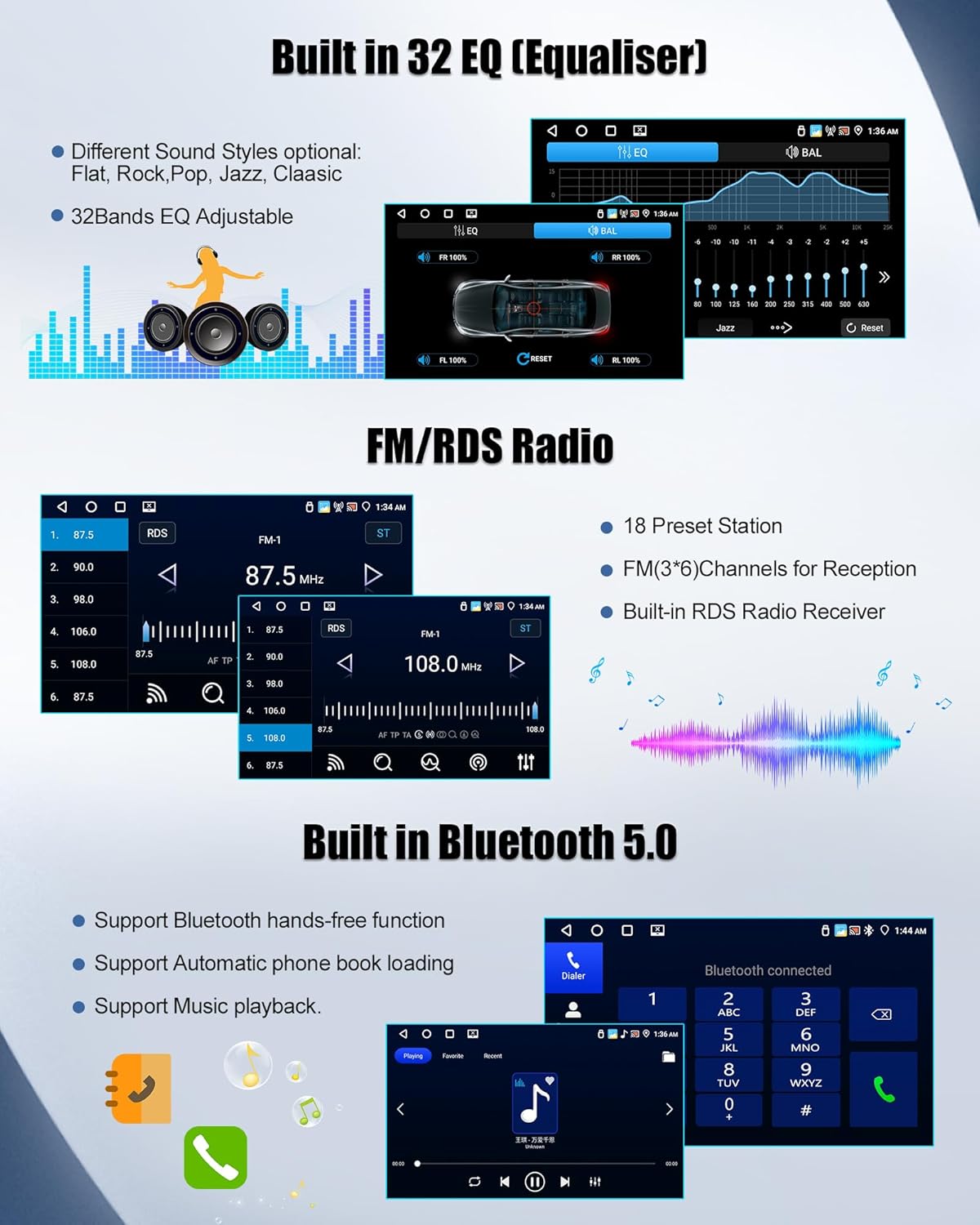
Image 4.3: Equalizer settings, FM/RDS radio, and Bluetooth interface.
5. Maintenance
To ensure the longevity and optimal performance of your autoradio, follow these maintenance guidelines:
- Cleaning the Screen: Use a soft, lint-free cloth to gently wipe the screen. Avoid abrasive cleaners or solvents.
- Software Updates: Periodically check for software updates through the system settings to ensure you have the latest features and security patches.
- Avoid Extreme Temperatures: Do not expose the unit to extreme heat or cold, as this can affect its electronic components.
- Cable Connections: Ensure all cables are securely connected to prevent intermittent issues.
6. Troubleshooting
If you encounter issues with your autoradio, refer to the following common problems and solutions:
| Problem | Possible Cause | Solution |
|---|---|---|
| Unit does not power on with car ignition. | Incorrect wiring; power cable not connected; blown fuse. | Check power cable connections. Verify vehicle's fuse box. Consult a professional installer. |
| Steering wheel controls not working. | Incorrect steering wheel control interface used for vehicle year. | Refer to Section 3.2 and Image 3.1 to ensure the correct interface (No. 2 or No. 3) is connected based on your Ford Fiesta's model year. |
| Microphone not working or poor audio quality. | External microphone not connected; internal microphone selected. | Ensure the external microphone is securely plugged in. Check system settings for microphone input selection (if available). |
| GPS signal is weak or inaccurate. | GPS antenna not properly installed or obstructed. | Ensure the GPS antenna is mounted in a clear location, free from obstructions, and securely connected. |
| Bluetooth connection issues. | Device not discoverable; interference; incorrect pairing process. | Ensure Bluetooth is enabled on both devices. Delete previous pairings and re-pair. Move closer to the unit. |
7. Specifications
| Feature | Specification |
|---|---|
| Brand | SIXWIN |
| Model Number | efb8de8f-5c1b-4d9e-85a8-d53876660c9a |
| Operating System | Android 13 |
| Memory | 4GB RAM + 64GB ROM |
| Screen Size | 9 Inches |
| Connectivity Technology | Auxiliary, Bluetooth, USB, Wi-Fi |
| Compatible Devices | Ford Fiesta 2009-2017 |
| Connector Type | 3.5 mm Jack, USB Type A |
| Audio Output Mode | Stereo |
| Surround Sound Configuration | 5.1 |
| Video Encoding | H.264, H.265/HEVC |
| Output Power | 45 Watts |
| Color | Black |
8. Warranty Information
The SIXWIN Android 13 Autoradio comes with a 1-year manufacturer's warranty from the date of purchase. This warranty covers defects in materials and workmanship under normal use. It does not cover damage caused by improper installation, accident, misuse, abuse, neglect, or unauthorized modification.
Please retain your proof of purchase for warranty claims.
9. Customer Support
For any questions, technical assistance, or warranty inquiries, please contact our customer support team. We are committed to providing 24-hour service and support.
Email: sum6987778@163.com

Image 9.1: Customer support contact information.
Ask a question about this manual
Ask about setup, troubleshooting, compatibility, parts, safety, or missing instructions. Manuals+ will review the question and use this page’s manual context to help answer it.