Introduction
This manual provides detailed instructions for the AITONE AT-01 Looper Pedal with Drum Machine and the accompanying 6-pack of 1/4" TS Right Angle Guitar Patch Cables. Please read this manual thoroughly before using the products to ensure proper operation and to maximize your experience.
AITONE AT-01 Looper Pedal with Drum Machine
Product Overview
The AITONE AT-01 is a compact and portable guitar effect pedal combining a looper and a drum machine. It offers up to 20 minutes of loop time and features 8 drum groove styles, providing a versatile tool for practice and performance.

Image: Front view of the AITONE AT-01 Looper Pedal, showcasing its compact design and controls.
Key Features
- Integrated Looper and Drum Machine functionality.
- Up to 20 minutes of loop recording time.
- 8 distinct drum groove styles.
- Compact and portable design.
- Low noise operation.
Controls and Connections

Image: AITONE AT-01 Looper Pedal with labels indicating its various controls and connections.
- DC 9V Input: Power supply connection.
- Input Jack: Connect your instrument (e.g., guitar).
- Output Jack: Connect to an amplifier or other effects.
- Mode Toggle Switch: Selects Looper, Drum, or Looper + Drum mode.
- Looper Level Knob: Adjusts the playback volume of the recorded loop.
- Drum Level Knob: Adjusts the playback volume of the drum machine.
- Rhythm Style Selector Knob: Chooses one of the 8 available drum patterns.
- Tap Tempo Button: Sets the tempo for the drum machine.
- Footswitch: Controls recording, playback, overdubbing, and stopping functions.
AITONE 1/4" TS Right Angle Guitar Patch Cables
Product Overview
This bundle includes a 6-pack of colored 1/4" TS right-angle guitar patch cables. These cables are designed for connecting guitar effects pedals and other audio equipment, offering reliable signal transmission and a space-saving right-angle design.
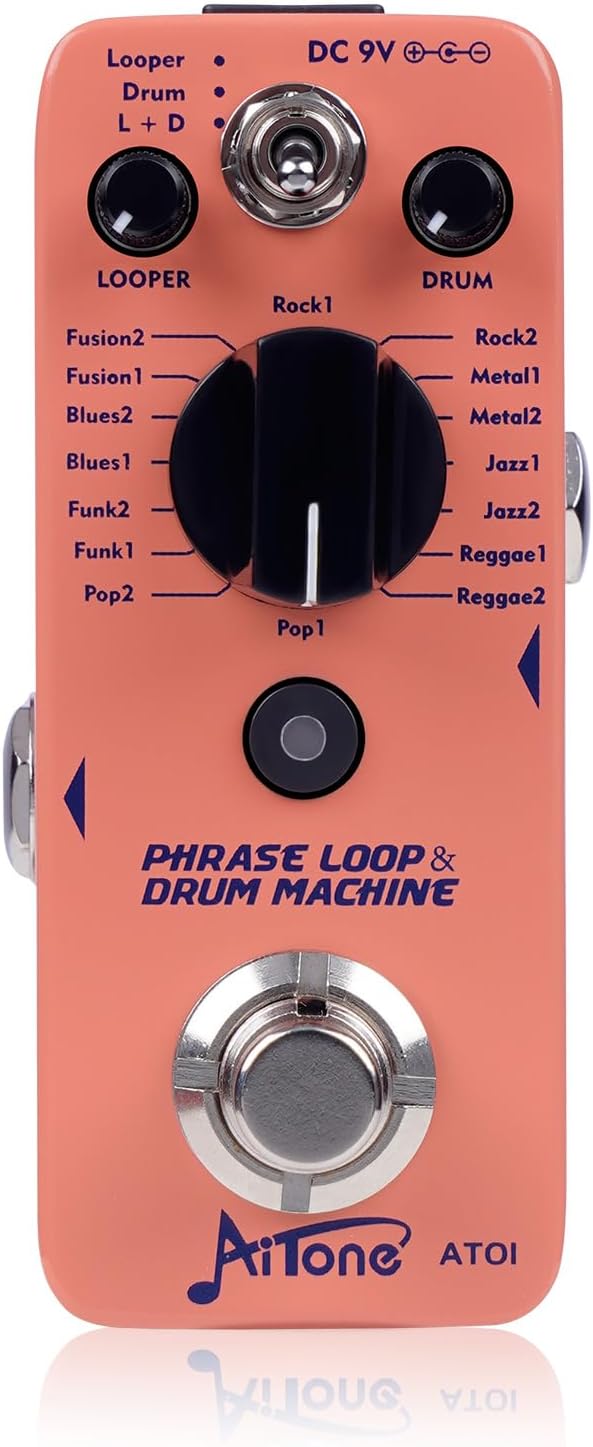
Image: A set of six colored 1/4 inch right-angle guitar patch cables, suitable for pedalboard connections.
Key Features
- Six distinct colors for easy identification in complex setups.
- High-purity oxygen-free copper (OFC) conductor for efficient signal transmission.
- Conductive PVC shield and OFC spiral shield to minimize external interference and noise.
- High-quality nickel-plated metal plugs for durability and corrosion resistance.
- Right-angle connectors for space efficiency on pedalboards.
- Durable PVC jacket with rubber protective shell at bends for enhanced longevity.
Setup
- Power Connection: Connect a standard 9V DC power adapter (center negative, not included) to the DC 9V input jack on the AITONE AT-01 pedal.
- Instrument Connection: Use a 1/4" instrument cable to connect your guitar (or other instrument) to the Input Jack of the AT-01 pedal.
- Output Connection: Use another 1/4" instrument cable to connect the Output Jack of the AT-01 pedal to your amplifier or the input of another effects pedal.
- Pedalboard Connections (using patch cables): If integrating the AT-01 into a pedalboard, use the included AITONE 1/4" TS right-angle patch cables to connect the AT-01 to other pedals. Ensure all connections are secure.
- Power On: Once all connections are made, power on your amplifier and then the AT-01 pedal.
Operating Instructions
AITONE AT-01 Looper Pedal
The AT-01 pedal features three operational modes: Looper, Drum, and Looper + Drum. Select the desired mode using the Mode Toggle Switch.
Looper Mode (Looper LED ON)
- Record: Press the footswitch once to start recording. The Looper LED will flash red.
- Play: Press the footswitch again to stop recording and start playback. The Looper LED will be solid green.
- Overdub: While playing, press the footswitch once to start overdubbing. The Looper LED will flash green. Press again to stop overdubbing.
- Undo/Redo: Press and hold the footswitch for 2 seconds to undo the last overdub. Press and hold again for 2 seconds to redo.
- Stop: Double-press the footswitch quickly to stop playback. The Looper LED will be off.
- Clear: While stopped, press and hold the footswitch for 2 seconds to clear the recorded loop.
- Adjust Loop Volume: Use the "Looper Level" knob to control the playback volume of your recorded loop.
Drum Mode (Drum LED ON)
- Select Rhythm: Turn the "Rhythm Style Selector" knob to choose one of the 8 available drum patterns (e.g., Rock, Metal, Jazz, Reggae, Pop, Funk, Blues, Fusion).
- Start/Stop Drum: Press the footswitch once to start the drum pattern. Press again to stop.
- Adjust Drum Volume: Use the "Drum Level" knob to control the playback volume of the drum machine.
- Set Tempo: Repeatedly tap the "Tap Tempo" button to set the desired tempo for the drum pattern. The Drum LED will flash in sync with the tempo.
Looper + Drum Mode (L+D LED ON)
In this mode, both the looper and drum machine operate simultaneously. The drum machine will automatically sync to the tempo of your recorded loop, or you can set the tempo manually using the Tap Tempo button before recording.
- Recording with Drum: Select a drum pattern and start it. Then, press the footswitch to start recording your loop. The loop will automatically sync to the drum tempo.
- Independent Volume Control: Adjust the "Looper Level" and "Drum Level" knobs independently to balance the volumes.
- All other looper and drum functions (play, overdub, stop, clear, tempo) operate as described in their respective modes.
Maintenance
- Keep the pedal and cables clean by wiping them with a soft, dry cloth.
- Avoid exposing the products to extreme temperatures, humidity, or direct sunlight.
- Do not use abrasive cleaners or solvents.
- Ensure all connections are secure but do not overtighten.
- Store the pedal and cables in a safe place when not in use to prevent damage.
Troubleshooting
| Problem | Possible Cause | Solution |
|---|---|---|
| No sound from pedal. | Incorrect connections, power issue, amplifier off, volume knobs set to zero. | Check all cable connections. Ensure power adapter is correctly connected and functional. Verify amplifier is on and volume is up. Adjust Looper Level and Drum Level knobs. |
| Loop not recording or playing. | Incorrect mode selected, footswitch not pressed correctly, loop cleared. | Ensure "Looper" or "L+D" mode is selected. Follow the footswitch instructions for recording and playback. Re-record the loop if it was accidentally cleared. |
| Drum machine not playing. | Incorrect mode selected, Drum Level set to zero, no rhythm selected. | Ensure "Drum" or "L+D" mode is selected. Adjust the Drum Level knob. Select a rhythm using the Rhythm Style Selector. |
| Excessive noise or hum. | Poor cable shielding, ground loop, faulty power supply. | Ensure high-quality cables are used (the included AITONE cables are designed to minimize noise). Try a different power supply. Check for ground loop issues in your setup. |
Specifications
- Product Model: AT-01
- Loop Recording Time: Up to 20 minutes
- Drum Styles: 8 distinct groove styles, including variations of Rock, Metal, Jazz, Reggae, Pop, Funk, Blues, and Fusion.
- Power Supply: DC 9V (center negative, not included)
- Input/Output: 1/4" TS Jack
- Dimensions (Pedal): Approximately 9.35cm (L) x 5.2cm (W) x 4.2cm (H) (3.68" x 2.04" x 1.65")
- Cable Type (Patch Cables): 1/4" TS Right Angle
- Cable Conductor: High-Purity Oxygen-Free Copper (OFC)
- Cable Shielding: Conductive PVC and OFC Spiral Shield
Warranty and Support
AITONE has a long-standing brand reputation and is committed to customer satisfaction. For any issues or inquiries regarding your AITONE AT-01 Looper Pedal or the included patch cables, please contact AITONE customer support via the "Contact Seller" option on Amazon. AITONE aims to provide prompt and effective solutions to customer concerns.
Please retain your proof of purchase for warranty purposes.