
1. Important Safety Information
Read this manual thoroughly before operating the Dvsripa Mobility Scooter. Failure to follow instructions and safety warnings may result in injury or damage to the scooter.
- Always wear a safety belt when operating the scooter.
- Ensure the battery is fully charged before long journeys.
- Do not operate the scooter under the influence of alcohol or medication.
- Be aware of your surroundings and other pedestrians or vehicles.
- Use the lighting system (front lights, tail lights, turn signals) for visibility, especially in low light conditions.
- Avoid sudden stops or turns at high speeds.
- Do not exceed the maximum weight capacity of 500 pounds.
- The rear anti-tip device is for added safety; do not rely solely on it.
2. Product Overview
The Dvsripa All-Terrain Heavy-Duty Mobility Scooter is designed for comfortable and safe travel across various terrains. Key features include an 800W motor, 60V20Ah battery, 16-inch tires, and a comprehensive lighting system.

Figure 2.1: Front-side view of the Dvsripa Mobility Scooter, highlighting its robust design and 4-wheel stability.
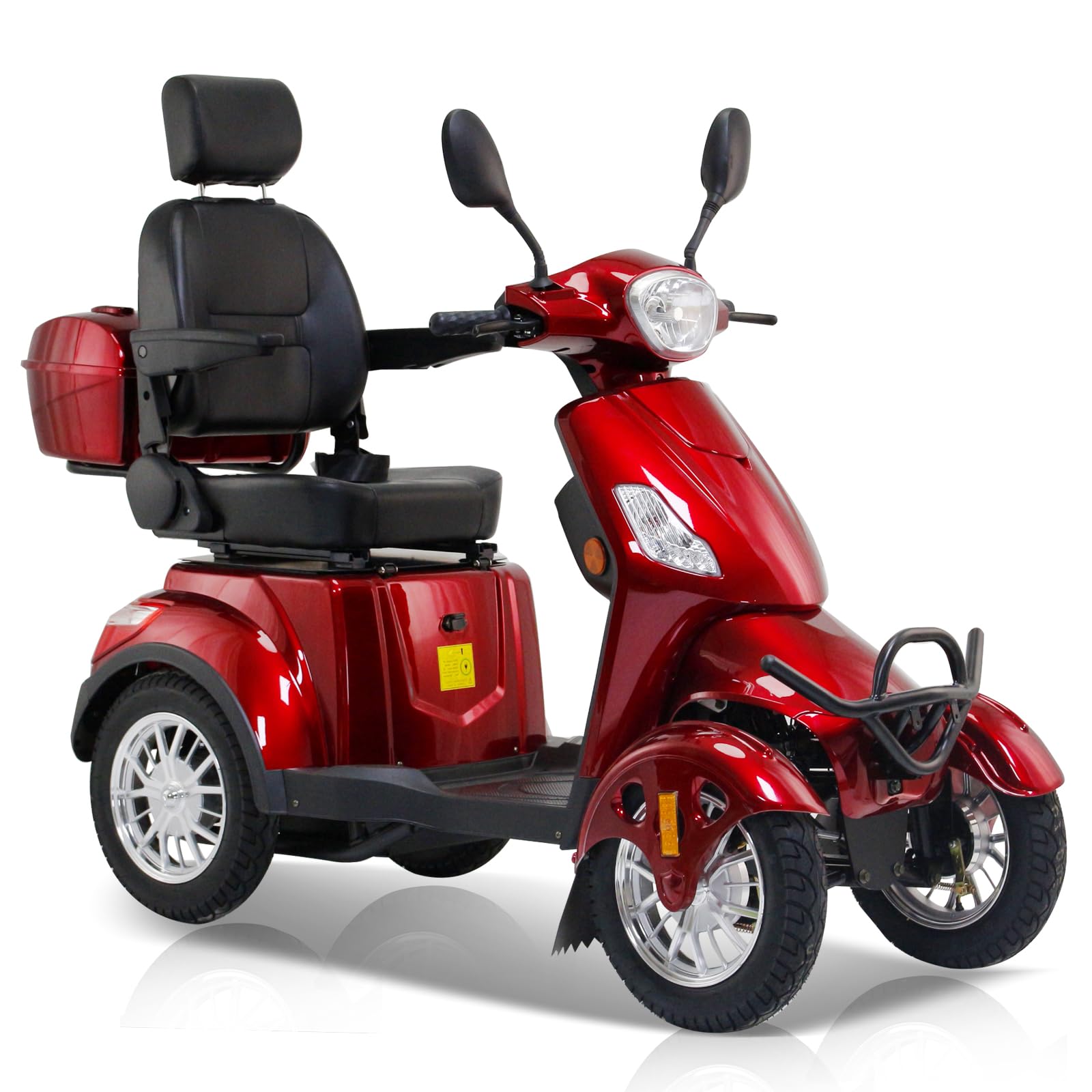
Figure 2.2: The Dvsripa Mobility Scooter with an overlay of key specifications including Max Speed (15mph), Battery (60V20A), Motor (800W), Max Load (500 LBS), Climbing Angle (20 Degrees), and Max Range (31 Miles).
3. Setup and Assembly
Follow these steps to set up your Dvsripa Mobility Scooter. It is recommended to have assistance during assembly.
- Unpack all components from the packaging.
- Assemble the mobility scooter following the detailed instructions provided in the included user manual (refer to specific diagrams for component placement).
- Locate the battery power switch, typically found under the seat. Ensure it is in the OFF position before connecting the charger.
- Charge the battery fully before the first use. Connect the charger to the scooter's charging port and then to a standard electrical outlet. The charging indicator will show when charging is complete.
- Adjust the seat and other components to fit your body and preferences for optimal comfort and control.
- Familiarize yourself with the controls before operating the scooter.

Figure 3.1: Scooter dimensions: Seat Cushion 17.7 X 17.7 inches, Width 27.2 inches, Length 65.5 inches, Height 43.4 inches.
4. Operating Instructions
4.1 Powering On and Off
- Ensure the battery power switch (located under the seat) is in the ON position.
- Insert the key into the ignition and turn it to the ON position. The LED display will illuminate.
- To turn off, turn the key to the OFF position and remove it.
Video 4.1: Demonstrates the Dvsripa Mobility Scooter in use, including powering on, engaging the safety belt, and operating the lights and turn signals. It also shows the under-seat storage and battery power switch.
4.2 Driving the Scooter
- Safety Belt: Always fasten the safety belt before driving.
- Throttle Control: Use the intuitive twist throttle control on the handlebar to adjust your speed. Gently twist to accelerate.
- Braking: Apply the brake levers on the handlebars to slow down or stop. The scooter features a push-to-lock brake style for parking.
- Steering: Navigate the scooter using the steering wheel. The 16-inch tires and front independent suspension provide stability and a smooth ride.
- Reverse: Use the reverse button for backing up.
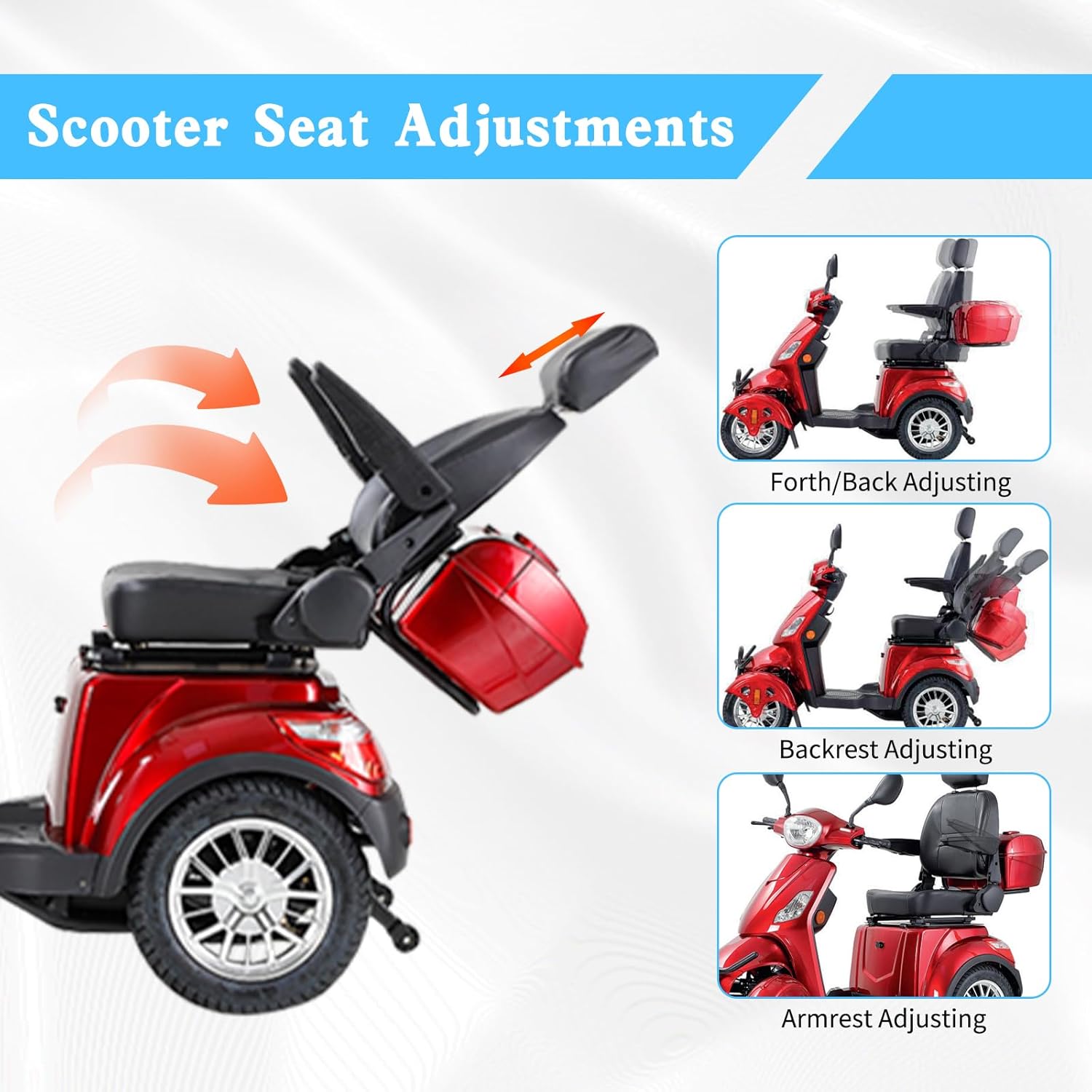
Figure 4.2: Close-up of the control panel, showing the LED display, High/Low Beam switch, Turn Signals switch, Horn, Reverse Button, and USB Charging Port.
4.3 Lighting System and Signals
- Headlights: Use the High/Low Beam switch to control the front lights for visibility.
- Turn Signals: Activate the turn signal switch to indicate turns.
- Tail Lights: The scooter is equipped with tail lights for rear visibility.
4.4 Adjustments and Storage
- Seat Adjustment: The luxurious reclining seat can be adjusted forth/back and the backrest can be adjusted for personalized comfort.
- Armrest Adjustment: Folding armrests can be adjusted for angle.
- Storage: Utilize the lockable storage box, rear basket, and under-seat storage compartment for personal items.
- USB Charger & Cup Holder: Stay connected and refreshed with the integrated USB charger and cup holder.

Figure 4.3: Illustrations showing how to adjust the seat (forth/back), backrest, and armrests for personalized comfort.
5. Maintenance
Regular maintenance ensures the longevity and safe operation of your Dvsripa Mobility Scooter.
- Battery Care: Charge the battery regularly. Avoid leaving the scooter unused for long periods without charging, as this can damage the battery. Always charge fully after each use.
- Tire Pressure: Periodically check the pressure of the 16-inch tires and inflate as needed to the recommended levels.
- Cleaning: Clean the scooter with a damp cloth. Avoid using harsh chemicals or direct water spray on electrical components.
- Inspections: Regularly inspect all moving parts, brakes, and the lighting system for proper function. Tighten any loose fasteners.
- Storage: When not in use, store the scooter in a safe, dry place away from extreme temperatures.
6. Troubleshooting
This section provides solutions to common issues you might encounter.
| Problem | Possible Cause | Solution |
|---|---|---|
| Scooter does not power on. | Battery power switch is off; battery is not charged; key not fully inserted. | Ensure battery switch is ON. Charge the battery. Ensure key is fully inserted and turned to ON. |
| Reduced range or power. | Battery not fully charged; battery degradation; heavy load; steep inclines. | Fully charge the battery. If battery is old, consider replacement. Reduce load or avoid extreme inclines. |
| Unusual noises during operation. | Loose components; motor issue; wheel obstruction. | Inspect for loose parts and tighten. Check wheels for obstructions. If noise persists, contact customer support. |
| Lights or turn signals not working. | Switch is off; bulb failure; electrical connection issue. | Ensure switch is ON. Check for damaged bulbs. If issue persists, contact customer support. |
For issues not listed here or if solutions do not resolve the problem, please contact Dvsripa customer support.
7. Specifications
| Feature | Detail |
|---|---|
| Model Name | All-Terrain Heavy-Duty 16-inch Mobility Scooter for Seniors |
| Brand | Dvsripa |
| Motor Power | 800W |
| Battery | 60V20Ah (Five 12V20Ah batteries) |
| Maximum Speed | 15 Miles per Hour |
| Maximum Range | 35-40 Miles |
| Maximum Weight Capacity | 500 Pounds |
| Climbing Angle | Up to 20 degrees |
| Wheel Size | 16 Inches |
| Turn Radius | 60 Inches |
| Brake Style | Push-to-Lock |
| Suspension | Front independent suspension, two rear shock absorbers |
| Lighting System | Front lights, tail lights, turn signals |
| Material Type | Alloy Steel, Aluminum, Leather, Rubber |
| Frame Material | Stainless Steel |
| Color | Red |
| Package Dimensions | 64.3 x 48.4 x 29.1 inches |
| Product Weight | 366 Pounds |
8. Warranty and Support
The Dvsripa Mobility Scooter comes with a one-year warranty and lifetime service. This warranty covers manufacturing defects and malfunctions under normal use (excluding batteries).
For any questions regarding your purchase, technical assistance, or warranty claims, please contact Dvsripa customer support. Ensure you have your purchase details and model information available when contacting support.
It is important to read the user manual carefully before using this mobility scooter to avoid accidents due to improper operation.