
1. Introduction
Thank you for choosing the WASTDE 60W Portable Solar Panel Charger. This manual provides essential information for the safe and efficient operation of your solar panel. Please read it thoroughly before use and retain it for future reference.
This portable solar panel is designed to convert sunlight into electrical energy, providing power for various electronic devices through its USB and DC outputs. Its foldable and waterproof design makes it suitable for outdoor activities such as camping, hiking, and emergency power needs.
2. Safety Information
- Do not attempt to disassemble, repair, or modify the solar panel. This may cause damage and void the warranty.
- Avoid exposing the solar panel to extreme temperatures, open flames, or corrosive substances.
- Ensure all connections are secure before use. Loose connections can lead to power loss or damage.
- Keep the solar panel away from water during heavy rain or submersion, despite its IP65 rating for light rain and dust.
- Do not place heavy objects on the solar panel.
- Keep out of reach of children.
- Always handle the solar panel with care to prevent physical damage to the cells.
3. Package Contents
Verify that all items are present in the package:
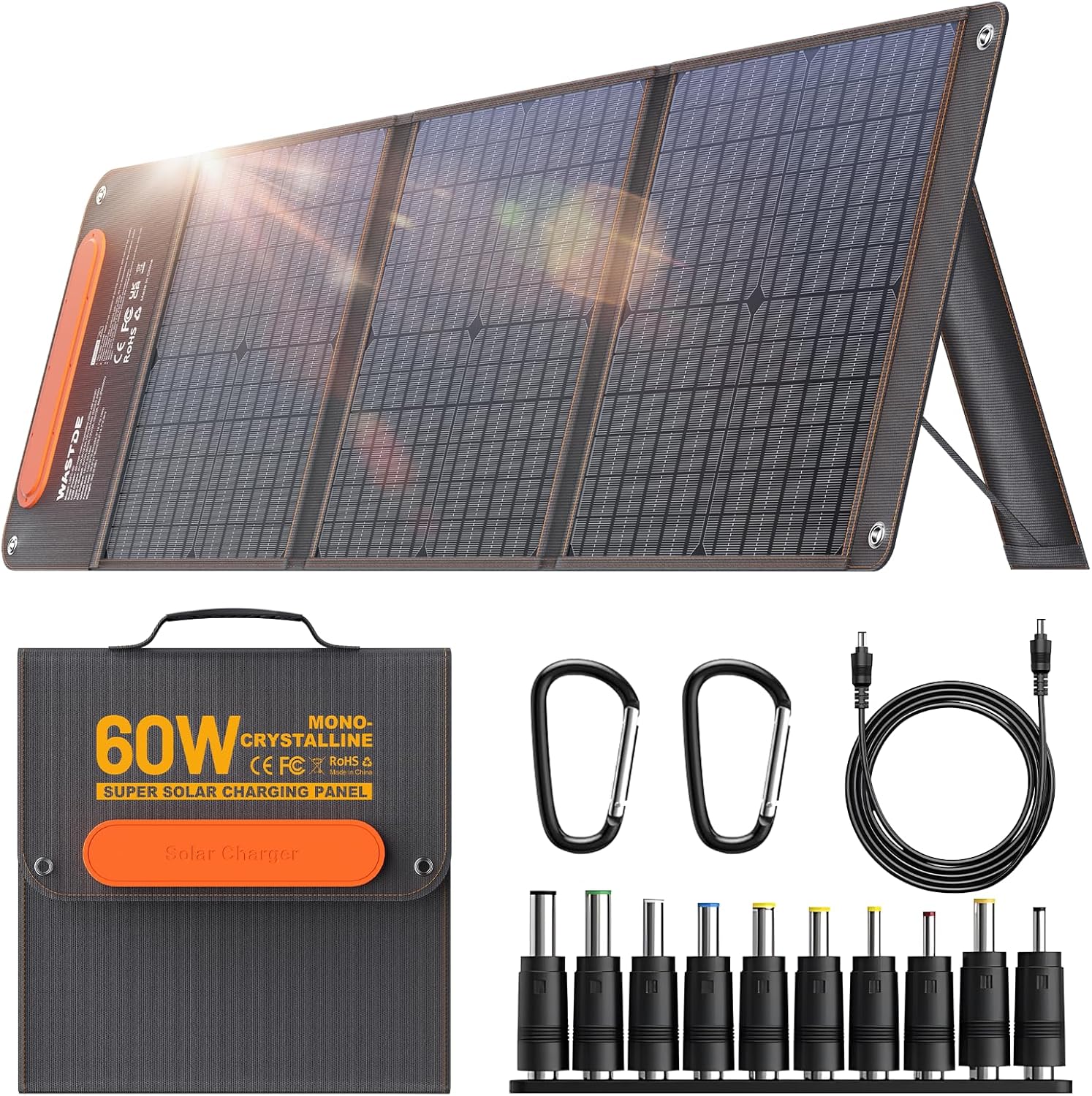
- 1 x WASTDE 60W Portable Solar Panel
- 1 x DC Cable
- 10 x DC Adapters (various sizes for compatibility)
- 2 x Carabiners
- 1 x Instruction Manual
4. Product Overview
Key Features:
- High Conversion Efficiency: Utilizes monocrystalline solar cells for 20%-30% solar energy conversion.
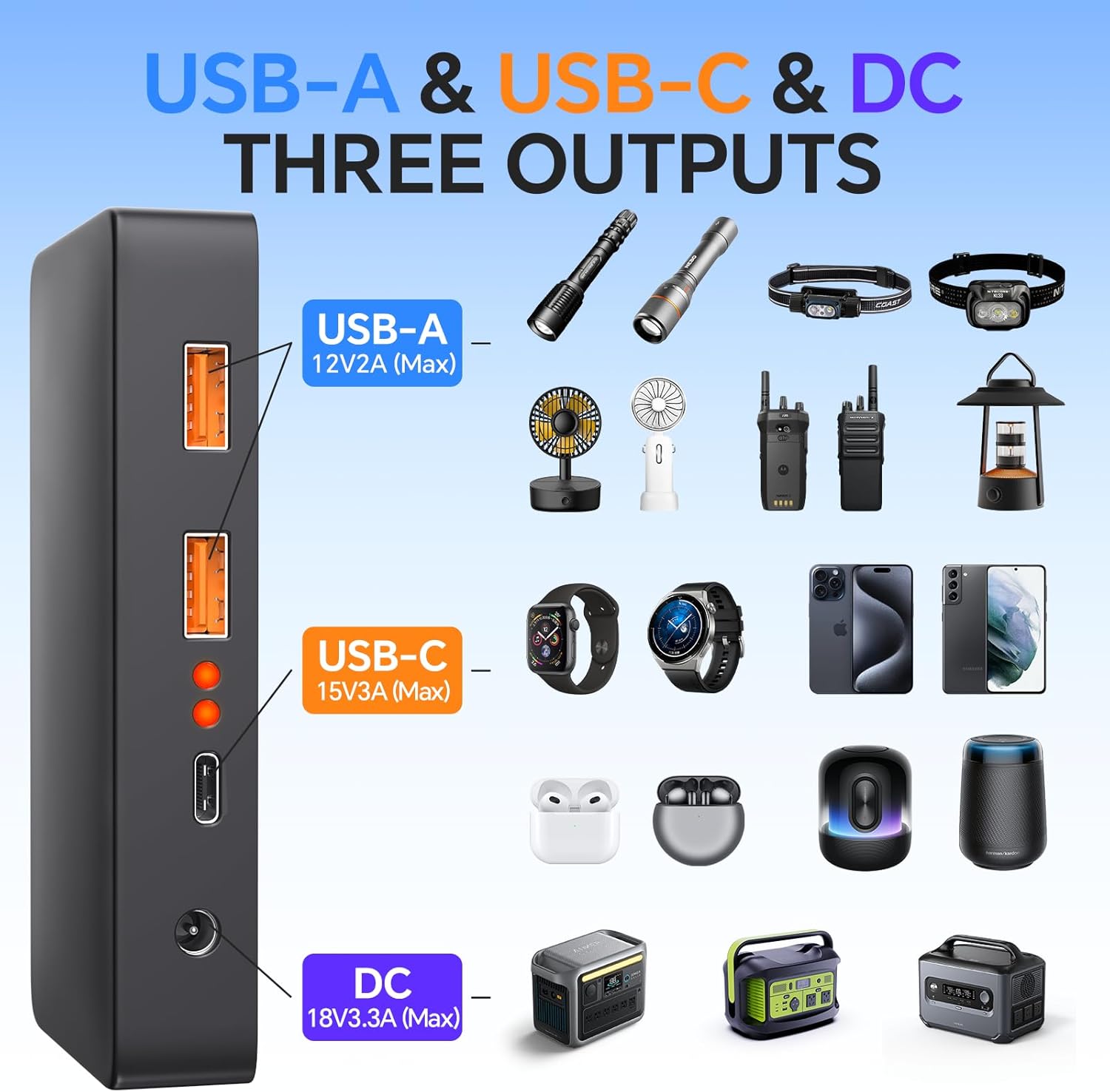
- Multiple Output Ports: Features 18V DC, 15V USB-C (up to 45W PD), and two USB-A ports (up to 12W QC3.0) for versatile device charging.
- Foldable and Portable Design: Compact and lightweight (approximately 6.6 lbs / 3 kg) with magnetic buckles for easy storage and transport.
- Durable Construction: IP65 waterproof and dustproof ETFE material ensures stability and durability in various outdoor conditions.
- Integrated Storage Bag: A double-layer zipper storage bag is included for cables and small accessories, featuring a charging port for convenience.
- Adjustable Angle Bracket: Built-in stands allow for optimal positioning towards the sun.

5. Setup
- Unfold the Solar Panel: Gently unfold the solar panel sections until they are fully extended. The magnetic buckles will release as you unfold.
- Position for Sunlight: Place the solar panel in a location with direct sunlight. For optimal performance, ensure no shadows fall on the panel.
- Adjust the Angle: Utilize the integrated adjustable angle brackets on the back of the panel to tilt it towards the sun. A 90-degree angle to the sun's rays is generally ideal for maximum efficiency.
- Secure the Panel: If necessary, use the included carabiners to secure the panel to a backpack, tent, or other stable structure, especially in windy conditions.

6. Operating Instructions
The solar panel does not have an internal power storage function. It generates power directly from sunlight to charge connected devices.
- Connect Your Device:
- For USB Devices (Phones, Tablets, etc.): Connect your device's USB charging cable to one of the USB-A or USB-C output ports on the solar panel.
- For DC Devices (Portable Power Stations, Laptops): Use the provided DC cable and select the appropriate DC adapter from the 10 included adapters to match your device's input port. Connect the DC cable to the solar panel's DC output and then to your device.
- Begin Charging: Once connected and positioned in direct sunlight, the solar panel will automatically begin charging your device. The charging speed will vary depending on sunlight intensity.
- Monitor Charging: Some devices or power stations may display charging status. Ensure your device is receiving power.
- Optimal Sunlight: For best results, periodically adjust the panel's angle to follow the sun's movement throughout the day.


7. Maintenance
- Cleaning: Regularly wipe the solar panel surface with a soft, damp cloth to remove dust, dirt, or debris. A clean surface ensures maximum sunlight absorption. Do not use harsh chemicals or abrasive materials.
- Storage: When not in use, fold the solar panel and store it in a cool, dry place away from direct sunlight and extreme temperatures.
- Inspection: Periodically inspect the panel and cables for any signs of damage, wear, or corrosion.
- Water Resistance: The IP65 rating protects against light rain and dust. Avoid prolonged exposure to heavy rain or submersion in water.

8. Troubleshooting
| Problem | Possible Cause | Solution |
|---|---|---|
| Device not charging | Insufficient sunlight; Panel not angled correctly; Loose connection; Faulty cable/adapter; Device not compatible. | Move panel to direct sunlight; Adjust panel angle; Check all cable connections; Try a different cable/adapter; Verify device compatibility and power requirements. |
| Slow charging speed | Partial shading; Low sunlight intensity (cloudy day); Incorrect panel angle; High power demand from device. | Ensure full sun exposure; Re-angle panel for optimal sun; Reduce number of devices charging simultaneously if possible. |
| Panel appears damaged | Physical impact; Exposure to extreme conditions. | Discontinue use if severe damage is present. Contact customer support for assistance. |
9. Specifications
| Feature | Detail |
|---|---|
| Model Number | LSFC-60 |
| Maximum Power | 60 Watts |
| Material | Monocrystalline Silicon, ETFE |
| Efficiency | 20%-30% Conversion Rate |
| Output Voltage (DC) | 18 Volts |
| Output Ports | 1x DC (18V/3.3A Max), 1x USB-C (15V/3A Max, up to 45W PD), 2x USB-A (12V/2A Max, QC3.0) |
| Waterproof Rating | IP65 |
| Item Weight | 3 Kilograms (6.6 pounds) |
| Product Dimensions (Folded) | 15.16 x 14.8 x 2.36 inches |
10. Warranty and Support
Warranty Information:
The WASTDE 60W Portable Solar Panel Charger comes with a 1-Year Manufacturer's Warranty from the date of purchase. This warranty covers defects in materials and workmanship under normal use.
The warranty does not cover damage caused by misuse, accident, unauthorized modification, or improper installation.
Customer Support:
For any questions, technical assistance, or warranty claims, please contact the seller (PZX-US) or the manufacturer directly. Refer to your purchase documentation for specific contact details.