
Introduction
Thank you for choosing the Ratsamee Gold Hollywood Vanity Mirror. This mirror is designed to enhance your makeup application experience with its versatile lighting options and convenient features. Please read this manual thoroughly before use to ensure proper setup and operation.
- Elegant Design: Large size (23" x 18") suitable for various makeup desks.
- 3 Color Light Settings: Choose between Cool White, Natural White, and Warm White.
- 15 Dimmable Bulbs: Adjustable brightness for optimal illumination.
- 10X Magnifying Mirror: Detachable magnifier for detailed work.
- USB Charging Port: Convenient 12V, 1A USB Type-C port for charging devices.
- Memory Function: Remembers your last light setting.

Image: The Ratsamee Gold Hollywood Vanity Mirror with lights, positioned on a white vanity desk in a bedroom setting.
Safety Information
WARNING: This mirror is made of glass and may break if not handled with care. Always use two hands when moving the mirror. This mirror is floor-mounted and may tip over if not securely mounted. Always follow the included assembly instructions to ensure safe and secure mounting. Keep the mirror away from high-traffic areas and out of reach of children and pets.
Package Contents
Please check the package for the following items:
- Ratsamee Hollywood Vanity Mirror (23"L x 18"W)
- 15 Dimmable LED Bulbs (pre-installed or to be installed)
- Detachable 10X Magnifying Mirror
- Power Adapter
- Base for tabletop use
- Mounting hardware (screws, anchors) for wall mounting (if applicable)
- Instruction Manual
Setup Instructions
Follow these steps to set up your Ratsamee Hollywood Vanity Mirror:
- Unpacking: Carefully remove all components from the packaging. Inspect for any damage.
- Base Assembly (for tabletop use):
- Align the holes in the mirror base with the corresponding holes on the bottom of the mirror frame.
- Secure the base to the mirror frame using the provided screws. Ensure they are tightened firmly but do not overtighten.

Image: Visual guide for attaching the mirror base, showing alignment and screw tightening.
- Wall Mounting (optional): If you prefer to mount the mirror on a wall, consult a professional for installation to ensure secure and safe mounting. Use appropriate wall anchors and screws for your wall type.
- Bulb Installation (if not pre-installed): Gently screw each LED bulb into its socket on the mirror frame until snug. Do not overtighten.
- Power Connection: Plug the power adapter into the mirror's power input port, then plug the adapter into a standard electrical outlet.
Operating Instructions
Your Ratsamee Vanity Mirror features intuitive touch controls for lighting and a USB charging port.
Light Controls

Image: Detail of the touch control panel on the mirror, indicating 'M' for mode and 'P' for power/brightness.
- Power On/Off: Touch the power button (usually indicated by a circle or 'P') to turn the lights on or off.
- Change Color Temperature: Short press the 'M' button (Mode) to cycle through the 3 color light settings: Cool White, Natural White, and Warm White.
- Adjust Brightness: Long press the 'P' button (Power/Brightness) to adjust the brightness level. Release when the desired brightness is reached.
- Memory Function: The mirror will remember your last used brightness and color temperature setting when turned off and on again.

Image: Comparison of the three available light color modes: Cool Light, Natural Light, and Warm Light.

Image: Illustration of the long-press function to adjust the mirror's brightness from low to high.
USB Charging Port
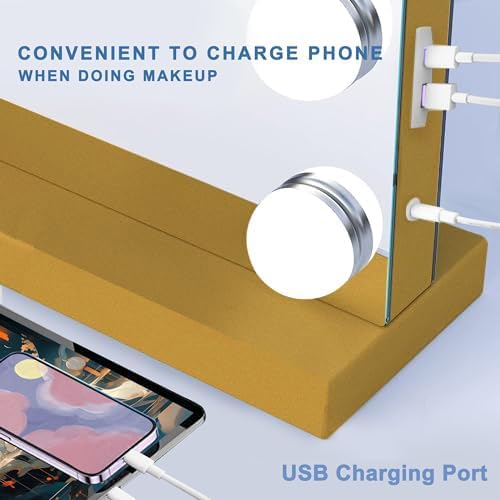
Image: A close-up view of the USB charging port located on the side of the mirror, with a phone charging.
- Locate the USB Type-C charging port on the side of the mirror frame.
- Connect your device's charging cable to this port to charge your phone or tablet while using the mirror.
- Output: 12V, 1A.
10X Magnifying Mirror

Image: A woman applying makeup using the detachable 10X magnifying mirror, highlighting its utility for detailed tasks.
The included 10X magnifying mirror can be attached to the main mirror surface for close-up detail work, such as eyeliner application or eyebrow grooming. It uses suction cups for easy attachment and removal.
Maintenance
- Cleaning the Mirror: Use a soft, lint-free cloth and a non-abrasive glass cleaner to wipe the mirror surface. Avoid spraying cleaner directly onto the bulbs or electrical components.
- Cleaning the Frame: Wipe the aluminum frame with a soft, damp cloth. Do not use harsh chemicals or abrasive cleaners.
- Bulb Replacement: If a bulb needs replacement, ensure the mirror is unplugged. Gently unscrew the old bulb and screw in a new compatible LED bulb.
- Storage: If storing the mirror, ensure it is unplugged and placed in a dry, safe location to prevent damage.
Troubleshooting
| Problem | Possible Cause | Solution |
|---|---|---|
| Lights do not turn on. |
|
|
| Lights flicker or are dim. |
|
|
| USB charging port not working. |
|
|
Specifications
| Feature | Detail |
|---|---|
| Brand | Ratsamee |
| Model | Hollywood Vanity Mirror |
| Dimensions (L x W) | 23"L x 18"W (57cm x 45cm) |
| Frame Material | Aluminum |
| Frame Color | Gold |
| Bulbs | 15 Dimmable LED Bulbs |
| Light Settings | 3 Color (Cool White, Natural White, Warm White) |
| Magnification | 10X Detachable Magnifying Mirror |
| USB Charging Port | USB Type-C (12V, 1A) |
| Material Type | Silver Coating 4mm High Quality Glass |
| Mounting Type | Tabletop (with included base) or Wall Mount |

Image: Dimensional diagram of the Ratsamee Hollywood Vanity Mirror, showing its 23"L x 18"W size.
Warranty & Support
Ratsamee is committed to providing high-quality products and customer satisfaction.
- Warranty: This product comes with a 2-year warranty covering free repairs.
- Returns: A 30-day free return policy is available.
- Damaged Products: For damaged products, please send photos of the damage to customer support for a free replacement without returning the damaged item.
- Customer Support: If you have any questions or require assistance, please contact our customer support team. You can typically find contact information through your purchase platform (e.g., Amazon's messaging assistant for the seller "Uniquejack Direct"). Our team aims to provide a satisfactory solution within 24 hours.

Image: Guide on how to find and contact seller support via the Amazon platform.

Image: Illustration of customer service, highlighting free repairs within 2 years and replacement for damaged products.
