
s116 max
S116 MAX Brushless Optical Flow Remote Control Drone User Manual
Model: S116 MAX
Brand: Generic
Introduction
This manual provides comprehensive instructions for the safe operation, setup, and maintenance of your S116 MAX Brushless Optical Flow Remote Control Drone. The S116 MAX is equipped with dual cameras, advanced optical flow technology, 360° intelligent infrared obstacle avoidance, and various intelligent flight modes, offering an immersive aerial experience. Please read this manual thoroughly before operating the drone to ensure proper use and to prevent damage or injury.
Safety Guidelines
Adhering to these safety guidelines is crucial for safe and responsible drone operation:
- Pre-Flight Check: Always inspect the drone, remote control, and battery for any damage before each flight. Ensure propellers are securely attached.
- Flight Environment: Fly in open areas, away from people, animals, buildings, and obstacles. Avoid flying near airports or restricted airspace.
- Weather Conditions: Do not fly in strong winds, rain, snow, or fog. Optimal conditions are calm and clear.
- Battery Safety: Use only the original battery and charging cable. Do not overcharge or puncture the battery. Discontinue use if the battery is swollen or damaged.
- Line of Sight: Maintain visual line of sight with the drone at all times during flight.
- Respect Privacy: Be mindful of privacy when using the camera. Do not record individuals without their consent.
- Age Recommendation: This product is recommended for adult users.
What's in the Box
Verify that all components are present upon unboxing:
- S116 MAX Drone (White)
- Remote Control
- Rechargeable Lithium-Ion Battery (1 included)
- ESC Camera (Integrated)
- Spare Blades (4 pieces)
- Charging Cable (USB)
- Screwdriver
- Storage Bag
- User Manual (This document)

Image: All components included in the S116 MAX drone package, laid out for clear identification.
Product Overview
The S116 MAX drone features a robust design with advanced functionalities. Key components include:
- Brushless Motors: Provide efficient and quiet operation with enhanced durability.
- Dual Camera System: Features a main HD camera for aerial photography and video, and a bottom optical flow camera for stable hovering. The main camera is electrically adjustable up to 90 degrees.
- 360° Intelligent Infrared Obstacle Avoidance: Sensors detect obstacles from all directions to prevent collisions.
- Optical Flow Positioning: Assists in maintaining stable flight and precise hovering, especially indoors or at low altitudes.
- Foldable Arms: For compact storage and portability.
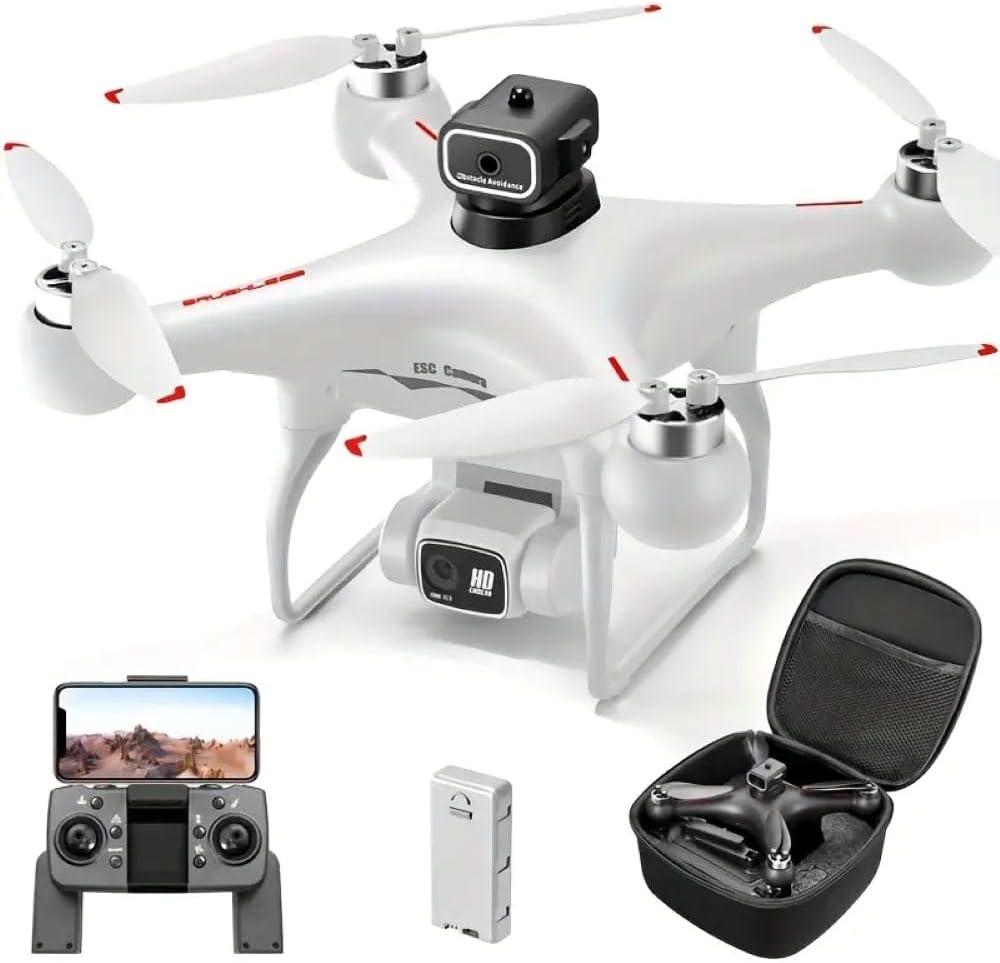
Image: The S116 MAX drone in white, alongside its remote control, battery, and a compact carrying case.

Image: Detailed view of the S116 MAX's dual camera, highlighting its electrical adjustability for varied shooting angles.

Image: Diagram illustrating the physical dimensions of the S116 MAX drone, showing its length, width, and height.
Setup
1. Battery Installation and Charging
- Insert the fully charged Lithium-Ion battery into the drone's battery compartment until it clicks into place.
- To charge the battery, connect the provided USB charging cable to the battery and a suitable USB power source (e.g., computer USB port, USB wall adapter). The charging indicator light will show charging status.
- Ensure the battery is fully charged before each flight for optimal performance and safety.
2. Propeller Installation
If propellers are not pre-installed, attach them according to the markings (A and B) on the propellers and motor arms. Use the provided screwdriver to secure them firmly.
3. Remote Control Setup
- Install 3x AA batteries (not included) into the remote control's battery compartment.
- Power on the remote control.
- Place your smartphone into the phone holder on the remote control.
4. App Installation and Connection (WIFI FPV)
- Scan the QR code in the quick start guide (or search your app store) to download the official S116 MAX drone application.
- Turn on the drone and the remote control.
- On your smartphone, go to Wi-Fi settings and connect to the drone's Wi-Fi network (usually named "S116 MAX_XXXXXX").
- Open the drone application. The live video feed from the drone's camera should appear, indicating a successful connection.
Operating Instructions
1. Pre-Flight Checks
- Ensure drone battery is fully charged.
- Ensure remote control batteries are sufficient.
- Check propellers for damage and ensure they are securely fastened.
- Confirm Wi-Fi connection between drone and smartphone app.
- Choose a safe, open flying area.
2. Take-off and Landing
- Calibration: Before first flight, perform gyroscope calibration as per app instructions.
- One-Key Take-off/Landing: Press the designated button on the remote or in the app for automatic take-off or landing.
- Manual Take-off: Push both joysticks down and outwards simultaneously to start motors, then slowly push the left joystick up to ascend.
3. Flight Controls
- Left Joystick: Controls altitude (up/down) and rotation (left/right).
- Right Joystick: Controls forward/backward and left/right movement.
- Headless Mode: Activates a mode where the drone's orientation is relative to the pilot, simplifying control regardless of the drone's front direction.
- Trajectory Flight: Draw a path on your smartphone screen, and the drone will automatically follow it.
- 360° Intelligent Infrared Obstacle Avoidance: This feature automatically detects and avoids obstacles within its sensor range, enhancing flight safety.

Image: Visual representation of the S116 MAX drone's key features, including its obstacle avoidance system and various flight modes.
4. Camera Operation (Photo & Video)
- Live FPV: View real-time footage on your smartphone via the app.
- Photo/Video Capture: Use the dedicated buttons on the remote control or within the app to take photos or start/stop video recording.
- Adjustable Camera: The main camera's angle can be adjusted remotely via the app or remote control for different perspectives.
- Storage: Captured media is typically saved to your smartphone or an inserted SD card (if supported by the drone).
Maintenance
- Cleaning: Use a soft, dry cloth to clean the drone body and camera lenses. Avoid using harsh chemicals.
- Propeller Inspection: Regularly check propellers for cracks, bends, or debris. Replace damaged propellers immediately using the provided spare blades.
- Battery Care: Store batteries in a cool, dry place. Do not fully discharge batteries for extended periods. Charge them to about 50-60% for long-term storage.
- Motor Maintenance: Keep motors free of dust and debris. Do not attempt to lubricate motors unless specified by the manufacturer.
- Storage: When not in use, store the drone and its components in the provided storage bag or a protective case to prevent damage.
Troubleshooting
| Problem | Possible Cause | Solution |
|---|---|---|
| Drone does not respond to remote control. | Not paired; low battery on drone or remote. | Ensure drone and remote are powered on and paired correctly. Charge batteries. |
| Drone drifts during flight. | Not calibrated; strong wind. | Perform gyroscope calibration. Fly in calm conditions. |
| No FPV video feed. | Wi-Fi not connected; app issue. | Reconnect to drone's Wi-Fi network. Restart app and drone. |
| Obstacle avoidance not working. | Sensors blocked; feature disabled. | Clean sensors. Ensure feature is enabled in the app. |
Specifications
| Feature | Detail |
|---|---|
| Brand | Generic |
| Model Name | S116 MAX |
| Color | White |
| Item Weight | 153 Grams (5.4 ounces) |
| Product Dimensions | 9.06"L x 9.06"W x 4.7"H (23cm x 23cm x 12cm) |
| Video Capture Resolution | 480p (Main camera output: 1920x1080 Pixels) |
| Connectivity Technology | USB, Wi-Fi |
| Control Type | Remote Control, App Control |
| Battery Type | Lithium Ion (1 included) |
| Special Features | Anti-Corrosion, Brushless Motor, Dual Camera, Optical Flow, Infrared Obstacle Avoidance, Headless Mode, Trajectory Flight |
| Skill Level | Intermediate |
Warranty and Support
For warranty information, technical support, or service inquiries, please refer to the manufacturer's official website or contact the retailer from whom you purchased the product. Keep your proof of purchase for warranty claims.
Ask a question about this manual
Ask about setup, troubleshooting, compatibility, parts, safety, or missing instructions. Manuals+ will review the question and use this page’s manual context to help answer it.