
1. Introduction
The WILDGAMEPLUS E3 is a versatile outdoor WiFi device combining the functions of a router, repeater, and range extender, powered by an integrated solar panel. Designed for outdoor environments, it offers a wireless transmission rate of up to 300Mbps and extends WiFi coverage up to 150 meters (492 feet). Its IP66 weatherproof housing ensures reliable operation in various weather conditions.
1.1 Package Contents
- WILDGAMEPLUS E3 Solar Panel Router Repeater
- Mounting Bracket

Figure 1.1: WILDGAMEPLUS E3 Solar Repeater, highlighting its outdoor and IP66 weatherproof capabilities.
2. Product Overview
The E3 device integrates a solar panel, WiFi module, and antennas into a single unit. It features a robust design suitable for outdoor deployment.
2.1 Device Components
- Solar Panel: Integrated 15W monocrystalline silicon panel for power generation.
- Antennas: Two high-gain external antennas for signal transmission and reception.
- Network Port: RJ45 Ethernet port for wired connection to an existing router or network device.
- USB Type-C Charging Hole: 5V/1A input for auxiliary charging.
- Power Switch: To turn the device on or off.
- Device Reset Key: For factory reset.
- Status Indicator Lamp: Provides operational status feedback.
- Heat Sink: For thermal management.
- Bracket Mounting Points: For secure installation.

Figure 2.1: Rear view of the E3 device with labeled components and dimensions (235mm/9.25in width, 322mm/12.68in height).

Figure 2.2: Side view of the E3 device with labeled ports and controls, including the mounting bracket dimensions (170mm/6.69in length).
3. Setup and Installation
Proper installation and setup are crucial for optimal performance of your WILDGAMEPLUS E3.
3.1 Mounting the Device
- Select a location with direct sunlight exposure for the solar panel and within range of your existing WiFi network.
- Attach the mounting bracket to a sturdy surface (wall, pole) using appropriate hardware.
- Secure the E3 device to the mounting bracket, ensuring the solar panel faces the sun.
- Adjust the angle of the solar panel for maximum sun exposure throughout the day.
3.2 Initial Configuration
The E3 can operate as a router, repeater, or range extender. For repeater functionality, a wired connection to your existing router is required for initial setup and network integration.
- Power On: Ensure the device is powered on using the power switch. Allow the solar panel to charge the internal battery sufficiently, or use the USB Type-C port for initial charging if needed.
- Connect to E3 WiFi: On your mobile phone or computer, connect to the WiFi network broadcast by the E3 repeater. The default SSID can usually be found on a label on the device.
- Access Web Interface: Open a web browser and navigate to the default IP address (e.g., 192.168.16.1) or the provided domain (e.g., myblink.cn).
- Login: Enter the default username and password (refer to the device label or manual for default credentials).
- Change Mode: In the web interface, navigate to the 'Advanced' settings and find the 'Change Mode' option.
- Select Network: Choose the desired WiFi network you wish to extend.
- Enter Password: Input the password for your existing WiFi network.
- Create Repeater WiFi: Set a new SSID and password for the E3's extended WiFi network.
- Apply and Reboot: Save the settings and allow the device to reboot.
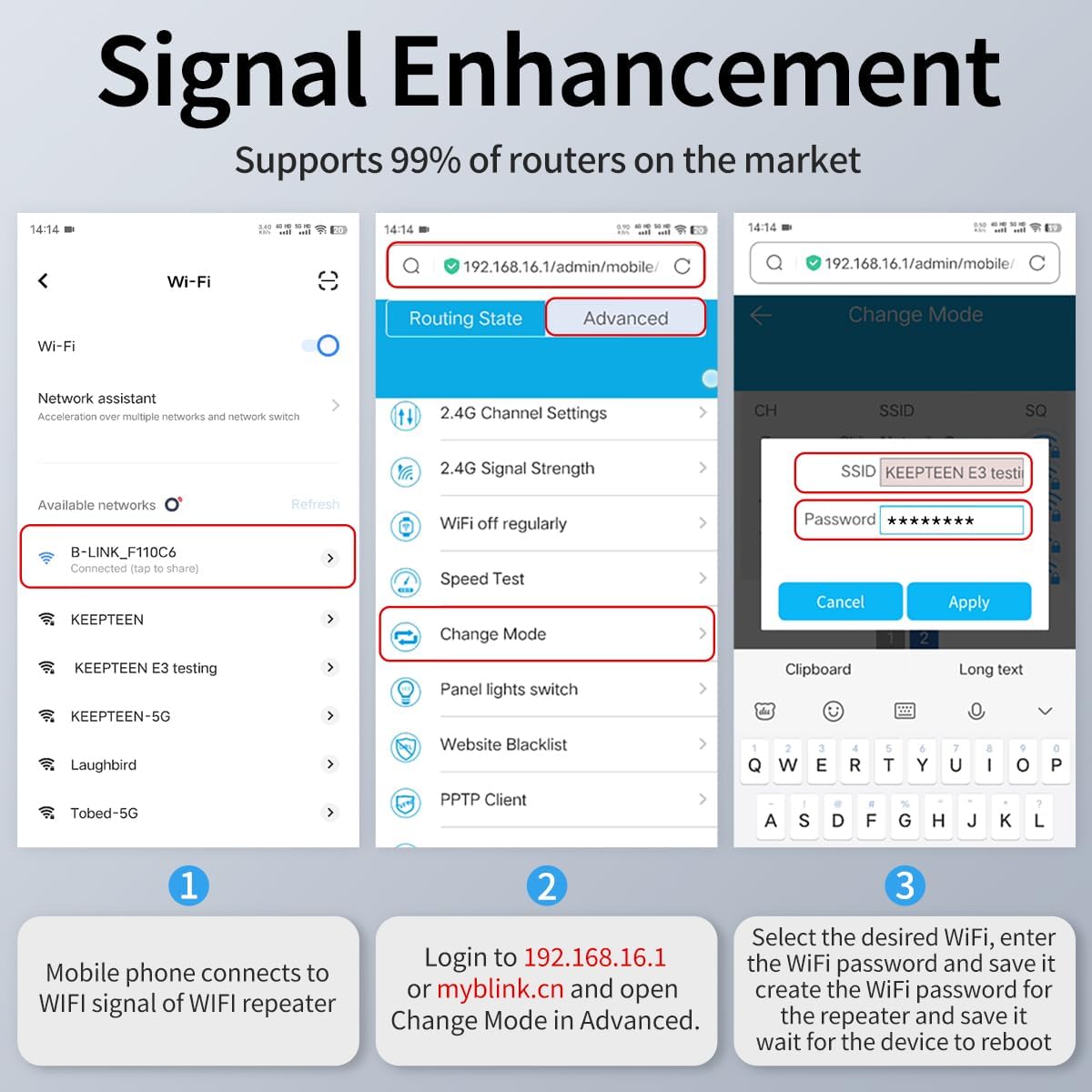
Figure 3.1: Step-by-step guide for configuring the E3 via its web interface for signal enhancement.

Figure 3.2: Conceptual diagram of setting up a WiFi base station using the E3 to amplify router WiFi signal coverage.

Figure 3.3: Visual representation of network extension, showing a router and multiple E3 repeaters extending WiFi coverage. Note: Connecting more than three levels of repeaters is not recommended as it may affect signal quality.
4. Operating Modes
The WILDGAMEPLUS E3 offers flexible operating modes to suit various networking needs.
4.1 Repeater Mode
In repeater mode, the E3 extends the range of an existing WiFi network. It receives the signal from your main router and re-broadcasts it, effectively expanding your WiFi coverage area. This mode requires a wired Ethernet connection from your main router to the E3's network port for optimal performance and initial setup.
4.2 Router Mode
When connected to an internet source (e.g., a modem) via its Ethernet port, the E3 can function as a standalone wireless router, creating a new WiFi network.
4.3 Access Point (AP) Mode
In AP mode, the E3 connects to a wired network and broadcasts a wireless signal, allowing wireless devices to connect to the wired network.
5. Maintenance
To ensure long-term performance and reliability of your WILDGAMEPLUS E3, follow these maintenance guidelines.
5.1 Solar Panel Care
- Regularly clean the surface of the solar panel to remove dust, dirt, leaves, or snow. A clean panel ensures maximum sunlight absorption and charging efficiency.
- Avoid shading the solar panel. Ensure no new obstructions (e.g., growing trees, new structures) block sunlight.
5.2 Weatherproofing
The E3 has an IP66 rating, indicating it is protected against dust ingress and powerful water jets. While designed for outdoor use, periodic inspection of cable connections and seals can help maintain its weatherproof integrity.
5.3 Battery Life
The integrated 25000mAh battery allows the device to operate continuously. In sunny conditions, it can work indefinitely. In cloudy conditions, it can sustain operation for up to 7 days on a full charge.
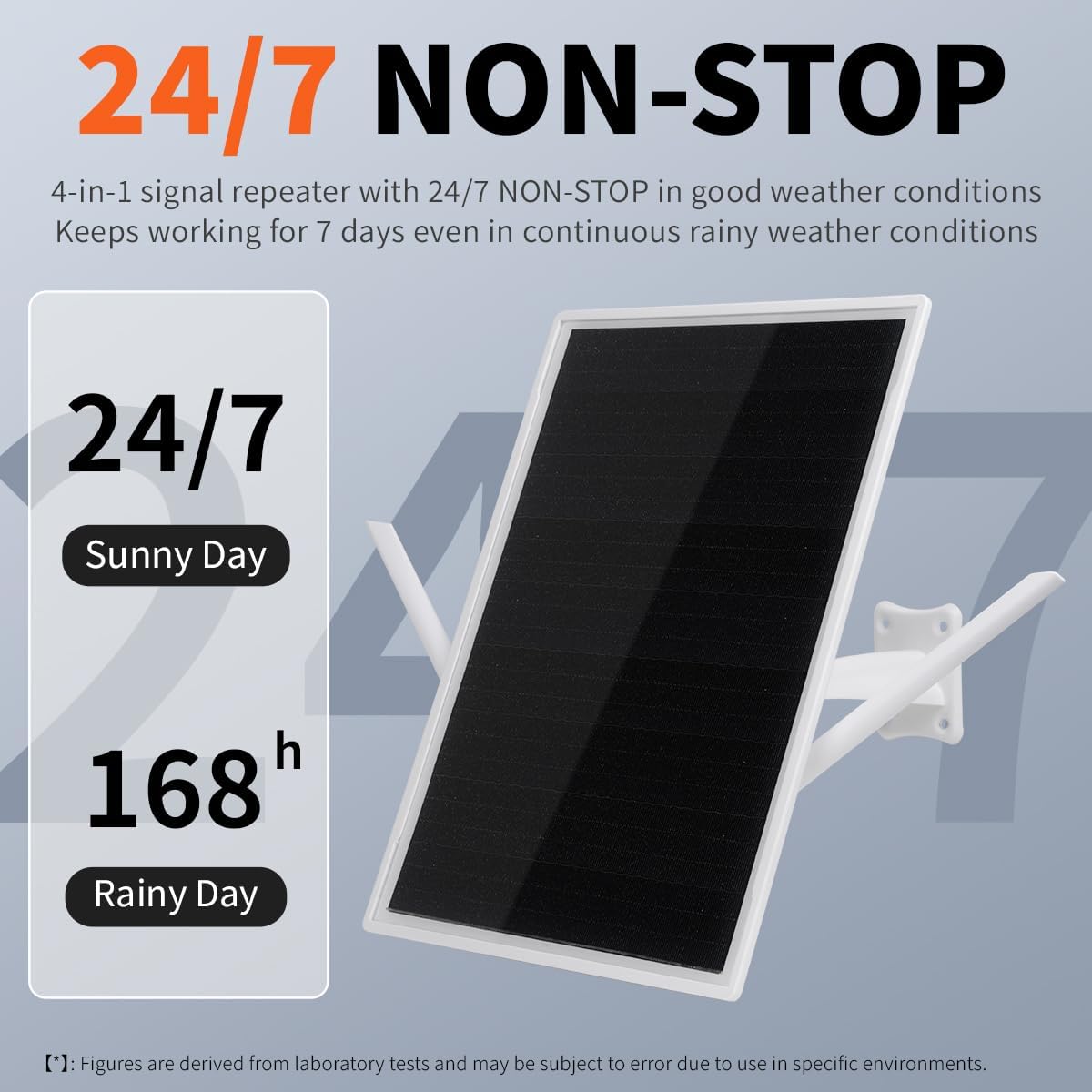
Figure 5.1: E3 operational endurance, highlighting continuous operation in sunny conditions and up to 168 hours (7 days) in rainy conditions.

Figure 5.2: Features of the 15W solar panel and integrated battery, emphasizing efficiency and durability.
6. Troubleshooting
This section addresses common issues you might encounter with your WILDGAMEPLUS E3.
6.1 No WiFi Signal or Weak Signal
- Check Power: Ensure the device is powered on and the solar panel is receiving adequate sunlight. The status indicator lamp should be active.
- Verify Connection: Confirm the Ethernet cable connecting the E3 to your main router is securely plugged in at both ends.
- Reposition: Adjust the E3's position or antenna orientation to improve signal reception from your main router.
- Interference: Minimize potential sources of interference (e.g., large metal objects, other electronic devices).
- Router Compatibility: The E3 is compatible with 802.11b/g/n 2.4Ghz routers. Ensure your main router operates on these standards.
6.2 Unable to Access Web Interface
- IP Address: Double-check the IP address or domain used (192.168.16.1 or myblink.cn).
- WiFi Connection: Ensure your device is connected to the E3's WiFi network, not your main router's.
- Browser Cache: Clear your browser's cache or try a different browser.
6.3 Device Not Extending WiFi Wirelessly
It is important to note that while the E3 is solar-powered, its primary function as a repeater requires a wired Ethernet connection to your existing router to extend that router's network. The solar power supplies the E3 itself, but the network signal extension relies on the wired link to the source network.
6.4 Factory Reset
If issues persist, perform a factory reset using the device reset key. This will revert all settings to their default values, requiring you to reconfigure the device.
7. Specifications
| Feature | Specification |
|---|---|
| Model Number | E3 |
| Wireless Communication Standard | 802.11b/g/n |
| Data Transfer Rate | 300 Mbps |
| Frequency Band Class | Tri-Band (operates on 2.4GHz) |
| Solar Panel Power | 15W |
| Battery Capacity | 25000mAh (10x Lithium batteries) |
| WiFi Coverage | Up to 150 meters (492 feet) |
| Weatherproof Rating | IP66 |
| Operating Temperature | -30°C to 70°C (-22°F to 158°F) |
| Max Connected Devices | 35 |
| Item Weight | 4.1 pounds (1.86 kg) |
| Package Dimensions | 14 x 10.5 x 3.3 inches |
| Special Features | Access Point Mode, Internet Security, LED Indicator, Weatherproof |
8. Warranty and Support
8.1 Warranty Information
Please refer to the product packaging or the retailer's website for specific warranty terms and conditions applicable to your WILDGAMEPLUS E3 device. Typically, electronic devices come with a limited manufacturer's warranty covering defects in materials and workmanship.
8.2 Technical Support
For technical assistance, troubleshooting beyond this manual, or warranty claims, please contact WILDGAMEPLUS customer support through the contact information provided on their official website or through your purchase channel.