
1. Introduction
This manual provides detailed instructions for the installation, operation, and maintenance of your KEMIMOTO Midnight S60 26-inch UTV Sound Bar. Please read this manual thoroughly before using the product to ensure proper function and safety. The KEMIMOTO Midnight S60 is designed for off-road vehicles, golf carts, ATVs, and marine boats, offering robust sound and dynamic lighting in various environments.

Figure 1: KEMIMOTO Midnight S60 UTV Sound Bar
2. What's in the Box
Upon opening the package, verify that all the following components are included:
- KEMIMOTO Midnight S60 Sound Bar
- Mounting Brackets (Universal, for 1"-2" roll bars)
- Mounting Hardware (Screws, rubber friction pads)
- Power Cable
- Remote Control
- User Manual (this document)
For a visual guide to the unboxing process, please refer to the product overview video below.
Video 1: KEMIMOTO Midnight S60 Product Overview and Unboxing
3. Product Features
3.1 Durable Construction
The KEMIMOTO Midnight S60 features a robust metal structure, providing superior impact resistance and efficient heat dissipation. This design minimizes resonance, ensuring optimal sound performance even in challenging environments.

Figure 2: Metal-Built Construction for Enhanced Durability
3.2 High-Fidelity Audio
Equipped with two woofers and two coaxial speakers (comprising two tweeters and two midranges) with high-sensitivity titanium diaphragms, the sound bar delivers powerful and clear audio. KEMIMOTO Bass technology ensures deep 65 Hz bass. With 200W peak power and 100W RMS output, the DSP system provides distortion-free sound reproduction.
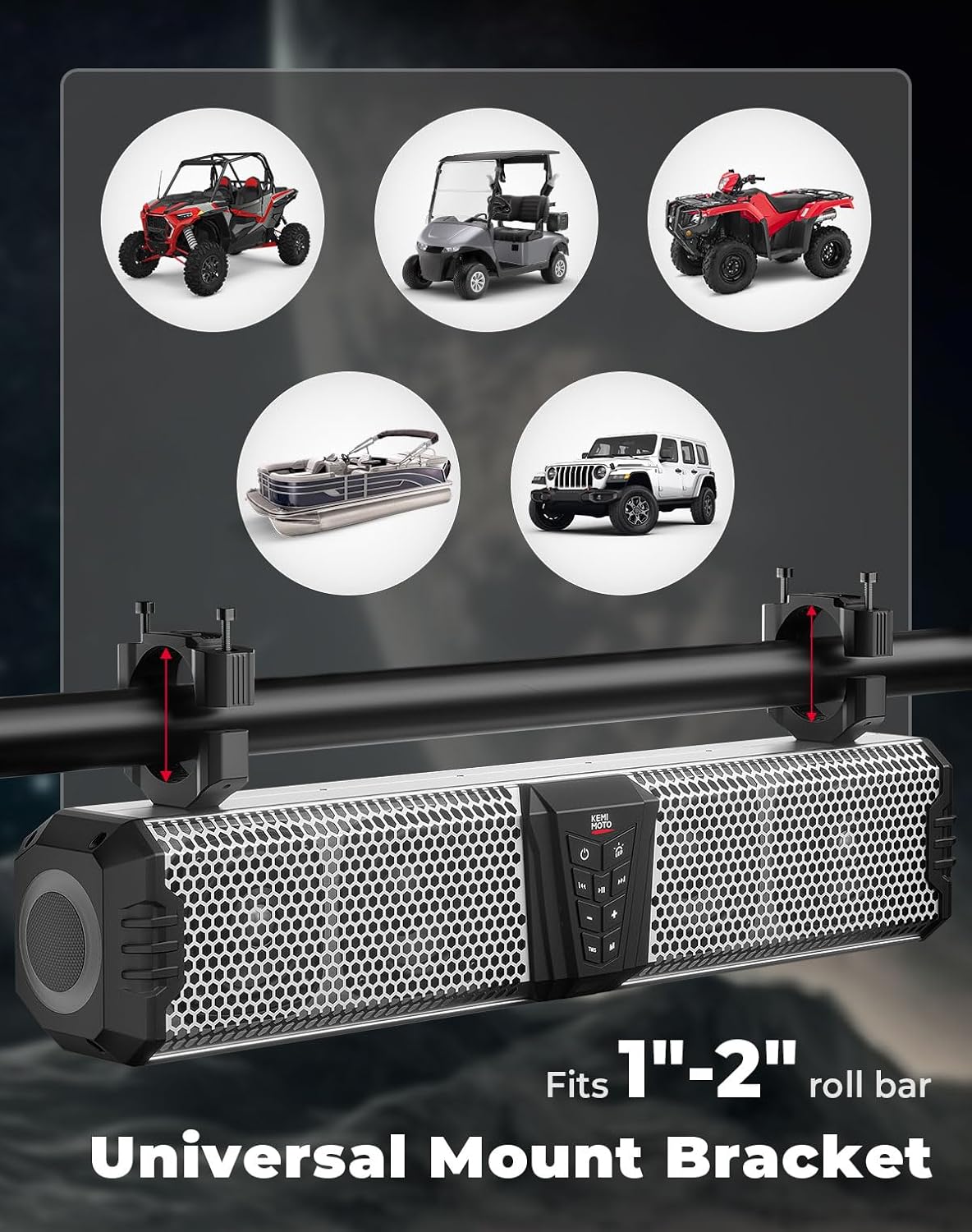
Figure 3: Internal Speaker Configuration for Distortion-Free Sound
3.3 Dynamic ARGB Lighting
The sound bar features a 5-side ambient ARGB light system with over 200 lighting modes, controllable via a dedicated app. This allows for customizable ambiance during your rides.
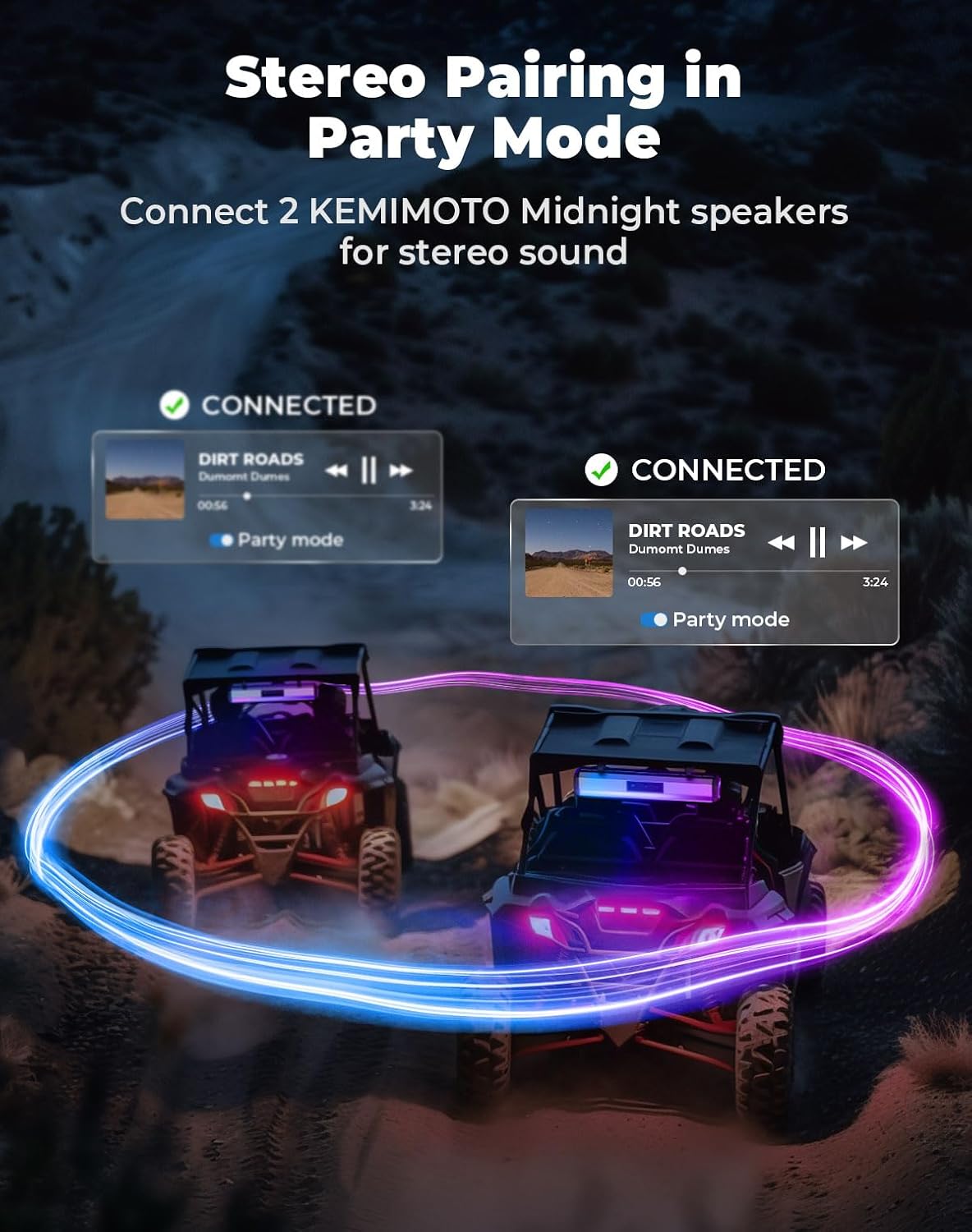
Figure 4: Customizable ARGB Lighting with App Control
3.4 Weatherproof Design
Constructed from Marine Grade IP66 weatherproof aluminum alloy, the sound bar is built for outdoor use. It can withstand high humidity, low temperatures (-20℃ to 85℃), and dusty conditions, ensuring reliable performance in extreme weather.

Figure 5: IP66 Weatherproof Construction
4. Setup & Installation
The KEMIMOTO Midnight S60 Sound Bar is designed for easy, drill-free installation, typically completed within 20 minutes. It is compatible with 1-inch to 2-inch roll cages found on UTVs, golf carts, ATVs, and marine boats.
4.1 Mounting the Sound Bar
- Attach the universal mounting brackets to the sound bar using the provided screws.
- Position the sound bar on your vehicle's roll bar (1"-2" diameter).
- Insert the rubber friction pads between the brackets and the roll bar to ensure a secure fit and prevent slippage.
- Tighten all screws firmly to secure the sound bar in place.

Figure 6: Universal Mount Bracket Compatibility
4.2 Power and Audio Connections
Connect the power cable to the DC12V-IN port on the sound bar and to your vehicle's 12V power source. The sound bar also supports auxiliary input (AUX-IN) and USB playback for versatile music options.
Video 2: KEMIMOTO Midnight S60 Installation Guide
5. Operating Instructions
5.1 Power On/Off
Press the power button on the sound bar's control panel or use the remote control to turn the unit on or off.
5.2 Bluetooth Pairing
To connect your device via Bluetooth:
- Ensure the sound bar is powered on and in Bluetooth mode (indicated by a blue light).
- On your mobile device, enable Bluetooth and search for available devices.
- Select "KM-MidnightS60" from the list to pair.
- Once connected, the sound bar will confirm with an audible prompt.
5.3 Remote Control Pairing
If your remote control is not responding, follow these steps to re-pair it with the sound bar:
- Turn off the sound bar and unplug its power cord.
- Remove the batteries from the remote control.
- Reinsert the batteries into the remote control.
- Press and hold the red and pink buttons at the bottom of the remote simultaneously until the remote's indicator light flashes.
- While the remote's light is flashing, reconnect the sound bar's power cable within 10 seconds.
- The remote will automatically pair, and the sound bar will turn off once paired successfully.
- Test the remote by turning the speaker on and off, and switching lighting modes.
Video 3: How to Pair KEMIMOTO Midnight Remote with Speaker
5.4 Lighting Control
The sound bar's ARGB lighting can be controlled via the included remote or the KEMIMOTO app. Explore over 200 lighting modes to match your mood or environment.
5.5 KEMIMOTO Party Mode (Stereo Pairing)
To connect two KEMIMOTO Midnight speakers for stereo sound:
- Ensure both speakers are powered on and disconnected from any Bluetooth device.
- On the main speaker, press the "Party Mode" button. The indicator light will turn blue.
- The main speaker will automatically search for and connect to a second KEMIMOTO Midnight speaker.
- Once connected, both speakers will play in stereo.
Figure 7: Stereo Pairing in Party Mode
5.6 KEMIMOTO Dome Mode
Activate Dome Mode to turn on the all-white reading light, useful for reading maps or manuals during night rides.
6. Maintenance
To ensure the longevity and optimal performance of your KEMIMOTO Midnight S60 Sound Bar, follow these maintenance guidelines:
- Cleaning: Use a soft, damp cloth to wipe down the exterior. Avoid abrasive cleaners or solvents that could damage the finish or internal components.
- Weather Protection: While the sound bar is IP66 weatherproof, prolonged exposure to extreme conditions (e.g., direct high-pressure water jets, submersion) should be avoided. Ensure all port covers are securely closed when not in use.
- Connection Check: Periodically inspect all cable connections for tightness and signs of wear.
7. Troubleshooting
If you encounter issues with your KEMIMOTO Midnight S60 Sound Bar, refer to the following common problems and solutions:
- No Power: Ensure the power cable is securely connected to both the sound bar and the vehicle's 12V power source. Check the vehicle's fuse for the power circuit.
- No Sound: Verify that the volume is turned up on both the sound bar and your connected device. Ensure the correct input source (Bluetooth, AUX, USB) is selected.
- Bluetooth Connection Issues: Make sure the sound bar is in Bluetooth pairing mode. Disconnect and re-pair your device. Try restarting both the sound bar and your device.
- Remote Control Not Working: Refer to Section 5.3 for remote control pairing instructions. Check the remote's battery.
- Lights Not Working/Incorrectly: Check the KEMIMOTO app or remote control for lighting mode settings. Ensure the sound bar is powered on.
If problems persist after attempting these solutions, please contact KEMIMOTO customer support.
8. Specifications
| Feature | Specification |
|---|---|
| Brand | KEMIMOTO |
| Speaker Maximum Output Power | 200 Watts |
| Frequency Response | 65 Hz |
| Connectivity Technology | Bluetooth |
| Audio Output Mode | Stereo |
| Weatherproof Rating | IP66 |
| Roll Bar Compatibility | 1"-2" |
| Operating Temperature | -20℃ to 85℃ |
9. Warranty & Support
The KEMIMOTO Midnight S60 UTV Sound Bar comes with a standard manufacturer's warranty. For specific warranty details, registration, or technical support, please visit the official KEMIMOTO website or contact their customer service directly. Keep your purchase receipt as proof of purchase for warranty claims.
KEMIMOTO Official Store: Visit Store