
1. Introduction
This manual provides comprehensive instructions for the safe and effective operation of your YUERLT 200W LED Moving Head Light. This professional stage lighting fixture is designed to produce dynamic beam, GOBO, ring, and prism effects, suitable for various events including discos, parties, clubs, and stage performances. Please read this manual thoroughly before installation and use, and retain it for future reference.
2. Safety Instructions
- Electrical Safety: Ensure the power supply voltage matches the specified requirements (AC 110-220V, 50-60Hz). Always connect to a grounded outlet. Disconnect power before any service or maintenance.
- Installation: Install the fixture in a well-ventilated area, away from flammable materials. Ensure secure mounting using appropriate clamps and safety cables. Avoid direct exposure to rain or moisture.
- Operation: Do not look directly into the light source. Maintain a safe distance from the fixture during operation to prevent eye injury. Do not operate if the housing is damaged.
- Temperature: The fixture can become hot during operation. Allow sufficient cooling time before handling. Do not block ventilation openings.
- Maintenance: Refer to the maintenance section for cleaning and service procedures. Only qualified personnel should perform repairs.
3. Package Contents
Verify that all items are present and in good condition upon unpacking:
- 1x YUERLT 200W LED Moving Head Light
- 1x Power Cable (1.2m Powercon Cable)
- 1x DMX Cable (2.0m Signal Cable)
- 1x User Manual
- 1x Mounting Buckle/Clamp

Image: Contents of the YUERLT 200W LED Moving Head Light package, including the light fixture, power cable, DMX cable, user manual, and mounting buckle.
4. Product Overview
The YUERLT 200W LED Moving Head Light is a versatile fixture offering a range of dynamic lighting effects. It features a powerful 200W LED light source, capable of producing sharp beams, intricate GOBO patterns, vibrant colors, and multi-faceted prism effects.
Key Features:
- Light Source: 200W LED with additional 21x SMD5050 RGB LEDs.
- Movement: 540° Pan (horizontal) and 200° Tilt (vertical) for wide coverage.
- GOBO Wheel: 12 static GOBO patterns for diverse projections.
- Color Wheel: 8 distinct colors plus white, with a 6-color rainbow effect.
- Prism: Dual prism system (6-facet + 12-facet) for splitting the beam into multiple patterns.
- Control Modes: DMX512 (13/15 channels), Sound-Activated, Master/Slave, Auto-Run.
- Heat Dissipation: Low-noise fan design for efficient cooling.

Image: Front and rear views of the YUERLT 200W LED Moving Head Light, showcasing its design and connectivity ports.

Image: Dimensional measurements of the YUERLT 200W LED Moving Head Light, indicating its height, width, and depth.

Image: A diagram showing the beam angle and prism angle capabilities of the light fixture.
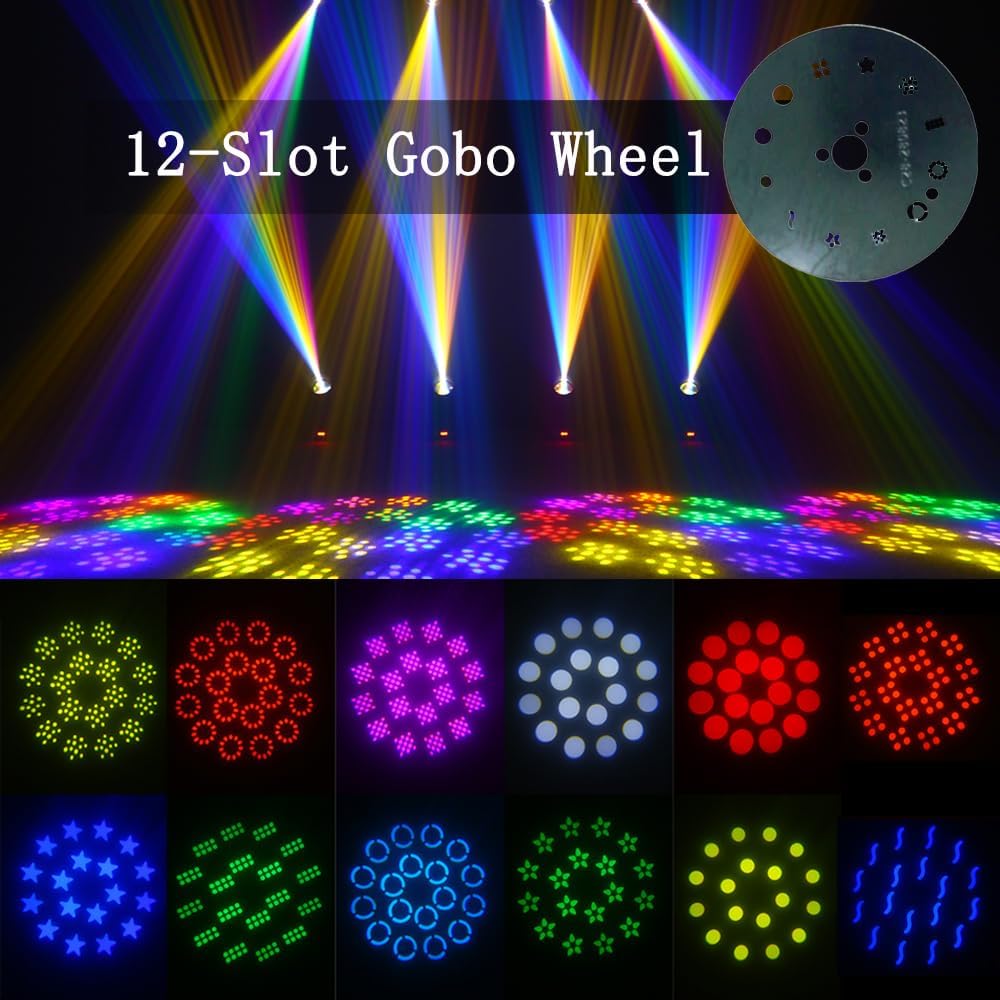
Image: Visual representation of various GOBO patterns projected by the light, including stars, circles, and abstract shapes.

Image: Demonstrates the 8 distinct colors that can be produced by the light fixture, including red, green, blue, yellow, and purple.

Image: Illustrates the multi-beam effects created by the 6+12 dual prism system, showing multiple light beams from a single source.
Product Videos:
Video: A demonstration of the YUERLT 200W RGB LED Spot Moving Head Light in action, showcasing its 18 prism effects and dynamic movements in a club setting.
Video: This video highlights the 200W LED Aperture Moving Head Light's beam and spot capabilities, demonstrating its use in a club or bar environment with various color and pattern changes.
Video: A comprehensive overview of the DJ Light 200W LED Moving Head Light, featuring its beam, GOBO, and ring effects, along with the 6+12 prism functionality.
5. Setup
- Unpacking: Carefully remove the fixture and all accessories from the packaging. Inspect for any damage during transit.
- Mounting: Securely attach the mounting buckle to the bottom of the fixture. Use appropriate truss clamps (not included) to mount the fixture to a truss or other stable structure. Ensure safety cables are used as a secondary attachment. The fixture can also be placed on a flat, stable surface.
- Power Connection: Connect the provided Powercon cable to the power input on the fixture and then to a suitable AC 110-220V, 50-60Hz grounded power outlet.
- DMX Connection (Optional): For DMX control, connect a DMX cable from your DMX controller's output to the DMX IN port of the first fixture. For multiple fixtures, daisy-chain them by connecting the DMX OUT of the first fixture to the DMX IN of the next, and so on.
- Initial Power-Up: Once securely mounted and connected, power on the fixture. It will perform a self-test and reset its pan and tilt movements.

Image: Close-up of the DMX IN, DMX OUT, and Powercon input ports on the fixture's base.

Image: Illustration of the foldable clamp mechanism used for securing the light fixture to a truss or mounting bar.
6. Operating Modes
The YUERLT 200W LED Moving Head Light offers several operating modes, selectable via the onboard LCD display and control buttons.
6.1. DMX Control Mode
This mode allows precise control over all fixture functions using a DMX512 controller. The fixture supports 13 or 15 DMX channels. Refer to the DMX channel chart in the included manual for specific channel assignments and values.
- Setting DMX Address: Use the LCD display and buttons to set the unique DMX start address for each fixture. Ensure no two fixtures have the same address if they are to be controlled independently.
- Channel Functions: DMX channels control Pan, Tilt, Dimmer, Strobe, Color, GOBO, Prism, and other effects.
6.2. Sound-Activated Mode
In this mode, the fixture reacts to ambient sound or music, creating dynamic light shows automatically. Sensitivity can often be adjusted via the menu.
6.3. Master/Slave Mode
Connect multiple fixtures via DMX cables. Set one fixture as the 'Master' and the others as 'Slave'. The slave units will mirror the master's movements and effects, synchronizing the light show without a dedicated DMX controller.
6.4. Auto-Run Mode
The fixture cycles through pre-programmed internal light shows. Various auto programs may be available, selectable via the menu.

Image: The LCD control panel displaying options for DMX mode, Auto mode, and Sound mode, along with settings for Pan, Tilt, Dimmer, and DMX address.
7. Maintenance
Regular maintenance ensures optimal performance and extends the lifespan of your fixture.
- Cleaning: Periodically clean the lenses and exterior housing with a soft, lint-free cloth. For stubborn dirt, use a mild glass cleaner. Ensure the fixture is powered off and cool before cleaning.
- Fan and Vents: Keep the cooling fan and ventilation openings free from dust and debris to prevent overheating. Use compressed air to clear dust if necessary.
- Cable Inspection: Regularly inspect power and DMX cables for any signs of wear, cuts, or damage. Replace damaged cables immediately.
- General Inspection: Check all mounting hardware, screws, and connections for tightness.

Image: A diagram highlighting the low-noise fan design for efficient heat dissipation, crucial for maintaining the fixture's performance and longevity.
8. Troubleshooting
If you encounter issues, refer to the following common problems and solutions:
| Problem | Possible Cause | Solution |
|---|---|---|
| Fixture does not power on | No power supply; faulty cable; blown fuse | Check power connection and outlet; replace power cable; check and replace fuse if necessary. |
| No light output | LED failure; dimmer channel at 0%; internal error | Check DMX dimmer channel; power cycle the unit; contact support if LED is faulty. |
| No DMX control | Incorrect DMX address; faulty DMX cable; DMX controller issue; incorrect channel mode | Verify DMX address and channel mode; check DMX cable connections; test with another DMX controller. |
| Erratic movement or effects | DMX signal interference; loose internal connection; motor issue | Ensure DMX cables are terminated; power cycle the unit; contact support. |
| Overheating | Blocked ventilation; excessive ambient temperature | Clear all ventilation openings; ensure adequate airflow around the fixture; reduce ambient temperature if possible. |
9. Specifications
| Feature | Detail |
|---|---|
| Brand | YUERLT |
| Model Number | YRYX200WJLSMD |
| Light Source Type | Light Emitting Diode |
| Wattage | 201 Watts (Max Compatible: 200 Watts) |
| Power Source | Corded Electric (AC 110-220V, 50-60Hz) |
| Product Dimensions | 9"L x 6"W x 14"H (22.86cm L x 15.24cm W x 35.56cm H) |
| Item Weight | 12.31 pounds (5.58 kg) |
| Beam Angle | 200 Degrees |
| Mounting Type | Floor Mount (with included buckle for truss mounting) |
| Control Modes | DMX512 (13/15 channels), Sound-Activated, Master/Slave, Auto-Run |
| Material | Plastic |
| Color | Multicolor |
10. Warranty and Support
For warranty information, technical support, or service inquiries, please refer to the contact details provided with your purchase documentation or visit the official YUERLT website. Keep your proof of purchase for warranty claims.