
Introduction
This manual provides detailed instructions for the safe and effective use of your Ohcans Hidden Camera Detector, Model T15. Please read this manual thoroughly before operation and retain it for future reference. This device is designed to help detect various hidden surveillance equipment, ensuring your privacy and security.
Product Overview
The Ohcans T15 is a versatile detection device designed to identify various hidden surveillance equipment, including wireless cameras, listening devices, and GPS trackers. It features multiple detection modes and adjustable sensitivity for comprehensive privacy protection.
Key Features
- AI Smart Chip for enhanced detection capabilities.
- RF signal detection from 1MHz to 6.5GHz, covering 1.2G/Wi-Fi 2.4G/5.8G wireless cameras.
- Four Detection Modes: Electromagnetic Wave (RF), GPS Location, Laser (Infrared Light), and Flashlight.
- Five levels of adjustable sensitivity for precise detection.
- Two alarm modes: audible beeping and silent vibration.
- Compact and portable design, measuring approximately 0.59 x 0.95 x 3.8 inches and weighing 28g.
- Equipped with a 400mAh battery, providing up to 25 hours of running time.
- Convenient Type-C charging port.

Image showing the Ohcans T15 Hidden Camera Detector, illustrating its two main components: the signal detection unit with an extendable antenna and the laser detection unit with red LEDs.

Diagram highlighting the key features of the Ohcans T15 detector, including anti-capture, anti-listening, intrusion prevention alarm, anti-positioning, long standby, ultra-high sensitivity, infrared lens, booster antenna, and compact design.
Package Contents
Please verify that all items are present in your package:
- Ohcans Hidden Camera Detector (Model T15)
- USB Type-C Charging Cable
- Lanyard
- User Manual

Image displaying the contents of the Ohcans T15 package: the hidden camera detector, a lanyard, and a USB Type-C data cable.
Device Layout and Controls
Familiarize yourself with the buttons and indicators on your T15 detector for optimal use.

Detailed diagram of the Ohcans T15 detector with labels for each component: Antenna, Viewfinder, Lights, Magnetic Detection, LED lights, Sensitivity indicators, Magnetic Mode Light, Charging Light, Mode Button, Signal Strength Adjustment Button, On/Off and Vibration Mode Keys, Charging Port, and Hanging Rope Hole.
- Antenna: Extendable for enhanced RF signal detection.
- Viewfinder: Used in conjunction with laser detection to visually locate camera lenses.
- Lights (Laser): Red LEDs that emit light to reflect off hidden camera lenses.
- Magnetic Detection: Sensor area for detecting magnetic fields, commonly associated with GPS trackers.
- LED Lights (Signal Strength/Sensitivity): Indicators that show detected signal strength or the current sensitivity level.
- Magnetic Mode Light: Illuminates when the magnetic detection mode is active.
- Charging Light: Indicates the device's charging status.
- Mode Button: Press to cycle through the available detection modes.
- Signal Strength Adjustment Button: Used to increase or decrease the detection sensitivity.
- On/Off and Vibration Mode Keys: Powers the device on or off, and toggles between audible and vibration alarm modes.
- Charging Port: USB Type-C port for connecting the charging cable.
- Hanging Rope Hole: Attachment point for the included lanyard.
Setup
Charging the Device
- Connect the provided USB Type-C cable to the charging port on the detector.
- Connect the other end of the cable to a standard USB power adapter (not included) or a computer USB port.
- The charging light will illuminate during charging. It will turn off or change color when the battery is fully charged.
- A full charge typically provides up to 25 hours of running time, depending on usage.
Powering On/Off
- To power on, press and hold the On/Off button (power icon) for a few seconds until the indicator lights activate.
- To power off, press and hold the On/Off button again until the indicator lights turn off.
Operating Instructions
General Operation
- Power on the device.
- Use the Mode Button to select the desired detection mode.
- Adjust sensitivity using the Signal Strength Adjustment Button as needed for your environment.
- The device offers two alarm modes: beeping and vibrating. Toggle between them by briefly pressing the On/Off button after the device is on.
RF Signal Detection (Wireless Cameras, Listening Devices)
- Extend the antenna fully for optimal signal reception.
- Select the RF detection mode (often indicated by a Wi-Fi icon).
- Slowly scan the area. The LED lights will indicate signal strength. More illuminated lights signify a stronger signal, indicating proximity to a hidden device.
- Adjust sensitivity: Decrease sensitivity to pinpoint the exact location once a strong signal is detected.
- The device detects 1.2G/Wi-Fi 2.4G/5.8G wireless cameras and RF signals within the 1MHz to 6.5GHz range.
Laser Detection (Hidden Camera Lenses)
- Select the Laser detection mode (often indicated by a light icon). The red LEDs on the laser unit will illuminate.
- Look through the viewfinder on the laser unit.
- Slowly scan the area, paying close attention to reflective surfaces, mirrors, smoke detectors, and small holes.
- Hidden camera lenses will appear as bright red dots when illuminated by the laser and viewed through the viewfinder.
Magnetic Field Detection (GPS Trackers)
- Select the Magnetic Field detection mode (indicated by the Magnetic Mode Light).
- Move the detector close to suspicious objects or areas, especially under vehicles, in luggage, or on metal surfaces.
- The device will alert you to the presence of magnetic fields, which are often used by GPS trackers.
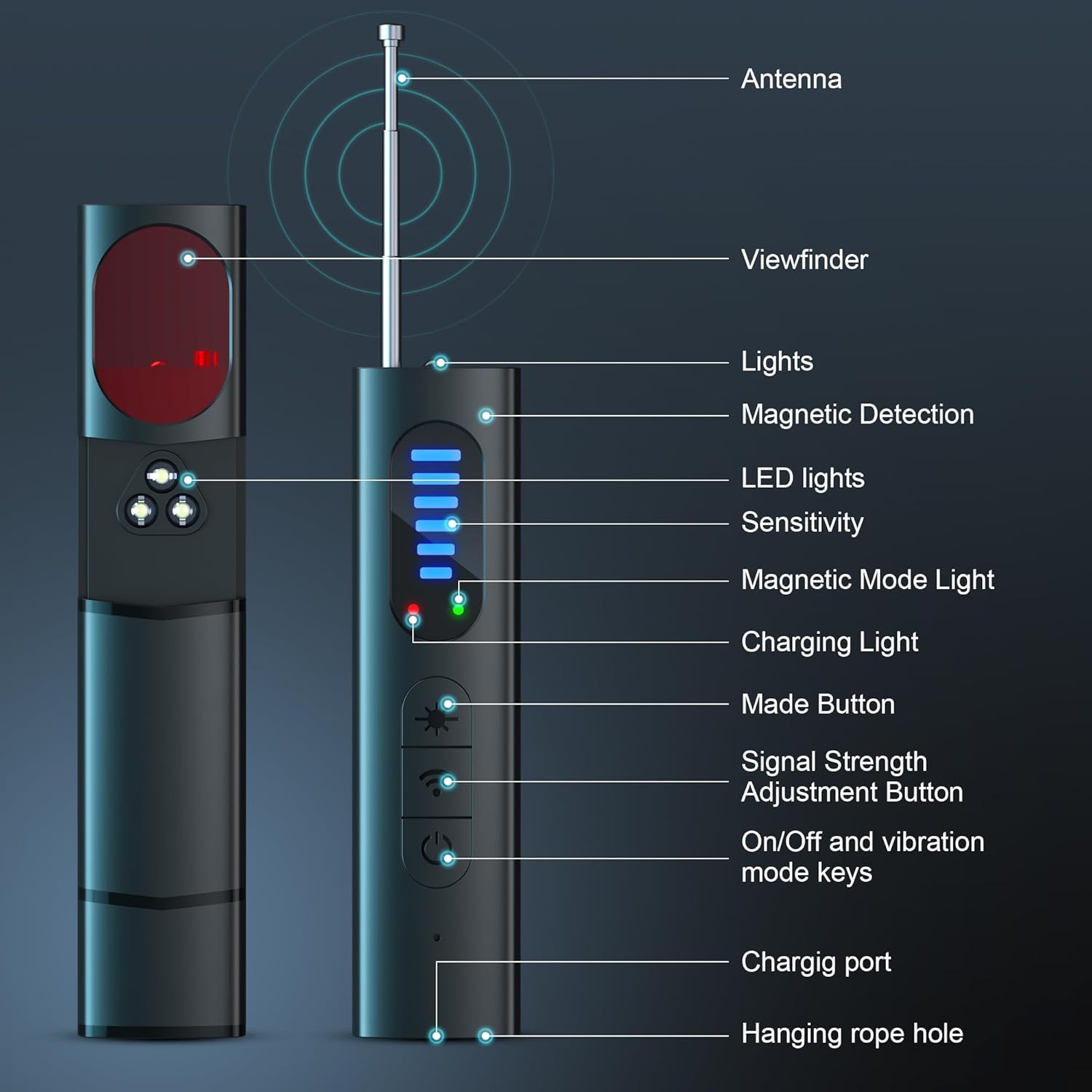
Image showing the Ohcans T15 detector being used to scan for a GPS locator under a car seat, illustrating the magnetic field detection capability.
Flashlight Function
The device includes a flashlight function for illuminating dark areas during inspection. Activate it by selecting the appropriate mode using the Mode Button.

Image demonstrating the LED lighting feature of the Ohcans T15 detector, illuminating a dark room.
Sensitivity Adjustment
The T15 features 5 levels of adjustable sensitivity to adapt to different environments and detection needs.
- In any detection mode, press the Signal Strength Adjustment Button to cycle through the 5 sensitivity levels.
- Higher sensitivity allows detection of weaker signals from a greater distance, useful for initial scans of large areas.
- Lower sensitivity helps pinpoint the exact location of a strong signal source, reducing false positives in cluttered environments.

Close-up image of the Ohcans T15 detector showing the sensitivity adjustment button and the LED indicators for the 5 levels of sensitivity.
Alarm Modes
The device offers both audible (beeping) and silent (vibration) alarm modes for discreet or overt alerts.
- After powering on, briefly press the On/Off button to switch between the beeping and vibrating alert modes.

Image illustrating the two working modes of the Ohcans T15 detector: sound alarm mode (represented by sound waves) and vibration alarm mode (represented by red light and vibration icon).
Maintenance
Cleaning
Wipe the device with a soft, dry cloth. Do not use abrasive cleaners, solvents, or harsh chemicals, as these can damage the device's surface or internal components.
Storage
Store the device in a cool, dry place away from direct sunlight, extreme temperatures, and high humidity. Keep it out of reach of children.
Battery Care
Recharge the battery regularly, even if the device is not in frequent use, to maintain battery health and prolong its lifespan. Avoid fully discharging the battery for extended periods, as this can reduce its capacity.
Troubleshooting
If you encounter any issues with your Ohcans T15 detector, please refer to the following table for common problems and solutions.
| Problem | Possible Cause | Solution |
|---|---|---|
| Device does not power on | Low battery | Charge the device fully using the provided Type-C cable. |
| Device does not power on | Power button not pressed correctly | Press and hold the On/Off button for a few seconds until the indicator lights activate. |
| Inaccurate detection or false alarms | High sensitivity setting | Reduce the sensitivity level using the Signal Strength Adjustment Button. |
| Inaccurate detection or false alarms | Environmental interference | Move away from strong electromagnetic sources (e.g., Wi-Fi routers, microwaves, large metal objects). |
| Cannot detect hidden cameras with laser mode | Not looking through viewfinder correctly | Ensure you are looking directly through the viewfinder while scanning the area. |
| Cannot detect hidden cameras with laser mode | Camera lens is too small or well-hidden | Scan slowly and thoroughly, adjusting your viewing angle and distance from suspicious objects. |
| Short battery life | Battery not fully charged | Ensure the device is fully charged before each use. |
| Short battery life | Aging battery | Contact customer support if battery life significantly degrades over time despite proper charging. |
Specifications
Technical details for the Ohcans Hidden Camera Detector T15:
| Feature | Detail |
|---|---|
| Model | T15 |
| Brand | Ohcans |
| Dimensions (L x W x H) | Approx. 3.8 x 0.95 x 0.59 inches |
| Weight | 28g (0.99 oz) |
| RF Detection Range | 1MHz - 6.5GHz |
| Wireless Detection | 1.2G/Wi-Fi 2.4G/5.8G |
| Detection Modes | RF Signal, Laser (Infrared), Magnetic Field, Flashlight |
| Sensitivity | 5 Levels Adjustable |
| Alarm Modes | Beeping, Vibration |
| Battery Capacity | 400mAh Lithium Polymer |
| Running Time | Up to 25 hours |
| Charging Port | USB Type-C |
| UPC | 741365676058 |
| ASIN | B0D8DL9PK7 |
Warranty and Support
For product issues, technical assistance, or warranty claims, please contact Ohcans customer service. Refer to your purchase documentation or the retailer's website for specific warranty terms and contact information.
You can also visit the Ohcans Store for more information and support: Ohcans Official Store.