
Introduction
Thank you for choosing the GM Seating Ergolux Executive Chair. This manual provides detailed instructions for the assembly, operation, and maintenance of your new chair. Please read this manual thoroughly before assembly and use to ensure proper function and safety.
Safety Information
- Maximum Weight Capacity: Do not exceed 300 lbs (136 kg). Exceeding this limit may cause damage to the chair and potential injury.
- Assembly: Follow all assembly instructions carefully. Ensure all components are securely fastened before use.
- Stability: Avoid standing on the chair or using it as a step stool. Do not lean excessively to one side or the back to prevent tipping.
- Children: Keep children away from the chair during assembly. This product is intended for adult use.
- Maintenance: Regularly check all bolts and screws to ensure they remain tight. Retighten as necessary.
Package Contents
Before beginning assembly, please verify that all parts are present and undamaged. If any parts are missing or damaged, please contact customer support.
- Chair Backrest
- Seat Cushion
- Armrests (2)
- Gas Lift Cylinder
- Base (5-star)
- Casters (5)
- Mechanism Plate
- Headrest
- Assembly Hardware (screws, bolts, Allen wrench)
Setup and Assembly
Assembly of the Ergolux Executive Chair is straightforward. Follow these steps carefully to ensure correct and safe setup.
- Attach Casters to Base: Insert the five casters into the holes at the end of each leg of the 5-star base. Push firmly until they click into place.
- Insert Gas Lift: Place the gas lift cylinder into the center hole of the assembled base.
- Attach Mechanism Plate to Seat: Align the mechanism plate with the pre-drilled holes on the underside of the seat cushion. Secure it using the provided screws and the Allen wrench. Ensure the front of the mechanism faces the front of the seat.
- Attach Armrests: Secure the armrests to the sides of the seat cushion using the provided screws. Ensure they are oriented correctly (left and right).
- Attach Backrest: Connect the backrest to the seat assembly. Align the mounting points and secure with screws.
- Attach Headrest: Slide the adjustable headrest into the designated slot at the top of the backrest.
- Connect Seat to Gas Lift: Carefully place the assembled seat onto the gas lift cylinder, ensuring it is centered and fully seated.

Image: Overview of the GM Seating Ergolux Executive Chair highlighting key adjustable features.
Operating Instructions
Your Ergolux Executive Chair offers multiple adjustment options for personalized comfort and ergonomic support.
1. Seat Height Adjustment
To adjust the seat height, locate the lever on the right side, beneath the seat.
- To raise the seat: Lift the lever while taking your weight off the seat. The seat will rise automatically.
- To lower the seat: Lift the lever while remaining seated. The seat will lower.
- Release the lever to lock the seat at the desired height.
2. Backrest Recline (90° to 160°)
The backrest can be reclined to various angles for working, relaxing, or resting.
- To recline: Pull out the adjustment lever (typically the same lever used for height or a separate one on the left side). Lean back to the desired angle.
- To lock: Push the lever back in to lock the backrest position.
- To return to upright: Lean forward slightly while pulling the lever out, then release the lever.
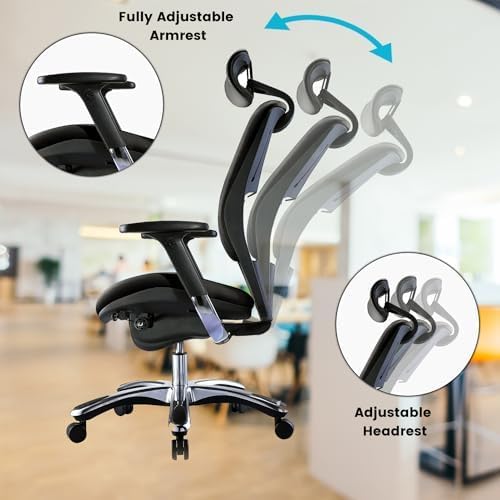
Image: Illustration of the chair's recline mechanism, adjustable armrests, and headrest.
3. Armrest Adjustment
The armrests are fully adjustable to support your arms and shoulders.
- Adjust height: Locate the button or lever on the side of each armrest. Press it and move the armrest up or down to your preferred height. Release to lock.
- Adjust angle/depth (if applicable): Some armrests may also pivot or slide forward/backward. Refer to the specific mechanism on your armrests for these adjustments.
4. Headrest Adjustment
The headrest can be adjusted for optimal neck and head support.
- To adjust: Gently push or pull the headrest up or down to the desired height. It may also tilt forward or backward.

Image: Close-up of adjustable armrests, headrest, and swivel wheels.
5. Swivel and Mobility
The chair features 360-degree swivel capability and smooth-rolling casters for easy movement around your workspace.
- Swivel: The seat can rotate freely 360 degrees.
- Mobility: The silent PU wheels are designed to protect your floor while providing smooth movement.
Maintenance
Proper care and maintenance will extend the life and appearance of your executive chair.
- Cleaning: Wipe clean with a damp cloth. For the PU leather, use a mild soap solution if necessary, then wipe dry immediately. Avoid harsh chemicals or abrasive cleaners.
- Hardware Check: Periodically check all screws and bolts to ensure they are tight. Retighten as needed to maintain stability and safety.
- Caster Care: Keep casters free of hair and debris to ensure smooth rolling and prevent floor damage.
- Avoid Direct Sunlight: Prolonged exposure to direct sunlight can cause the leather to fade or crack.
Troubleshooting
If you encounter any issues with your chair, please refer to the following common solutions:
- Chair is Wobbly: Ensure all assembly screws and bolts are fully tightened. Check that the gas lift is properly seated in the base and mechanism.
- Gas Lift Not Adjusting: Verify that the adjustment lever is correctly engaged. If the issue persists, the gas lift may need replacement. Contact customer support.
- Casters Not Rolling Smoothly: Check casters for trapped debris (hair, lint, etc.) and clean them. Ensure they are securely inserted into the base.
- Squeaking Noises: Apply a small amount of silicone lubricant to moving parts or joints if squeaking occurs. Avoid oil-based lubricants on plastic components.
Specifications
| Brand | GM Seating |
| Model Name | GM Seating Ergolux Genuine Chair |
| Model Number | GMVAPLB-FBM |
| Color | Black |
| Material (Frame) | Aluminum, Metal |
| Material (Seat) | Faux Leather, Foam |
| Product Dimensions (D x W x H) | 29.13"D x 27.56"W x 54.46"H |
| Item Weight | 68 Pounds |
| Maximum Weight Recommendation | 300 Pounds (136 kg) |
| Reclining Position Count | 3 (90° to 160°) |
| Furniture Base Movement | Swivel |
| Included Components | Assembly hardware |
| Recommended Uses | Office |
| Product Care Instructions | Wipe Clean |
Warranty and Support
For warranty information or technical support, please contact GM Seating customer service. Keep your purchase receipt for warranty claims.
You can visit the official GM Seating store for more information: GM Seating Store