
1. Introduction
This manual provides detailed instructions for the safe and effective operation of your Pyle 880W Portable Bluetooth PA Speaker System, model PPHP122NSM. This system is designed for portable audio playback and public address applications, featuring Bluetooth connectivity, a wireless microphone, and various media playback options. Please read this manual thoroughly before using the product and retain it for future reference.
2. Important Safety Instructions
- Do not expose this appliance to rain or moisture.
- Do not block any ventilation openings.
- Ensure proper grounding for the power adapter.
- Protect the power cord from being walked on or pinched.
- Only use attachments/accessories specified by the manufacturer.
- Unplug this appliance during lightning storms or when unused for long periods.
- Refer all servicing to qualified service personnel.
- Do not open the unit; there are no user-serviceable parts inside.
- Keep the unit away from heat sources such as radiators, heat registers, stoves, or other apparatus that produce heat.
3. Package Contents
Verify that all items listed below are included in your package:
- PA Speaker System
- Remote Control
- Power Adapter
- Wireless Microphone
- Speaker Stand

Image 3.1: The Pyle PA Speaker System with its remote control, power adapter, wireless microphone, and speaker stand.
4. Product Features
- 880 Watt Peak Power Output with 12-inch Subwoofer and 1-inch Tweeter.
- Bluetooth 5.0 for wireless audio streaming.
- True Wireless Stereo (TWS) function for connecting multiple speakers.
- Multi-color flashing LED party lights.
- Built-in rechargeable 7.4V, 3600mAh battery with LED level indicator.
- FM radio with digital LED display.
- USB flash memory reader and Micro SD card reader for MP3 playback.
- 3.5mm AUX input and 6.5mm microphone input.
- Recording function.
- Microphone priority function.
- Adjustable echo, bass, and treble controls.
- Rugged, durable molded cabinet with trolley handle and rolling wheels for portability.
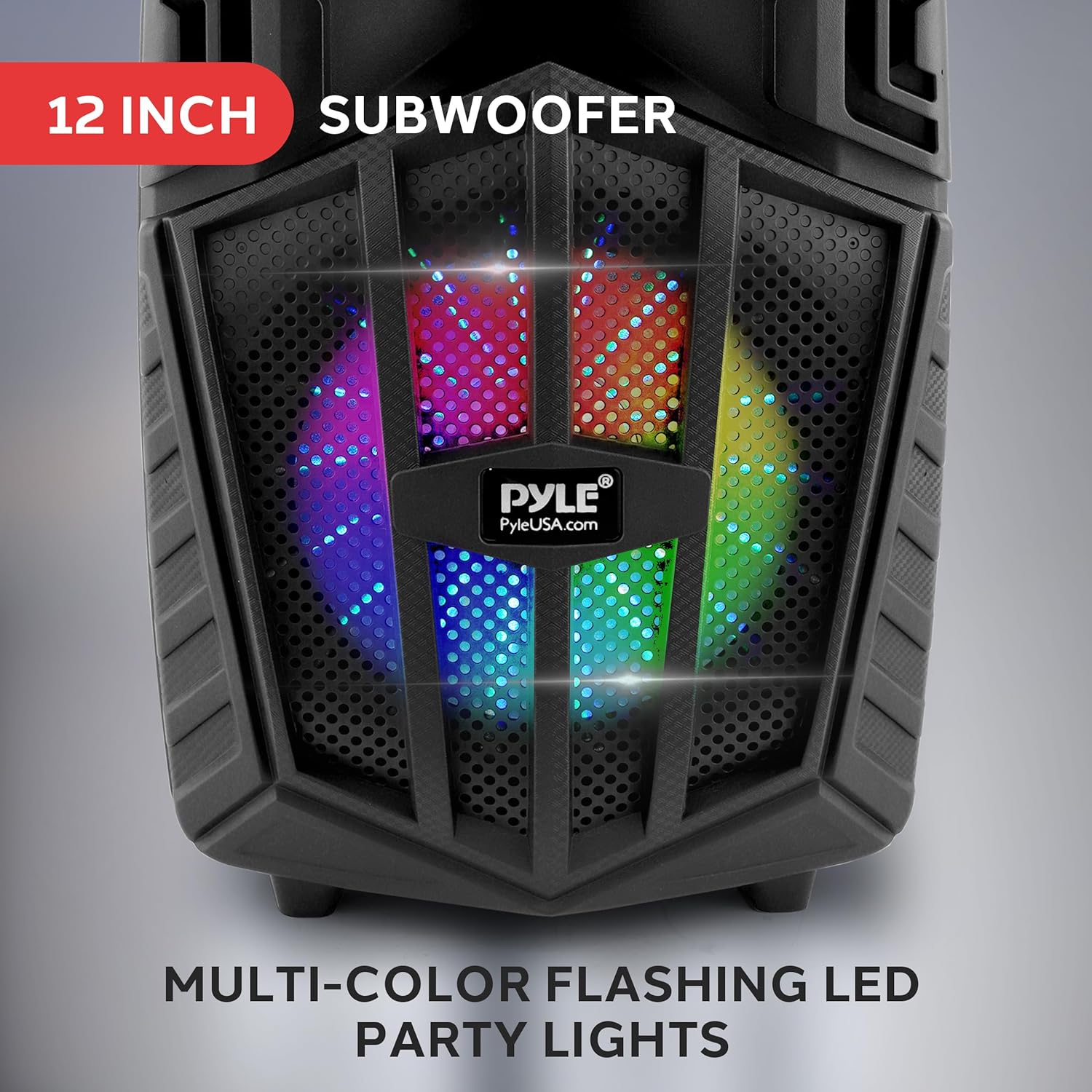
Image 4.1: The 12-inch subwoofer with integrated multi-color LED party lights.
5. Controls and Functions
The control panel is located on the top of the speaker. Familiarize yourself with the various buttons and inputs:

Image 5.1: Overview of the speaker's top control panel.
Control Panel Layout:
- MIC.VOL: Microphone Volume Control.
- ECHO: Microphone Echo Effect Control.
- TREBLE: Treble Adjustment for overall sound.
- BASS: Bass Adjustment for overall sound.
- MODE: Press to switch between Bluetooth, FM, AUX, USB, and SD modes.
- REC: Press to start/stop recording.
- MIC PRI: Microphone Priority function (ducks music when mic is used).
- TWS: True Wireless Stereo pairing button.
- PLAY/PAUSE: Play/Pause audio in media modes.
- PREV/NEXT: Skip to previous/next track or FM station.
- VOLUME: Master Volume Control.
- USB Port: For USB flash drive playback.
- SD Card Slot: For Micro SD card playback.
- AUX Input: 3.5mm input for external audio devices.
- MIC Input: 6.5mm input for wired microphones.
- Power Input: DC 9V input for charging.
- Power Switch: On/Off switch for the unit.
6. Setup
6.1 Initial Charging
Before first use, fully charge the speaker for approximately 5 hours. Connect the provided power adapter to the DC 9V input on the speaker and plug it into a standard wall outlet. The LED battery indicator will show charging status.
6.2 Speaker Stand Assembly
The included speaker stand can be assembled to elevate the speaker for optimal sound projection. Extend the tripod legs and secure them. Place the speaker onto the pole mount located at the bottom of the speaker. Ensure the speaker is stable before use.

Image 6.1: The speaker positioned on its stand, demonstrating the pole mount feature.
6.3 Microphone Connection
The system includes a wireless microphone. Ensure the microphone has batteries installed. Turn on the microphone. The speaker will automatically detect and connect to the wireless microphone. For a wired microphone, connect it to the 6.5mm MIC Input.
7. Operating Instructions
7.1 Power On/Off
Toggle the Power Switch to the 'ON' position to turn on the speaker. The LED display will illuminate. Toggle to 'OFF' to power down.
7.2 Mode Selection
Press the MODE button repeatedly to cycle through available input modes: Bluetooth, FM Radio, AUX, USB, and SD Card. The current mode will be indicated on the LED display.
7.3 Bluetooth Pairing
- Turn on the speaker and select Bluetooth mode using the MODE button. The display will show 'BLUE' and a pairing indicator will flash.
- Enable Bluetooth on your mobile device (smartphone, tablet, etc.).
- Search for available Bluetooth devices and select 'PYLE AUDIO' from the list.
- Once paired, the speaker will emit a confirmation tone, and the Bluetooth indicator will stop flashing.
- You can now stream audio wirelessly from your device.
7.4 True Wireless Stereo (TWS) Function
To connect two Pyle PPHP122NSM speakers for a stereo experience:
- Ensure both speakers are powered on and in Bluetooth mode.
- On one of the speakers (this will be the primary unit), press and hold the TWS button. The speaker will emit a pairing tone.
- The primary speaker will automatically search for and connect to the second speaker. Once connected, a confirmation tone will sound.
- Now, pair your Bluetooth device to the primary speaker as described in section 7.3. Audio will play in stereo across both speakers.
7.5 FM Radio Operation
- Switch to FM mode using the MODE button.
- Press the PLAY/PAUSE button to automatically scan and save available FM stations.
- Use the PREV and NEXT buttons to navigate through the saved stations.
7.6 USB/SD Card Playback
- Insert a USB flash drive or Micro SD card (with MP3 audio files) into the respective slot.
- The speaker will automatically switch to USB/SD mode and begin playing audio. If not, press the MODE button to select.
- Use the PLAY/PAUSE, PREV, and NEXT buttons to control playback.
7.7 AUX Input
Connect an external audio device (e.g., MP3 player, laptop) to the 3.5mm AUX input using a compatible audio cable. Switch to AUX mode using the MODE button. Audio will play from the connected device.
7.8 Recording Function
To record audio from the microphone or AUX input to a USB drive or SD card:
- Ensure a USB drive or SD card is inserted.
- Connect your microphone or AUX device.
- Press the REC button to start recording.
- Press REC again to stop recording. The recorded file will be saved to the USB drive/SD card.
7.9 Microphone Priority Function
Press the MIC PRI button to activate this function. When active, any music playing will automatically lower in volume when the microphone is used, allowing the microphone audio to be prominent.
7.10 Adjusting Audio
Use the MIC.VOL knob to adjust the volume of the microphone. Use the ECHO knob to add an echo effect to the microphone. Adjust the overall sound characteristics using the TREBLE and BASS knobs. The master volume is controlled by the main VOLUME knob.
7.11 LED Party Lights
The multi-color flashing LED lights activate automatically when the speaker is powered on. There is no separate control for these lights; they are integrated into the speaker's operation.
8. Charging the Speaker
The speaker has a built-in rechargeable battery. When the battery level is low, connect the provided power adapter to the DC 9V input and a wall outlet. The LED battery indicator will show the charging status. A full charge takes approximately 5 hours and provides up to 3 hours of continuous playtime, depending on usage volume and features.
9. Maintenance and Care
- Cleaning: Use a soft, dry cloth to clean the exterior of the speaker. Do not use liquid cleaners or abrasive materials.
- Storage: When not in use for extended periods, store the speaker in a cool, dry place. It is recommended to charge the battery periodically (e.g., every 3 months) to maintain battery health.
- Avoid Extreme Conditions: Do not expose the speaker to extreme temperatures, direct sunlight, or high humidity.
10. Troubleshooting
| Problem | Possible Cause | Solution |
|---|---|---|
| No power | Battery is depleted; Power adapter not connected; Power switch off. | Charge the speaker; Ensure power adapter is securely connected; Turn power switch to ON. |
| No sound | Volume too low; Incorrect mode selected; Device not connected properly. | Increase master volume; Select correct input mode (Bluetooth, AUX, USB/SD); Reconnect audio source. |
| Bluetooth not pairing | Speaker not in Bluetooth mode; Device Bluetooth off; Speaker too far from device. | Ensure speaker is in Bluetooth mode; Enable Bluetooth on your device; Move device closer to speaker (within 30 ft). |
| Microphone not working | Microphone off; Batteries low/dead; Volume too low. | Turn on microphone; Replace microphone batteries; Increase MIC.VOL. |
| TWS pairing failed | Speakers not in Bluetooth mode; TWS button not pressed correctly. | Ensure both speakers are in Bluetooth mode; Press and hold TWS button on one speaker until paired. |
11. Technical Specifications
| Specification | Detail |
|---|---|
| Power Output | 880 Watts Peak |
| Speaker Type | PA Speaker System |
| Subwoofer Size | 12 inches |
| Tweeter Size | 1 inch |
| Bluetooth Version | 5.0 |
| Battery Type | Rechargeable, 7.4V, 3600mAh |
| Charge Time | Approximately 5 hours |
| Playtime | Up to 3 hours (continuous) |
| Audio Inputs | Bluetooth, USB, SD Card, AUX (3.5mm), Mic (6.5mm) |
| Material | Polypropylene (PP) |
| Product Dimensions (L x W x H) | 20.71 x 13.62 x 9.88 inches |
| Item Weight | 15.76 pounds |
12. Warranty and Support
Pyle products are designed and manufactured to the highest quality standards. For warranty information or technical support, please refer to the warranty card included with your product or visit the official Pyle website. Keep your purchase receipt as proof of purchase.
For further assistance, you may visit the Pyle store on Amazon: PyleUSA Store


