
Introduction
This manual provides detailed instructions for the assembly, operation, and maintenance of your EliteBloom Tianxun TX 850 Metal Detector. Please read this manual thoroughly before using the device to ensure proper function and safety.
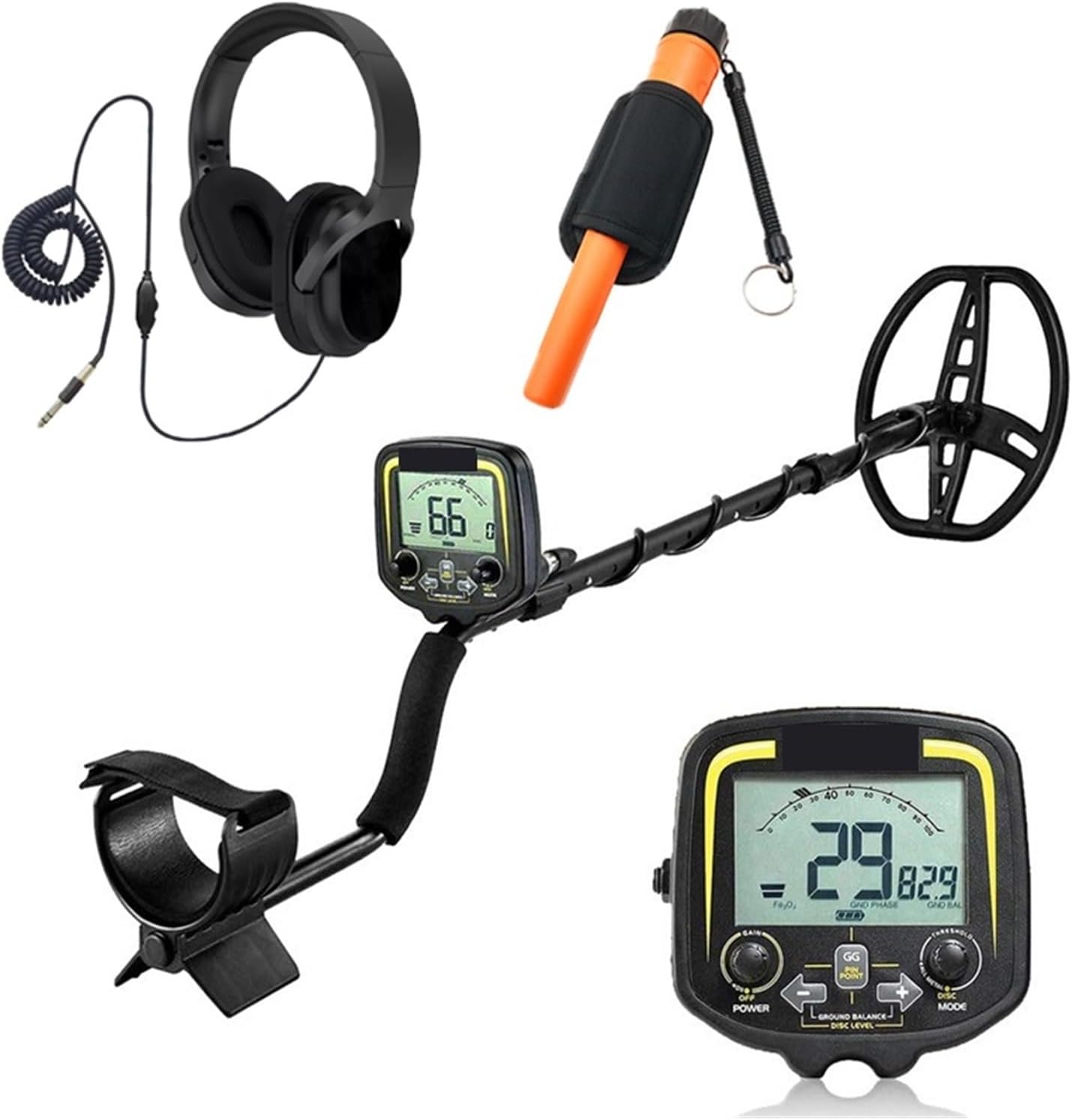
Image: The EliteBloom Tianxun TX 850 Metal Detector shown with its main components: the detector unit, search coil, control box, headphones, and a GPpointer small pinpointer.
Safety Information
- Battery Warning: Keep batteries away from heat, sparks, and open flames. Do not use or store near water.
- Avoid use near airports or other sensitive areas where electromagnetic interference could be an issue.
- Always be aware of your surroundings when operating the metal detector.
- Do not attempt to disassemble or modify the detector, as this may void the warranty and cause damage.
Package Contents
Verify that all components are present in your package:
- Tianxun TX 850 Metal Detector Unit
- 11-inch DD Waterproof Search Coil
- Control Box
- Adjustable Stem
- Armrest and Handle
- Headphones (if included in your specific package)
- GPpointer Small Pinpointer (if included in your specific package)
- User Manual
Setup and Assembly
Follow these steps to assemble your metal detector:
- Attach the Search Coil: Connect the 11-inch DD search coil to the lower stem using the provided bolt and nut. Ensure it is securely fastened but not overtightened.
- Assemble the Stem: Insert the lower stem into the middle stem, and then insert the middle stem into the upper stem. Adjust the length to a comfortable operating height. The adjustable stem allows for lengths between 42 and 52 inches.
- Mount the Control Box: Slide the control box onto the upper stem. Secure it in place.
- Wrap the Cable: Carefully wrap the search coil cable around the stem, ensuring it is snug but not stretched. Plug the coil connector into the corresponding port on the control box.
- Install Batteries: The detector requires one 9V battery (not included). Open the battery compartment on the control box, insert the 9V battery, and close the compartment securely.
- Attach Armrest and Handle: Ensure the armrest and ergonomic handle are properly positioned for comfortable use. The handle is designed for an easy, anti-slip grip.

Image: Key features of the detector, including the adjustable stem, pinpoint search mode, ergonomic handle, waterproof search coil, and detector stand.
Operating Instructions
Powering On and Basic Controls
- Power: Press the POWER button to turn the detector on or off.
- Volume: Adjust the audio volume using the dedicated control.
- Sensitivity (SENS): Adjust the detector's sensitivity to optimize performance based on ground conditions and target depth. Higher sensitivity increases detection depth but can also increase false signals in mineralized ground.
- Headphone Jack: Plug in headphones for private listening and to hear faint signals more clearly.
LCD Display
The LCD display provides crucial information during operation:
- Possible Metal Types: Indicates the likely type of metal detected.
- Target Depth: Estimates the depth of the detected object.
- DISC/NOTCH Range: Shows the current discrimination and notch settings.
- SENS Level: Displays the current sensitivity setting.
- Battery Status: Indicates the remaining battery life.
Operating Modes
The TX 850 offers five distinct operating modes for various detection scenarios:
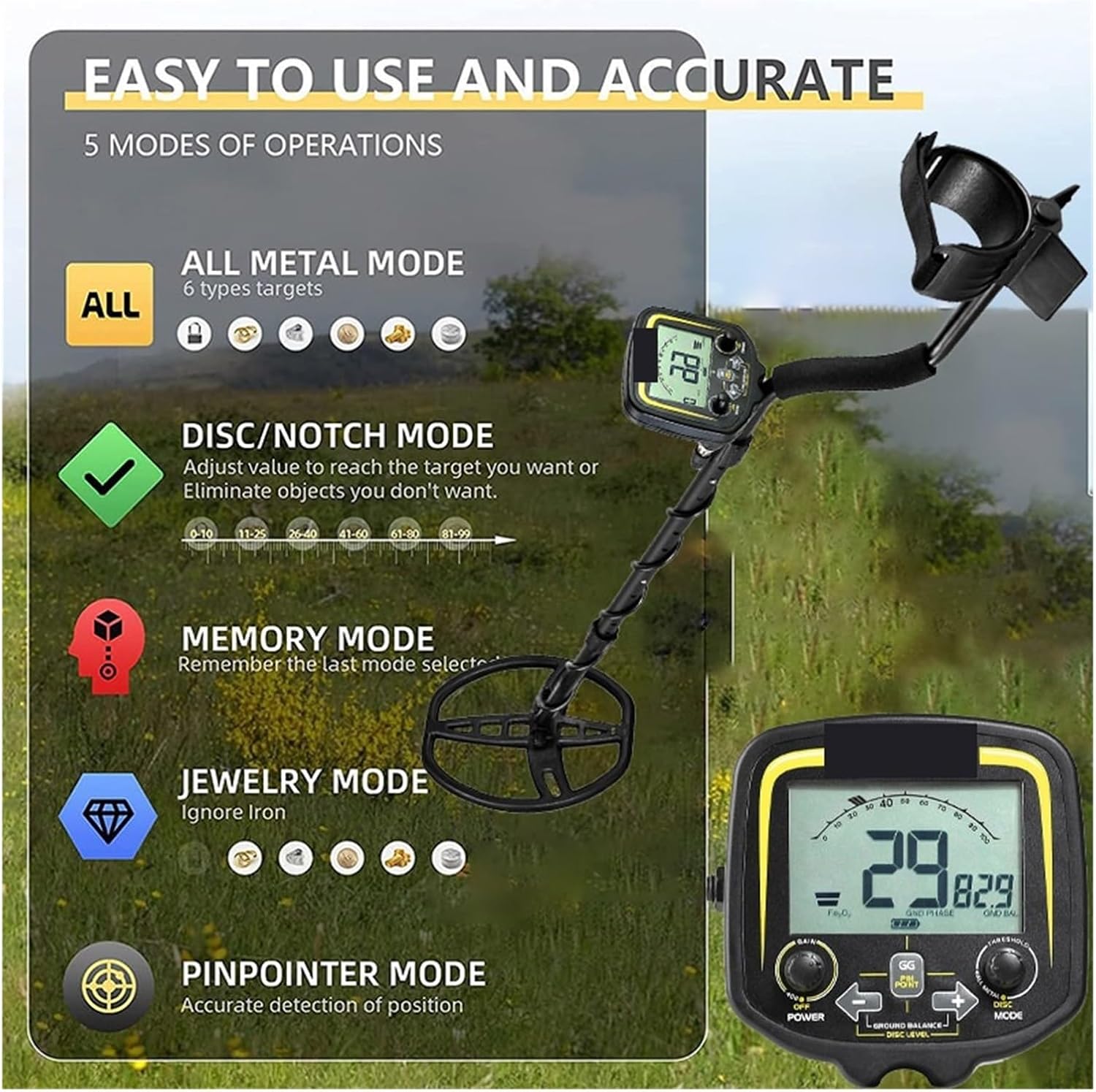
Image: Visual representation of the five operating modes available on the TX 850 detector.
- All Metal Mode: Detects all types of metal without discrimination. This mode offers the deepest detection and is ideal for general searching or when you want to find everything.
- DISC/NOTCH Mode: Allows you to adjust the discrimination level to ignore unwanted metals (e.g., iron) or to target specific types of metals. The detector will emit different tones for different metal types.
- Memory Mode: Recalls the last used detection settings, allowing for quick resumption of your preferred search parameters.
- Jewelry Mode: Optimized for finding jewelry by typically ignoring iron and other common trash metals.
- Pinpointer Mode (GG PIN POINT): Used for precise localization of a detected target. Once a target is found, switch to this mode to narrow down its exact position before digging.
Ground Balance
Ground balance is crucial for effective metal detection, especially in mineralized soil. The TX 850's ground balance feature allows the detector to ignore or "see through" naturally occurring minerals in the earth, preventing false signals and ensuring that only metal objects are detected. The ground balance range extends from ferrite to including.
Identification and Precise Positioning
- Identification: The detector differentiates between various metal types by emitting distinct audio tones. When the detector "rejects" certain metals based on your DISC/NOTCH settings, it is identifying and filtering them out.
- Precise Positioning: After detecting a target, use the Pinpointer Mode to accurately locate the buried object. This helps minimize digging and ensures you find the target efficiently.
Maintenance and Care
- Cleaning: Wipe the detector with a damp cloth after each use. Do not use abrasive cleaners or solvents.
- Storage: Store the detector in a dry, cool place when not in use. Remove the battery if storing for extended periods to prevent leakage.
- Search Coil: The 11-inch DD search coil is waterproof. However, the control box is not. Do not submerge the control box in water.
- Cable Care: Avoid sharp bends or kinks in the coil cable.
- Battery: Replace the 9V battery when the low battery indicator appears on the LCD.
Troubleshooting
- No Power:
- Check if the 9V battery is correctly installed and fully charged.
- Ensure the battery compartment is securely closed.
- False Signals/Chattering:
- Reduce the sensitivity (SENS) setting.
- Perform a ground balance adjustment.
- Ensure the search coil cable is tightly wrapped around the stem and securely connected.
- Move away from power lines, fences, or other sources of electromagnetic interference.
- Poor Detection Depth:
- Increase the sensitivity (SENS) setting, if ground conditions allow.
- Ensure the search coil is parallel to the ground and swept at a consistent height.
- Check battery level; low battery can affect performance.
- Inaccurate Target ID:
- Ensure the search coil is swept slowly and consistently over the target.
- Adjust discrimination settings.
- Mineralized ground can sometimes affect target identification.
Specifications
| Model | TX 850 |
| Brand | EliteBloom |
| Stretched Length | 42-52 inches (107-130 cm) |
| Battery | 1 x 9V (not included) |
| Working Voltage | 9V |
| Basic Sensitivity (US Coin) | 12-15 inches |
| Maximum Detection Depth | 1.5 meters (for a 50 x 50 x 1.2 cm aluminum plate) |
| Search Coil | 11-inch DD, waterproof, interchangeable |
| Frequency | 19 KHZ, crystal control |
| Indication Mode | LCD and sound indicator |
| Battery Life | Up to 15 hours |
| Operating Temperature | -10°C to +50°C (14°F to 122°F) |
| Operating Humidity | 0 to 90% non-condensing |

Image: Detailed dimensions of the detector's components, including adjustable height and search coil size.
Warranty Information
Specific warranty details for the EliteBloom Tianxun TX 850 Metal Detector are not provided in this manual. Please refer to the product packaging or contact the retailer/manufacturer directly for warranty terms and conditions.
Customer Support
For technical assistance, troubleshooting, or inquiries regarding your EliteBloom Tianxun TX 850 Metal Detector, please contact your point of purchase or the EliteBloom customer service department. Contact information may be available on the product packaging or the manufacturer's official website.