
Introduction
Thank you for choosing the ROMSHINE Large Vanity Desk. This manual provides essential information for the safe and efficient assembly, operation, and maintenance of your new vanity desk. Please read these instructions carefully before beginning assembly or use, and retain them for future reference.
Safety Information
Important Safety Precautions:
- Always secure the vanity to the wall using the provided hardware to prevent tipping.
- Never attempt to move the vanity when it is in use or fully loaded.
- Keep the power cord for the LED lights away from heat sources and sharp edges.
- Never insert foreign objects into the electrical components or light sockets.
- Always turn off and unplug the vanity's lighting system before cleaning or performing any maintenance.
- Ensure all screws and fasteners are tightened securely during assembly and periodically check for looseness.
- Do not exceed the weight capacity of the drawers or desktop.
Setup and Assembly
The ROMSHINE Large Vanity Desk requires assembly. All necessary parts and detailed instructions are included in the package. Please follow the assembly steps in the order specified in the provided instruction manual for optimal results and stability.
General Assembly Tips:
- Clear a spacious area for assembly.
- Identify all parts and hardware before starting. Each piece is typically labeled.
- Use appropriate tools as recommended in the assembly guide.
- Avoid overtightening screws to prevent damage to the engineered wood.
- It is recommended to have two people for assembly, especially when handling larger components or the mirror unit.
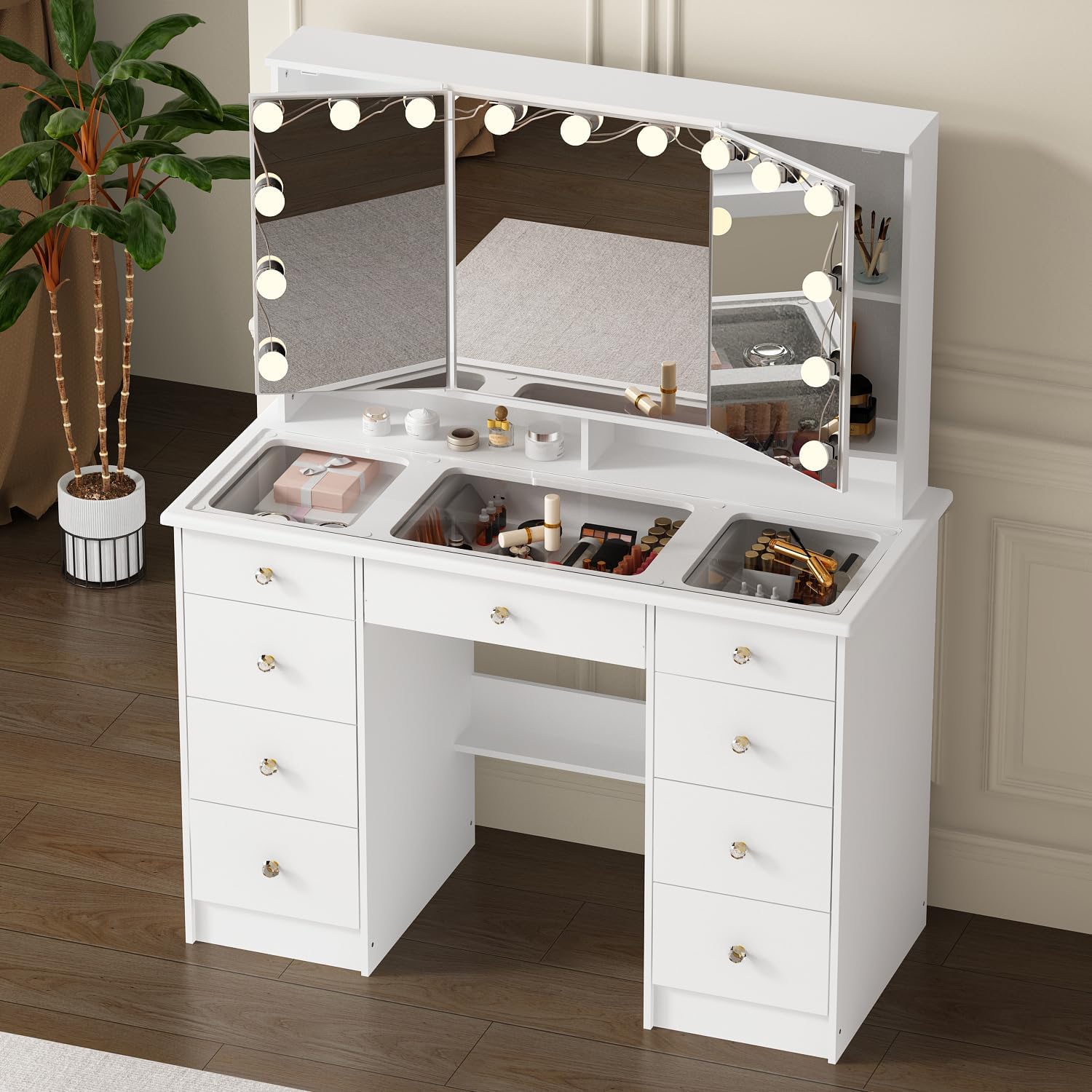
Figure 1: Fully assembled ROMSHINE Large Vanity Desk, White-Glass Desktop model.

Figure 2: Overhead view illustrating the glass top and organized compartments of the vanity desk.
Operating Instructions
Tri-Fold Mirror with LED Lighting
The vanity desk features a large tri-fold mirror equipped with adjustable LED bulbs. These bulbs offer three distinct color settings and adjustable brightness to provide optimal lighting for your makeup routine.
- Power On/Off: Locate the touch sensor on the mirror surface to turn the lights on or off.
- Color Modes: Tap the touch sensor to cycle through the three available color modes: white light, neutral light, and warm light. Select the mode that best suits your environment or preference.
- Brightness Adjustment: Press and hold the touch sensor to adjust the brightness level. Release when the desired brightness is achieved.

Figure 3: Illustration of the three adjustable light modes (white, neutral, warm) and brightness control on the vanity mirror.
Storage Capacity
The vanity table is designed with extensive storage options to help keep your beauty products organized and your space clutter-free.
- 9 Spacious Drawers: Utilize the nine drawers for organizing makeup, brushes, skincare products, and other accessories.
- Hidden Shelves: Behind the side mirrors, there are hidden shelves providing additional discreet storage for items you wish to keep out of sight.

Figure 4: View of the vanity desk with drawers open, showcasing the internal storage capacity.

Figure 5: A side cabinet door opened to reveal hidden shelves, providing additional storage options.
Maintenance and Care
Proper care and maintenance will ensure the longevity and appearance of your vanity desk.
- Cleaning the Surface: Wipe surfaces with a soft, damp cloth. Avoid harsh chemicals or abrasive cleaners that may damage the finish.
- Mirror Care: Clean mirrors with a glass cleaner and a lint-free cloth. Do not spray cleaner directly onto the mirror; apply it to the cloth first.
- Dusting: Regularly dust all surfaces with a dry, soft cloth.
- Spills: Immediately wipe up any spills to prevent staining or damage to the engineered wood.
- Hardware: Periodically check and tighten all screws and fasteners to maintain stability.
- Electrical Components: Ensure the LED lights and wiring are kept dry and free from moisture. Unplug before cleaning.
Troubleshooting
If you encounter any issues with your vanity desk, refer to the following common troubleshooting tips:
| Problem | Possible Cause | Solution |
|---|---|---|
| LED lights not working | Power cord not plugged in; loose connection; faulty bulb/wiring. | Ensure power cord is securely plugged into an outlet. Check all connections. If issue persists, contact customer support. |
| Lights not changing color/brightness | Incorrect operation of touch sensor. | Refer to 'Operating Instructions' for correct touch sensor usage (tap for color, press and hold for brightness). |
| Drawers are stiff or misaligned | Loose assembly screws; debris in drawer slides. | Check and tighten all assembly screws for the drawer and frame. Clean drawer slides of any obstructions. |
| Vanity feels unstable | Loose fasteners; not secured to wall. | Ensure all assembly fasteners are tight. Verify the vanity is properly secured to the wall using the anti-tip hardware. |
Specifications
Detailed specifications for the ROMSHINE Large Vanity Desk (White-Glass Desktop):
| Feature | Detail |
|---|---|
| Brand | ROMSHINE |
| Model Number | White-Glass Desktop |
| Product Dimensions | 43.3" W x 19.7" D x 54" H (19.7 x 43.3 x 54 inches) |
| Material | Engineered Wood |
| Color | White |
| Mirror Type | Tri-Fold with Hollywood Bulbs |
| Lighting Features | 3 Color Modes (White, Neutral, Warm), Brightness Adjustable |
| Storage | 9 Drawers, Hidden Shelves behind mirrors |

Figure 6: Detailed dimensions of the vanity desk and its components.
Warranty and Support
For warranty information, product support, or to inquire about replacement parts, please refer to the documentation included with your purchase or contact ROMSHINE customer service directly. Contact details can typically be found on the manufacturer's website or on your purchase receipt.