
1. Product Overview
The AOKCOS Swivel TV Floor Stand (Model FTC1404AGB-USA) is designed to securely hold televisions ranging from 32 to 65 inches. It features adjustable height, swivel, and tilt functions to optimize viewing angles in various room setups. The stand is constructed with durable metal and a tempered glass base, ensuring stability and safety for your television.
- Compatibility: Supports TVs from 32" to 65" (including 43"/50"/55"/65" flat or curved screens).
- Weight Capacity: Up to 88 lbs (40 kg).
- VESA Compatibility: From 100x100mm to 400x400mm.
- Swivel Range: 30° left or right.
- Tilt Range: -2° to 10°.
- Height Adjustment: 8 levels, from 46 to 53.1 inches (base to top).
- Base Dimensions: 21.6" (L) x 15" (W) tempered glass.
2. Safety Information
Please read all instructions carefully before assembly and use. Failure to follow these instructions may result in property damage, serious injury, or death. Ensure all parts are present and undamaged before proceeding. Do not exceed the maximum weight capacity or VESA compatibility. Always use the provided safety locks to prevent the TV from falling or swaying.
3. Setup and Assembly
Assembly typically takes approximately 15 minutes. All necessary tools and numbered parts are included. A detailed installation manual and video are provided for guidance.
3.1 Unpacking and Component Check
Carefully unpack all components and lay them out on a soft, clean surface to prevent scratches. Verify that all parts listed in the included manual are present.

Image: All components of the AOKCOS TV stand laid out for assembly.
3.2 Attaching TV Brackets
Attach the vertical TV brackets to the back of your television using the appropriate screws and spacers from the provided hardware kit. Ensure the brackets are securely fastened and aligned with your TV's VESA mounting holes.
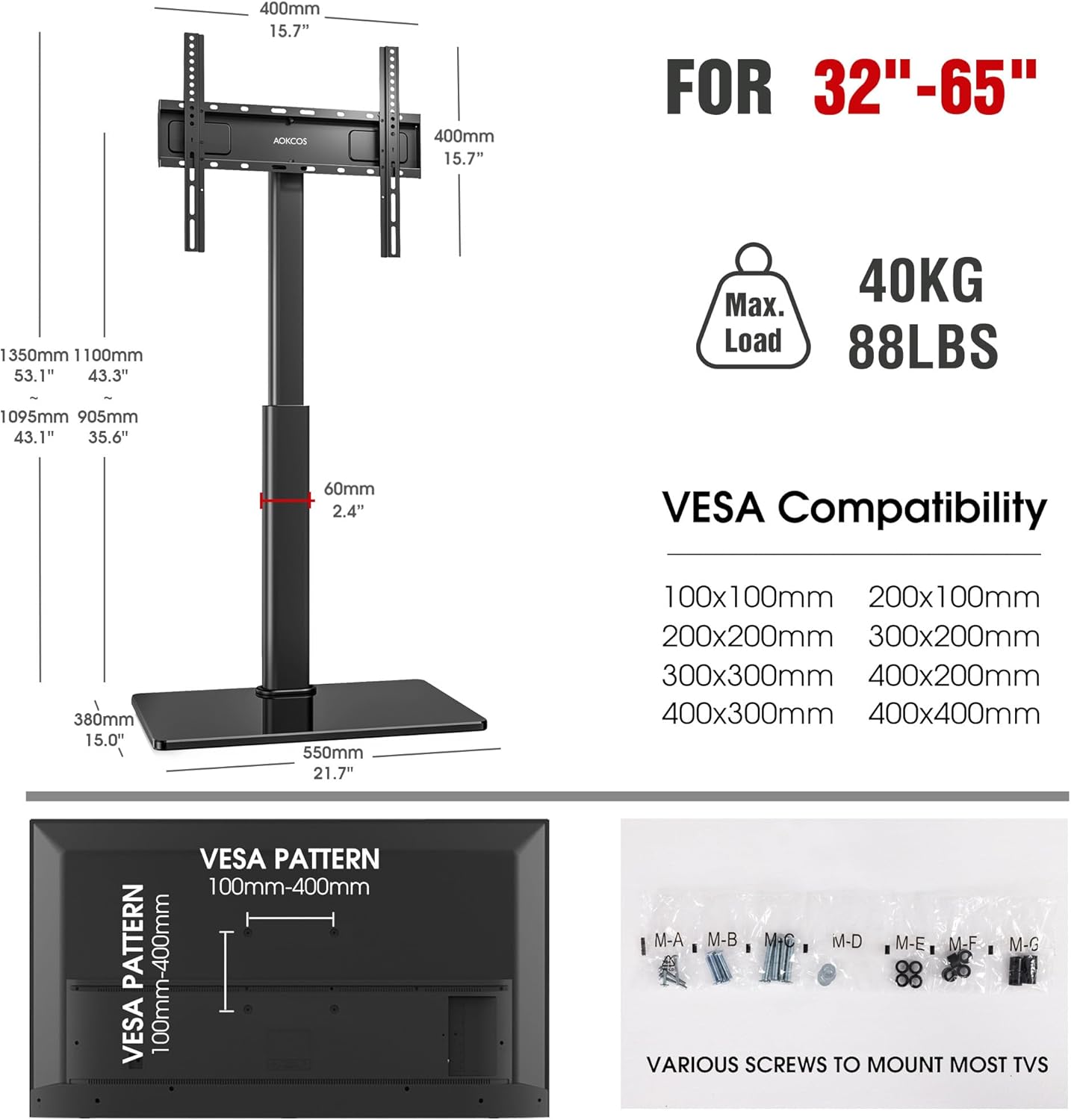
Image: A diagram illustrating VESA compatibility patterns and the variety of screws included for mounting different TV models.
3.3 Assembling the Stand Base and Column
Assemble the tempered glass base and the main support column according to the step-by-step instructions in the manual. Ensure all connections are tight and stable.

Image: The AOKCOS TV floor stand fully assembled, viewed from the front, without a television.
3.4 Mounting the TV to the Stand
Carefully lift the TV (with attached brackets) and hook it onto the main mounting plate of the stand. Ensure the TV is properly seated and then secure it using the safety locks (screws numbered "H" in the manual) to prevent accidental dislodgement.

Image: A close-up of the safety locks on the TV stand, highlighting their function in securing the television.
3.5 Assembly Video Guide
Video: A seller-provided video demonstrating the assembly process for the AOKCOS TV stand.
Video: A short seller-provided video showcasing the 'Snap Install' feature of the AOKCOS TV stand.
4. Operating Instructions
4.1 Height Adjustment
The stand offers 8 levels of height adjustment, allowing you to set the TV height from 46 to 53.1 inches (measured from the base to the top of the column). To adjust the height, loosen the securing bolts on the column, slide the TV to the desired height, and then re-tighten the bolts securely.
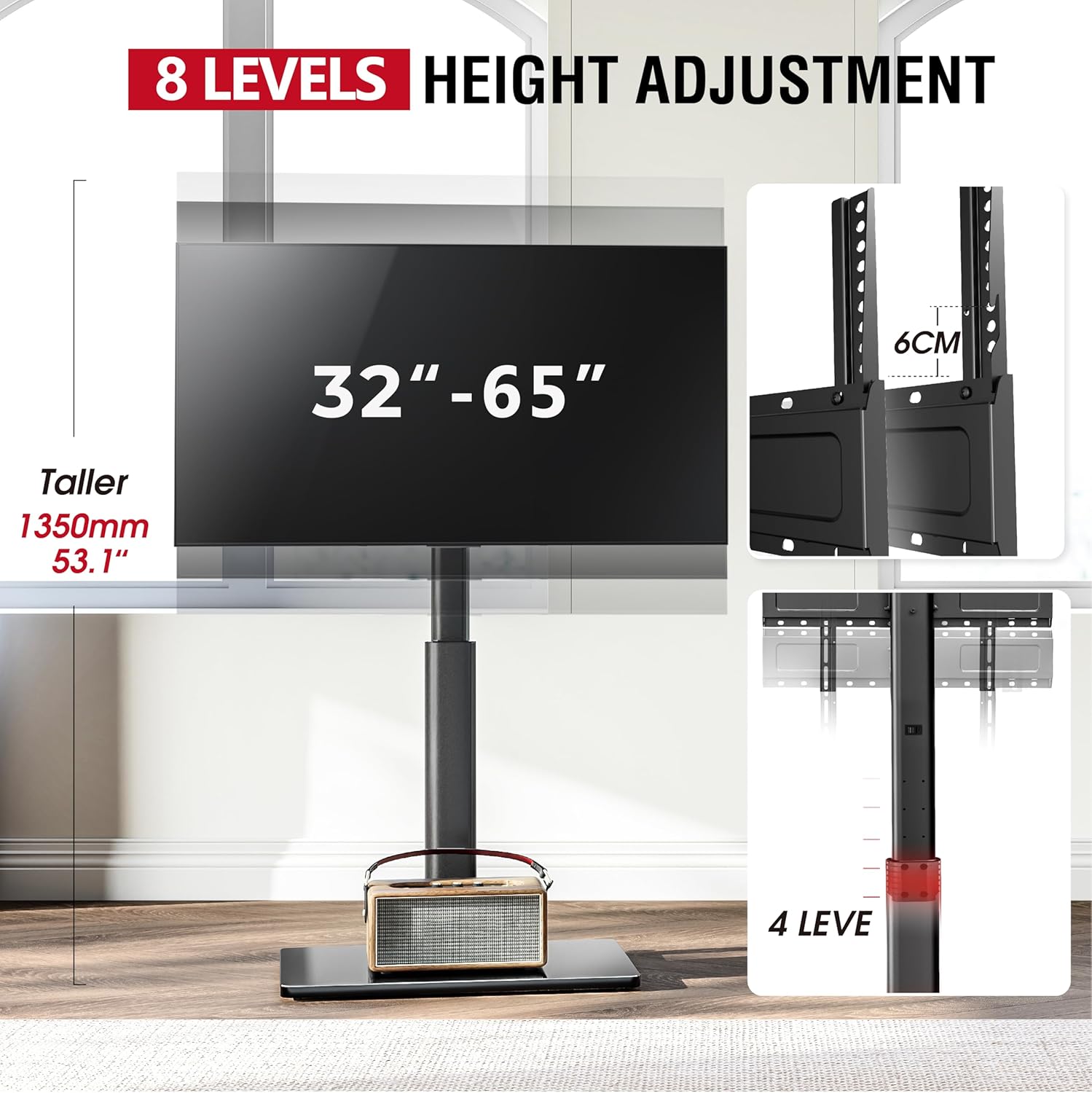
Image: Visual representation of the 8-level height adjustment, showing the range from 46 to 53.1 inches.
4.2 Swivel and Tilt Adjustment
The TV can be swiveled 30° to the left or right to achieve optimal viewing angles. The tilt function allows for adjustment from -2° to 10°. To adjust the tilt, use the provided spanner to turn the long screws on the back of the mount. No need to remove the TV for tilt adjustments.

Image: A TV on the stand, illustrating the 60-degree ultra-wide viewing angle possible with the swivel feature.

Image: A diagram detailing the 12-degree tilt adjustment, highlighting the method of adjustment using a spanner.
4.3 Cable Management
Utilize the integrated cable management clips on the back of the stand's column to route and organize your TV and accessory cables. This helps maintain a tidy appearance and prevents cable clutter.

Image: Cables organized using the integrated cable management system on the stand.
5. Maintenance
Regular maintenance ensures the longevity and safe operation of your TV stand.
- Cleaning: Wipe the stand and glass base with a soft, damp cloth. Avoid abrasive cleaners or solvents that may damage the finish.
- Inspection: Periodically check all screws and connections to ensure they remain tight. Re-tighten if necessary.
- Stability: Ensure the stand is placed on a flat, stable surface. The non-slip rubber feet on the tempered glass base help prevent movement.
6. Troubleshooting
- TV appears unstable or sways: Ensure all assembly screws are fully tightened. Verify that the safety locks are engaged. Check that the stand is on a level surface.
- Difficulty adjusting height/swivel/tilt: Ensure no cables are obstructing movement. For tilt, use the provided spanner on the designated screws. For height, loosen securing bolts before adjusting.
- Missing parts: Refer to the contact information in the support section for assistance.
6.1 Hook Mount and Safety Lock Video
Video: A seller-provided video highlighting the correct use of the hook mount and safety lock mechanisms for secure TV installation.
7. Specifications
| Feature | Specification |
|---|---|
| Brand | AOKCOS |
| Model Number | FTC1404AGB-USA |
| Compatible TV Sizes | 32"-65" |
| Maximum Load Capacity | 88 lbs (40 kg) |
| VESA Compatibility | 100x100mm to 400x400mm |
| Height Adjustment | 8 levels (46" to 53.1") |
| Swivel Angle | 30° Left/Right |
| Tilt Angle | -2° to 10° |
| Material | Metal, Tempered Glass |
| Color | Black |
| Item Weight | 20.3 pounds |
| Package Dimensions | 29 x 17 x 4 inches |
8. Warranty and Support
For any questions regarding installation, operation, or warranty claims, please contact AOKCOS customer support. Refer to your purchase documentation for specific warranty details.
Manufacturer: AOKCOS