
Introduction
The EZ Tattoo P2S Pro Wireless Tattoo Machine Kit is designed to provide a comprehensive and efficient tattooing experience for both beginners and experienced artists. This manual offers detailed instructions for the proper setup, operation, and maintenance of your new tattoo kit, ensuring safe and effective use.
What's in the Box
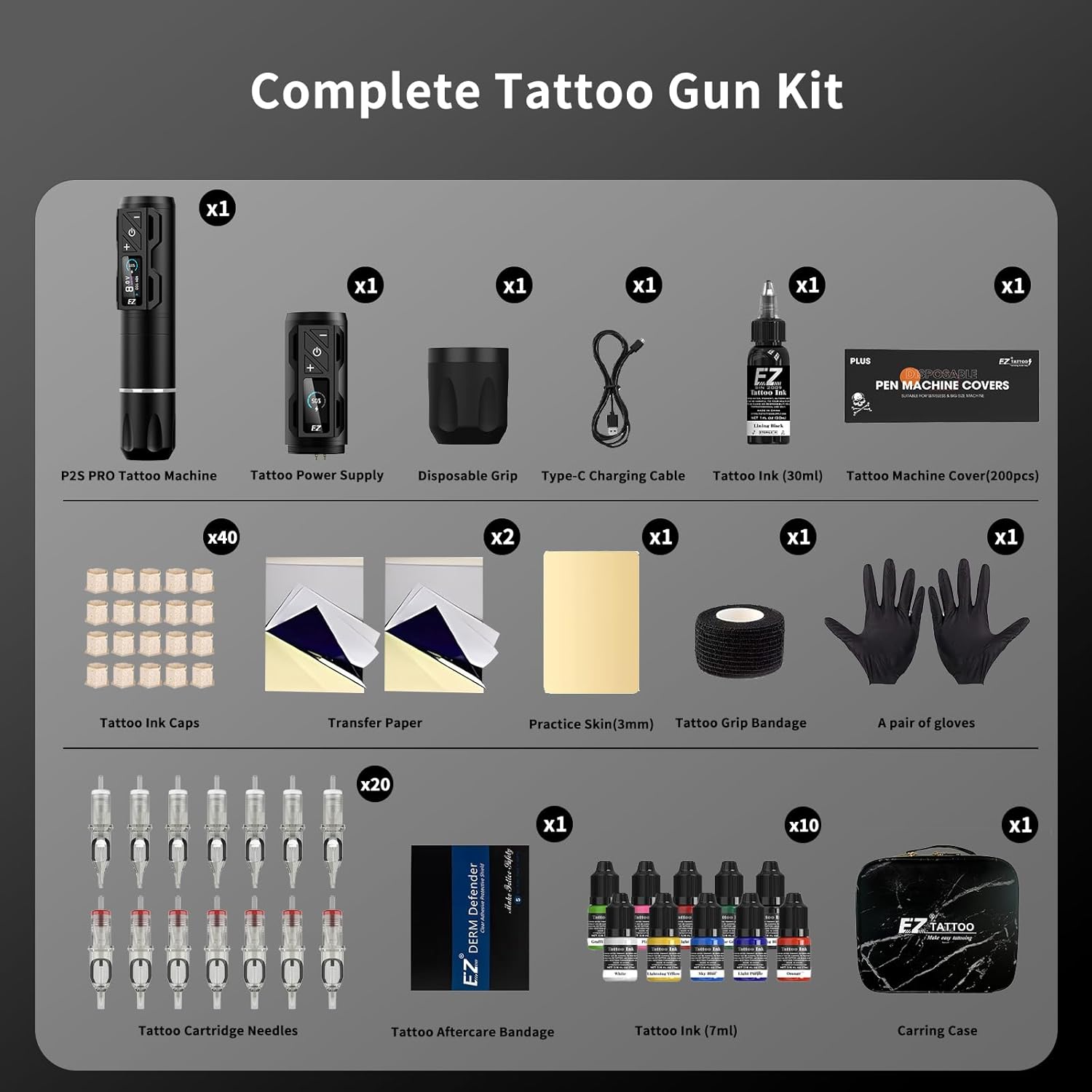
Your EZ Tattoo Kit includes the following components:
- 1 x P2S Pro Wireless Tattoo Machine
- 1 x Extra Power Supply
- 20 x Tattoo Cartridge Needles
- 40 x Eco-Friendly 12mm Ink Cups
- 1 x Practice Skin
- 2 x Transfer Paper
- 200 x Tattoo Machine Covers
- 1 x Pair of Tattoo Gloves
- 1 x USB-C Charging Cable
- 1 x Disposable Grip
- Assorted Tattoo Inks (7ml and 30ml)
- 1 x Tattoo Aftercare Bandage
- 1 x Carrying Case
Setup
1. Charging the Battery
The P2S Pro wireless tattoo machine is equipped with an 1800mAh battery. Before initial use, ensure the battery is fully charged. Connect the provided USB-C charging cable to the machine and a suitable power source. The OLED digital display will illuminate, showing the charging status. Note that this device does not support fast charging; use only the provided cable for optimal charging.

2. Attaching the Cartridge Needle
Carefully unpackage a sterile tattoo cartridge needle. Insert the needle into the machine's front opening until it clicks securely into place. Ensure the needle is firmly seated to prevent movement during operation.

3. Installing the Disposable Grip
For hygiene and comfort, attach a disposable grip over the machine's body. This provides a secure and ergonomic hold during tattooing.
Video 1: Demonstrates the unboxing, setup, and basic operation of the EZ Tattoo Complete Kit, including attaching the needle and grip.
Operating Instructions
1. Power On/Off
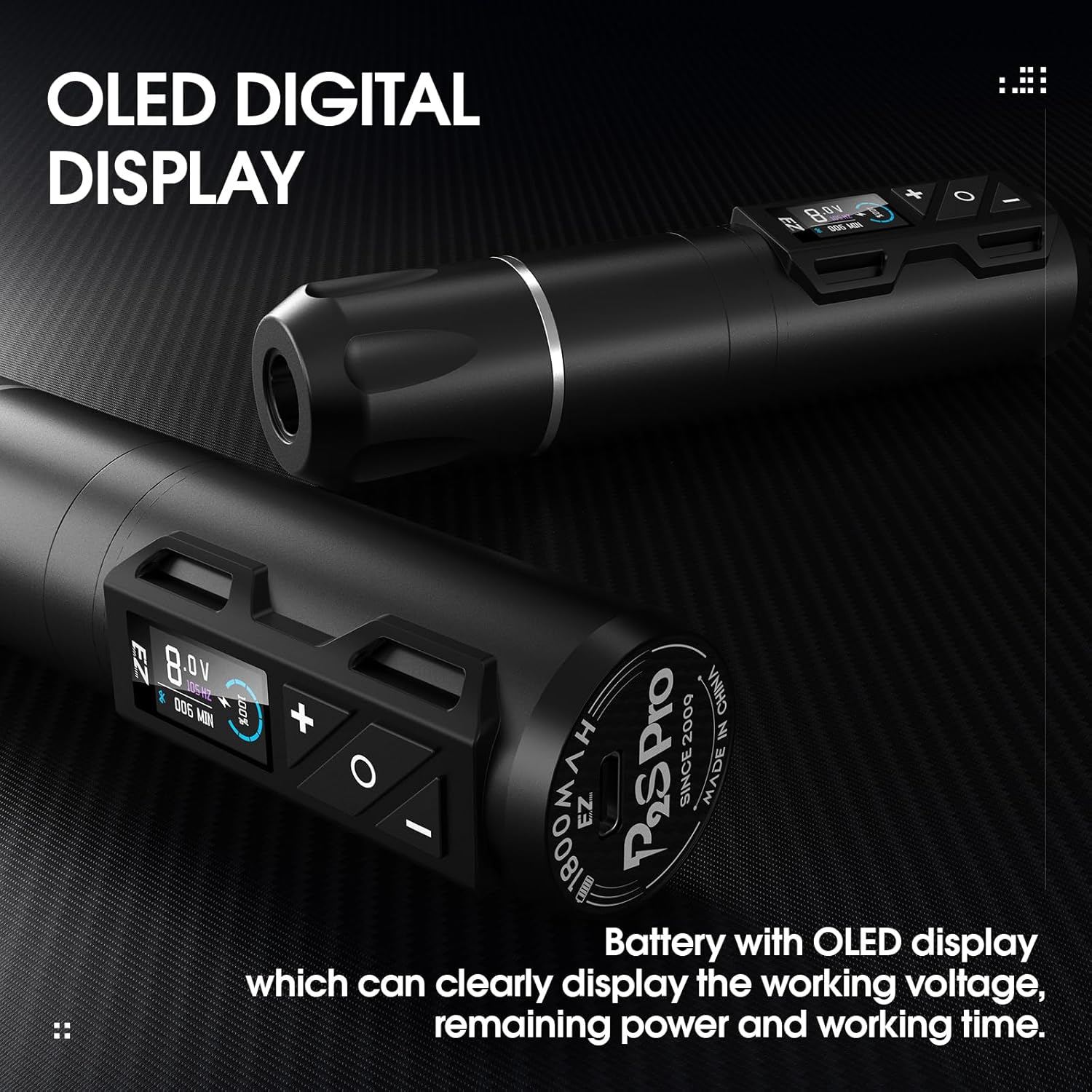
Press and hold the power button on the machine to turn it on or off. The OLED digital display will illuminate, showing the current operating voltage and remaining battery power.
2. Adjusting Voltage
Use the '+' and '-' buttons on the machine to adjust the operating voltage. The P2S Pro offers an adjustable voltage range of 4V-12V, allowing for precise control over needle speed and power suitable for various tattooing techniques.

3. Needle Depth Adjustment
Rotate the grip of the machine to adjust the needle depth. This allows for fine-tuning the needle's protrusion to match your tattooing requirements and skin type.
4. General Operation
The P2S Pro is designed for smooth, soft, and quiet operation, ensuring ideal healing results. It gently and smoothly transfers ink to the skin, making it suitable for all skin types.
Maintenance
Proper maintenance is crucial for the longevity and performance of your EZ Tattoo machine.
- Cleaning: After each use, thoroughly clean the machine's exterior with a suitable disinfectant wipe. Ensure no ink or debris enters the internal components.
- Storage: Store the tattoo machine and its components in a clean, dry place, away from direct sunlight and extreme temperatures. Avoid storage at high temperatures to prevent damage to the battery and internal electronics.
- Battery Care: To maintain battery health, avoid completely draining the battery frequently. Recharge as needed using the provided cable.
Troubleshooting
If you encounter issues with your EZ Tattoo P2S Pro machine, consider the following common solutions:
- Machine Not Turning On: Ensure the battery is charged. If the battery is charged and the machine still doesn't power on, try connecting it to the charger to see if it responds.
- Inconsistent Needle Movement: Check that the cartridge needle is properly seated and not damaged. Ensure the voltage setting is appropriate for the needle type and task.
- Unusual Noise or Vibration: Verify that all components, including the grip and needle, are securely attached. If the issue persists, discontinue use and contact customer support.
- Battery Drains Quickly: Ensure the battery is fully charged before use. Operating at higher voltages for extended periods may consume battery faster.
For persistent issues or problems not listed here, please refer to the support section for contact information.
Specifications
| Feature | Detail |
|---|---|
| Model | P2S Pro Wireless Tattoo Machine |
| Battery Capacity | 1800mAh Lithium Ion (included) |
| Operating Voltage | 4V-12V (adjustable) |
| Motor | Customized Swiss Motor, Brushless Motor Directly Drive |
| Stroke Length | 3.5mm |
| Display | OLED Digital Display |
| Material | Aircraft Aluminum |
| Water Resistance Level | Water Resistant |
| Package Dimensions | 10.12 x 9.02 x 3.93 inches |
| Weight | 2.6 Pounds |
| Manufacturer | EZTAT2 |
| ASIN | B0D89H5GGT |
Safety Information
Adhere to the following safety guidelines to ensure safe operation and prevent injury or damage:
- Professional Use: This equipment is intended for use by trained and qualified individuals. Improper use can lead to injury or health risks.
- Sterilization: Always use sterile needles and follow proper sterilization protocols for all equipment that comes into contact with skin or bodily fluids.
- Storage: Avoid storage at high temperatures. Store the device in a cool, dry place away from direct sunlight.
- Power Source: Use only the provided charging cable and a compatible power source. Do not attempt to use unapproved chargers or cables.
- Disposal: Dispose of used needles and other contaminated materials according to local regulations for biohazardous waste.
Warranty and Support
EZTAT2 is committed to customer satisfaction. While specific warranty details are not provided in this manual, for any questions, comments, or suggestions regarding your EZ Tattoo Kit, please contact EZTAT2 customer support. We are dedicated to assisting you and resolving any issues you may encounter.
For further assistance, visit the official EZTAT2 store: https://www.amazon.com/stores/EZTAT2/page/296837AC-D45C-4A87-A6ED-942D4181B9D5