
Introduction
This manual provides detailed instructions for the safe and effective use of your XUNTOP Digital Level Box Angle Finder with Laser, Model XOP018. This device is designed for precise angle measurement in various applications, featuring a digital display, dual-sided laser, and magnetic base.
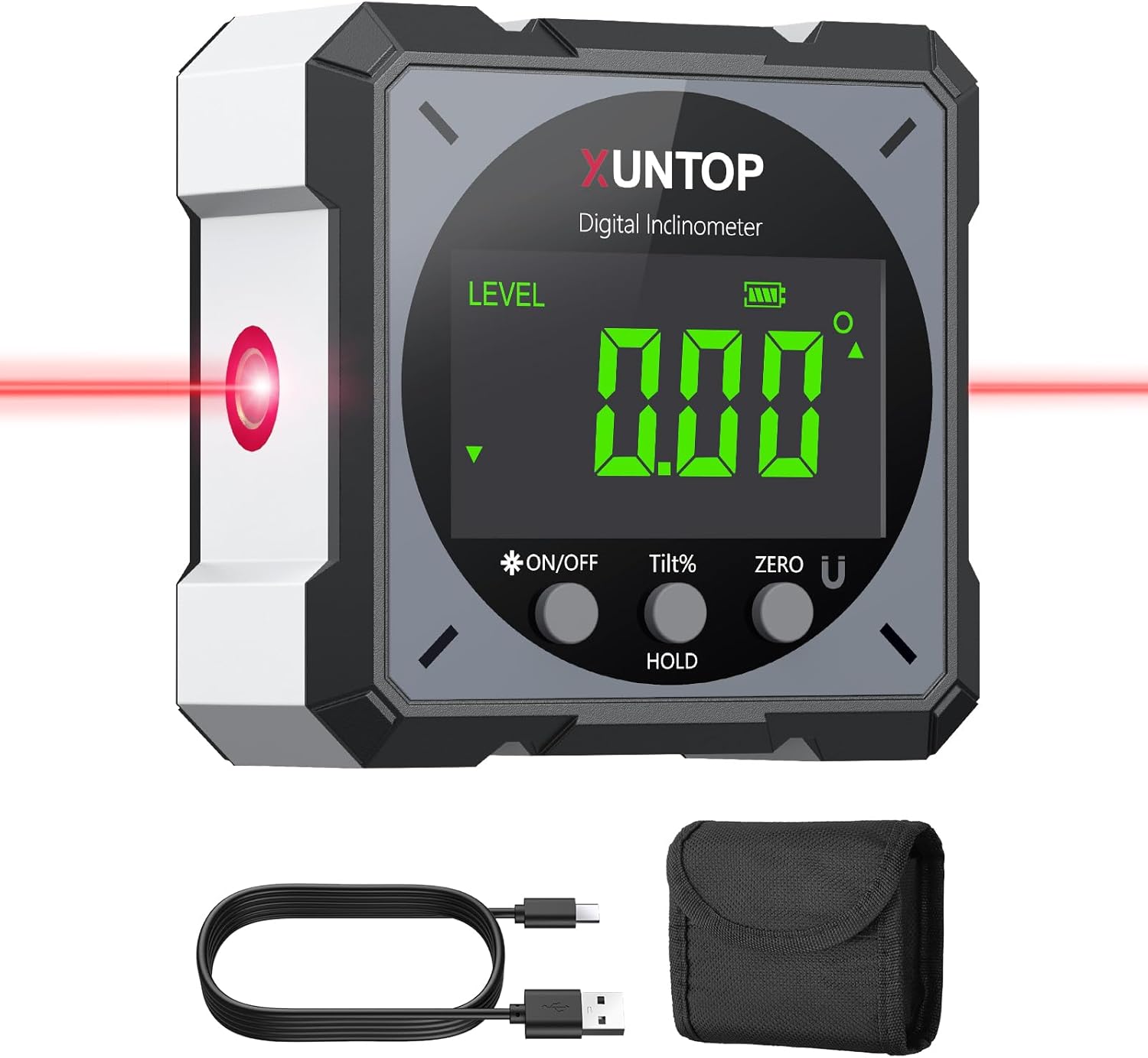
Figure 1: XUNTOP Digital Level Box Angle Finder with Laser (Model XOP018) and included accessories.
Package Contents
- 1 x XUNTOP Digital Level Box (Model XOP018)
- 1 x Type-C Charging Cable
- 1 x Carry Bag
- 1 x User's Manual

Figure 2: Contents of the XUNTOP Digital Level Box package.
Product Features
- Accurate Digital Angle Gauge: Measures 4x90° with an accuracy of +/- 0.1° at 0° and 90°, and +/-0.2° at other angles. Resolution: 0.05°.
- Dual-Sided Laser: Features two electronic lasers for horizontal and symmetrical alignment.
- Magnetic Base: Strong magnets on all four sides for secure attachment to metal surfaces.
- Automatic Inversion: Display automatically rotates for easy reading when upside down.
- USB-C Charging: Internal rechargeable battery with Type-C port.
- Durable Design: Made of aluminum with brass inserts and ABS housing, IP54 dust-proof and waterproof.
- Portable: Compact size (L2.4in, W2.4in, H1.2in) with a matching belt bag.
- Bright Backlight: Ensures clear readability in various lighting conditions.

Figure 3: Overview of the XUNTOP Digital Inclinometer's main features.
Setup
1. Charging the Device
Before first use, fully charge the device. Locate the USB-C charging port on the back of the unit, protected by a rubber cover. Gently lift the rubber cover and connect the provided Type-C charging cable to a USB power source (computer or power outlet adapter, not included).

Figure 4: Connecting the USB-C charging cable to the device.
2. Power On/Off
Press the ON/OFF button to turn the device on. To turn it off, press and hold the ON/OFF button for a few seconds.
3. Initial Calibration
For optimal accuracy, it is recommended to perform an initial calibration. Place the device on a flat, level surface. Press and hold the ZERO button until "CAL" appears on the display. Follow the on-screen prompts to complete the calibration process. The device will display "PASS" upon successful calibration.
Operating Instructions
1. Basic Angle Measurement
Place the device on the surface you wish to measure. The digital display will show the angle in degrees. The display automatically inverts for easy reading when the device is upside down.
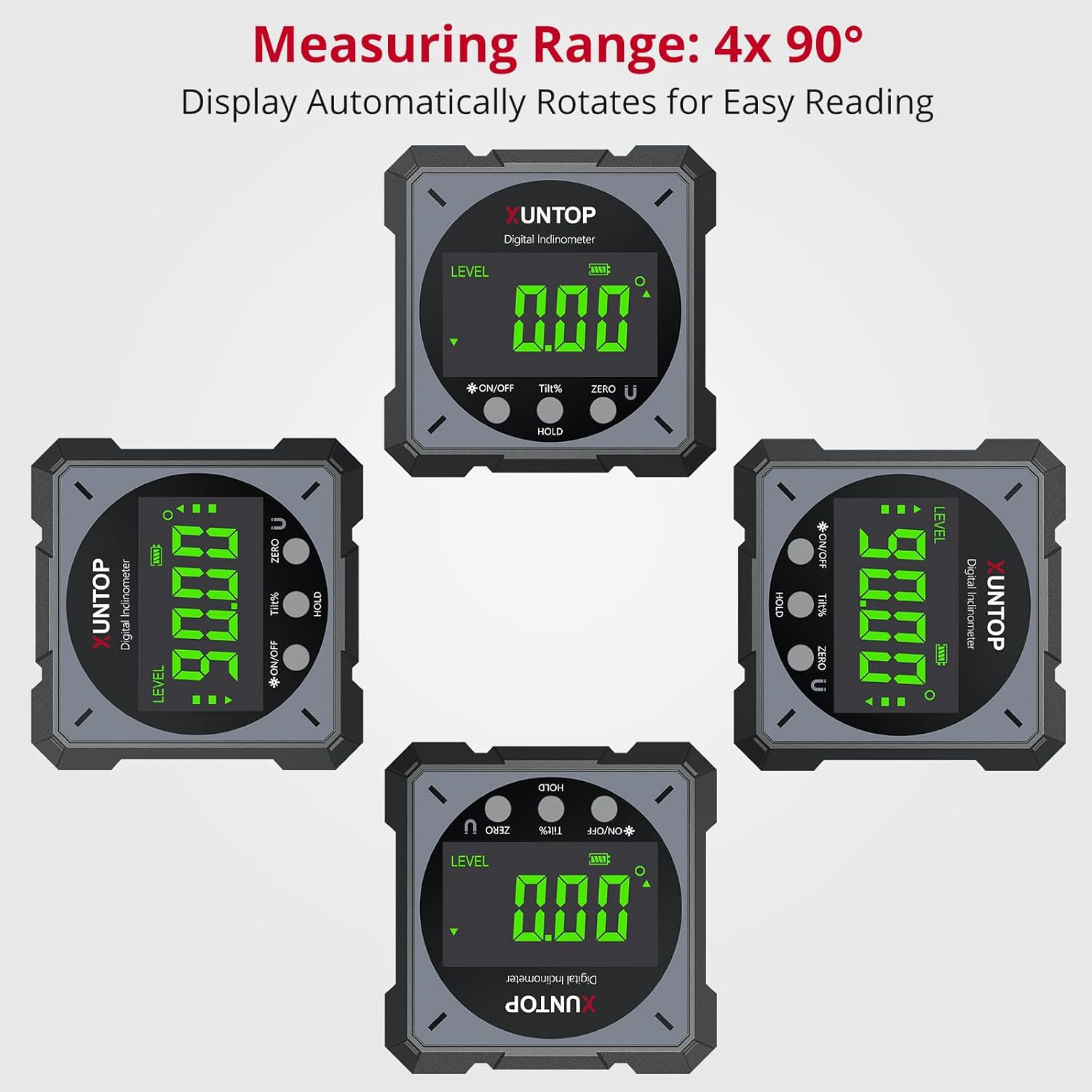
Figure 5: Automatic display inversion for convenient reading.
2. Zeroing Function
To set a relative zero point, place the device on your desired reference surface and press the ZERO button. The display will show 0.00°, and subsequent measurements will be relative to this new zero point.
3. Hold Function
To hold the current measurement on the display, press the HOLD button. The reading will freeze, allowing you to move the device and record the value. Press HOLD again to release.
4. Laser Function
The device features dual-sided lasers for precise alignment. With the unit powered on, press the ON/OFF button repeatedly to cycle through laser modes:
- 1st Press: Right laser activates.
- 2nd Press: Left laser activates (right laser turns off).
- 3rd Press: Both right and left lasers activate.
- 4th Press: Both lasers turn off.

Figure 6: Using the laser function for alignment.
Video 1: Demonstration of the XUNTOP Digital Angle Finder with Laser, showcasing its features and operation.
5. Unit Conversion
Press the TILT% button to switch between angle (degrees) and slope percentage (%).
Maintenance
- Cleaning: Wipe the device with a soft, dry cloth. Avoid abrasive cleaners or solvents.
- Storage: Store the device in its provided carry bag in a dry, stable environment.
- Environmental Factors: Avoid exposing the device to extreme temperatures, high humidity, or strong magnetic fields, as these can affect accuracy.
- Recalibration: If you suspect inaccuracies, perform the calibration procedure described in the "Setup" section.
Troubleshooting
- "Err" Display: This usually indicates the device is not stable or is being moved during measurement. Ensure the device is placed on a stable surface.
- Inaccurate Measurements:
- Check for calibration errors. Recalibrate the device if necessary.
- Ensure the device is not exposed to extreme temperatures, high humidity, or nearby strong magnetic fields.
- Verify battery power. Low battery can affect measurement accuracy.
- Ensure proper positioning and alignment during measurement.
- Protractor Not Working: Check the battery condition. If the battery is low, recharge the device. If the issue persists, try resetting the device by turning it off and on again.
- Laser Issues: If the laser beam appears weak, misaligned, or fluctuates, ensure the device is fully charged and not exposed to environmental interference. Consult manufacturer guidelines for further assistance if problems persist.
Specifications
| Feature | Detail |
|---|---|
| Brand | XUNTOP |
| Model Number | XOP018 |
| Material | Metal (Aluminum with Brass inserts), ABS Housing |
| Color | Gray |
| Product Dimensions | 2.4"L x 2.4"W x 1.2"H |
| Item Weight | 5.6 ounces |
| Measurement Range | 4 x 90° |
| Accuracy | +/- 0.1° at 0° and 90°, +/-0.2° at the rest |
| Resolution | 0.05° |
| Power Source | Battery Powered (1 Lithium Polymer battery included) |
| Charging Port | USB-C |
| Waterproof Rating | IP54 |
| Operation Mode | Manual |
Warranty and Support
For warranty information or technical support, please refer to the contact details provided with your purchase or visit the official XUNTOP website. Keep your purchase receipt as proof of purchase.