
1. Introduction
Thank you for purchasing the Aiwa Voice Activated Intelligent 34" Tower Fan. This manual provides essential information for the safe and efficient operation of your new fan. Please read it thoroughly before use and retain it for future reference.
This tower fan features voice activation for hands-free control, three speed settings, 60-degree oscillation, and an 8-hour timer. It also offers Normal, Natural, and Sleep modes to suit various preferences.
2. Safety Information
WARNING: To reduce the risk of fire, electric shock, or injury, observe the following safety precautions:
- Always unplug the fan before cleaning or performing any maintenance.
- Do not operate the fan with a damaged cord or plug. If the cord or plug is damaged, contact customer support.
- Do not run the power cord under carpeting. Do not cover the cord with throw rugs, runners, or similar coverings. Arrange the cord away from traffic areas where it will not be tripped over.
- Do not insert fingers or foreign objects into any openings on the fan.
- Do not use this fan in wet or moist locations, such as bathrooms or laundry areas.
- This appliance is not intended for use by persons (including children) with reduced physical, sensory, or mental capabilities, or lack of experience and knowledge, unless they have been given supervision or instruction concerning use of the appliance by a person responsible for their safety.
- Children should be supervised to ensure that they do not play with the appliance.
- Ensure the fan is placed on a stable, level surface to prevent it from tipping over.
3. Package Contents
Verify that all components are present in the package:
- Aiwa Voice Activated Intelligent 34" Tower Fan Unit
- Remote Control
- Power Cord (integrated)
- User Manual (this document)
4. Product Overview
Familiarize yourself with the parts and controls of your Aiwa Tower Fan.

Figure 4.1: Front view of the Aiwa Voice Activated Intelligent 34" Tower Fan.

Figure 4.2: Top control panel and remote control for the Aiwa Tower Fan.
Control Panel & Remote Functions:
- On/Off Button: Powers the fan on or off.
- Speed Button: Cycles through Low, Medium, and High fan speeds.
- Mode Button: Switches between Normal, Natural, and Sleep modes.
- Timer Button: Sets the auto-off timer for 1-8 hours.
- Swing Button: Activates or deactivates the 60-degree oscillation.
- Voice Receiver: Integrated microphone for voice command input.
5. Setup
5.1 Unpacking
- Carefully remove the fan and all packaging materials from the box.
- Ensure all components listed in Section 3 are present and undamaged.
5.2 Placement
Place the fan on a firm, level surface. Ensure there is adequate space around the fan for proper airflow and oscillation. Avoid placing it near curtains or other objects that could obstruct the air intake or outlet.
5.3 Power Connection
Plug the power cord into a standard 120V AC electrical outlet. The fan is now ready for operation.
6. Operating Instructions
The Aiwa Tower Fan can be operated using the control panel buttons, the remote control, or voice commands.
6.1 Voice Activation
The fan responds to the wake word "Fan Boss". Once activated, you can issue commands. No Wi-Fi or app setup is required for voice control.

Figure 6.1: Voice activation in use, showing a person relaxing while controlling the fan.
Available Voice Commands:
- "Fan Boss, turn on" / "Fan Boss, turn off": Powers the fan on or off.
- "Fan Boss, speed low" / "Fan Boss, speed medium" / "Fan Boss, speed high": Adjusts fan speed.
- "Fan Boss, increase speed" / "Fan Boss, decrease speed": Increments or decrements fan speed.
- "Fan Boss, normal mode" / "Fan Boss, natural mode" / "Fan Boss, sleep mode": Changes the operating mode.
- "Fan Boss, swing on" / "Fan Boss, swing off": Activates or deactivates oscillation.
- "Fan Boss, set timer for X hours" (e.g., "Fan Boss, set timer for 2 hours"): Sets the auto-off timer.
- "Fan Boss, keep me cool for X hours" (e.g., "Fan Boss, keep me cool for 4 hours"): Sets the auto-off timer.
- "Fan Boss, it's too hot": Increases fan speed.
- "Fan Boss, it's too cold": Decreases fan speed.
6.2 Manual Operation (Control Panel & Remote)
- Power On/Off: Press the ⏻ button.
- Adjust Speed: Press the 💨 button repeatedly to cycle through Low, Medium, High.
- Change Mode: Press the ☰ button repeatedly to select Normal, Natural, or Sleep mode.
- Activate Oscillation: Press the ⟳ button to start or stop the 60-degree oscillation.
- Set Timer: Press the ⏱ button repeatedly to set the auto-off timer for 1, 2, 3, 4, 5, 6, 7, or 8 hours.
6.3 Modes Explained
- Normal Mode: Provides a constant airflow at the selected speed.
- Natural Mode: Simulates a natural breeze by varying the fan speed intermittently.
- Sleep Mode: Operates at a lower, quieter speed, often gradually decreasing speed over time to promote comfortable sleep.
Demonstration Video: Aiwa Voice Activated Tower Fan
This video demonstrates the voice activation and various operational features of the Aiwa Tower Fan, including turning it on, adjusting swing mode, and setting a timer.
7. Maintenance
Regular cleaning helps maintain the fan's performance and extends its lifespan.
7.1 Cleaning
- Always unplug the fan from the power outlet before cleaning.
- Use a soft, damp cloth to wipe the exterior surfaces of the fan. Do not use abrasive cleaners or solvents.
- Use a vacuum cleaner with a brush attachment to remove dust from the air intake and outlet grilles.
- Ensure the fan is completely dry before plugging it back in and operating.
7.2 Storage
When not in use for extended periods, store the fan in its original packaging or a clean, dry place. Wrap the power cord neatly to prevent damage.
8. Troubleshooting
If you encounter issues with your fan, refer to the following common problems and solutions:
| Problem | Possible Cause | Solution |
|---|---|---|
| Fan does not turn on. | No power supply. | Ensure the power cord is securely plugged into a working outlet. Check the circuit breaker. |
| Voice commands are not recognized. | Wake word not used or spoken clearly. Too much background noise. | Ensure you say "Fan Boss" clearly before the command. Reduce background noise. Speak closer to the fan. |
| Fan is not oscillating. | Oscillation function is off. | Press the Swing button on the control panel/remote or use the voice command "Fan Boss, swing on". |
| Weak airflow. | Fan speed is too low. Air intake/outlet blocked. | Increase fan speed. Clean dust from grilles. Ensure no obstructions. |
9. Specifications
Technical details for the Aiwa Voice Activated Intelligent 34" Tower Fan:
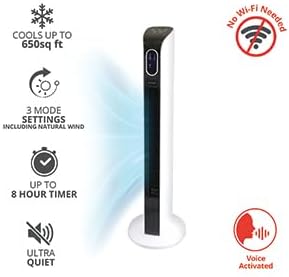
Figure 9.1: Key features and specifications at a glance.
- Model Number: WLF4-1001-VAW
- Brand: Aiwa
- Color: White
- Electric Fan Design: Floor Fan
- Power Source: Corded Electric
- Product Dimensions: 8.5"D x 8.5"W x 35"H
- Room Type: Bedroom, Home Office, Living Room, Nursery, Playroom
- Special Features: Bladeless, Oscillating, Remote Controlled, Voice Activated
- Recommended Uses: Air Circulation, Cooling, Ventilating
- Mounting Type: Floor Mount
- Number of Speeds: 3 (Low, Medium, High)
- Wattage: 75 watts
- Indoor/Outdoor Usage: Indoor
- Control Method: Voice, Remote, Manual Buttons
- Timer: Up to 8 hours
- Oscillation: 60 degrees
- Coverage Area: Up to 650 sq ft
- UPC: 805106820466
10. Warranty and Support
For warranty information and customer support, please refer to the warranty card included with your product or visit the official Aiwa website. Do not attempt to repair the fan yourself, as this may void the warranty.
If you require assistance, please contact Aiwa customer service with your model number (WLF4-1001-VAW) and proof of purchase.