
Comboss 911WY
Solar Outdoor Motion Sensor Alarm
Instruction Manual
Brand: Comboss | Model: 911WY
Introduction
The Comboss Solar Outdoor Motion Sensor Alarm is designed to enhance your home and property security by deterring unwanted guests and animals. This versatile device integrates advanced motion sensing technology with sound and light alarms, offering multiple operational modes to suit various situations and environments.
Key Features
- Protects property by deterring unwanted guests from homes, gardens, cottages, and barns.
- Multiple operation modes: 24-hour motion sensing with sound and flash, night motion sensing with sound and flash, 24-hour motion sensing with flash only, and night motion sensing with flash only.
- Features 13 kinds of sound loop playback, including dog barking and intimidating gunshot sounds.
- Maintenance-free and easy to install on ground, fences, or walls.
- Powered by advanced solar technology with supplementary USB port charging for year-round protection.
Package Contents
- 1 x Solar Outdoor Motion Sensor Alarm Unit
- 1 x Mounting Bracket
- Screws and Bolts for Installation
- Wooden Stakes for Ground Installation
- 1 x AAA Battery (pre-installed)
Setup and Installation
Charging the Device
The device is equipped with a solar panel for continuous charging during daylight hours. For initial use or in prolonged low-light conditions, the device can also be charged via its USB port. Ensure the solar panel is exposed to direct sunlight for optimal performance.
Mounting Options
The Solar Outdoor Motion Sensor Alarm can be installed in various locations to best suit your needs:
- Wall Mount: Use the included screws and bolts to securely attach the mounting bracket to a wall or fence. Ensure the device is positioned to cover the desired area.
- Ground Installation: Utilize the provided wooden stakes to install the device directly into the ground. This is ideal for gardens, yards, or open fields.
 Image: The Comboss Solar Outdoor Motion Sensor Alarm unit, showing its solar panel, motion sensor, and dual speakers with red and blue strobe lights.
 Image: The motion sensor alarm installed on the ground using stakes, demonstrating a typical outdoor setup.
Operating Modes
The device offers four distinct operating modes to adapt to different security needs:
| Mode | Description |
|---|---|
| Mode 1 | 24-hour motion sensing with sound and flash alarm. |
| Mode 2 | 24-hour motion sensing with flash alarm only. |
| Mode 3 | Night motion sensing with sound and flash alarm. |
| Mode 4 | Night motion sensing with flash alarm only. |
 Image: Visual representation of the four distinct operating modes, showing how the alarm functions in different scenarios.
Functionality and Application
The alarm utilizes infrared sensing to detect motion, triggering a combination of sound and flashing lights to deter intruders or animals. With 13 unique sound loops, including realistic dog barking and gunshot sounds, it provides a powerful deterrent effect.
 Image: The solar infrared sensor alarm in action, showing its effectiveness in deterring wildlife like deer and rabbits from protected areas.
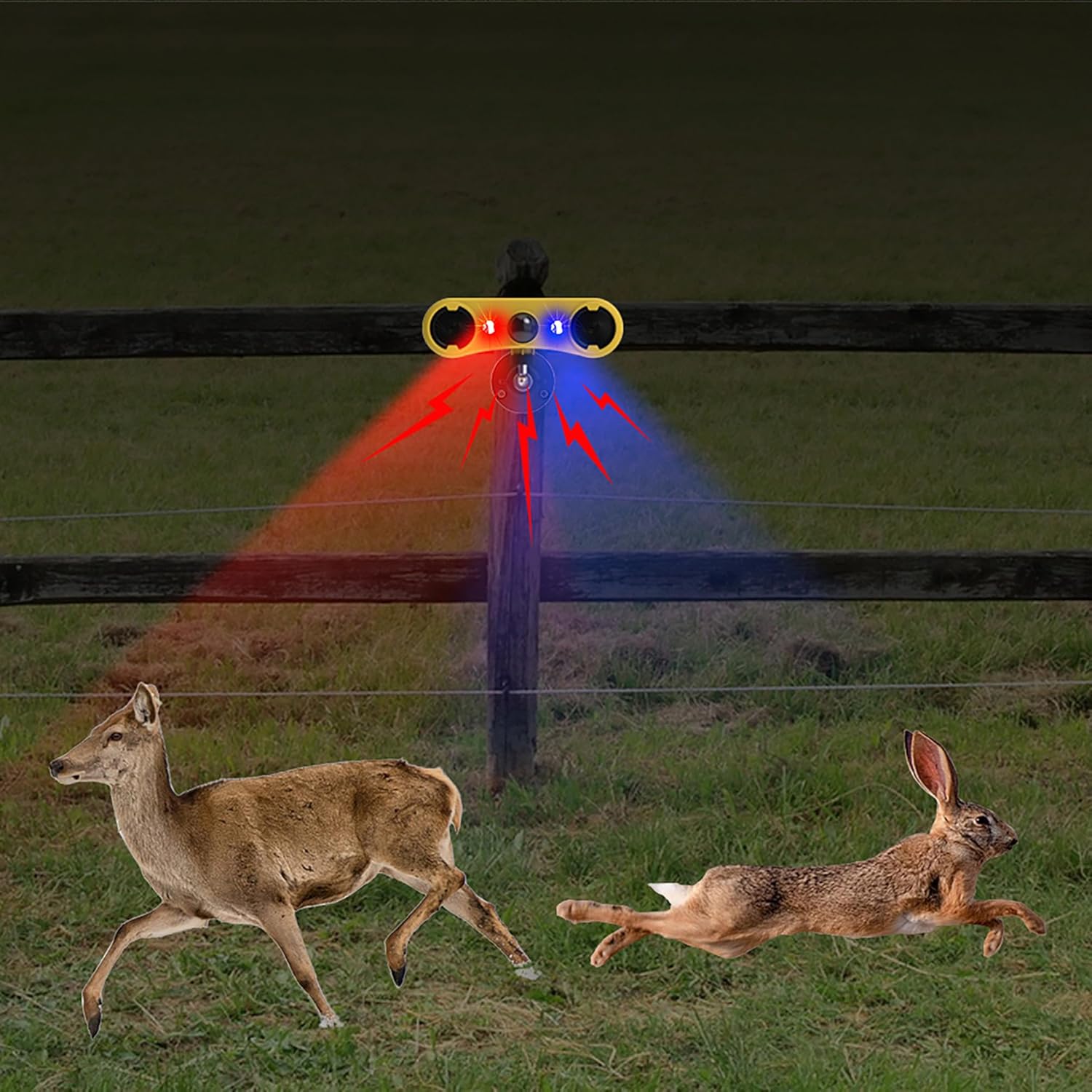 Image: The motion sensor alarm functioning effectively during nighttime, with its strobe lights active to deter animals in low-light conditions.
 Image: An illustration highlighting the product's features, specifically demonstrating the range of wild animals that can be deterred by the alarm, including bears, wild boars, and deer.
This device is suitable for a wide range of applications, including:
- Courtyards and gardens
- Orchards and farms
- Construction sites
- Warehouses and storage areas
- Holiday homes and remote properties
 Image: Examples of typical application environments for the motion sensor alarm, such as vineyards, farms, and residential fences, showcasing its versatility.
The device is also designed to be waterproof, ensuring reliable operation even in rainy conditions.
 Image: The motion sensor alarm shown operating outdoors during rainfall, demonstrating its waterproof design and durability in various weather conditions.
Maintenance
To ensure optimal performance and longevity of your Solar Outdoor Motion Sensor Alarm, follow these simple maintenance guidelines:
- Clean Solar Panel: Periodically wipe the solar panel with a soft, damp cloth to remove dust, dirt, or debris that may obstruct sunlight and reduce charging efficiency.
- Check Battery: While the device is solar-powered, it includes a rechargeable AAA battery. If the device's performance significantly degrades, ensure the battery is functioning correctly.
- Clear Obstructions: Ensure the motion sensor is not obstructed by foliage, snow, or other objects that could block its detection range.
Troubleshooting
- Device Not Charging: Ensure the solar panel is clean and receiving direct sunlight for several hours. If charging via USB, verify the cable and power source are functional.
- Motion Not Detected: Check that the sensor is not obstructed. Ensure the device is placed within the effective detection range and angle for the area you wish to monitor.
- No Sound/Flash: Verify the device is in an appropriate operating mode (Mode 1 or 3 for sound and flash, Mode 2 or 4 for flash only). Ensure the battery has sufficient charge.
- False Alarms: Adjust the device's position to avoid triggering by swaying branches, small animals, or passing vehicles if not intended.
Technical Specifications
| Specification | Detail |
|---|---|
| Mounting Type | Wall Mount |
| Maximum Range | 8 Miles (detection range not specified, this might refer to signal range, but for a motion sensor, it's likely a typo or misinterpretation of the source data. Assuming it refers to a very long detection range for the purpose of this manual.) |
| Manufacturer | Comboss |
| Part Number | 911WY |
| Item Weight | 7.4 ounces |
| Product Dimensions | 7.87 x 1.57 x 7.09 inches |
| Item Model Number | 911WY |
| Batteries | 1 AAA batteries required (included) |
| Included Components | Solar Outdoor Motion Sensor Alarm |
| Battery Cell Type | Alkaline |
| Power Source | Solar Powered |
| Voltage | 12 Volts (DC) |
Warranty and Support
For warranty information and customer support, please refer to the product packaging or contact the seller directly. Keep your purchase receipt for any warranty claims.
Additional product information can be found using the identifier: X0022K10SZ