
PowerSmart DL5040C
PowerSmart Portable Generator User Manual
Model: DL5040C | Brand: PowerSmart
1. Introduction and Overview
This manual provides essential information for the safe operation, maintenance, and troubleshooting of your PowerSmart Portable Generator with Inverter Technology (Model DL5040C). This generator is designed to provide reliable portable power for various residential applications, offering 4400 starting watts and 3600 running watts. It features advanced inverter technology for clean power, a CO Senser for enhanced safety, and is capable of parallel operation for increased power output.

Figure 1: PowerSmart Portable Generator (Model DL5040C)
Key features include:
- 4400 Starting Watts / 3600 Running Watts: Provides ample power for essential appliances and tools.
- Inverter Technology: Delivers clean, stable power, safe for sensitive electronics.
- CO Protect (CO Senser): Automatically shuts down the generator if carbon monoxide levels become dangerously high.
- Quiet Operation: Engineered for reduced noise levels, making it suitable for various environments.
- Parallel Capable: Allows connection of two identical units for double the power output.
- Extended Runtime: Offers approximately 5.1 hours of runtime at 50% load.

Figure 2: Inverter technology ensures Total Harmonic Distortion (THD) is less than 3%, providing clean power for sensitive electronics.
2. Safety Information
WARNING: Carbon Monoxide Hazard
Generator exhaust contains carbon monoxide, a colorless, odorless, poisonous gas that can kill you in minutes. You CANNOT see or smell it. ALWAYS use the generator outdoors, far away from windows, doors, and vents. Never use it in an enclosed area or indoors.
Your PowerSmart generator is equipped with a CO Protect (CO Senser) feature. This sensor monitors carbon monoxide levels and will automatically shut down the engine if dangerous levels are detected. While this feature enhances safety, it is not a substitute for proper ventilation and safe operating practices.

Figure 3: CO Protect feature for enhanced safety.
Fuel Safety:
- Gasoline is highly flammable and toxic. Handle with extreme care.
- Store fuel in approved containers in a well-ventilated area, away from ignition sources.
- Never refuel a hot or running engine. Allow the generator to cool down before adding fuel.
Electrical Safety:
- Do not operate the generator in wet conditions.
- Ensure all electrical connections are secure and in good condition.
- Use appropriate extension cords rated for outdoor use and the power requirements.
3. Components and Controls
Familiarize yourself with the main components and control panel of your generator before operation.

Figure 4: Detailed view of the Control Panel.
Control Panel Features:
- Engine Switch (ENG.SW): Used to turn the engine ON or OFF.
- Indicator Lights:
- A: CO Alarm (Red)
- B: CO Failure (Yellow)
- C: Low Oil Level Alarm (Yellow)
- D: Overload Indicator (Red)
- E: Running Indicator (Green)
- F: Voltage, Frequency, Run Time, Total Run Time (Digital Display)
- CO Self-Test Button: Initiates a self-test for the CO Protect system.
- Overload Reset Button: Resets the generator after an overload shutdown.
- ECO Switch: Engages Eco-mode for fuel efficiency and quieter operation under light loads.
- AC Breaker 20A: Circuit breaker for the 120V 20A AC outlets.
- AC 120V 20A Outlets (NEMA 5-20R): Standard household outlets.
- AC 120V 30A RV Ready Outlet: For higher power demands, commonly used for RVs.
- Parallel Operation Outlets: Used to connect two identical generators for increased power.
- DC Breaker: Circuit breaker for the 12V DC port.
- DC 12V Port (Marine 12V): For charging 12V batteries.
- Ground Terminal: For grounding the generator.
4. Setup
Before first use, perform the following setup steps:
- Unpacking: Carefully remove the generator from its packaging. Inspect for any shipping damage.
- Add Engine Oil:
- Place the generator on a level surface.
- Remove the oil fill cap/dipstick.
- Using the provided funnel, add 10W-30 4-stroke engine oil (not included) to the crankcase. Fill to the upper mark on the dipstick. Do not overfill.
- Replace the oil fill cap/dipstick securely.

Figure 5: Ensure proper oil level before starting.
- Add Fuel:
- Ensure the engine is cool before adding fuel.
- Open the fuel tank cap.
- Pour fresh, unleaded gasoline (non-ethanol recommended) into the fuel tank. Do not overfill. Leave some space for expansion.
- Securely close the fuel tank cap.
- Grounding: For safety, connect a grounding wire from the generator's ground terminal to a suitable earth ground.
5. Operating Instructions
Follow these steps to safely operate your PowerSmart generator:
- Pre-Start Check:
- Check engine oil level.
- Check fuel level.
- Ensure all circuit breakers are in the "OFF" position.
- Place the generator on a firm, level surface outdoors, away from any combustible materials and at least 20 feet from any building openings.
- Starting the Engine:
- Turn the Engine Switch (ENG.SW) to the "ON" position.
- If the engine is cold, apply choke as needed.
- Pull the recoil starter handle firmly and smoothly until the engine starts.
- Once the engine starts, gradually push the choke lever back to the "OFF" position.
- Connecting Electrical Loads:
- Allow the generator to run for a few minutes to warm up.
- Plug in your appliances or extension cords.
- Turn the AC circuit breakers to the "ON" position.
- Avoid overloading the generator. Monitor the digital display for wattage output.

Figure 6: Reference guide for common appliance wattage requirements.
- Using ECO Mode:
- Flip the ECO switch to the "ON" position.
- In ECO mode, the engine speed automatically adjusts to the load, reducing fuel consumption and noise.
- For high-demand appliances or starting motors, turn ECO mode "OFF".
- Parallel Operation:
- This generator is designed to be parallel capable, allowing two identical units to be linked for increased power output.
- Refer to the separate parallel kit instructions for detailed connection procedures.
- Ensure both generators are properly grounded and started before connecting the parallel kit.

Figure 7: Two PowerSmart generators connected for double the power.
- Stopping the Engine:
- Disconnect all electrical loads.
- Turn the AC circuit breakers to the "OFF" position.
- Turn the Engine Switch (ENG.SW) to the "OFF" position.
- For long-term storage, turn the fuel valve to the "OFF" position and allow the engine to run until it runs out of fuel.
6. Maintenance
Regular maintenance ensures optimal performance and extends the lifespan of your generator.
- Engine Oil:
- Change the engine oil after the first 20 hours of operation (break-in period).
- Thereafter, change the oil every 50-100 hours or at least once a year.
- Use recommended 10W-30 4-stroke engine oil.

Figure 8: Regular engine maintenance is crucial.
- Air Filter: Inspect and clean the air filter regularly. Replace if damaged.
- Spark Plug: Inspect and clean the spark plug periodically. Replace if worn.
- Fuel System: Use fresh fuel. For storage longer than 30 days, drain the fuel tank and carburetor or use a fuel stabilizer.
- General Cleaning: Keep the generator clean and free of debris.
7. Troubleshooting
Refer to this section for common issues and their solutions.
| Problem | Possible Cause | Solution |
|---|---|---|
| Engine will not start | No fuel; Low oil level; Engine switch OFF; Choke not used (cold engine); Spark plug issue. | Add fuel; Add oil (check low oil alarm); Turn engine switch ON; Apply choke; Inspect/replace spark plug. |
| No power output | AC circuit breaker OFF; Overload; Loose connections; Overload indicator (Red) is on. | Turn AC breaker ON; Reduce load, press Overload Reset; Check connections. |
| Engine stops unexpectedly | Low oil level; Out of fuel; Overload; CO Protect activated (CO Alarm Red). | Add oil; Add fuel; Reduce load; Move generator to well-ventilated area, allow to cool, restart. |
| CO Alarm (Red) is on | High carbon monoxide levels detected. | Immediately move generator to an open, well-ventilated outdoor area. Allow to cool before restarting. Do not operate in enclosed spaces. |
8. Specifications
| Specification | Value |
|---|---|
| Model Number | DL5040C |
| Starting Wattage | 4400 watts |
| Running Wattage | 3600 watts |
| Voltage | 120 Volts |
| Fuel Type | Gasoline |
| Power Source | Gas-Powered |
| Item Weight | 57 Pounds |
| Product Dimensions (L x W x H) | 21.2 x 17.7 x 20.9 inches |
| Manufacturer | Amerisun Inc. |
| UPC | 840432700648 |
| Special Features | Portable, Super Quiet, CO Senser, Inverter Technology |
| Included Components | Wrench |
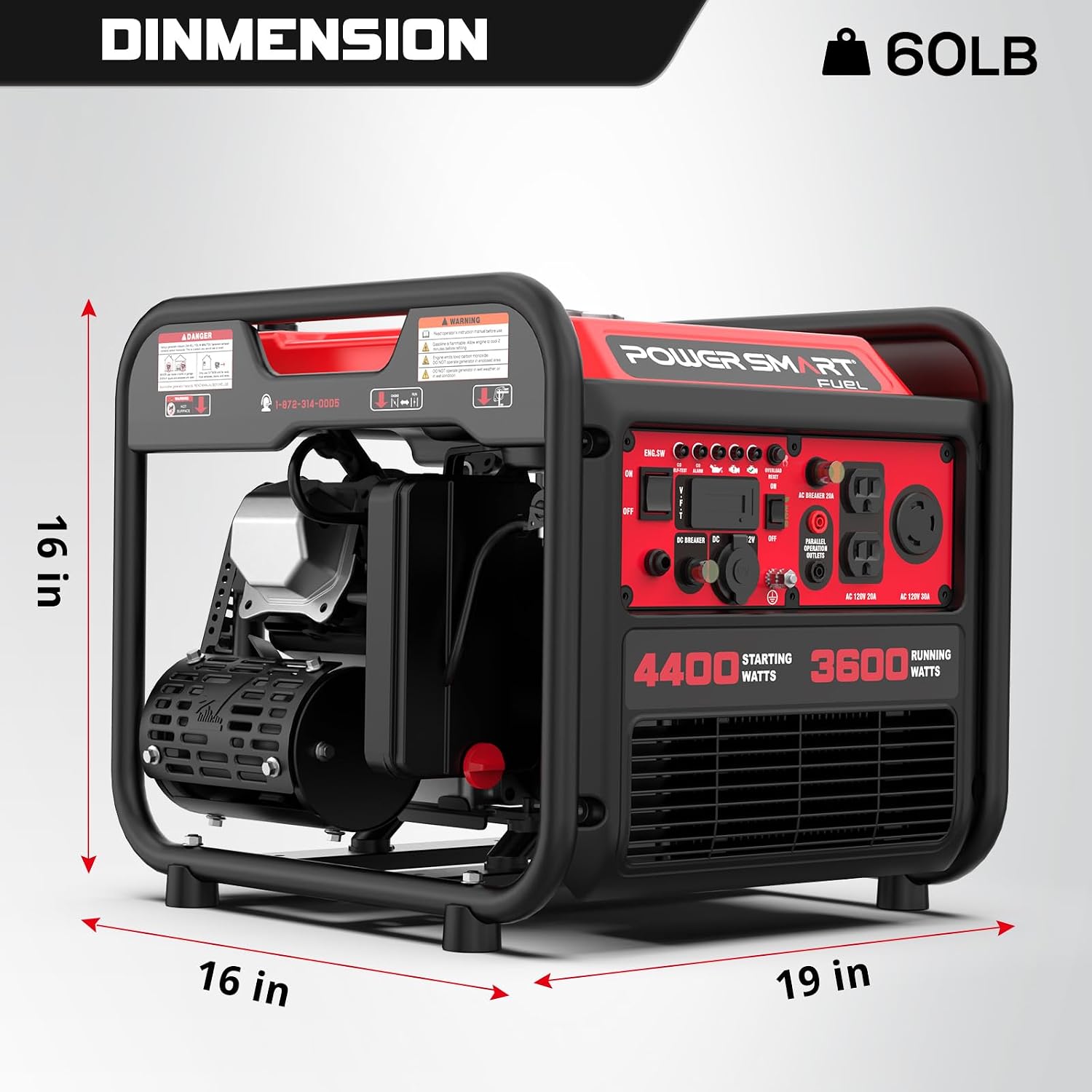
Figure 9: Generator dimensions for planning placement and storage.
9. Warranty and Support
PowerSmart products are backed by a comprehensive warranty to ensure your satisfaction.
- Warranty Period: Your PowerSmart Portable Generator comes with a 2-year warranty.
- Support: For technical assistance, parts, or warranty claims, please contact Amerisun Inc., the manufacturer. They offer support through their IL headquarters and have over 500 certified repair centers in the U.S.

Figure 10: Your generator is covered by a 2-year warranty.
For further assistance, please visit the official PowerSmart website or contact their customer service directly.
Related documentsDL5040C


Ask a question about this manual
Ask about setup, troubleshooting, compatibility, parts, safety, or missing instructions. Manuals+ will review the question and use this page’s manual context to help answer it.