
InnaMall NPS306W
WANPTEK NPS306W DC Power Supply User Manual
Model: NPS306W
Introduction
This user manual provides detailed instructions for the safe and efficient operation of the WANPTEK NPS306W DC Power Supply. This adjustable switching regulated DC power supply is designed for use in research institutes, laboratories, and factories, offering precise control over output voltage and current.
The NPS306W series features a compact design, light weight, and high power density, overcoming the bulkiness of traditional power supplies. Its digital display provides clear readings of voltage, current, and power.
Safety Precautions
Always read and understand all safety instructions before operating the device. Failure to do so may result in injury or damage to the equipment.
- Ensure the input power matches the specified AC 110V, 60Hz.
- Do not operate the power supply in wet or damp conditions.
- Avoid blocking ventilation openings to prevent overheating.
- Do not attempt to disassemble or repair the unit yourself. Refer to qualified service personnel.
- Always connect the ground wire properly.
- Ensure output terminals are correctly connected before powering on.
Product Overview
The WANPTEK NPS306W is a variable DC power supply with a maximum output of 30V and 6A. It features a three-window digital display for voltage, current, and power, along with coarse and fine adjustment knobs for precise control.
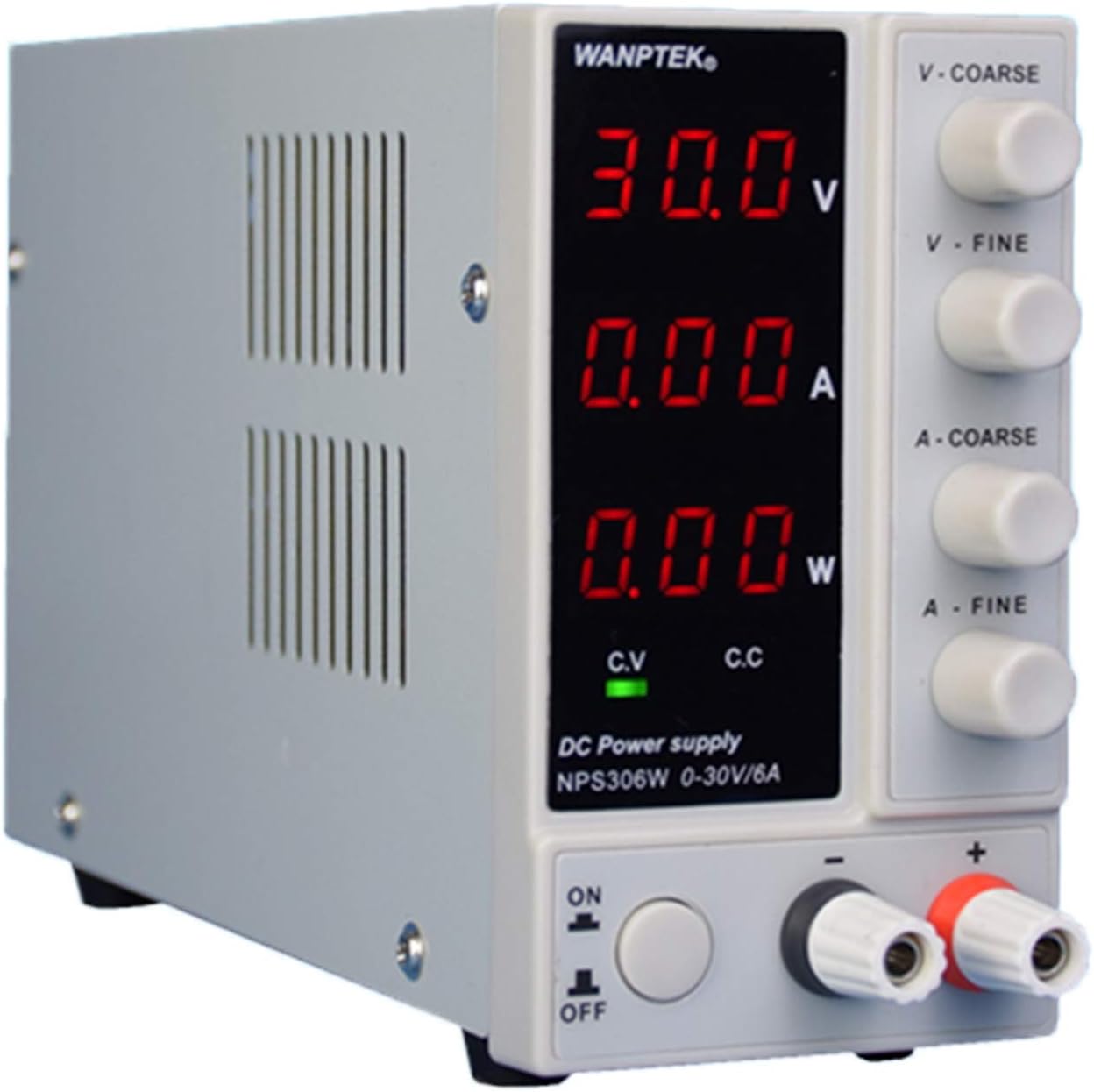
Image: Front view of the WANPTEK NPS306W DC Power Supply, showing the digital display for voltage, current, and power, along with adjustment knobs and output terminals.
Key Features:
- Wide input voltage range: 115V±5V.
- High frequency operation for reduced transformer size.
- Compact size, light weight, and high power density.
- Efficiency rate up to 70%.
- Zero adjustment for output voltage and current.
- Three-window digital display for voltage, current, and power.
- Continuously adjustable output from 0 to rated voltage/current.
Package Contents
Upon opening the package, please verify that all items listed below are present and in good condition:
- 1 x DC power supply (WANPTEK NPS306W)
- 1 x Power cord
- 1 x Output line
- 1 x Operation manual (this document)
Setup
Physical Placement:
Place the power supply on a stable, flat surface. Ensure adequate ventilation around the unit. Do not place it near heat sources or in direct sunlight. Maintain a minimum clearance of 10 cm (4 inches) on all sides for proper airflow.

Image: Side view of the WANPTEK NPS306W DC Power Supply illustrating its dimensions: 23cm (length), 7cm (width), and 13cm (height).
Connecting Power:
- Ensure the power switch on the front panel is in the "OFF" position.
- Connect the provided power cord to the AC input socket on the rear of the power supply.
- Plug the other end of the power cord into a grounded AC 110V, 60Hz power outlet.
Connecting Output:
- Identify the positive (+) (red) and negative (-) (black) output terminals on the front panel.
- Connect the provided output line to your load. Ensure correct polarity.
- Tighten the terminal caps to secure the connections.
Operating Instructions
Front Panel Controls and Indicators:

Image: Detailed view of the WANPTEK NPS306W front panel, highlighting the digital displays for voltage, current, and power, along with the V-COARSE, V-FINE, A-COARSE, A-FINE adjustment knobs, and the ON/OFF switch.
- Digital Displays: Three displays show real-time Voltage (V), Current (A), and Power (W).
- V-COARSE / V-FINE: Knobs for coarse and fine adjustment of output voltage.
- A-COARSE / A-FINE: Knobs for coarse and fine adjustment of output current.
- C.V. (Constant Voltage) Indicator: Lights up when the unit is operating in constant voltage mode.
- C.C. (Constant Current) Indicator: Lights up when the unit is operating in constant current mode.
- ON/OFF Switch: Powers the unit on or off.
- Output Terminals: Red (+) for positive, Black (-) for negative.
Basic Operation:
- Power On: Press the ON/OFF switch to turn on the power supply. The digital displays will illuminate.
- Set Voltage: Use the V-COARSE and V-FINE knobs to set the desired output voltage. Observe the voltage display.
- Set Current Limit: Use the A-COARSE and A-FINE knobs to set the desired current limit. This acts as a maximum current the supply will deliver.
- Connect Load: Ensure your load is properly connected to the output terminals.
- Operation Mode: The power supply will automatically switch between Constant Voltage (C.V.) and Constant Current (C.C.) modes depending on the load.
- In C.V. mode, the output voltage remains constant, and the current varies according to the load.
- In C.C. mode, the output current remains constant (at the set limit), and the voltage varies according to the load.
- Power Off: Before disconnecting the load, turn off the power supply using the ON/OFF switch.

Image: Front view of the WANPTEK NPS306W DC Power Supply, showing the clear digital readouts for voltage, current, and power, indicating its operational status.
Maintenance
Proper maintenance ensures the longevity and reliable operation of your WANPTEK NPS306W DC Power Supply.
- Cleaning: Regularly clean the exterior of the unit with a soft, dry cloth. Do not use abrasive cleaners or solvents. Ensure the unit is powered off and unplugged before cleaning.
- Ventilation: Keep the ventilation openings clear of dust and debris. Use a soft brush or compressed air to gently clean the vents if necessary.
- Storage: When not in use for extended periods, store the power supply in a cool, dry place, away from direct sunlight and extreme temperatures.
- Inspection: Periodically inspect the power cord and output lines for any signs of damage. Replace if necessary.
Troubleshooting
This section addresses common issues you might encounter with your power supply. If the problem persists, contact customer support.
| Problem | Possible Cause | Solution |
|---|---|---|
| No power/Display off | Power cord not connected; Power switch off; No power from outlet. | Check power cord connection; Ensure power switch is ON; Test outlet with another device. |
| No output voltage/current | Output terminals not connected; Voltage/current knobs set to zero; Overload protection activated. | Ensure output lines are connected; Adjust V/A knobs; Reduce load or check for short circuit. |
| C.C. indicator always on | Load resistance is too low, causing the current to reach the set limit. | Increase the current limit (A-COARSE/A-FINE) or increase the load resistance. |
| Unit overheats | Blocked ventilation; Excessive load. | Ensure vents are clear; Reduce load or operate within specified limits. |
Specifications
Detailed technical specifications for the WANPTEK NPS306W DC Power Supply:
| Parameter | Value |
|---|---|
| Model | NPS306W |
| Net Weight | 1.3 kg |
| Product Size (L x W x H) | 23 x 7 x 13 cm (70 x 130 x 230 mm) |
| Input Power | AC 110V, 60Hz (Range: 115V±5V) |
| Output Voltage | 0-30V (Continuously adjustable) |
| Output Current | 0-6A (Continuously adjustable) |
| Output Power | 180W |
| Working Temperature | 0 ℃ - 40 ℃ (Relative humidity: <80% RH) |
| Storage Temperature | -10 ℃ ~ 70 ℃ (Relative humidity: <70% RH) |
| Voltage Stability (C.V.) | 0.1% ± 3MV |
| Load Stability (C.V.) | 0.2% ± 3MV |
| Ripple Voltage (C.V.) | ≤ 0.5% Vp-p |
| Current Stability (C.C.) | 0.1% ± 3mA |
| Ripple Current (C.C.) | ≤ 0.5% Vp-p |
| Recovery Time | ≤ 500 µs |
| Temperature Coefficient | ≤ 100ppm / ℃ |
| Display Type | Three window digital tube display (Voltage, Current, Power) |
| Display Accuracy | 0.5% + 3 words |
| Display Staging Rate | Voltage 0.1V, Current 0.01A, Power 0.1W/1W |
Warranty and Support
For warranty information and technical support, please refer to the contact details provided by your retailer or the manufacturer's official website. Keep your purchase receipt as proof of purchase for warranty claims.
This product is manufactured by InnaMall. For further assistance, please contact their customer service department.
Ask a question about this manual
Ask about setup, troubleshooting, compatibility, parts, safety, or missing instructions. Manuals+ will review the question and use this page’s manual context to help answer it.