
ZIHANMOHAN GT27
ZIHANMOHAN GT27 Bluetooth 5.4 Sport Earbuds User Manual
Model: GT27 | Brand: ZIHANMOHAN
Introduction
Thank you for choosing the ZIHANMOHAN GT27 Bluetooth 5.4 Sport Earbuds. These open-ear wireless earbuds are designed for comfort, stability, and high-quality audio during your active lifestyle. Featuring advanced Bluetooth 5.4 technology for stable connections, a long-lasting battery life of up to 45 hours with the charging case, clear call quality with dual microphones, and IPX5 water resistance, the GT27 earbuds are your ideal companion for sports, fitness, and daily use.

Figure 1: ZIHANMOHAN GT27 Sport Earbuds and Charging Case. The image displays the black earbuds, one pair inside the open charging case showing a digital battery display, and another pair outside the case, highlighting their design.
Package Contents
Please check the package contents upon unboxing to ensure all items are present:
- ZIHANMOHAN GT27 Wireless Sport Earbuds (Left and Right)
- Wireless Charging Case
- Charging Cable
- User Manual (this document)
Setup
1. Initial Charging
Before first use, fully charge the earbuds and the charging case. Place the earbuds into the charging case. Connect the charging cable to the case and a power source. The LED display on the charging case will indicate the battery level.

Figure 2: The charging case with earbuds inside, displaying the battery percentage on its LED screen. This indicates the charging status.
2. Pairing with Your Device
- Ensure the earbuds are charged and placed inside the charging case.
- Open the charging case. The earbuds will automatically enter pairing mode.
- On your device (smartphone, tablet, etc.), enable Bluetooth.
- Search for "GT27" or "ZIHANMOHAN GT27" in the list of available Bluetooth devices.
- Select "GT27" to connect. Once connected, you will hear a confirmation prompt, and the earbuds will be ready for use.
The earbuds offer quick and simple pairing, instantly and automatically connecting to your device within a 10-meter (32 feet) range after the initial setup.

Figure 3: Illustration highlighting the new Bluetooth 5.4 chip for stable connection and improved sound quality, shown alongside the earbuds in their charging case.
Operating Instructions
1. Wearing the Earbuds
The ZIHANMOHAN GT27 earbuds feature an open-ear design, providing a comfortable and secure fit without inserting into the ear canal. This design allows you to remain aware of your surroundings while enjoying audio, making them ideal for sports and outdoor activities.
- Gently place the ear hook over your ear, positioning the speaker part near your ear canal.
- Adjust for a snug and comfortable fit. The lightweight design ensures comfort even during extended wear.

Figure 4: Two individuals wearing the ZIHANMOHAN GT27 earbuds during physical activity, demonstrating their secure and comfortable fit for sports like running and fitness.

Figure 5: A diagram illustrating how the earbuds sit comfortably on the ear, emphasizing their stable and fall-proof design for active use.
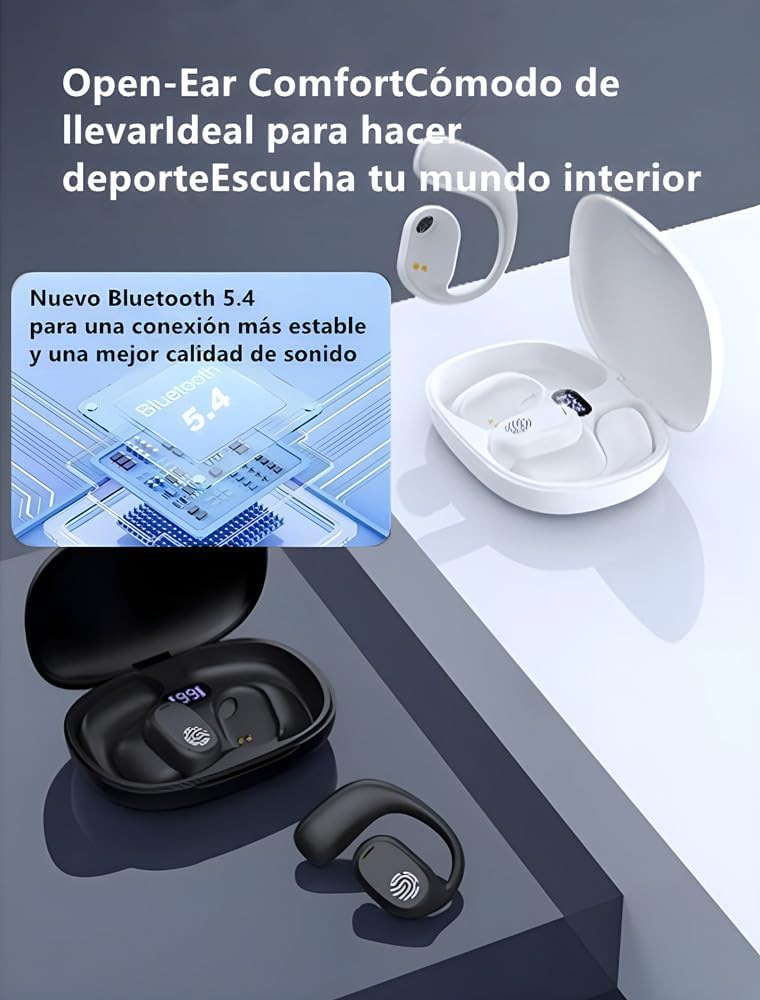
Figure 6: A visual representation of the open-ear design, highlighting that the earbuds do not block the ear canal, providing comfort and allowing ambient sound awareness.
2. Smart Touch Controls
The earbuds feature intuitive touch controls on the outer surface of each earbud. Specific functions may vary slightly, but common controls include:
- Single Tap: Play/Pause music, Answer/End call.
- Double Tap (Left/Right): Previous/Next track.
- Triple Tap (Left/Right): Volume Down/Up.
- Long Press: Reject call, Activate voice assistant.
Refer to the quick start guide included in the package for precise touch control mapping if available.
3. Making and Receiving Calls
The GT27 earbuds are equipped with dual microphones and directional sound transmission technology to ensure clear voice and video calls. Background noise is minimized for superior call quality.
- Answering a Call: Single tap either earbud.
- Ending a Call: Single tap either earbud.
- Rejecting a Call: Long press either earbud.
4. Battery Life and Charging
The earbuds provide up to 10 hours of music playback on a single charge. With the portable charging case, the total playtime extends up to an impressive 45 hours, ensuring uninterrupted listening throughout your day.
- Earbud Charging: Place earbuds into the charging case. They will charge automatically.
- Case Charging: Connect the charging case to a USB power source using the provided cable. The LED display shows the charging progress.
Figure 7: An illustration depicting the 10-hour single earbud playtime and the extended 45-hour total playtime with the charging case.
Maintenance
Proper maintenance will extend the lifespan of your ZIHANMOHAN GT27 earbuds.
- Cleaning: Use a soft, dry, lint-free cloth to clean the earbuds and charging case. Do not use harsh chemicals or abrasive materials.
- Water Resistance (IPX5): The earbuds are IPX5 waterproof, meaning they are resistant to sweat and light splashes of water. Do not submerge them in water or expose them to heavy rain. Dry them thoroughly before placing them back in the charging case.
- Storage: Store the earbuds and charging case in a cool, dry place away from direct sunlight and extreme temperatures.

Figure 8: Visual representation of the IPX5 waterproof rating, showing water splashing on the earbuds, and an illustration of directional audio transmission to reduce sound leakage.
Troubleshooting
If you encounter any issues with your ZIHANMOHAN GT27 earbuds, please refer to the following common solutions:
| Problem | Possible Solution |
|---|---|
| Earbuds not pairing/connecting. |
|
| No sound from one or both earbuds. |
|
| Charging case not charging. |
|
| Unexpected language prompts (e.g., Chinese). |
|
Specifications
| Feature | Detail |
|---|---|
| Brand | ZIHANMOHAN |
| Model Name | GT27 |
| Connectivity Technology | Wireless (Bluetooth 5.4) |
| Special Features | Noise Cancellation, Fast Charging, Touch Control, Lightweight, Microphone included |
| Ear Placement | Open-Ear |
| Form Factor | True Wireless |
| Impedance | 32 ohms |
| Noise Isolation | Active Noise Suppression |
| Color | Black |
| Playtime (Earbuds) | Up to 10 hours |
| Total Playtime (with Charging Case) | Up to 45 hours |
| Water Resistance | IPX5 (Sweat and splash resistant) |
| Included Components | Wireless charging case, Cable, User Manual |
Warranty and Support
ZIHANMOHAN products are designed for reliability and performance. For information regarding warranty coverage, please refer to the warranty card included with your purchase or visit the official ZIHANMOHAN website.
If you require further assistance, have questions about your product, or need to report an issue that is not covered in the troubleshooting section, please contact ZIHANMOHAN customer support through the retailer where you purchased the product or via the contact information provided on the official brand website.
Please have your product model (GT27) and purchase details ready when contacting support.
Related Documents - GT27
 |
Mitsubishi Electric GOT2000 Series Connection Manual: Non-Mitsubishi Electric Products This manual provides essential connection information for Mitsubishi Electric's GOT2000 Series Graphic Operation Terminals when interfacing with non-Mitsubishi Electric products, specifically for use with GT Works3 Version 1 software. It details safety precautions, design considerations, mounting instructions, wiring guidelines, and operational best practices to ensure safe and efficient use of the GOT2000 series. |
 |
Bluetooth Earphone GT27 Instruction Manual Instruction manual for the GT27 Bluetooth Earphone, covering product overview, parameter configuration, wireless pairing, usage instructions, and precautions. |
 |
GOT2000 Series Connection Manual (Non-Mitsubishi Electric Products 2) For GT Works3 Version1 This manual provides detailed instructions and procedures for connecting Mitsubishi Electric GOT2000 Series Graphic Operation Terminals to a wide range of non-Mitsubishi Electric PLCs, controllers, and devices. It covers various connection types, settings, and precautions necessary for integration using GT Works3 software. |
 |
Mitsubishi Electric GT27-ROUT Material Fact Sheet Detailed material fact sheet for the Mitsubishi Electric GT27-ROUT, part of the GOT2000 series HMI. Includes specifications, dimensions, weight, packaging, environmental compliance, and a comprehensive list of compatible products. |
 |
Mitsubishi Electric GT2708-STBA Material Fact Sheet Material Fact Sheet for the Mitsubishi Electric GT2708-STBA Human Machine Interface (HMI). Details specifications, dimensions, weight, stock information, life cycle, and compatible products. |
 |
Mitsubishi Electric 277068 GT2708-VTBD(C) Material Fact Sheet Material fact sheet for the Mitsubishi Electric 277068 GT2708-VTBD(C) Human Machine Interface (HMI), detailing its specifications, dimensions, weight, stock data, and compatible products. |
Ask a question about this manual
Ask about setup, troubleshooting, compatibility, parts, safety, or missing instructions. Manuals+ will review the question and use this page’s manual context to help answer it.