
SWARK A3018
SWARK A3018 Rechargeable Battery for iPhone 15 User Manual
Model: A3018
1. Introduction
This manual provides comprehensive instructions for the installation, operation, and maintenance of your new SWARK A3018 rechargeable battery, designed specifically for the iPhone 15. Please read this manual carefully before attempting installation to ensure safe and proper use.

Common signs indicating a need for battery replacement, such as rapid discharge or frequent charging.
2. Important Safety Information
- Trained Technician Serviceable Only: Battery replacement should ideally be performed by a trained technician. If you choose to perform the installation yourself, proceed with extreme caution.
- Do Not Disassemble: Do not attempt to disassemble, crush, heat, or puncture the battery. This can lead to fire or burning.
- Avoid Extreme Temperatures: Do not expose the battery to high temperatures or direct sunlight.
- Proper Disposal: Dispose of old batteries according to local regulations. Do not dispose of in household waste.
- Power Off Device: Always turn off your device completely before beginning any repair or replacement procedure.
3. Package Contents
Your SWARK A3018 battery replacement kit includes the following items:
- 1 x SWARK A3018 Rechargeable Li-Polymer Battery
- 1 x Set of Installation Tools (screwdrivers, prying tools, suction cup, SIM ejector tool)
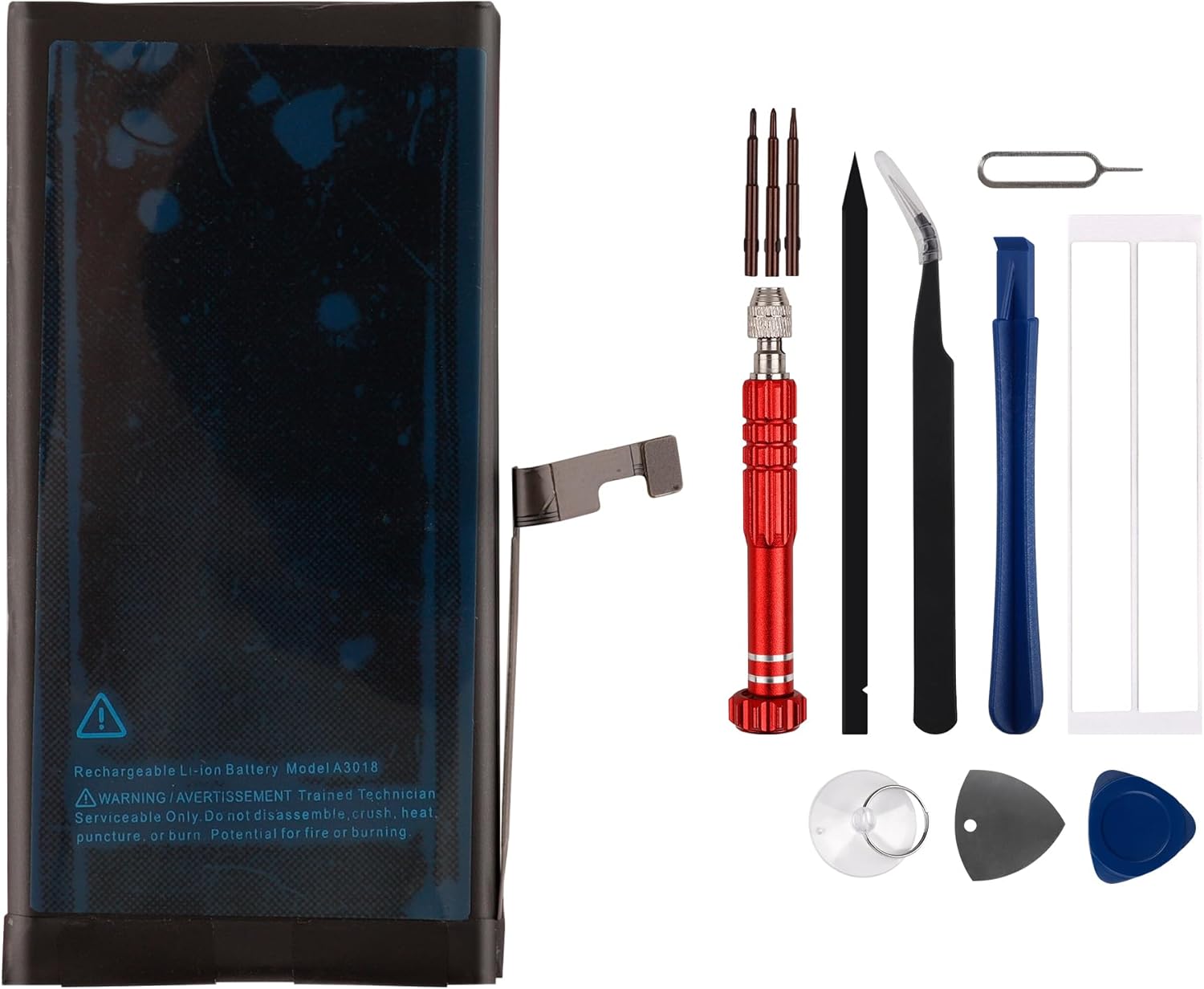
The SWARK A3018 battery alongside the complete set of tools provided for installation.
4. Compatibility
This SWARK A3018 battery is specifically designed and compatible with the iPhone 15. Please verify your device model before proceeding with installation.

Visual confirmation of the battery's compatibility with the iPhone 15 model.
5. Installation Guide
Replacing a phone battery requires careful attention. If you are unsure about the process, it is highly recommended to seek professional assistance or refer to detailed video tutorials.
5.1 Before You Begin
- Verify Model: Double-check that your device is an iPhone 15.
- Power Off: Completely power off your iPhone 15 before starting.
- Gather Tools: Ensure all necessary tools are at hand. Note that the top of the screwdriver may be stored inside the screwdriver handle.
- Watch Tutorials: For detailed visual guidance, search for "iPhone 15 battery replacement" tutorials on platforms like YouTube.
5.2 Step-by-Step Installation (General Overview)
- Prepare Device: Ensure your iPhone is powered off.
- Remove Screws: Carefully remove the pentalobe screws located at the bottom edge of the iPhone.
- Open Device: Use the suction cup and prying tools to gently separate the display assembly from the rear case. Exercise extreme caution to avoid damaging internal cables.
- Disconnect Old Battery: Locate the battery connector on the mainboard. Carefully disconnect it using a plastic prying tool.
- Remove Old Battery: Gently remove the old battery. This may involve carefully prying it out if adhesive strips are present.
- Install New Battery: Place the new SWARK A3018 battery into position. Ensure it fits correctly.
- Connect New Battery: Carefully connect the new battery's flex cable to the mainboard connector. Ensure a secure connection.
- Test Functionality: Before fully reassembling, briefly power on the phone to ensure the new battery is recognized and functioning. Power off again.
- Reassemble Device: Carefully reattach the display assembly, ensuring all cables are properly seated. Replace the pentalobe screws.
Important: Take your time and be gentle throughout the entire process to prevent damage to your device.
6. Operating Instructions
6.1 Initial Use and Calibration
For optimal performance and to calibrate the new battery, it is recommended to follow these steps for the first 3 charging and discharging cycles:
- Full Discharge: Use your iPhone until the battery completely drains and the phone shuts off.
- Full Charge: Connect your iPhone to a charger and allow it to charge uninterrupted to 100%. Keep it on the charger for an additional hour after reaching 100%.
- Repeat this full discharge and full charge cycle two more times.
This process helps the battery management system accurately learn the new battery's capacity, potentially improving its overall life and performance.
7. Battery Maintenance Tips
- Avoid Extreme Temperatures: Do not expose your phone to very hot or very cold environments, as this can degrade battery health.
- Optimal Charging: While full cycles are good for calibration, for daily use, try to keep your battery charge between 20% and 80% to prolong its lifespan.
- Use Quality Chargers: Always use certified or original charging cables and adapters.
- Software Updates: Keep your iPhone's operating system updated, as software optimizations can improve battery efficiency.
8. Troubleshooting
| Problem | Possible Cause | Solution |
|---|---|---|
| Phone does not power on after battery replacement. | Battery connector not properly seated; battery completely drained. | Ensure battery connector is securely attached. Try charging the phone for at least 30 minutes. |
| Battery drains quickly. | Improper initial calibration; background apps consuming power; faulty installation. | Perform the initial full charge/discharge cycles (Section 6.1). Check background app usage. Re-check battery connection. |
| Phone shows incorrect battery percentage. | Battery not calibrated. | Perform the initial full charge/discharge cycles (Section 6.1). |
| Tools missing or damaged. | Shipping damage or oversight. | Contact SWARK customer service for assistance. |
9. Product Specifications

Detailed view of the battery's label, displaying model number and capacity.
| Feature | Detail |
|---|---|
| Model Number | A3018 |
| Battery Type | Li-Polymer |
| Capacity | 3349mAh |
| Nominal Voltage | 3.876V |
| Energy | 12.98Wh |
| Compatibility | iPhone 15 |
| Manufacturer | shenzhen thinkmap innovative energy co., ltd |
10. Customer Support and Warranty
SWARK is committed to providing excellent customer service. If you encounter any issues or have questions regarding your SWARK A3018 battery, please do not hesitate to contact our support team.
- Contact: Please refer to your purchase platform or product packaging for specific contact details.
- Response Time: Our customer service team aims to respond within 24 hours to assist you.
We are dedicated to ensuring your satisfaction and will provide assistance to resolve any concerns you may have.