
Introduction
This manual provides comprehensive instructions for the GOWENIC Zopscrv19kou6tx Kids Headphones. These headphones are designed for children, featuring a durable construction, comfortable fit, and essential safety features like volume limiting. Please read this manual carefully before using the product to ensure proper operation and to maximize its lifespan.
Safety Information
- Volume Limiting: The BT06C+ headphones include a volume limit feature to protect children's hearing. In child mode, the volume is limited to 85dB.
- Supervision: Always supervise young children when they are using headphones, especially during initial setup and operation.
- Cleaning: Use a soft, dry cloth for cleaning. Avoid liquid cleaners.
- Storage: Store the headphones in a cool, dry place away from direct sunlight and extreme temperatures.
Package Contents
Please check the package for the following items:
- GOWENIC Zopscrv19kou6tx Kids Headphones
- 3.5mm Audio Cable (detachable)
- USB Charging Cable

Image: The GOWENIC Zopscrv19kou6tx Kids Headphones shown with the included 3.5mm audio cable and USB charging cable.
Product Overview
Familiarize yourself with the different parts of your headphones:
- Adjustable Headband: For a comfortable fit on various head sizes.
- Soft Earmuffs: Designed for comfort during extended use.
- Power Switch (ON/OFF): Located on the earcup.
- USB Charging Port: For recharging the internal battery.
- 3.5mm Audio Jack: For wired connection.
- Control Buttons: (e.g., Volume Up/Down, Play/Pause, M button for child mode) on the earcup.
- Built-in Microphone: For hands-free calls.

Image: Side view highlighting the ON/OFF switch and USB charging port.
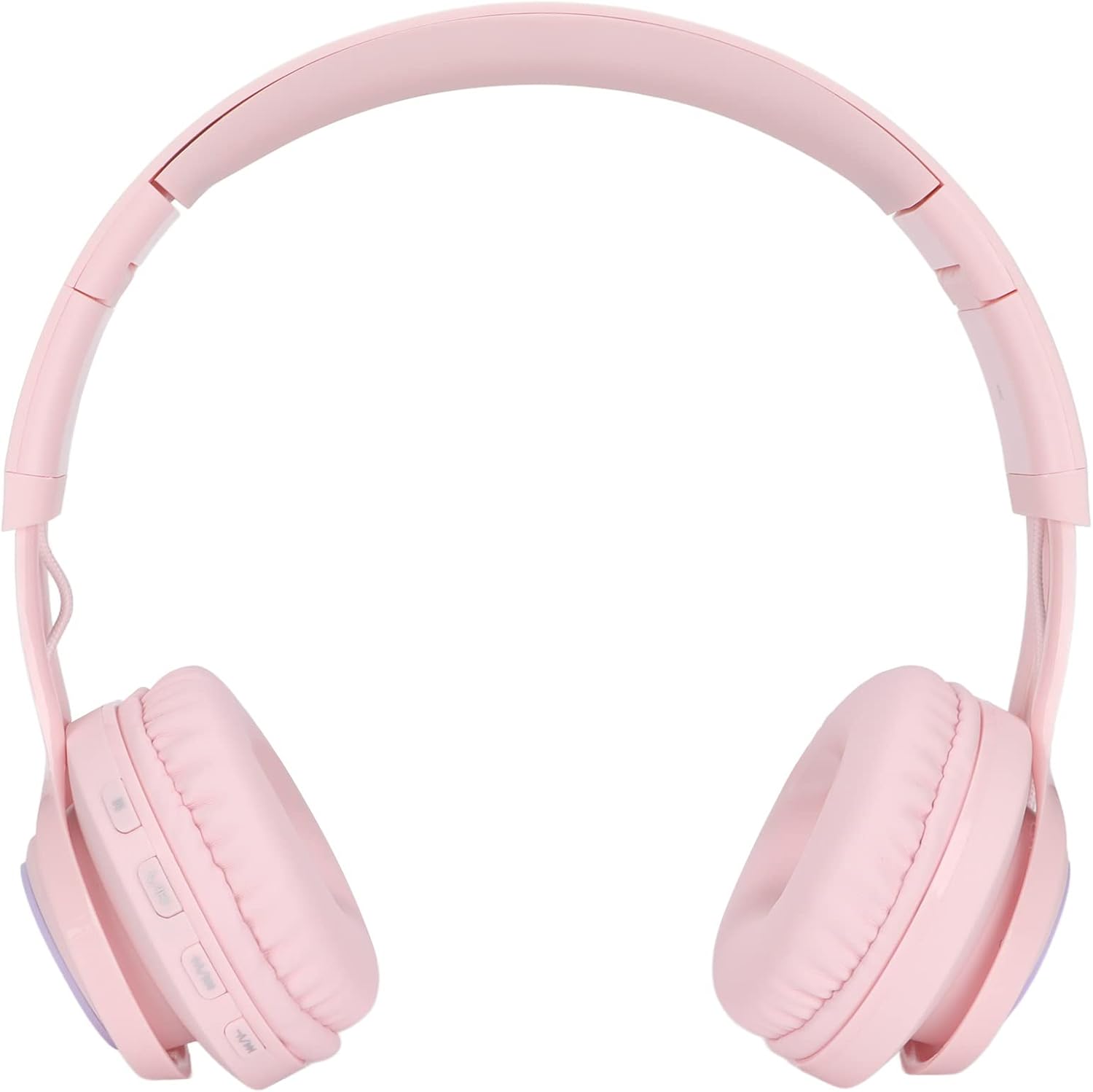
Image: Close-up of the earcup showing the control buttons, including the 'M' button.
Setup
1. Charging the Headphones
- Connect the small end of the USB charging cable to the USB charging port on the headphone earcup.
- Connect the larger end of the USB charging cable to a standard USB power adapter (not included) or a computer's USB port.
- The indicator light will show charging status (e.g., red for charging, off or blue for fully charged).
2. Powering On/Off
- To power on, slide the ON/OFF switch to the "ON" position.
- To power off, slide the ON/OFF switch to the "OFF" position.
3. Bluetooth Pairing (Wireless Mode)
- Ensure the headphones are charged and powered on.
- Activate Bluetooth on your device (smartphone, tablet, PC, TV).
- Search for available Bluetooth devices. The headphones should appear as "BT06C+" or similar.
- Select the headphones to pair. A stable connection can be established within 20 meters.
4. Wired Connection (3.5mm Audio Cable)
- Insert one end of the 3.5mm audio cable into the 3.5mm audio jack on the headphone earcup.
- Insert the other end of the 3.5mm audio cable into the 3.5mm audio jack of your audio device.
- The headphones will automatically switch to wired mode. This mode can be used even if the internal battery is depleted.
Operating Instructions
1. Adjusting Volume and Child Mode
- Standard Volume Adjustment: Use the volume buttons on the earcup to increase or decrease the volume.
- Child Mode (85dB Limit): Press the 'M' button on the earcup to activate child mode. This limits the maximum volume to 85dB to protect sensitive hearing. Press 'M' again to switch back to standard mode.
2. Making/Answering Calls (Wireless Mode)
- The headphones feature a built-in microphone for hands-free calls when connected via Bluetooth.
- To answer an incoming call, press the designated button on the side of the headset (usually the Play/Pause button).
- To end a call, press the same button again.
3. Adjusting Fit and Portability
- Headband Adjustment: The headband is adjustable and stretchable. Gently slide the earcups up or down to find a comfortable fit for the user's head size.
- Folding for Storage: The headphones feature a foldable design. Fold the earcups inwards to save space, making them easy to carry and store.

Image: Detail of the adjustable headband for a customized fit.
Maintenance
- Cleaning: Wipe the headphones with a soft, dry, lint-free cloth. Do not use abrasive cleaners, alcohol, or chemical solvents.
- Storage: When not in use, store the headphones in a protective case or a clean, dry environment. Avoid placing heavy objects on them.
- Battery Care: For optimal battery life, avoid fully discharging the battery frequently. Charge the headphones regularly, even if not used for extended periods.
Troubleshooting
| Problem | Possible Solution |
|---|---|
| No sound in wireless mode. |
|
| No sound in wired mode. |
|
| Headphones not charging. |
|
| Cannot pair via Bluetooth. |
|
Specifications
| Brand: | GOWENIC |
| Model Name: | Zopscrv19kou6tx (BT06C+) |
| Connectivity Technology: | Wired (3.5mm) and Wireless (Bluetooth) |
| Included Components: | Headphones, 3.5mm Audio Cable, USB Charging Cable |
| Cable Feature: | Detachable |
| Special Features: | Built-in Microphone, Foldable Design, Adjustable Headband, Volume Limiting (85dB Child Mode) |
| Bluetooth Range: | Up to 20 meters |
| Country of Origin: | China |
| ASIN: | B0D84B6CWY |
Warranty and Support
Specific warranty information is not available in the provided product details. For warranty claims or technical support, please contact your retailer or the manufacturer directly using the contact information provided with your purchase.