
1. Introduction
The Genérico ZK SF400+ID is an advanced IP-based fingerprint and RFID access control terminal designed for professional security and attendance management. It offers both network and standalone operation modes, integrating seamlessly with ZKAccess 3.5 software. This manual provides essential information for the proper installation, operation, and maintenance of your device.
1.1 What's in the Box
Upon unpacking, please verify that all items listed below are present:
- SF400+ID Fingerprint Access Terminal
- Mounting Toolkit
- User Manual (this document)

Image: Package contents of the SF400 Access Control Kit, showing the terminal, various accessories, and documentation.
2. Safety Information
Please read and follow these safety guidelines to prevent damage to the device or injury to yourself:
- Do not expose the device to water or excessive moisture.
- Ensure the power supply is within the specified voltage range (DC 12V/3A).
- Avoid installing the device in direct sunlight or near heat sources.
- Only use authorized accessories and components.
- Do not attempt to open or repair the device yourself. Refer to qualified service personnel.
3. Product Overview
The SF400+ID features a 2.8-inch resistive touch screen for intuitive operation, a high-resolution ZK Optical Sensor for fingerprint recognition, and an integrated 125KHz RFID card reader. It supports various communication methods and offers robust access control functionalities.
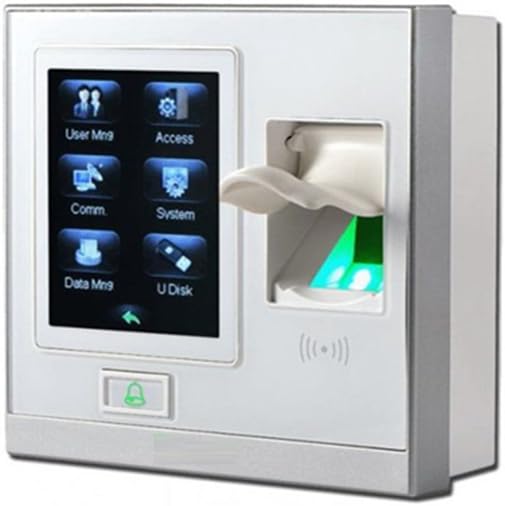
Image: Front view of the Genérico ZK SF400+ID terminal, showing the touch screen display with menu icons, the fingerprint scanner, and the RFID reader area.
4. Setup
4.1 Mounting the Device
The SF400+ID is designed for 86mm (L) x 86mm (H) socket installation. Ensure the mounting surface is stable and secure. Use the provided toolkit for installation.

Image: Various components of an access control system, including the SF400 terminal, an electromagnetic lock, an exit button, a power adapter, a door closer, mounting brackets, and an RFID card.
4.2 Wiring Connections
The terminal supports multiple connection types:
- Power Supply: Connect to a DC 12V/3A power source.
- Communication: Use TCP/IP for network environments or RS485 for serial communication.
- Access Control Interface: Connect to electric locks, door sensors, alarms, exit buttons, and door bells.
- Wiegand Signal: Supports Wiegand input and output for integration with other controllers or slave readers.
- Auxiliary Input: Connects to external devices like smoke detectors or emergency switches for linkage functions.

Image: A collection of access control system components, including an uninterruptible power supply, an exit button, RFID key fobs, RFID cards, and an electromagnetic lock, illustrating typical wiring accessories.
4.3 Initial Power-Up
After all connections are secure, apply power to the device. The terminal will boot up, and the 2.8-inch touch screen will display the graphical user interface.
5. Operating Instructions
5.1 User Interface Navigation
The device features a 2.8-inch resistive touch screen with a color display and graphical UI. Navigate through menus by tapping icons and using the back/confirm buttons.
5.2 User Management
Enroll users by registering their fingerprints and/or RFID cards. The device supports up to 1,500 fingerprints and 5,000 cards.
- Fingerprint Enrollment: Access the 'User Mgt' menu, select 'Enroll Fingerprint', and follow the on-screen prompts to register a user's fingerprint multiple times for accuracy.
- RFID Card Enrollment: In the 'User Mgt' menu, select 'Enroll Card', and present the 125KHz ID card to the device's RFID reader.
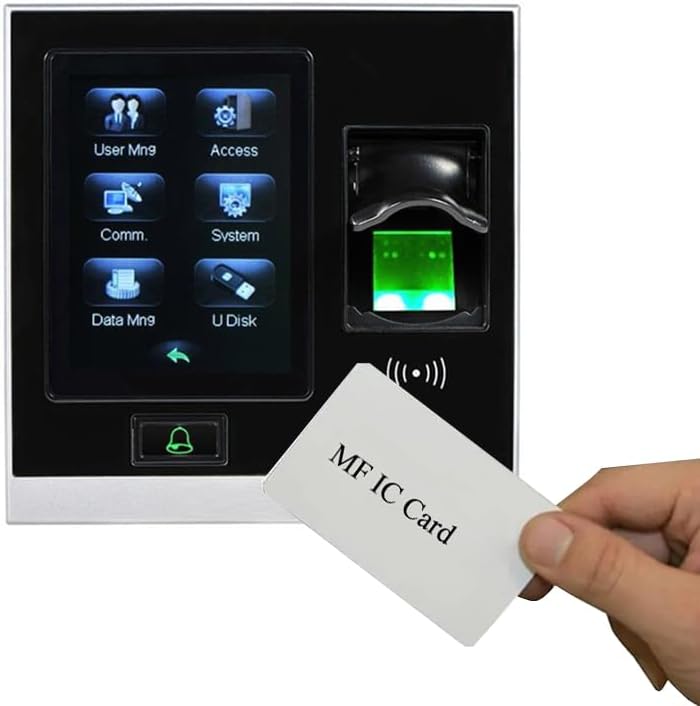
Image: A hand holding an RFID card labeled 'MF IC Card' near the SF400+ID terminal, demonstrating the card recognition feature.
5.3 Access Control Features
Configure various access control parameters to enhance security:
- Time Zones: Define specific time periods for access.
- Holidays: Set up holiday schedules where access rules may differ.
- A&C Group: Assign users to different access groups with unique permissions.
- Unlock Combination: Implement multi-person verification for high-security areas.
- Multi-Verification Methods: Supports up to 15 methods, including fingerprint only, card only, fingerprint + card, etc.
- Anti-Passback: Prevents users from passing their card/fingerprint back to another person for re-entry without proper exit.
5.4 Attendance Management
The SF400+ID can record up to 80,000 attendance records. It supports up to 24 user-defined schedules for daily bell alerts (optional).
5.5 Data Management
Utilize the USB Host port for offline data management, including downloading attendance logs and user data, or uploading user information.
5.6 Auxiliary Input and Duress Alarm
The auxiliary input allows connection to external sensors like smoke detectors. When enabled, the device can generate an alarm signal and open doors in emergencies. The Duress Alarm offers protection against threats by triggering an alarm when a specific duress fingerprint or code is used.
6. Maintenance
6.1 Cleaning
Regularly clean the fingerprint sensor and screen with a soft, dry cloth. Avoid using abrasive cleaners or solvents.
6.2 Data Backup
Periodically back up attendance records and user data to a USB flash drive or through the network to ZKAccess 3.5 software to prevent data loss.
6.3 Firmware Updates
Check the manufacturer's website for available firmware updates to ensure optimal performance and access to new features.
7. Troubleshooting
- Device not powering on: Check power supply connections and ensure the adapter is functioning correctly.
- Fingerprint not recognized: Ensure the finger is clean and dry. Re-enroll the fingerprint if issues persist.
- RFID card not detected: Ensure the card is 125KHz compatible and presented correctly to the reader. Re-enroll the card if necessary.
- Network connection issues: Verify network cable connections, IP settings, and router configuration.
- Door not unlocking: Check wiring to the electric lock, ensure access permissions are correctly configured, and verify the lock's functionality.
8. Specifications
| Feature | Specification |
|---|---|
| Model | SF400-ID |
| LCD | 2.8 inch resistive touch screen |
| Fingerprint Sensor | ZK Optical Sensor (500DPI) |
| Algorithm Version | ZKFinger VX10.0 |
| Communication | TCP/IP, USB Host, RS485 |
| Fingerprint Capacity | 1,500 |
| Card Capacity (Optional) | 5,000 (EM/Mifare) |
| Records Capacity | 80,000 |
| Access Control Interface | Electric lock, Door sensor, Alarm, Exit button, Door Bell |
| Wiegand Signal | Wiegand input & output |
| Aux. Input | 1ea for linkage function |
| Power Supply | DC 12V/3A |
| Operating Temperature | 0°C ~ 45°C (32°~113°F) |
| Operating Humidity | 20 ~ 80% |
| Dimensions (L x W x H) | 105 x 105 x 32 mm (4.13 x 1.26 x 4.13 inches) |
| Item Weight | 14.8 ounces |
9. Warranty and Support
For warranty information and technical support, please refer to the documentation provided with your purchase or contact your vendor. Keep your purchase receipt as proof of purchase.