
1. Introduction
The Zendstanding Type-C Tester Power Meter (Model KWS-2301C) is a compact and precise digital multimeter designed for monitoring voltage, current, power, capacity, and other parameters of Type-C charging devices. Featuring a 0.77-inch ISP black & white OLED display, it provides clear, real-time data for various applications, from testing chargers and power banks to analyzing mobile phones and laptops.

Figure 1: The Zendstanding Type-C Tester Power Meter, showcasing its compact design and clear OLED display.
2. Key Features
- Medium Screen Black Display: 0.77-inch ISP black & white high-definition display with high resolution and clarity. Displays voltage, current, power, capacity, energy, time, maximum values, current direction, and CPU temperature.
- Improved Measurement Accuracy: Provides accurate data for detecting charging devices such as chargers, mobile phones, tablets, and power banks.
- All C-port Input & Output: Utilizes Type-C for both input and output ports, equipped with a maximum 12A high current terminal for stability.
- Bidirectional Current Testing: Offers visible charging speed experience with bidirectional current testing function.
- Fast Charging Testing: Supports fast charging tests for protocols like PD2.0, PD3.0, PPS, QC2.0, QC3.0, FCP, SCP, AFC, PE, DASH, VOOC, SuperVOOC.
- Power-off Storage: Stores capacity and energy data when power is off for convenient subsequent viewing and testing.
3. Package Contents
Upon opening your package, please ensure all items listed below are present and in good condition:
- 1X Type-C Tester Power Meter (Model KWS-2301C)
4. Setup and Connection
The Type-C Tester Power Meter is designed for simple inline connection. It features both input and output Type-C ports.
- Identify the input and output ports on the tester. The input port is typically where the power source (charger, power bank) connects, and the output port is where the device being charged (phone, tablet, laptop) connects.
- Connect your Type-C power source (e.g., wall charger, power bank) to the Input Type-C port of the tester.
- Connect your Type-C charging cable from the Output Type-C port of the tester to the device you wish to test (e.g., smartphone, laptop).
- Once connected, the display will automatically illuminate and begin showing real-time measurement data.

Figure 2: Diagram illustrating the input and output Type-C ports and how to connect the tester inline with a charging setup.

Figure 3: The tester in use, measuring power flow from a power bank to a smartphone, demonstrating its practical application.
5. Operating Instructions
5.1 Display and Navigation
The tester features a single button on its side for display control.
- Single Click: Press the button once to switch between different display interfaces, showing various measurement parameters.
- Double Click: Press the button twice rapidly to change the display direction (rotate the screen 180 degrees), useful for different viewing angles.

Figure 4: The tester's display can be rotated 180 degrees by double-clicking the button, allowing for flexible viewing.
5.2 Interpreting Displayed Data
The OLED screen provides comprehensive real-time data. Below is a guide to the displayed parameters:

Figure 5: A detailed breakdown of the information presented on the tester's screen, including voltage, current, power, capacity, and more.
- Voltage (V): 4-30V range. Indicates the electrical potential difference.
- Current (A): 0-12A range. Indicates the flow of electrical charge.
- Power (W): 0-360W range. Calculated as Voltage x Current.
- Capacity (mAh): 0-99999mAh range. Measures the total charge transferred over time.
- Energy (mWh): 0-99999mWh range. Measures the total energy consumed over time.
- Hour Timer (T): 0-99 hours. Tracks the duration of the measurement.
- Max-W: Records the highest power observed during the test.
- Max-A: Records the maximum current observed during the test.
- Max-V: Records the maximum voltage observed during the test.
- Current Direction Indicator: Shows the direction of current flow.
- CPU Temperature: Displays the internal temperature of the tester's CPU.
Note: 12A is the peak current and is not recommended for long-term use to prevent potential damage to the tester or connected devices.
5.3 Fast Charging Detection
The tester automatically detects and displays information for various fast charging protocols. When a fast charging protocol is active, the display will show the negotiated voltage and current, allowing you to verify if your charger and device are utilizing fast charging correctly.
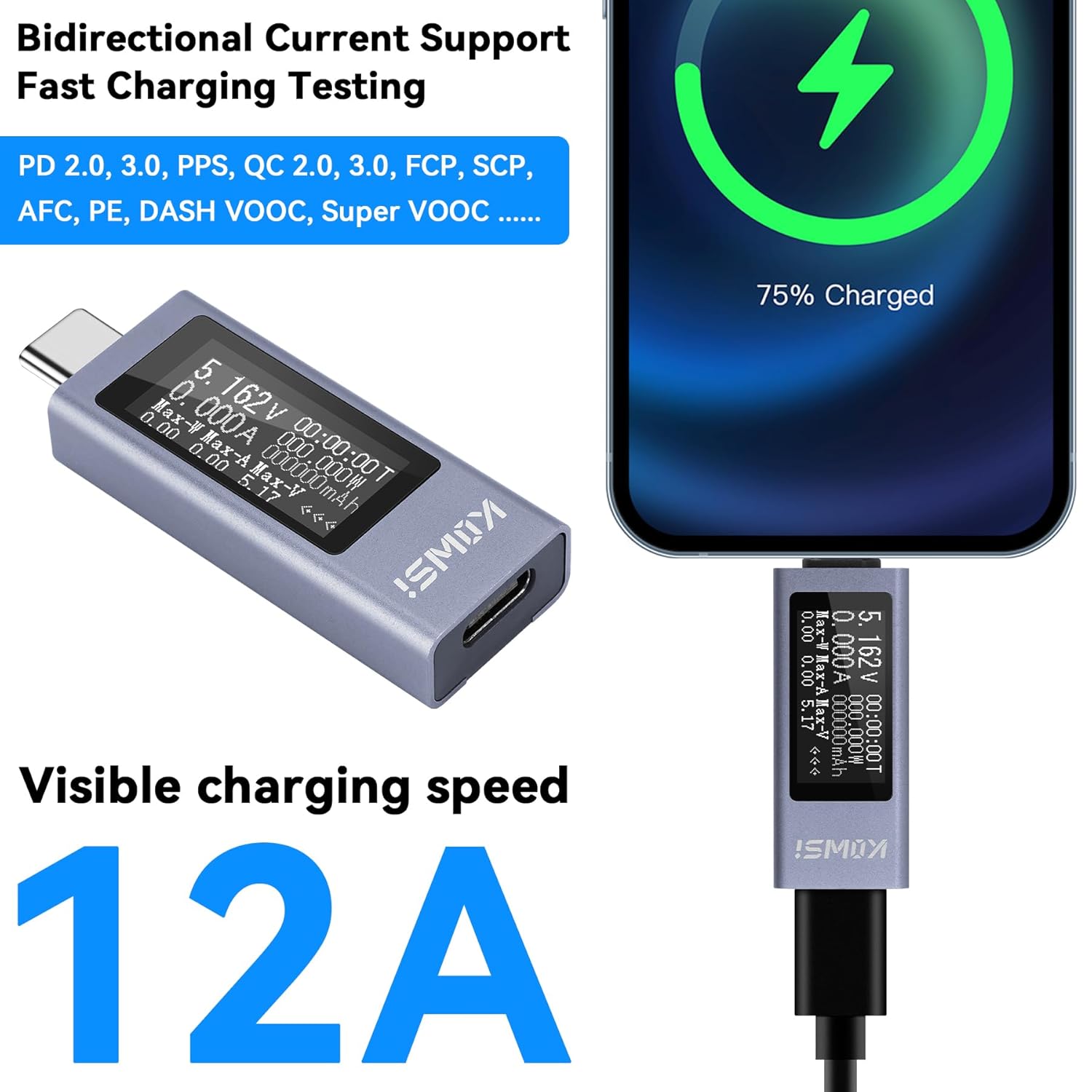
Figure 6: The tester actively monitoring a fast-charging session, displaying real-time voltage and current to confirm fast charge protocol engagement.
5.4 Power-off Storage Function
The tester is equipped with a power-off storage function. This means that accumulated capacity (mAh) and energy (mWh) data are saved even when the mobile power source is disconnected or turned off. This feature is convenient for long-term monitoring or for reviewing data after a charging cycle is complete.

Figure 7: The tester connected to a laptop, demonstrating its ability to record and store power data, even after the power source is removed.
6. Specifications
| Parameter | Value |
|---|---|
| Model Number | KWS-2301C |
| Product Dimensions | 1.66 x 0.71 x 0.35 inches |
| Item Weight | 0.71 ounces |
| Display Screen | 0.77" ISP Black & White OLED |
| Measurement Voltage | 4V-30V |
| Measurement Current | 0-12A |
| Measurement Power | 0-360W |
| Capacity Range | 0-99999mAh |
| Energy Range | 0-99999mWh |
| Hour Timer Range | 0-99 hours |
| Interface Type | Type-C Input & Output |
| Color | White |
7. Compatibility
The Zendstanding Type-C Tester Power Meter is broadly compatible with a wide range of devices utilizing Type-C ports for charging and data transfer. This includes, but is not limited to:
- Smartphones (e.g., iPhone 15 series, Huawei, Xiaomi)
- Tablets (e.g., iPad Pro/Mini/Air)
- Laptops (e.g., MacBook)
- Power Banks
- Wireless Earbuds (e.g., AirPods)
- Various other Type-C enabled devices and chargers.
Note: Incompatible Type-C interfaces may require self-equipped adapters for proper connection and measurement.
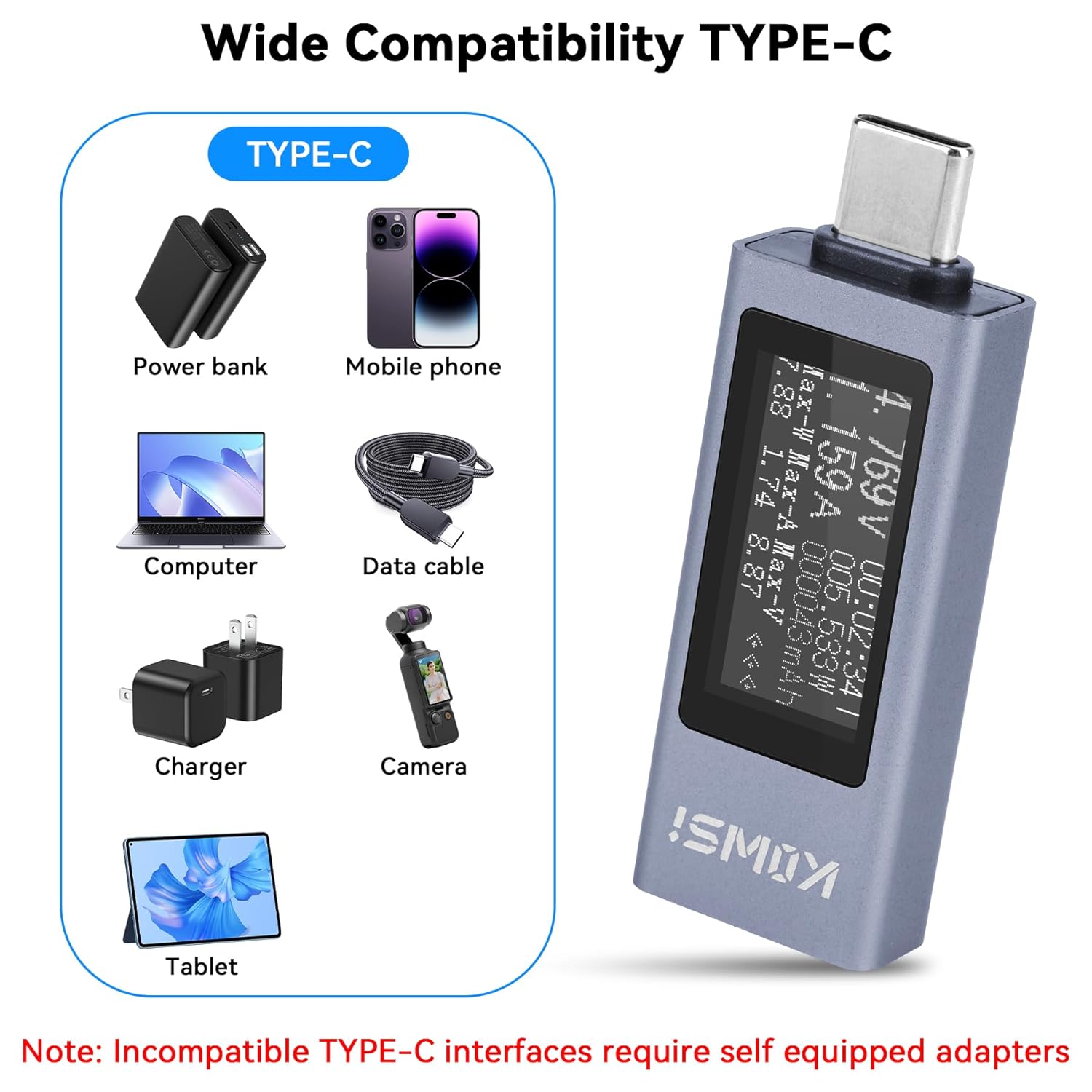
Figure 8: An overview of the wide range of Type-C devices compatible with the power meter, including phones, tablets, and laptops.
8. Troubleshooting
If you encounter issues while using your Type-C Tester Power Meter, please refer to the following common problems and solutions:
- Display is Blank:
Possible Cause: Insufficient power or incorrect connection.
Solution: Ensure the tester is correctly connected inline between a functioning power source (charger/power bank) and a device that is drawing power. Verify that both the power source and the device are working correctly. - Inconsistent or Zero Readings:
Possible Cause: Loose connection, faulty cable, or device not drawing power.
Solution: Re-seat all Type-C connections firmly. Try using a different Type-C cable. Ensure the device connected to the output is actively charging or drawing power. - Tester Blocks Video Signal (e.g., from MacBook to Monitor):
Possible Cause: The tester is primarily designed for power measurement and may not pass through video signals on all Type-C connections, especially those requiring specific data protocols for display output.
Solution: This tester is optimized for power measurement. If video pass-through is critical, this specific model may not be suitable for that application. Consider using it only for power monitoring where video is not required. - Button Not Responding:
Possible Cause: Button stuck or internal issue.
Solution: Gently press the button multiple times. If it remains unresponsive, contact customer support.
For issues not covered here, please refer to the Warranty and Support section.
9. Maintenance
To ensure the longevity and optimal performance of your Type-C Tester Power Meter, follow these maintenance guidelines:
- Cleaning: Use a soft, dry cloth to wipe the device. Do not use liquid cleaners or aerosols.
- Storage: Store the tester in a cool, dry place away from direct sunlight and extreme temperatures.
- Handling: Avoid dropping the device or subjecting it to strong impacts, as this can damage the internal components or the screen.
- Moisture: Keep the device away from water and high humidity. If it gets wet, disconnect it immediately and allow it to dry completely before reuse.
10. Warranty and Support
Zendstanding is committed to providing high-quality products and customer satisfaction. We offer a worry-free return and exchange policy within one year of purchase for any product issues, including but not limited to manufacturing defects, items not matching the description, or damage from collisions.
If you experience any problems during use, or if you have questions about your Type-C Tester Power Meter, please do not hesitate to contact us. Our customer support team is available to assist you promptly.
Contact Information: Please refer to the contact details provided with your purchase or visit the official Zendstanding store on Amazon for support options.