
1. Introduction
The Aicevoos D9C Socket Tester is a professional device designed for comprehensive electrical outlet testing. It accurately detects common wiring conditions and problems, including RCD (Residual Current Device) functionality, AC voltage, frequency, and leakage current. This manual provides detailed instructions for safe and effective use of your D9C Socket Tester.

Image 1.1: Front view of the Aicevoos D9C Socket Tester, showing its LCD screen and control buttons.
2. Safety Information
Always prioritize safety when working with electrical systems. This device is designed to assist in identifying electrical issues, but it does not replace the expertise of a qualified electrician. Please read and understand all safety warnings before use.
- Do not use the device if it appears damaged or is not functioning correctly.
- Ensure your hands are dry before handling the tester or any electrical outlets.
- Never attempt to open or repair the device yourself. Refer to qualified personnel for service.
- When performing the RCD test, be aware that it will trip the circuit breaker. Ensure no critical equipment is in operation before proceeding.
- If the RCD test fails to trip the circuit breaker, immediately discontinue use of the outlet and consult a professional electrician for inspection and repair.
- This device is for testing purposes only and should not be used as a permanent monitoring tool.
3. Product Features
The Aicevoos D9C Socket Tester offers a range of features for comprehensive electrical diagnostics:
- Professional Socket Testing: Detects common wiring conditions and problems in electrical outlets.
- Instantaneous Inspection: Clear LCD display provides immediate wiring status feedback.
- RCD Test Function: Verifies the functionality of Residual Current Devices.
- Wiring Detection: Identifies faults such as missing ground, neutral, or live wires, and wiring reversals.
- AC Voltage Measurement: Measures the AC voltage of the circuit.
- Leakage Current and Voltage Measurement: Detects leakage current and voltage.
- Data Hold Function: Automatically locks data after three seconds of plugging into a socket.
- Automatic Switch-Off: Conserves battery life by automatically powering off after 5 minutes of inactivity.

Image 3.1: Visual representation of the key features of the Aicevoos D9C Socket Tester.
4. Setup
4.1 Battery Installation
The Aicevoos D9C Socket Tester requires 2 x AAA 1.5V batteries for operation. To install or replace batteries:
- Locate the battery compartment cover on the back of the device.
- Using a small Phillips (PZ1) screwdriver, carefully unscrew the retaining screw.
- Remove the battery compartment cover.
- Insert two AAA batteries, ensuring correct polarity (+/-).
- Replace the battery compartment cover and secure it with the screw.
4.2 Device Overview

Image 4.1: Diagram illustrating the display screen, socket wiring display area, Power On/Data Retention Key, and RCD Key.
Familiarize yourself with the device's components:
- Display Screen: Shows test results, voltage, current, and wiring status.
- Socket Wiring Display Area: Indicates specific wiring fault patterns.
- Power On/Data Retention Key: Used to power on the device and hold data.
- RCD Key: Initiates the RCD test.
5. Operating Instructions
5.1 Basic Operation
- Ensure batteries are correctly installed.
- Plug the Aicevoos D9C Socket Tester directly into the standard electrical outlet you wish to test.
- The device will automatically power on and display the current wiring status, AC voltage, and frequency.
5.2 Wiring Status Display
The LCD screen provides immediate visual feedback on the wiring status. The indicators will illuminate to show the detected condition:
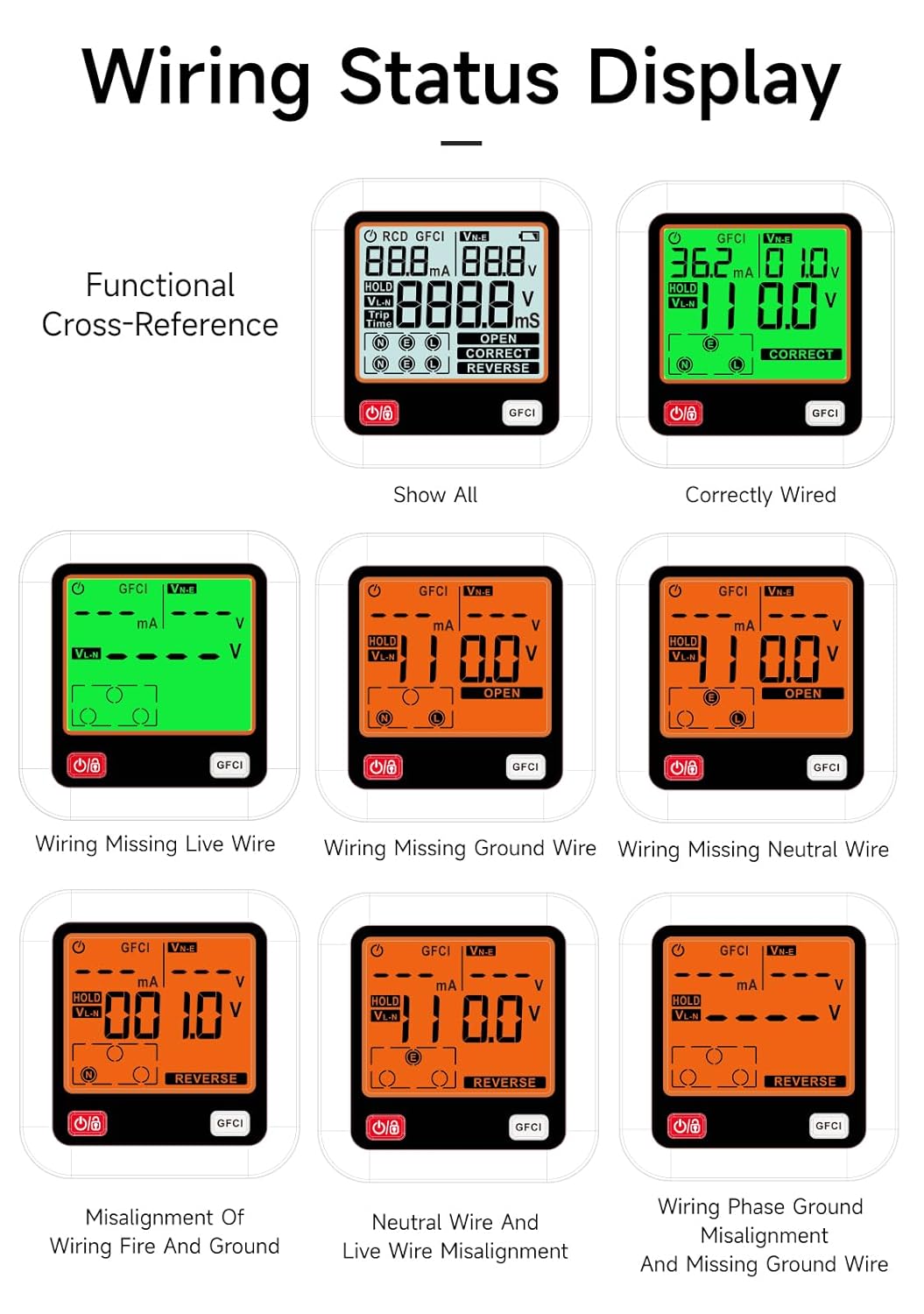
Image 5.1: Examples of wiring status displays, including Correctly Wired, Missing Live Wire, Missing Ground Wire, Missing Neutral Wire, Misalignment of Wiring Fire and Ground, Neutral Wire and Live Wire Misalignment, and Wiring Phase Ground Misalignment and Missing Ground Wire.
- CORRECT: Indicates proper wiring.
- OPEN: Indicates an open circuit or missing wire (e.g., Open Ground, Open Neutral, Open Live).
- REVERSE: Indicates reversed wiring (e.g., Live/Neutral Reverse, Live/Ground Reverse).
- Other combinations: The display can show specific combinations of faults, such as missing ground with reversed polarity.
5.3 RCD (GFCI) Test
The RCD test function verifies if the Residual Current Device (or GFCI) associated with the circuit is operating correctly. This test simulates a leakage current to trigger the RCD.

Image 5.2: The RCD test in progress. The button indicator will flash, signaling the completion of the tripping process.
- Plug the tester into the desired outlet.
- Ensure the wiring status is 'CORRECT' before proceeding with the RCD test. Do not perform the RCD test on incorrectly wired outlets.
- Press the white 'RCD' button on the tester.
- The RCD (or leakage protection switch) for that circuit should trip, cutting power to the outlet. The button indicator on the tester will flash.
- If the RCD does not trip, it indicates a malfunction in the residual current device. Immediately consult a professional electrician.
- To restore power, reset the tripped RCD or circuit breaker in your electrical panel.
5.4 AC Voltage Measurement
The tester automatically displays the AC voltage (V) and frequency (Hz) of the circuit when plugged in. This allows for quick verification of the power supply.

Image 5.3: The tester's display showing the measured AC voltage.
5.5 Leakage Current and Voltage Measurement
The device can also measure leakage current and voltage, providing additional diagnostic information about the electrical circuit.

Image 5.4: The tester's display showing leakage current (mA) and leakage voltage (Vn-e).
5.6 Data Hold Function
The data hold function allows you to lock the displayed readings for easier viewing after removing the tester from the socket.

Image 5.5: The 'HOLD' indicator on the display, signifying that the data is locked.
- When the tester is plugged into a socket, the data will automatically lock after approximately three seconds. The 'HOLD' indicator will appear on the screen.
- To release the held data and return to live readings, press the Power On/Data Retention Key.
6. Maintenance
To ensure the longevity and accuracy of your Aicevoos D9C Socket Tester, follow these maintenance guidelines:
- Cleaning: Wipe the device with a soft, dry cloth. Do not use abrasive cleaners or solvents.
- Storage: Store the tester in a cool, dry place, away from direct sunlight and extreme temperatures.
- Battery Replacement: Replace batteries when the low battery indicator appears on the display. Remove batteries if the device will not be used for an extended period to prevent leakage.
- Inspection: Periodically inspect the device for any signs of damage, such as cracks in the casing or bent pins. Do not use if damaged.
7. Troubleshooting
If you encounter issues with your Aicevoos D9C Socket Tester, refer to the following troubleshooting steps:
- Device does not power on: Check if batteries are correctly installed and have sufficient charge. Replace batteries if necessary.
- Inconsistent or no readings: Ensure the tester is fully and securely plugged into the socket. Try testing a known working socket to verify device functionality. If readings remain inconsistent, re-insert the device or test another socket.
- RCD test does not trip the circuit: This indicates a potential fault with the RCD or the electrical wiring. Immediately discontinue use of the outlet and consult a professional electrician. Do not attempt to bypass or repair the RCD yourself.
- Display is dim or flickering: This usually indicates low battery power. Replace the AAA batteries.
For issues not covered here, please contact Aicevoos customer support.
8. Specifications
Technical specifications for the Aicevoos D9C Socket Tester:
| Parameter | Value |
|---|---|
| Product Name | AS-D9C |
| Phase Voltage | 90-250V / 45-65Hz |
| Leakage Voltage | 0-99V / 45-65Hz |
| Trip Time | 10-1000ms |
| RCD Test Current | >30mA |
| Auto Power Off | 5 Minutes |
| Data Hold | Yes |
| Battery | 2 x AAA 1.5V |
| Dimensions | 8.2 x 7.39 x 7.39 cm |
| Weight | 120 Grams |
| Operating Voltage Min. | 90 Volts |
| Operating Voltage Max. | 250 Volts |
| Certifications | CE |
Table 8.1: Functional parameters of the Aicevoos D9C Socket Tester.
9. Warranty and Support
Aicevoos is committed to providing high-quality products. For any questions, concerns, or technical support regarding your D9C Socket Tester, please contact Aicevoos customer service. Refer to the product packaging or the official Aicevoos website for contact details.
Please retain your purchase receipt for warranty purposes. Information regarding spare parts availability is currently not available.