
1. Introduction
Thank you for choosing the HYCHIKA 140-SD Detail Sander. This powerful 140W palm sander tool is designed for efficient material removal on wood surfaces, featuring a 13,000 OPM motor and an effective dust collection system. This manual provides essential information for the safe and proper operation, maintenance, and troubleshooting of your new detail sander. Please read it thoroughly before first use and keep it for future reference.
2. Safety Instructions
Always follow basic safety precautions when using electrical tools to reduce the risk of fire, electric shock, and personal injury.
- Eye Protection: Always wear appropriate eye protection, such as safety goggles, when operating the sander.
- Respiratory Protection: Wear a dust mask, especially when sanding materials that produce fine dust.
- Work Area: Ensure your work area is clean, well-lit, and free from clutter. Keep children and bystanders away.
- Electrical Safety: Do not expose the sander to rain or wet conditions. Do not abuse the cord. Keep the cord away from heat, oil, sharp edges, or moving parts.
- Secure Workpiece: Always secure the workpiece firmly to prevent movement during sanding.
- Ventilation: Ensure adequate ventilation in the work area to disperse dust and fumes.
- Maintenance: Disconnect the sander from the power source before making any adjustments, changing accessories, or storing the tool.
3. Package Contents
Verify that all items are present upon opening the package:
- HYCHIKA 140-SD Detail Sander
- 12 pieces of Sandpaper (P80, P120, P240 grits)
- Dust Collection Bag
- Vacuum Adapter (if included, based on image)

Figure 3.1: Contents of the HYCHIKA Detail Sander package, showing the sander, various grit sandpapers, and the dust collection bag.
4. Product Features
- Powerful Motor: The 1.2 Amp motor delivers 13,000 OPM (Orbits Per Minute) for fast and thorough material removal, ensuring efficient sanding performance.
- Included Sandpapers: Comes with 12 sheets of sanding paper (4x P80, 4x P120, 4x P240) for immediate use across various sanding tasks.
- Efficient Dust Collection: A high-performance system keeps your worksurface clean with less sawdust and debris, improving visibility and reducing cleanup time.
- Ergonomic Design: The soft rubber handle provides a comfortable and secure grip. The compact and lightweight design allows for easy control and one-handed operation.
- Easy On and Off Switch: Features a dust-sealed on/off switch for hassle-free operation, protecting internal components from dust ingress.

Figure 4.1: Upgraded Dust Collection System.

Figure 4.2: Ergonomic Design with Soft Rubber Handle.

Figure 4.3: Hook and Loop Design for easy sandpaper changes.

Figure 4.4: Key Specifications: 1.8M Cable, 140W Motor, 13000 OPM.
5. Setup
5.1 Attaching Sandpaper
- Ensure the sander is unplugged from the power source.
- Align the holes on the sandpaper with the holes on the sanding pad.
- Press the sandpaper firmly onto the hook-and-loop pad until it is securely attached.
5.2 Dust Collection System
The sander comes with an integrated dust collection system to minimize airborne dust.
- Attaching the Dust Bag: Slide the dust collection bag onto the dust port at the rear of the sander until it is securely fitted.
- Connecting to a Vacuum Cleaner: For enhanced dust extraction, you can connect the sander to a shop vacuum using the provided vacuum adapter. Attach the adapter to the dust port, then connect your vacuum hose to the adapter.
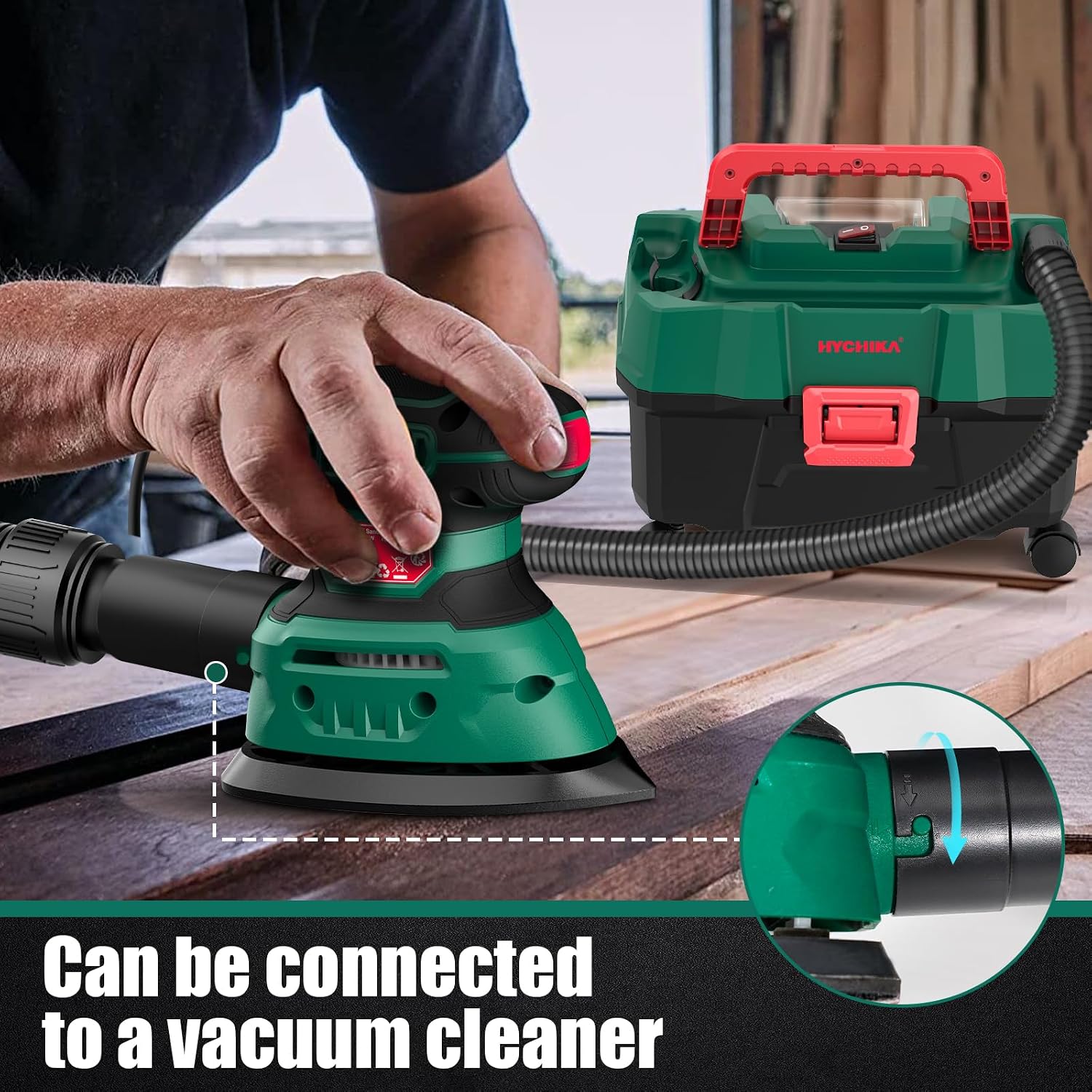
Figure 5.1: Connecting the sander to an external vacuum cleaner.
6. Operating Instructions
6.1 Powering On/Off
- Ensure the sander is properly set up with sandpaper and dust collection.
- Plug the sander into a 120V power outlet.
- To turn the sander ON, locate the dust-sealed switch (often a rocker switch) and press it to the "I" (ON) position.
- To turn the sander OFF, press the switch to the "O" (OFF) position.
6.2 Sanding Technique
For best results, follow these guidelines:
- Hold the sander firmly with both hands, if comfortable, or one hand using the ergonomic grip.
- Place the sander flat on the workpiece before turning it on.
- Apply light, even pressure. Let the sander's speed and the sandpaper do the work. Excessive pressure can reduce efficiency and damage the workpiece or sander.
- Move the sander in smooth, overlapping passes across the surface. For wood, sand along the grain.
- The triangular sanding pad is ideal for reaching corners and tight spaces.
- When finished, lift the sander from the workpiece before turning it off.

Figure 6.1: Sander in use, demonstrating its effectiveness in complex areas and dust collection.
6.3 Choosing Sandpaper Grits
The included sandpapers offer different grits for various applications:
- P80 (Coarse): Ideal for rapid material removal, stripping old paint or varnish, and rough shaping.
- P120 (Medium): Suitable for general sanding, smoothing surfaces after coarse sanding, and preparing for finishing.
- P240 (Fine): Used for final smoothing, light sanding between coats of finish, and achieving a very smooth surface.

Figure 6.2: Multiple grits available for various applications.
7. Maintenance
Regular maintenance ensures optimal performance and extends the life of your sander.
7.1 Cleaning and Dust Bag Emptying
- Always unplug the sander before cleaning.
- Empty the dust collection bag frequently, especially after prolonged use, to maintain efficient dust extraction. To empty, detach the bag and shake out the contents into a waste receptacle.
- Use a soft brush or compressed air to clean dust from the ventilation openings and around the sanding pad.
- Do not use harsh chemicals or abrasive cleaners.
7.2 Sandpaper Replacement
- Replace sandpaper when it becomes worn, torn, or no longer effectively removes material.
- Follow the instructions in Section 5.1 for attaching new sandpaper.
8. Troubleshooting
| Problem | Possible Cause | Solution |
|---|---|---|
| Sander does not turn on. | No power supply; Faulty switch; Damaged cord. | Check power outlet and cord connection. Ensure switch is fully engaged. If problem persists, contact customer support. |
| Poor dust collection. | Dust bag full; Dust port clogged; Improperly attached dust bag/vacuum. | Empty dust bag. Clear any blockages from the dust port. Ensure dust bag or vacuum adapter is securely attached. |
| Sander vibrates excessively or sands unevenly. | Worn or improperly attached sandpaper; Damaged sanding pad. | Replace sandpaper, ensuring it is correctly aligned and firmly attached. Inspect sanding pad for damage. |
| Switch is stiff or hard to operate. | Dust accumulation in switch mechanism; New tool stiffness. | Operate the switch several times to loosen it. Ensure no dust is visibly obstructing it. This can be common with dust-sealed switches. |
9. Specifications
| Feature | Detail |
|---|---|
| Model Number | 140-SD |
| Power Source | Corded Electric |
| Voltage | 120 Volts |
| AC Adapter Current | 1.2 Amps |
| Motor Power | 140W |
| Orbits Per Minute (OPM) | 13,000 OPM |
| Grit Type | Fine (P80, P120, P240 included) |
| Item Weight | 2.2 Pounds |
| Cable Length | 1.8 Meters (approx. 5.9 feet) |
10. Warranty and Support
HYCHIKA BETTER TOOLS FOR BETTER LIFE stands behind the quality of its products. For warranty information, technical support, or service inquiries, please refer to the warranty card included with your product or visit the official HYCHIKA website.
Contact Information:
- Website: HYCHIKA Official Store on Amazon
- Please check the product packaging or included documentation for specific customer service contact details.
