
Introduction
Welcome to the world of music with your new UISCOM 88 Key Semi-weighted Electronic Keyboard Piano. This instrument is designed to provide a dynamic and responsive playing experience, ideal for beginners and experienced musicians alike. Featuring 128 preset rhythms, 128 tones, and 80 demo songs, it offers a diverse sonic palette. Its MIDI and Bluetooth capabilities allow for seamless integration with learning software and smart devices, enhancing your musical journey. Lightweight and portable, it's perfect for home practice, stage performances, or social playing.

Image: The UISCOM 88 Key Electronic Keyboard Piano set up in a bright, modern living space, showcasing its sleek design and full-size keys.
What's in the Box
Please check the package contents to ensure all items are present:
- UISCOM 88 Key Semi-weighted Electronic Keyboard Piano
- Adjustable Stand
- Sustain Pedal
- Power Supply (AC adapter)
- Carrying Case
- Headphones
- Music Stand (Sheet Music Holder)

Image: A visual representation of the included sheet music stand, sustain pedal, and a close-up of the piano's control panel.
Setup
1. Assembling the Stand
Carefully unpack the adjustable stand components. Follow the instructions provided in the stand's manual to assemble it. Ensure all screws are tightened securely for stability. The stand is designed to be easily adjustable to your preferred playing height.
Video: This video demonstrates the step-by-step installation process for the keyboard piano stand, ensuring correct and stable assembly.
2. Placing the Piano on the Stand
Gently place the UISCOM 88 Key Electronic Keyboard Piano onto the assembled stand. Ensure it is centered and stable. The piano is lightweight, making it easy to position.
3. Connecting Power and Accessories
- Power Supply: Connect the AC adapter to the 'POWER' port on the piano and then plug it into a wall outlet.
- Sustain Pedal: Plug the sustain pedal into the designated 'PEDAL' port.
- Headphones: For silent practice, connect the included headphones to the 'HEADPHONES' jack.
- Music Stand: Insert the music stand into the slot on top of the piano.
- MIDI/USB: Use the MIDI/USB ports to connect to external devices or computers for advanced functions.
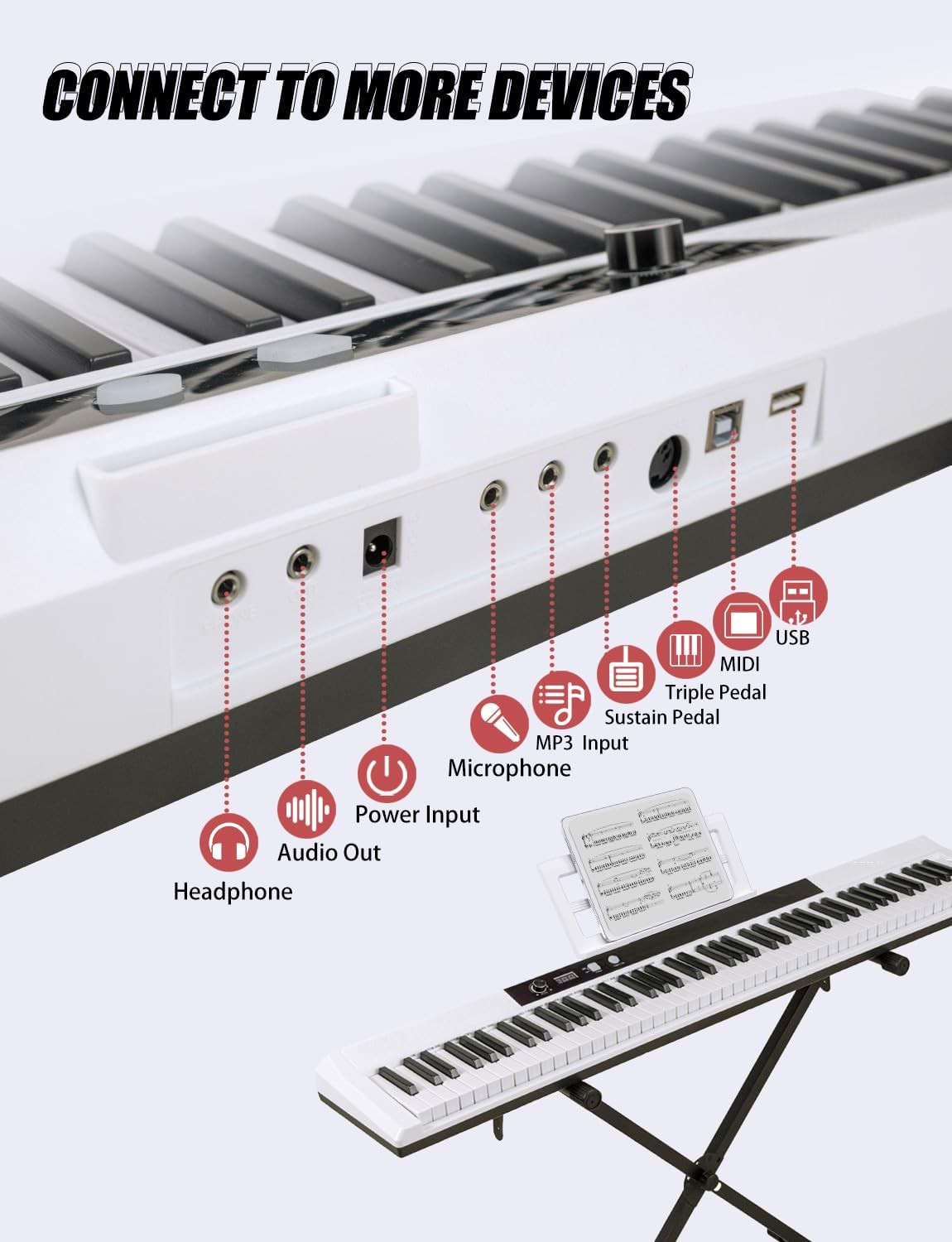
Image: A close-up view of the piano's rear panel, highlighting all available connection ports including headphones, audio out, power input, microphone, MP3 input, sustain pedal, MIDI, and USB.
Operating Instructions
1. Power On/Off
Press the 'POWER' button located on the control panel to turn the piano on or off. The digital display will illuminate upon power-up.
2. Volume Control
Adjust the master volume using the dedicated volume knob or buttons on the control panel to suit your environment and preference.
3. Tones and Rhythms
Your piano features 128 preset tones and 128 preset rhythms. Use the 'TONE' and 'RHYTHM' buttons, along with the data wheel or number keys, to select your desired sound or accompaniment style. The digital display will show the selected number.

Image: A detailed view of the piano's keys and control panel, illustrating the semi-weighted action and the display of various musical features.
4. MIDI and Bluetooth Connectivity
The piano is MIDI-enabled, allowing direct connection to music learning software on your computer. Utilize the Bluetooth function to wirelessly connect to your smart devices, opening up possibilities for interactive learning and creative expression.
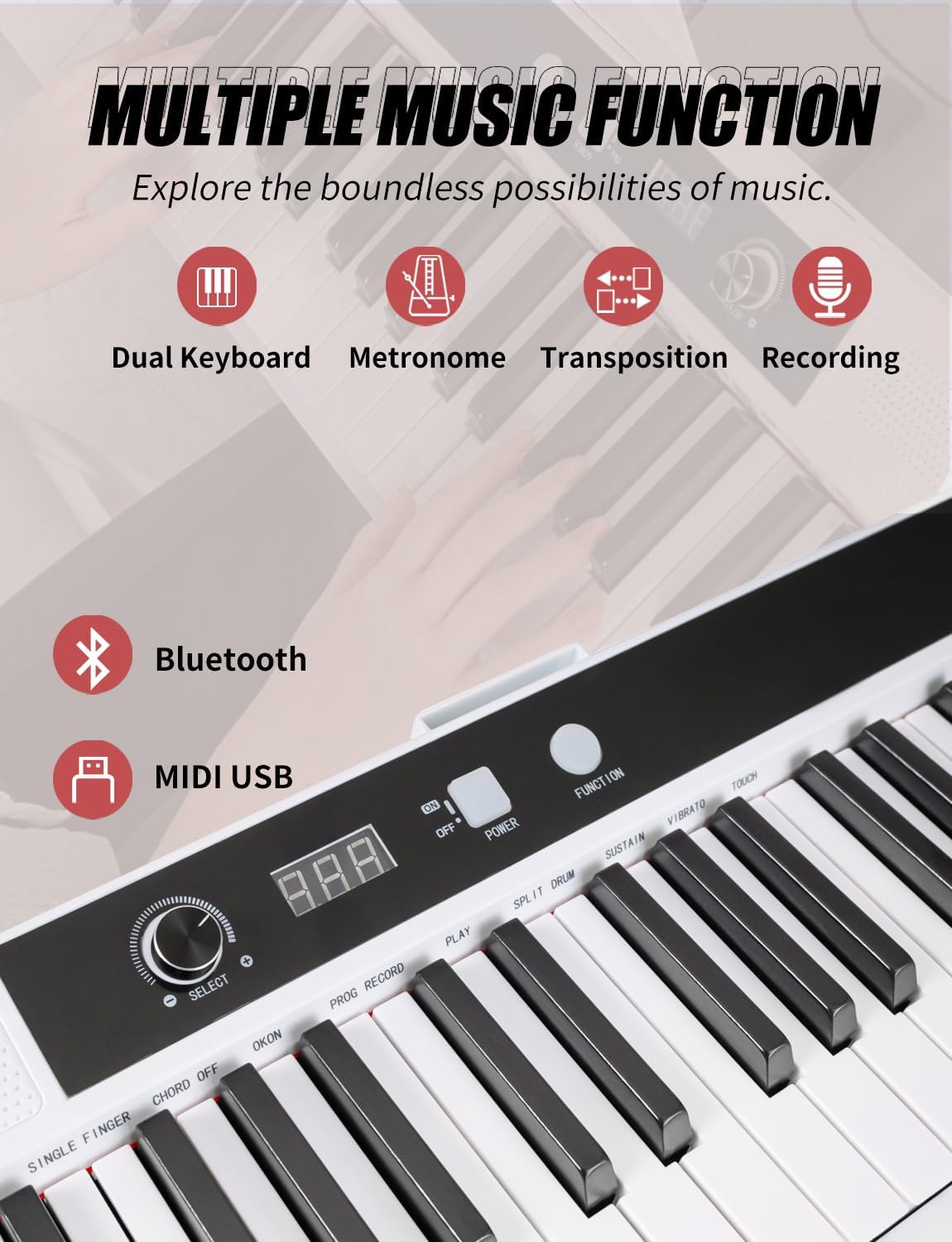
Image: A visual guide to the piano's diverse music functions, emphasizing its capabilities for dual keyboard mode, metronome, transposition, recording, Bluetooth, and MIDI USB connectivity.
5. Recording and Playback
Use the 'RECORD' button to capture your performances. The 'PLAYBACK' function allows you to listen to your recorded pieces. This is a great tool for self-assessment and tracking progress.
6. Metronome and Demo Songs
Activate the built-in metronome for rhythm practice. Explore the 80 demo songs to enjoy pre-recorded melodies and learn new pieces.
7. Semi-Weighted Keys
The semi-weighted 88 keys offer a realistic piano feel with a faster rebound and lighter touch, making it comfortable for extended playing sessions and ideal for developing proper finger technique.
Video: This video provides a concise overview of the UISCOM 88 Key Full Size Semi-weighted Electronic Keyboard Piano, highlighting its key features and design.
8. Silent Practice Mode
Connect your headphones to the dedicated jack for silent practice, allowing you to play anytime without disturbing others.

Image: A young person is shown practicing on the piano with headphones, emphasizing the silent practice mode and the presence of dual powerful speakers for an immersive experience.
Maintenance
- Cleaning: Use a soft, dry cloth to wipe down the piano's surface. Avoid abrasive cleaners or solvents.
- Storage: When not in use, store the piano in its carrying case to protect it from dust and damage. Keep it in a cool, dry place away from direct sunlight and extreme temperatures.
- Handling: Always handle the piano with care. Avoid dropping it or placing heavy objects on top of it.
Troubleshooting
- No Sound: Check if the piano is powered on and the volume is turned up. Ensure headphones are not plugged in if you intend to use the speakers. Verify all cables are securely connected.
- Keys Not Responding: Ensure the piano is powered on. If specific keys are unresponsive, contact customer support.
- Connectivity Issues: For Bluetooth, ensure the piano is in pairing mode and your smart device's Bluetooth is enabled. For MIDI/USB, check cable connections and software settings on your computer.
Specifications
| Feature | Detail |
|---|---|
| Model Name | 2001 |
| Number of Keys | 88 |
| Key Type | Semi-Weighted |
| Dimensions | 51.2 inches x 9.25 inches x 3.5 inches |
| Item Weight | 15.9 Pounds |
| Tones | 128 Preset Tones |
| Rhythms | 128 Preset Rhythms |
| Demo Songs | 80 |
| Polyphony | 128 |
| Connectivity | MIDI, Bluetooth, 3.5mm Jack (Headphones, MP3 Input) |
| Power Source | AC adapter |
| Material Type | Synthetic Composite/Plastic |

Image: The piano's compact dimensions are illustrated, emphasizing its portability and ease of transport.
Warranty and Support
UISCOM is committed to 100% customer satisfaction. We provide high-quality customer support and assistance to ensure your journey with our digital pianos is enjoyable and hassle-free. For any questions, concerns, or warranty claims, please refer to the contact information provided in your product packaging or visit the official UISCOM website.

Image: The official UISCOM brand logo.