
1. Introduction
This manual provides essential instructions for the safe and effective operation of your Calogy 10x10 and Mini Heat Press Machine Kit. Please read this guide thoroughly before initial use and retain it for future reference.
2. Safety Information
WARNING: Heat presses operate at high temperatures. Always exercise caution to prevent burns and other injuries.
- Always place the heat press on a stable, heat-resistant surface.
- Keep hands and fingers away from the heating plate during operation.
- Do not leave the machine unattended while it is powered on or heating.
- Ensure proper ventilation in your workspace.
- Unplug the machine when not in use and allow it to cool completely before storing.
- The built-in temperature fuse will cut off power if the temperature exceeds 240°C/464°F to prevent overheating.
- Advanced anti-short circuit technology is integrated for enhanced safety.

Image: Diagram illustrating the overheating protection feature of the Calogy Heat Press, showing a safety fuse that cuts power if temperature exceeds 240°C/464°F.
3. What's Included
Your Calogy Heat Press Machine Kit includes:
- 1 x Calogy 10x10 inches Heat Press Machine
- 1 x Calogy Mini Heat Press Machine
- 1 x Calogy 15x15 inches Heat Press Mat
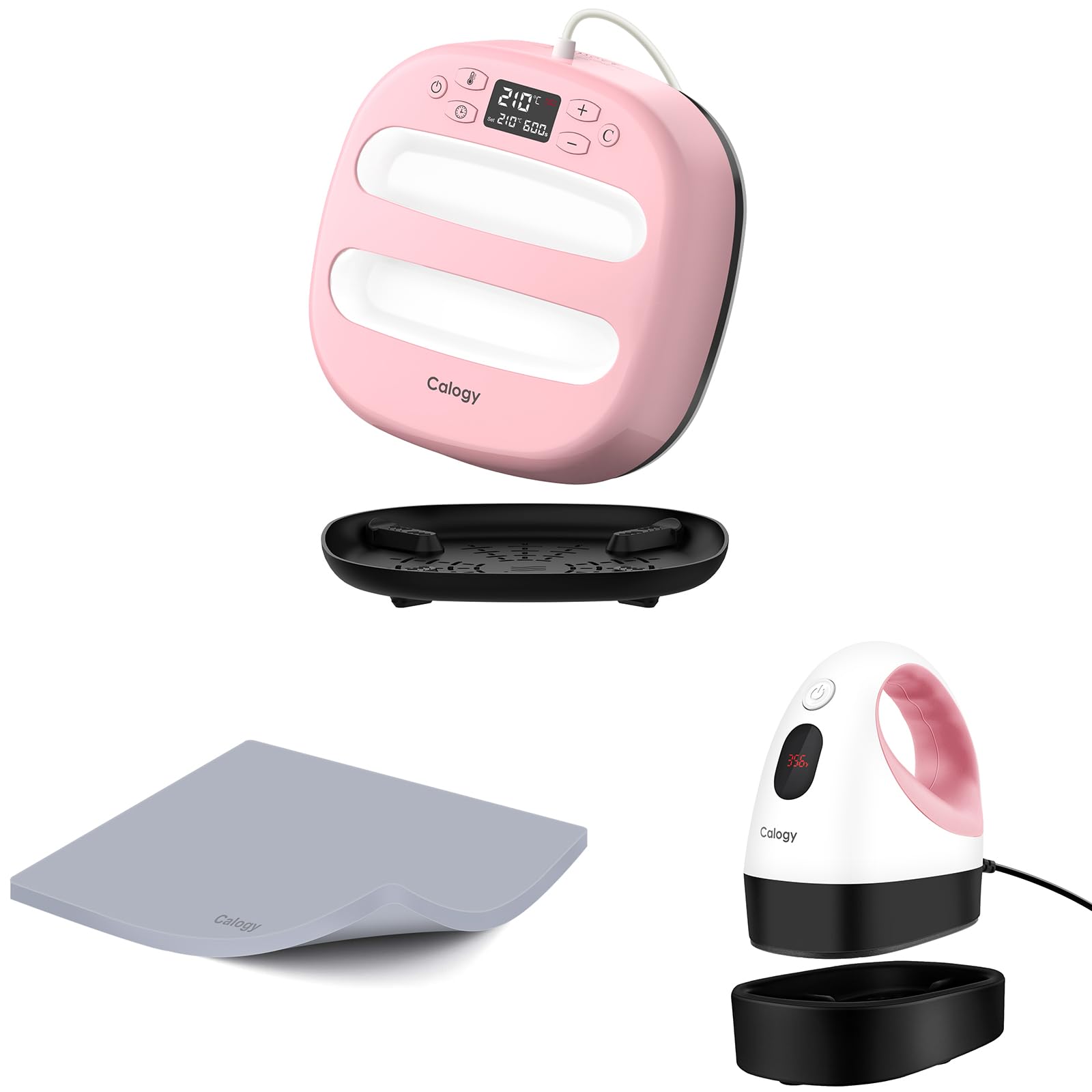
Image: The Calogy 10x10 Heat Press Machine in pink with its black safety base.

Image: The Calogy Mini Heat Press Machine in white and pink with its black safety base.

Image: A grey Calogy Heat Press Mat showing dimensions of 15 inches (38 cm) by 15 inches (38 cm) and a thickness of 0.34 inches (0.85 cm).
4. Specifications
4.1 Calogy 10x10 Heat Press Machine
- Heating Plate Size: 10 x 10 inches (25.4 x 25.4 cm)
- Maximum Temperature: 210°C / 410°F
- Timer Range: 10s - 600s
- Temperature Setting Increment: 5°C / 5°F
- Auto-Off Feature: 15 minutes of inactivity
- Power: 1300W
- Net Weight: 2.7 kg / 5.95 lb
- Power Cord Length: 6.06 ft / 1.85 m
- Dimensions: 26 cm (W) x 26 cm (L) x 9.5 cm (H) / 10.24 in (W) x 10.24 in (L) x 3.74 in (H)
4.2 Calogy Mini Heat Press Machine
- Heating Plate Size: 2.87 x 4.43 inches (7.29 x 11.25 cm)
- Dimensions: 4.52 x 2.95 x 5.1 inches (11.5 x 7.5 x 13 cm)
- Temperature Levels: 3 preset levels (Low: 140°C/284°F, Medium: 160°C/320°F, High: 180°C/356°F)
- Auto-Off Feature: 15 minutes of inactivity
- Display: LED for real-time temperature
4.3 Calogy Heat Press Mat
- Size: 15 x 15 inches (38 x 38 cm)
- Thickness: Approximately 0.34 inches (0.85 cm)
- Heat Resistance: Up to 500°C / 937°F

Image: A diagram showing the dimensions and key specifications (Power, Net Weight, Power Cord) of the Calogy 10x10 Heat Press Machine and the Heat Press Mat.
5. Setup
- Unpack: Carefully remove all components from the packaging.
- Placement: Place the heat press machine on a flat, stable, and heat-resistant surface. Ensure there is adequate space around the machine for safe operation and ventilation.
- Power Connection: Plug the power cord into a suitable electrical outlet.
- Mat Placement: For the 10x10 heat press, place the 15x15 inch heat press mat on your work surface to protect it from heat.
6. Operating Instructions
6.1 Calogy 10x10 Heat Press Machine Operation

Image: Diagram labeling the control panel of the Calogy 10x10 Heat Press, including Power ON/OFF, Temperature Button, Timer Button, Increase Button (+), Decrease Button (-), Countdown Button (C), Real-time Temp Display, Setting Temp, Setting Time, Handle, Main Body, Heat Plate, and Safety Base.
- Power On: Press the power button (⏻) to turn on the machine. The display will show the current temperature.
- Set Temperature: Press the temperature button (🌡️). Use the '+' and '-' buttons to adjust the desired temperature. The temperature adjusts in 5°C/°F increments. Long press '+' or '-' for faster adjustment.
- Set Time: Press the timer button (⏱️). Use the '+' and '-' buttons to adjust the desired time (10s to 600s). Long press '+' or '-' for faster adjustment.
- Preheating: Allow the machine to preheat until it reaches the set temperature. The heating status light will be constant during heating and flash when the set temperature is reached. A beep will sound when the set temperature is reached.
- Prepare Item: Place your garment or item on the heat press mat. Position your heat transfer material (HTV, Infusible Ink, etc.) onto the item.
- Press: Place the heat press firmly onto your design. Press the countdown button (C) to start the timer.
- Finish: Once the timer counts down to zero, a beep will sound. Carefully lift the heat press from your item. Follow the specific instructions for your heat transfer material regarding warm peel or cool peel.

Image: A four-step visual guide demonstrating how to operate the Calogy Heat Press: 1. Set desired temperature and time, 2. Place DIY decal and press, 3. Countdown and Beep reminder, 4. Remove cover slowly and finish.
6.2 Calogy Mini Heat Press Machine Operation

Image: Diagram showing the three temperature levels of the Calogy Mini Heat Press: Low (140°C/284°F), Medium (160°C/320°F), and High (180°C/356°F), along with instructions for changing levels.
- Power On: Long press the power button (⏻) for 3 seconds to turn on the machine. The LED display will show the current temperature.
- Set Temperature Level: Press the power button once to cycle through the 3 temperature levels (L1, L2, L3). The LED will display the corresponding temperature.
- Preheating: Allow the machine to preheat to the selected temperature.
- Press: Apply the mini heat press firmly and evenly over your design for the recommended time for your material.
- Auto-Off: The mini heat press will automatically power off after 15 minutes of inactivity.
6.3 Heat Transfer Material Guide
Refer to the following table for general temperature and time recommendations for various heat transfer materials and base fabrics. Always perform a test press on a scrap piece of fabric if unsure.
| Base Material | Basic PU (Warm Peel) | Foil (Cool Peel) | Glitter (Warm Peel) | Holographic (Warm Peel) | Stretchable (e.g. Sportflex) (Warm Peel) | Patterned (Cool Peel) | Ready to Apply Designs (Cool Peel) | Fusible Fabric (-) |
|---|---|---|---|---|---|---|---|---|
| 100% Cotton | 330°F/165°C 30s (G) | 315°F/155°C 30s (G) | 340°F/170°C 30s (G) | 330°F/165°C 30s (G) | - | 340°F/170°C 50s (F) | 340°F/170°C 50s (F) | 315°F/155°C 30s |
| Cotton Poly Blend | 330°F/165°C 30s (G) | 315°F/155°C 30s (G) | 340°F/170°C 30s (G) | 330°F/165°C 30s (G) | - | 340°F/170°C 50s (F) | 340°F/170°C 50s (F) | 315°F/155°C 30s |
| Polyester | 285°F/140°C 30s (G) | 315°F/155°C 30s (G) | 340°F/170°C 30s (G) | 330°F/165°C 30s (G) | 315°F/155°C 30s (G) | - | - | 315°F/155°C 30s |
| Nylon Blend Or Silk | 280°F/140°C 30s (G) | 285°F/140°C 30s (G) | - | - | 315°F/155°C 30s (G) | - | - | 305°F/150°C 30s |
| Silk | 280°F/140°C 30s (G) | 285°F/140°C 30s (G) | - | - | - | - | - | 305°F/150°C 30s |
| Mesh | 280°F/140°C 30s (G) | 305°F/150°C 30s (G) | - | - | - | - | - | 315°F/155°C 30s |
| Cotton Canvas | 340°F/170°C 30s (G) | 305°F/150°C 30s (G) | 285°F/140°C 30s (G) | 295°F/145°C 30s (G) | - | 340°F/170°C 50s (F) | 340°F/170°C 50s (F) | 330°F/165°C 30s |
| Felt | 280°F/140°C 30s (G) | 305°F/150°C 30s (G) | 285°F/140°C 30s (G) | 295°F/145°C 30s (G) | - | 265°F/130°C 30s (F) | 265°F/130°C 30s (F) | 305°F/150°C 30s |
| Faux Leather | 280°F/140°C 30s (G) | 255°F/125°C 30s (G) | 285°F/140°C 30s (G) | 295°F/145°C 30s (G) | - | 265°F/130°C 20s (F) | 265°F/130°C 20s (F) | - |
| Cardstock | 280°F/140°C 30s (G) | 270°F/130°C 30s (G) | 290°F/145°C 30s (G) | 295°F/145°C 30s (G) | - | 290°F/145°C 30s (F) | 290°F/145°C 30s (F) | - |
| Corkboard | 315°F/155°C 15s | - | 315°F/155°C 15s | 315°F/155°C 15s | - | - | - | - |
| Chipboard | 315°F/155°C 15s | - | 315°F/155°C 15s | 315°F/155°C 15s | - | - | - | - |
G: Gentle Press (Light pressure)
F: Firm Press (Strong pressure)
Warm Peel: Remove liner while your design is warm to the touch, but not hot. If you allow it to cool completely, it may require more effort to remove the liner.
Cool Peel: Allow to cool completely before removing the liner. Removing the liner while still warm or hot may cause your iron-on design to stretch or warp.

Image: First part of a table detailing recommended temperature and time settings for various heat transfer materials on different base fabrics.

Image: Second part of a table detailing recommended temperature and time settings for various heat transfer materials on different base fabrics, including notes on peel types and pressure.
7. Maintenance
- Cleaning the Heating Plate: Ensure the machine is unplugged and completely cool. Use a soft, damp cloth to wipe the heating plate. For stubborn residue, use a specialized heat press cleaner or a small amount of rubbing alcohol on a cloth. Avoid abrasive cleaners or sharp objects that could scratch the plate.
- Cleaning the Exterior: Wipe the exterior surfaces with a soft, dry cloth.
- Storage: Store the heat press in a dry, dust-free environment. Always place the heat press on its safety base when not in use.
8. Troubleshooting
8.1 Common Issues and Solutions
- Machine not turning on:
• Check if the power cord is securely plugged into both the machine and the electrical outlet.
• Ensure the power outlet is functional. - Temperature not reaching set value:
• Allow sufficient time for preheating. Larger temperature changes require more time.
• Ensure the machine is not in a cold environment that might affect heating efficiency. - Heat transfer material not adhering:
• Verify that the temperature and time settings match the recommendations for your specific material and fabric (refer to the Heat Transfer Material Guide).
• Ensure you are applying adequate pressure during the press.
• Check if the material is compatible with the fabric.
• Ensure the fabric is clean and dry before pressing. - Design peeling or cracking after washing:
• This often indicates insufficient heat or pressure during application. Re-evaluate your settings and technique.
• Ensure you are following the correct peel method (warm peel vs. cool peel).
• Allow the design to cure for 24 hours before washing. - Machine beeps continuously:
• The machine beeps when the set temperature is reached or when the timer finishes. This is normal operation. - Display shows 'OFF':
• This indicates the machine is powered off but still plugged in. Press the power button to turn it on.
9. Warranty and Support
Calogy offers 7x24 hour customer service. If you encounter any problems or have questions regarding your heat press machine kit, please contact us directly for assistance. We are committed to providing prompt and helpful support.
For support, please visit the Calogy Store on Amazon or refer to your purchase documentation for contact details.