
1. Safety Information
Please read all instructions carefully before assembly and use. Keep this manual for future reference.
- Weight Capacity: Do not exceed the maximum weight capacity of 99 lbs (45 kg).
- TV Size: This stand is designed for TVs between 32 and 75 inches.
- VESA Compatibility: Ensure your TV's VESA pattern is within the range of 100x100mm to 600x400mm.
- Stable Surface: Always place the TV stand on a stable, level surface to prevent tipping.
- Children Safety: Keep children away from the assembly area. Small parts may be a choking hazard.
- Proper Installation: Incorrect installation may result in property damage or personal injury. If you have any doubts, consult a professional.
- Tighten All Screws: Ensure all screws are securely tightened before placing the TV on the stand.
2. Package Contents
Verify all parts are present and undamaged before beginning assembly. If any parts are missing or damaged, contact customer support.
- Tempered Glass Base
- Support Column
- TV Mounting Brackets (2 pieces)
- Horizontal Support Arms
- Hardware Kit (various screws, washers, spacers for TV mounting)
- Cable Clips
- Assembly Tools (e.g., Allen wrench, screwdriver)
- Instruction Manual

Figure 2.1: Included hardware kit with various screws and spacers for TV mounting.
3. Specifications
| Feature | Specification |
|---|---|
| Mounting Type | Tabletop Mount |
| Movement Type | Swivel |
| Material | Metal, Tempered Glass |
| Color | Black |
| Compatible TV Sizes | 32 - 75 inches |
| Maximum Load Capacity | 99 lbs (45 kg) |
| VESA Compatibility | 100x100mm to 600x400mm |
| Swivel Angle | ±30° |
| Tilt Angle | -2° to +10° |
| Height Adjustment | 8 Levels |
| Base Thickness | 8mm Tempered Glass |

Figure 3.1: Technical specifications and dimensions of the AOKCOS TV Stand.
4. Setup and Installation
4.1. Compatibility Check
Before assembly, ensure your TV meets the following criteria:
- TV Size: Between 32 and 75 inches.
- TV Weight: Less than 99 lbs (45 kg).
- VESA Pattern: The distance between the mounting holes on the back of your TV must be between 100x100mm and 600x400mm.
4.2. Assembly Steps
Follow these steps for a secure installation. It is recommended to have two people for certain steps, especially when lifting the TV.
- Assemble the Base and Support Column: Attach the support column to the tempered glass base using the provided screws and tools. Ensure it is firmly secured.
- Attach TV Brackets to Your TV: Select the appropriate screws, washers, and spacers from the hardware kit that fit your TV's VESA mounting holes. Secure the two vertical TV mounting brackets to the back of your TV. Ensure the hooks on the brackets face inward and are vertical.
Video 4.1: Step-by-step installation guide for the AOKCOS TV Stand. This video demonstrates the assembly process for a similar AOKCOS TV stand model.
- Mount the TV to the Stand: Carefully lift your TV and hook the attached TV brackets onto the horizontal support arms of the stand.
- Secure with Safety Locks: Once the TV is hung, attach the safety screws to the designated holes on the TV mounting brackets to prevent the TV from accidentally lifting off the stand.
Video 4.2: Important instructions on how to properly attach the hook mount and engage the safety lock for secure TV installation.
- Cable Management: Use the integrated cable clips on the back of the support column to organize and hide TV cables for a tidy appearance.

Figure 4.1: Detailed view of the stand's cable management system and safety features.
5. Operating Instructions
5.1. Swivel Adjustment
The TV stand allows for a ±30° swivel to the left or right, providing optimal viewing angles from various positions in your room.
- Gently rotate the TV screen to your desired viewing angle.
- The swivel mechanism is designed for smooth, stable movement.

Figure 5.1: The stand's swivel capability allows for a wide viewing angle.
5.2. Tilt Adjustment
Adjust the TV's vertical tilt from -2° (downward) to +10° (upward) to reduce glare and optimize viewing comfort.
- Locate the tilt adjustment screws on the back of the TV mounting brackets.
- Use the provided tool to loosen the screws, adjust the tilt to your preference, and then securely tighten the screws.

Figure 5.2: Adjusting the tilt angle for optimal viewing.
5.3. Height Adjustment
The stand offers 8 levels of height adjustment to position your TV at the ideal viewing height.
- The main support column has four pull-out positions secured by screws.
- Additionally, the TV brackets offer two adjustment options for fine-tuning the height.
- To adjust, remove the TV from the stand (if necessary for column adjustment), reposition the components, and re-secure all screws.
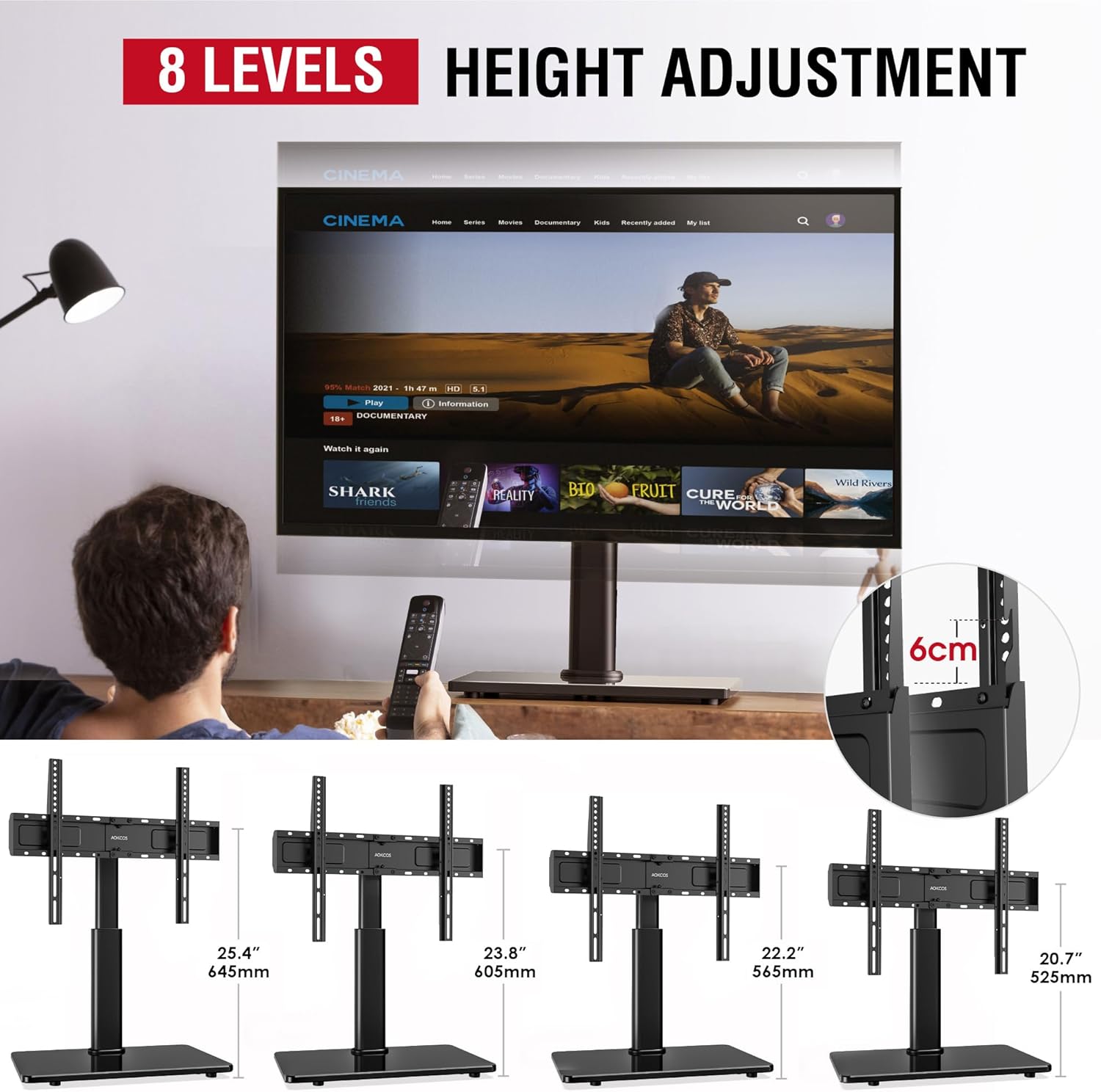
Figure 5.3: Visual representation of the 8-level height adjustment feature.
6. Maintenance
To ensure the longevity and proper function of your TV stand, follow these maintenance guidelines:
- Cleaning: Use a soft, dry cloth to clean the metal and glass surfaces. Avoid abrasive cleaners or solvents that could damage the finish.
- Check Connections: Periodically check all screws and bolts to ensure they remain tight. Loose connections can compromise stability.
- Avoid Overloading: Do not place items heavier than the specified weight capacity on the stand or TV.
- Environmental Conditions: Avoid exposing the stand to extreme temperatures or high humidity.
7. Troubleshooting
If you encounter any issues with your TV stand, refer to the following common problems and solutions:
- Problem: The TV stand feels unstable or wobbly.
Solution: Ensure all assembly screws are fully tightened. Verify the stand is placed on a flat, level surface. Check that the TV's weight and VESA pattern are within the stand's specifications. - Problem: Difficulty adjusting the TV's height or tilt.
Solution: For height adjustment, ensure the TV is removed before adjusting the main column. For tilt, loosen the adjustment screws sufficiently before attempting to change the angle, then re-tighten. - Problem: TV appears to lean forward or backward excessively.
Solution: Double-check that the tilt adjustment screws are properly secured. Ensure the TV mounting brackets are correctly installed and aligned on the TV's back. Verify the TV's weight does not exceed the stand's capacity. - Problem: Missing parts during assembly.
Solution: Carefully review the package contents list. If parts are genuinely missing, contact AOKCOS customer support for assistance.
8. Warranty and Support
This AOKCOS TV stand comes with a 2-Year Manufacturer Warranty.
For warranty claims, technical support, or any questions regarding your product, please contact AOKCOS customer service. You can typically find contact information on the product packaging or the official AOKCOS website.
Thank you for choosing AOKCOS.