
YITAHOME MAYIHEfQe8
YITAHOME King Size Bed Frame Instruction Manual
Model: MAYIHEfQe8
Product Overview
This manual provides detailed instructions for the assembly, operation, and maintenance of your YITAHOME King Size Bed Frame with LED Light, Upholstered Platform Bed Frame with Built-in Headboard Storage and Charging Station.
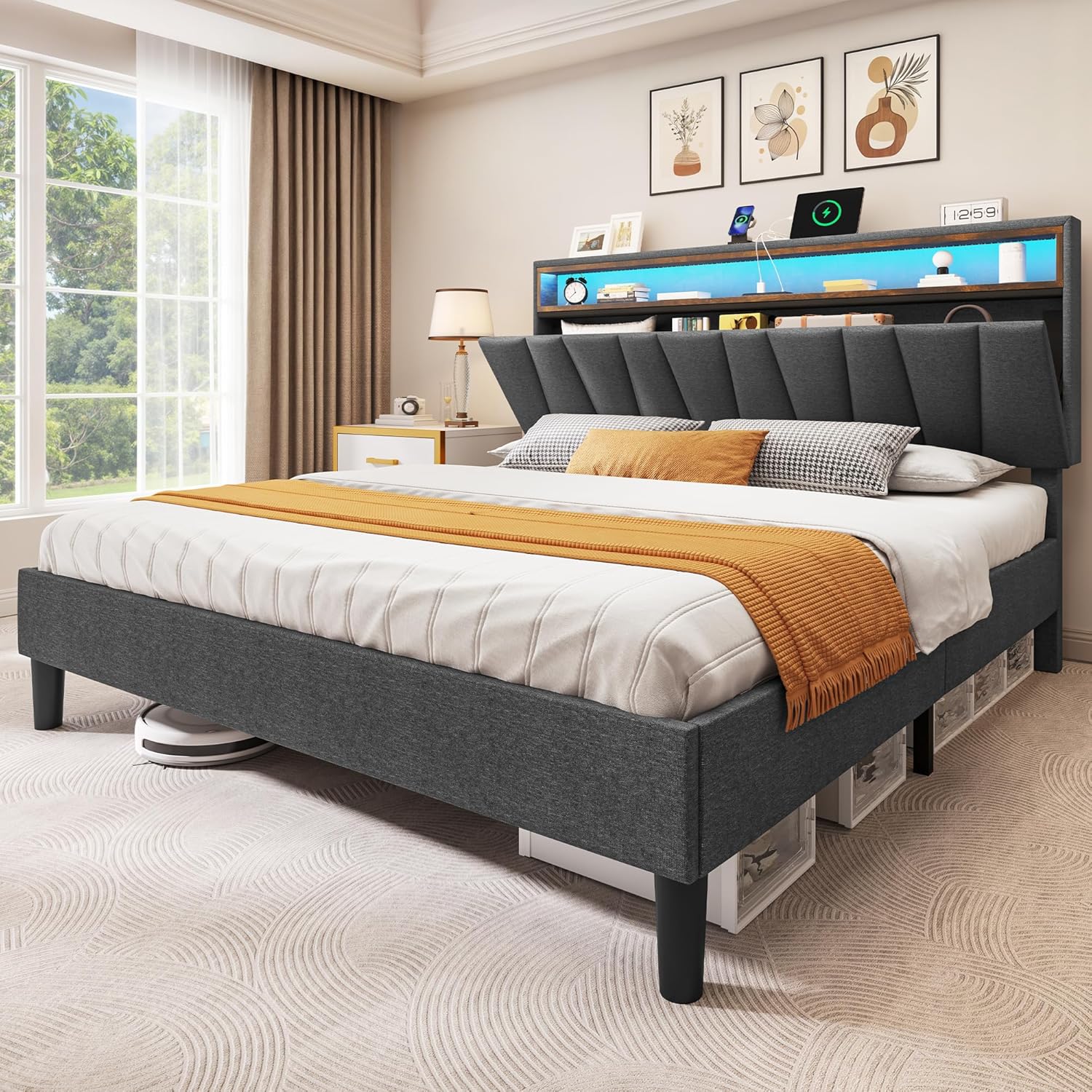
Image: The YITAHOME King Size Bed Frame, showcasing its upholstered headboard, integrated LED lighting, and under-bed clearance. The bed frame is grey linen with a wooden shelf in the headboard.
Key Features:
- Customizable LED lighting on the headboard with app and remote control.
- Concealed headboard storage and built-in charging station (AC outlets and USB ports).
- 7.87-inch under-bed clearance for additional storage.
- Durable metal and wood slat construction for silent support, supporting up to 1100 pounds.
- No box spring required.
Important Safety Information
Please read and understand all instructions before assembly and use. Keep this manual for future reference.
- Be cautious when using the under-bed storage to prevent objects from shifting and causing injury.
- Handle with care during assembly and maintenance to avoid sharp edges.
- Ensure all connections are secure before use.
- Do not exceed the maximum weight capacity of 1100 pounds.
Setup and Assembly
Assembly is required for this bed frame. It is recommended to have two people for assembly.
Package Contents:
Verify all components are present before beginning assembly. Refer to the included parts list in your packaging.
Tools Required:
- Hex key (usually included)
- Screwdriver (Phillips head)
Assembly Steps:
- Unpack Components: Carefully remove all parts from the packaging. Lay them out on a clean, soft surface to prevent scratches. Identify all labeled components according to the parts list.
- Assemble Headboard: Attach the headboard legs to the main headboard section using the provided screws and washers. Ensure all connections are firm.
- Connect Side Rails: Join the side rail sections together. The hook and loop design simplifies this step. Attach the support feet to the side rails.
- Attach Footboard: Secure the footboard to the assembled side rails. The screws for this section are often pre-inserted; loosen them, position the footboard, and then tighten.
- Install Center Brace: Assemble the middle brace components and attach them to the bed frame. This provides central support.
- Place Wood Slats: Lay the wooden slats across the bed frame. Many slats feature a hook and loop (Velcro) system for easy and secure placement. Ensure they are evenly spaced and firmly seated.
- Connect LED and Charging Station: Follow the specific instructions for connecting the LED light strip and the charging station. Ensure the power cord is routed safely and connected to a suitable power outlet.

Image: A detailed diagram illustrating the dimensions of the King size bed frame (82.2"L x 79.5"W x 44.4"H) and its weight capacity of 1100 lbs. It also shows the headboard storage depth and under-bed clearance.

Image: Close-up views highlighting key construction features: EVA bars for noise reduction, the hook-and-loop design for easy slat installation, and the soft, comfortable upholstered fabric.
Operating Instructions
LED Lighting System:
The integrated LED lighting system can be controlled via a mobile application or the included remote control.
- Mobile App Control: Download the designated mobile application (refer to the QR code or app store link in your packaging). Pair your device with the bed frame's LED system via Bluetooth. The app allows for adjustment of colors (over 60,000 options), brightness, various lighting modes, timing functions, and music synchronization.
- Remote Control: Use the provided remote control to power the lights on/off, change colors, adjust brightness, and select pre-set modes. Ensure the remote has working batteries.

Image: An illustration demonstrating the LED light features, including over 60,000 colors, music mode, timing function, and dynamic modes, controllable via a mobile app or remote control.
Charging Station:
The headboard features a built-in charging station for convenient access to power.
- AC Outlets: Two 125V/12A AC outlets are available for plugging in electronic devices.
- USB Ports: Two 5V/2A USB ports are provided for charging mobile phones, tablets, and other USB-powered devices.
- Power Cord: The charging station is powered by a 6.5-foot plug-in power cord. Ensure it is securely plugged into a suitable wall outlet.

Image: A close-up view of the headboard's built-in charging station, showing two AC outlets and two USB ports, along with the 6.5-foot power cord.
Headboard Storage:
The headboard includes concealed storage compartments. Lift the top panel to access the storage area. Do not overload the storage compartments.
Under-Bed Clearance:
The bed frame provides 7.87 inches (20 cm) of under-bed clearance, suitable for storing items in containers or bins. Ensure items stored do not obstruct the bed frame's stability or movement.

Image: A visual representation of the 7.8-inch (20 cm) under-bed clearance, demonstrating the large storage space available beneath the bed frame, suitable for storage boxes.
Maintenance
- Cleaning: For the upholstered linen fabric, use a soft, damp cloth to wipe down surfaces. For spills, blot immediately with a clean, dry cloth. Avoid harsh chemicals or abrasive cleaners.
- Frame Inspection: Periodically check all bolts and screws to ensure they remain tight. Re-tighten if necessary to maintain stability and prevent squeaking.
- LED Lights: If LED lights malfunction, check the power connection and remote control batteries. If issues persist, contact customer support.
- Charging Station: Ensure the power cord is not pinched or damaged. Do not overload the outlets or USB ports.
Troubleshooting
| Problem | Possible Cause | Solution |
|---|---|---|
| Bed frame is wobbly or noisy. | Loose bolts or screws; uneven floor; improperly installed slats. | Re-tighten all assembly bolts. Ensure the bed is on a level surface. Verify slats are correctly seated and secured by the hook and loop system. Consider using rubber pads under feet on hard floors. |
| LED lights are not working. | Power cord disconnected; remote control batteries dead; app not paired. | Check if the LED power cord is securely plugged into an outlet. Replace remote control batteries. Re-pair the mobile app with the LED system. |
| Charging station is not providing power. | Main power cord disconnected; circuit overload. | Ensure the main power cord for the charging station is fully plugged into a wall outlet. Unplug some devices to reduce load if overloaded. |
| Headboard storage difficult to open/close. | Overloaded storage; mattress too thick. | Remove some items from the storage compartment. Note that mattresses thicker than 12 inches may impede easy opening. |
Specifications
| Attribute | Detail |
|---|---|
| Brand | YITAHOME |
| Model Number | MAYIHEfQe8 |
| Size | King |
| Product Dimensions (L x W x H) | 82.28" x 80" x 44.49" |
| Item Weight | 113.1 pounds |
| Weight Capacity | 1100 pounds |
| Material | Linen fabric, Metal, Wood |
| Color | Grey |
| Under-Bed Clearance | 7.87 inches (20 cm) |
| Charging Station | 2 AC Outlets (125V/12A), 2 USB Ports (5V/2A) |
| Assembly Required | Yes |
| Country of Origin | China |
Warranty and Support
For warranty information, please refer to the documentation included with your purchase or contact YITAHOME customer service directly. YITAHOME offers customer support for product inquiries, assembly assistance, and troubleshooting.
For assistance, please visit the official YITAHOME store or contact their customer support channels as indicated on their website or product packaging.
Online Support: YITAHOME Amazon Store
Ask a question about this manual
Ask about setup, troubleshooting, compatibility, parts, safety, or missing instructions. Manuals+ will review the question and use this page’s manual context to help answer it.