
1. Important Safety Instructions
Please read all instructions carefully before using this appliance. Keep this manual for future reference.
- This appliance is for household use only. Do not use outdoors or on wet surfaces.
- Do not allow children to operate the vacuum cleaner. Close supervision is necessary when used near children.
- Do not pick up flammable or combustible liquids, such as gasoline, or use in areas where they may be present.
- Do not pick up anything that is burning or smoking, such as cigarettes, matches, or hot ashes.
- Do not use without the dust cup and filters in place.
- Turn off the appliance before connecting or disconnecting the motorized brush, extension tube, or other accessories.
- Use only manufacturer's recommended attachments.
- Do not immerse the vacuum cleaner in water or other liquids.
- If the charging cable is damaged, it must be replaced by the manufacturer, its service agent, or similarly qualified persons to avoid a hazard.
2. Package Contents
Carefully unpack all components and check against the list below. If any items are missing or damaged, contact customer support.

Image: All components included in the BuTure VAC VC60 package.
- 1 x Vacuum Cleaner Main Body
- 1 x Telescopic Extension Tube
- 1 x Electronic Brush for Soft and Hard Floors
- 3 x HEPA Filters (1 installed, 2 replacements)
- 1 x Scented Tablet Tray
- 1 x Round Brush
- 1 x Crevice Tool
- 1 x Battery Pack
- 1 x Charger
- 1 x Small Cleaning Tool
- 1 x Wall Mount
- 1 x User Manual
3. Assembly and Setup
Follow these steps to assemble your BuTure VAC VC60 cordless vacuum cleaner.
- Attach the Extension Tube: Insert the telescopic extension tube into the main body until it clicks securely into place.
- Connect the Floor Brush: Attach the electronic brush for soft and hard floors to the other end of the extension tube, ensuring it clicks firmly.
- Install the Battery: Slide the battery pack into the designated slot on the main body until it locks. Ensure it is fully charged before first use.
- Optional Accessories: For handheld use or specific cleaning tasks, attach the round brush or crevice tool directly to the main body or the extension tube.
- Wall Mount Installation: Choose a suitable location for the wall mount. Secure it to the wall using appropriate screws and anchors (not included). The vacuum can then be stored on the mount.
4. Operating Instructions
Learn how to use your vacuum cleaner effectively.
4.1 Power On/Off and Suction Modes
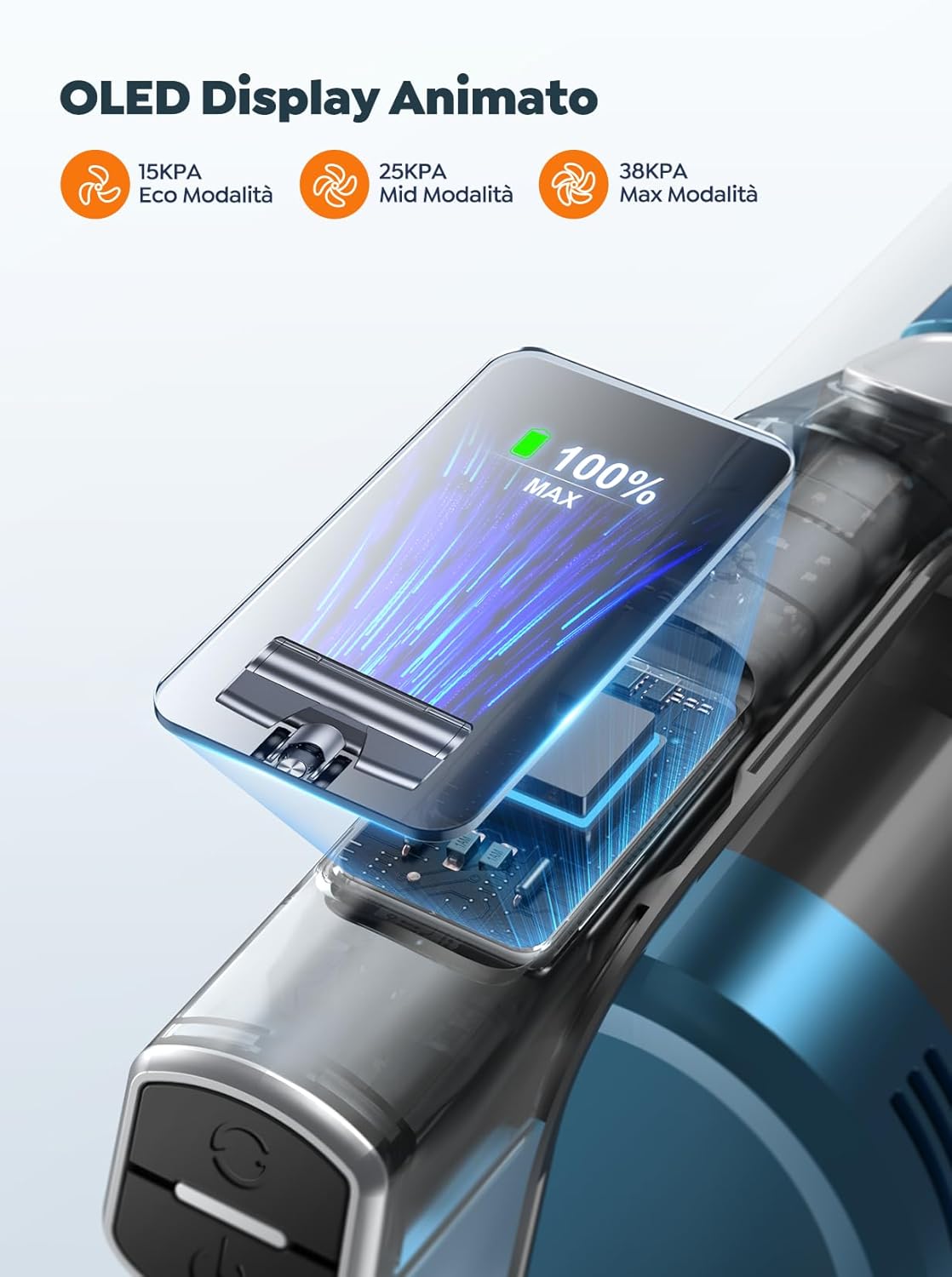
Image: OLED display indicating suction modes and battery status.
- Power On: Press the power button on the main body to turn on the vacuum cleaner. It will start in the default suction mode.
- Adjust Suction: Use the mode button to cycle through the three available suction levels:
- Eco Mode (15 kPa): For light cleaning and extended runtime.
- Mid Mode (25 kPa): For everyday cleaning tasks.
- Max Mode (38 kPa): For deep cleaning and stubborn dirt.
- OLED Display: The intelligent color OLED display shows the current battery level, selected suction mode, and provides intuitive instructions for troubleshooting if issues arise.
- Power Off: Press the power button again to turn off the vacuum cleaner.
4.2 Using the Scented Tablet Tray

Image: The vacuum cleaner's aroma feature in action.
The VC60 includes a scented tablet tray to release a fresh fragrance during operation. Locate the tray, insert a scented tablet (one is included, additional tablets sold separately), and close the tray. The vacuum will then disperse a pleasant scent as you clean.
5. Charging and Battery

Image: Removable battery with charging and runtime indicators.
- Battery Capacity: The vacuum is equipped with a 7 x 2200 mAh lithium-ion battery.
- Charging: Connect the charger to the battery pack (either attached to the vacuum or removed). Plug the charger into a power outlet. The OLED display will indicate charging status.
- Charging Time: A full charge typically takes 4-5 hours.
- Runtime: Enjoy up to 55 minutes of cleaning performance on a single charge (in Eco mode). Runtime will vary based on the selected suction mode and surface type.
- Battery Removal: The battery is removable for convenient charging or replacement. Press the battery release button and slide the battery out.
6. Maintenance
Regular maintenance ensures optimal performance and extends the lifespan of your vacuum cleaner.
6.1 Emptying the Dustbin
Empty the 1.5-liter dustbin regularly, especially when the MAX fill line is reached, to maintain strong suction.
- Ensure the vacuum is turned off.
- Press the dustbin release button and remove the dustbin from the main body.
- Position the dustbin over a trash can and press the bottom release latch to open the lid and empty the contents.
- Close the lid and reattach the dustbin to the main body until it clicks.
6.2 Cleaning the Filters

Image: Multi-cone filtration system with HEPA filter.
The VC60 features a high-quality filtration system, including HEPA filters, designed to capture over 99.98% of fine particles. Clean filters regularly to prevent clogging and maintain suction power.
- Remove the dustbin as described above.
- Twist and pull out the filter assembly from the dustbin.
- Separate the HEPA filter and other filter components.
- Tap off loose dirt. Rinse the filters under cold running water until the water runs clear. Do not use detergent.
- Allow all filter components to air dry completely for at least 24 hours before reassembling and placing them back into the dustbin. Do not use a dryer or heat to dry.
- Replace HEPA filters every 3-6 months, or as needed, for optimal performance.
6.3 Cleaning the Brush Roll

Image: Anti-tangle V-shaped brush roll design.
The V-shaped brush roll and comb-like structure are designed to minimize hair tangles. However, occasional cleaning is recommended.
- Ensure the vacuum is turned off and disconnected from the power source.
- Locate the brush roll release tab on the side of the floor brush head.
- Open the tab and remove the brush roll.
- Use the small cleaning tool provided to cut and remove any tangled hair or debris from the brush roll.
- Clean the brush roll housing.
- Reinsert the brush roll and close the release tab until it clicks.
7. Troubleshooting
If you encounter any issues with your vacuum cleaner, refer to the following table for common problems and solutions. The OLED display may also provide diagnostic messages.
| Problem | Possible Cause | Solution |
|---|---|---|
| Vacuum does not turn on. | Battery is not charged or not properly installed. | Ensure the battery is fully charged and correctly inserted into the main body. |
| Low suction power. | Dustbin is full; filters are clogged; brush roll is tangled; blockage in the tube/nozzle. | Empty the dustbin. Clean or replace filters. Remove tangled hair from the brush roll. Check for and clear any blockages. |
| Brush roll not spinning. | Brush roll is tangled; blockage in the brush head; brush head is not properly attached. | Clean the brush roll and remove any obstructions. Ensure the brush head is securely attached. |
| Short runtime. | Battery not fully charged; operating in Max mode; battery degradation. | Ensure battery is fully charged (4-5 hours). Use Eco or Mid mode for longer runtime. If battery life significantly decreases, consider replacing the battery. |
| Unusual noise. | Blockage in the air path; foreign object in the brush roll. | Check for and remove any blockages in the tube, nozzle, or brush head. |
8. Specifications
Technical details for the BuTure VAC VC60 Cordless Vacuum Cleaner.
| Feature | Detail |
|---|---|
| Model | VC60 |
| Motor Power | 450 W |
| Suction Power | 15 kPa (Eco) - 38 kPa (Max) |
| Battery Capacity | 7 x 2200 mAh (Lithium-ion) |
| Runtime | Up to 55 minutes |
| Charging Time | 4-5 hours |
| Dustbin Capacity | 1.5 Liters |
| Noise Level | ≤ 68 dB |
| Display Type | OLED Color Display |
| Filter Type | HEPA Filter |
| Extension Tube Length | 40-64 cm (adjustable) |
| Item Weight | 2.8 Kilograms |
| Dimensions (L x W x H) | 26L x 111W x 25H centimeters (assembled) |
9. Warranty and Customer Support
BuTure VAC provides a professional after-sales service and support team. For warranty information, technical assistance, or any questions regarding your VC60 cordless vacuum cleaner, please contact BuTure VAC customer support through the retailer where the product was purchased or refer to the official BuTure VAC website for contact details.
Please retain your proof of purchase for warranty claims.