
Introduction
This manual provides detailed instructions for the installation, operation, and maintenance of your new electrosmart 8-inch Android 13 Car Stereo. Please read this manual thoroughly before installation and use to ensure proper functionality and to maximize your user experience. Keep this manual for future reference.
Product Overview
The electrosmart 8-inch Android 13 Car Stereo is an advanced multimedia system designed to integrate seamlessly into compatible Chevrolet, GMC, and Buick vehicles. It features a responsive IPS touch screen, wireless and wired CarPlay/Android Auto, GPS navigation, Bluetooth 5.2, DSP sound processing, and support for a backup camera.

Image: The electrosmart 8-inch Android 13 Car Stereo unit, showcasing its display and physical buttons.
Compatibility
This car stereo is compatible with the following vehicle models and years:
- Chevrolet Silverado 1500HD 2500HD 3500HD (2007-2014) (Second Generation)
- Chevrolet Avalanche (2007-2011)
- Chevrolet Express Van (2008-2011)
- Chevrolet Impala (2006-2012)
- Chevrolet Tahoe (2007-2014)
- Chevrolet Equinox (2005-2009) (First Generation)
- Chevrolet Suburban (2007-2014)
- GMC Acadia (2007-2012)
- GMC Savana (2008-2013)
- GMC Sierra (2007-2011)
- GMC Yukon (2007-2013)
- Buick Enclave (2008-2012)
Note: This unit is not compatible with cars that have Onstar.

Image: Visual representation of the car stereo installed in different compatible Chevrolet, GMC, and Buick dashboards.
Package Contents
Verify that all items are present in the package:
- electrosmart 8-inch Android 13 Car Stereo Unit
- Power Cable
- RCA Cable
- Backup Camera & Cable
- CANBUS Decoder
- GPS Antenna
- Radio Antenna
- USB Cable
- External Microphone
- User Manual (this document)

Image: A visual guide to the components included in the electrosmart car stereo package, including cables, antennas, and the main unit.
Installation Guide
Professional installation is recommended. Ensure the vehicle's battery is disconnected before beginning installation.
1. Remove Existing Stereo
Carefully remove your vehicle's existing factory stereo unit and trim panels. Refer to your vehicle's service manual for specific instructions on panel removal.
2. Connect Wiring Harnesses
Connect the provided power cable, RCA cables, and other necessary wiring harnesses to the corresponding ports on the new electrosmart stereo and your vehicle's wiring. Ensure the CAN BUS decoder is properly connected, as it is essential for power and vehicle integration, especially with Bose systems.

Image: Comparison of a vehicle's dashboard before and after the installation of the electrosmart car stereo, demonstrating the integrated fit.
3. Install GPS Antenna
Mount the GPS antenna in a location with a clear view of the sky, typically on the dashboard or under the windshield, to ensure optimal signal reception.
4. Install Backup Camera (Optional)
If installing the included backup camera, route the camera cable from the rear of the vehicle to the stereo unit. Connect the camera's power to the vehicle's reverse light circuit and the video signal to the designated input on the stereo. Ensure proper wiring for automatic display when reversing.

Image: Illustration of the backup camera view on the stereo screen, showing parking guidelines and a wide-angle perspective.
5. Secure the Stereo
Carefully slide the new stereo into the dashboard opening and secure it using the appropriate mounting brackets and screws. Reinstall all trim panels.
6. Initial Power On and Testing
Reconnect the vehicle's battery. Power on the stereo and perform initial tests for audio, touch screen responsiveness, GPS, Bluetooth, and backup camera functionality.
Operating Instructions
Touch Screen Operation
The 8-inch IPS touch screen provides a clear and responsive interface. Navigate through menus and applications by tapping, swiping, and pinching gestures.

Image: The responsive HD IPS touch screen displaying a vibrant image, highlighting its clarity and ease of interaction.
Steering Wheel Control (SWC)
The unit supports existing steering wheel controls for convenient operation of audio functions, calls, and navigation without taking your hands off the wheel. Configuration may be required in the system settings.
CarPlay & Android Auto (Wired/Wireless)
Connect your smartphone via USB for wired CarPlay/Android Auto or wirelessly via Bluetooth. This allows access to phone apps, GPS navigation, calls, messages, and music directly on the stereo screen. Activate voice assistants like Siri or Google Assistant for hands-free control.
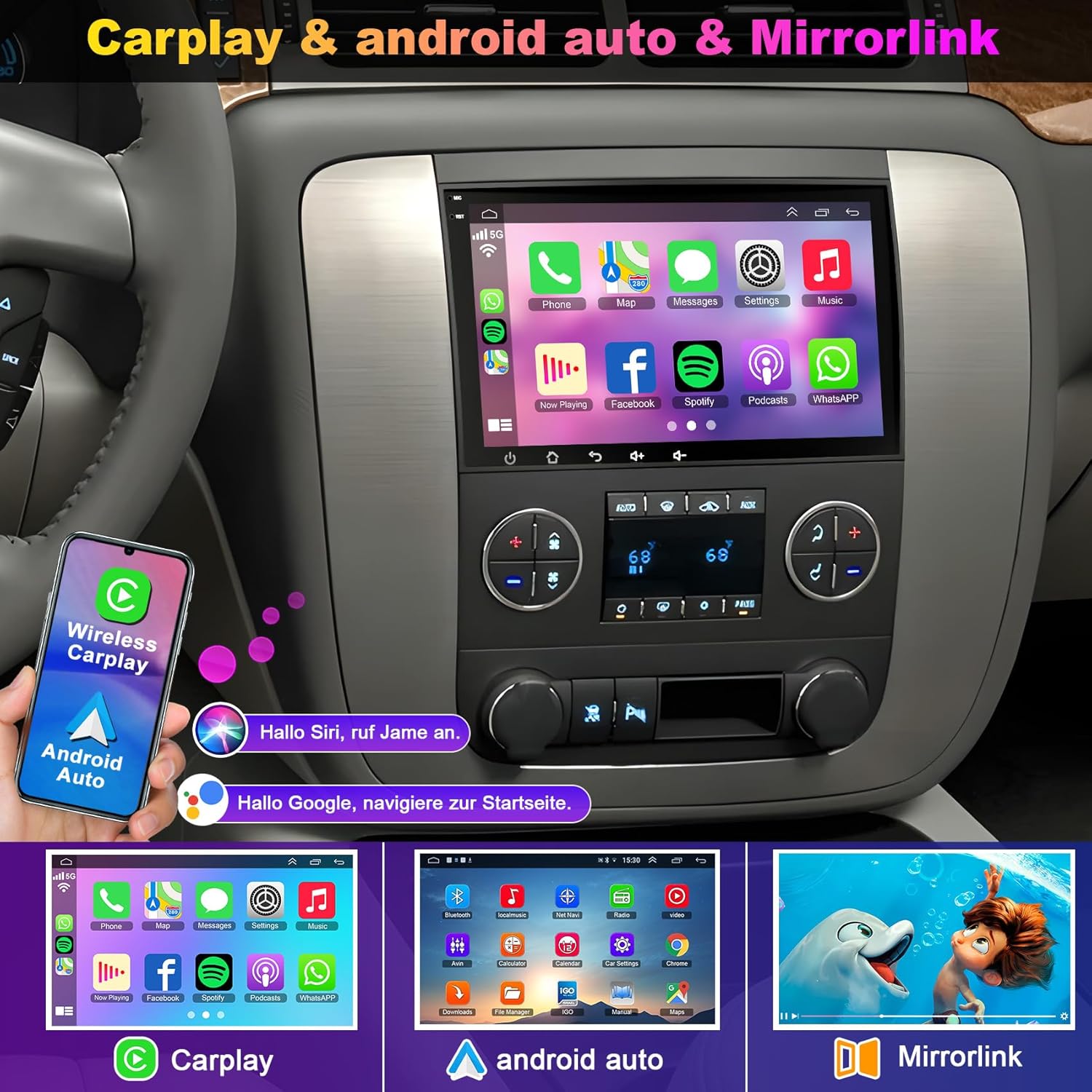
Image: The car stereo displaying both Apple CarPlay and Android Auto interfaces, demonstrating seamless smartphone integration.
GPS Navigation
The unit includes a dual navigation system supporting both offline and online maps. Download worldwide maps via applications like Herewego for up-to-date road conditions and guidance.

Image: The car stereo displaying a GPS navigation map, indicating routes and current location.
Bluetooth 5.2
Pair your phone via Bluetooth 5.2 for hands-free calling, phonebook access, and wireless audio streaming. This feature enhances safety and convenience while driving.

Image: The car stereo displaying Bluetooth call functionality and FM radio interface.
FM Radio
Tune into your favorite FM radio stations. The system provides clear reception for news, music, and traffic updates.
WiFi Connection
Connect the stereo to a WiFi hotspot (e.g., from your smartphone) to access online content, download applications, and browse the internet directly from the unit.
DSP/EQ Settings
Utilize the built-in Digital Sound Processor (DSP) and Equalizer (EQ) settings to customize the audio output to your preference. Adjust bass, treble, and other sound parameters for an optimized listening experience.
Split Screen Function
The split-screen feature allows you to run two applications simultaneously on the display, such as navigation and music playback, enhancing multitasking capabilities.
Full RCA Output
The unit supports full RCA video output, enabling connection to external monitors, such as headrest screens, for rear-seat entertainment.
Troubleshooting
- No Power / Unit Not Turning On: Ensure the CAN BUS decoder is correctly connected. For vehicles with Bose systems, proper CAN BUS connection is critical for power.
- Backup Camera Not Working: Verify all camera connections. If the included camera is not compatible with your specific vehicle model, contact customer support for a free replacement. Check if the green loop on the camera cable needs to be cut to disable extra grid lines, or the white loop to reverse the image.
- Low Sound Output: The internal amplifier may not be as powerful as some factory units. Check EQ settings and ensure all speaker connections are secure.
- Steering Wheel Controls Not Responding: Access the system settings to configure or recalibrate the steering wheel controls. Ensure the CAN BUS connection is secure.
- Bluetooth Connectivity Issues: Ensure Bluetooth is enabled on both the stereo and your smartphone. Try unpairing and re-pairing the devices.
- System Password: If prompted for a system password for advanced settings, the default password is 8888.
- No Installation Instructions: While this manual provides general guidance, specific vehicle panel removal and wiring diagrams may require consulting a vehicle-specific service manual or online resources.
Specifications
| Screen Size | 8 inches |
| Display Type | IPS Touch Screen |
| Resolution | 1280 x 720 HD |
| Operating System | Android 13 |
| CPU | Quad Core |
| RAM | 4GB |
| ROM | 64GB |
| Connectivity | Bluetooth 5.2, USB, WiFi |
| Special Features | Wireless/Wired CarPlay, Android Auto, GPS Navigation, DSP, SWC, Backup Camera Support, Split Screen, RCA Output |
| Item Weight | 3.21 pounds |
| Package Dimensions | 11.5 x 7.44 x 4.06 inches |
Warranty and Support
Your electrosmart car stereo comes with a 30-day money-back guarantee for any reason and an 18-month warranty for quality-related issues. If you encounter any questions during use or installation, please contact electrosmart customer support for professional technical assistance.
Contact information can typically be found on the product packaging or the electrosmart official website.