
Introduction
Thank you for choosing the Irfora GT972 Metal Detector. This device is designed for detecting various metals, including coins, relics, jewelry, gold, and silver. It features high sensitivity and discrimination capabilities, making it versatile for different treasure hunting environments. This manual provides detailed instructions for assembly, operation, and maintenance to ensure optimal performance and longevity of your metal detector.
Package Contents
Please verify that all items listed below are present in your package.
- 1 x Irfora GT972 Metal Detector Unit
- 1 x User Manual (English)
- Note: 2 x 9V batteries are not included and must be purchased separately.
Key Features
- LCD Display: Provides clear indications of metal types, signal strength, DISC and NOTCH settings, sensitivity levels, battery condition, and a digital display of the target ID.
- Three Audio Discrimination Tones: Emits distinct high, medium, and low tones to differentiate between various types of metal targets.
- NOTCH Function: Allows discrimination against unwanted metal types, enabling the user to focus on valuable items.
- DISC Function: Eliminates specific target categories by setting a DISC value. The detector will not respond to targets exceeding this numerical setting.
- PINPOINTER Function: Accurately locates the precise position of a detected target.
- Waterproof Search Coil: Equipped with a 10-inch round search coil that is waterproof for effective searching in shallow water.
Setup and Assembly
Follow these steps to assemble your Irfora GT972 Metal Detector.
- Attach the Search Coil: Secure the 10-inch search coil to the lower stem using the provided bolt and nut. Ensure it is firmly attached but allows for slight angle adjustment.
- Connect the Stems: Insert the lower stem into the middle stem, and then connect the middle stem to the upper stem. Adjust the length to a comfortable operating height.
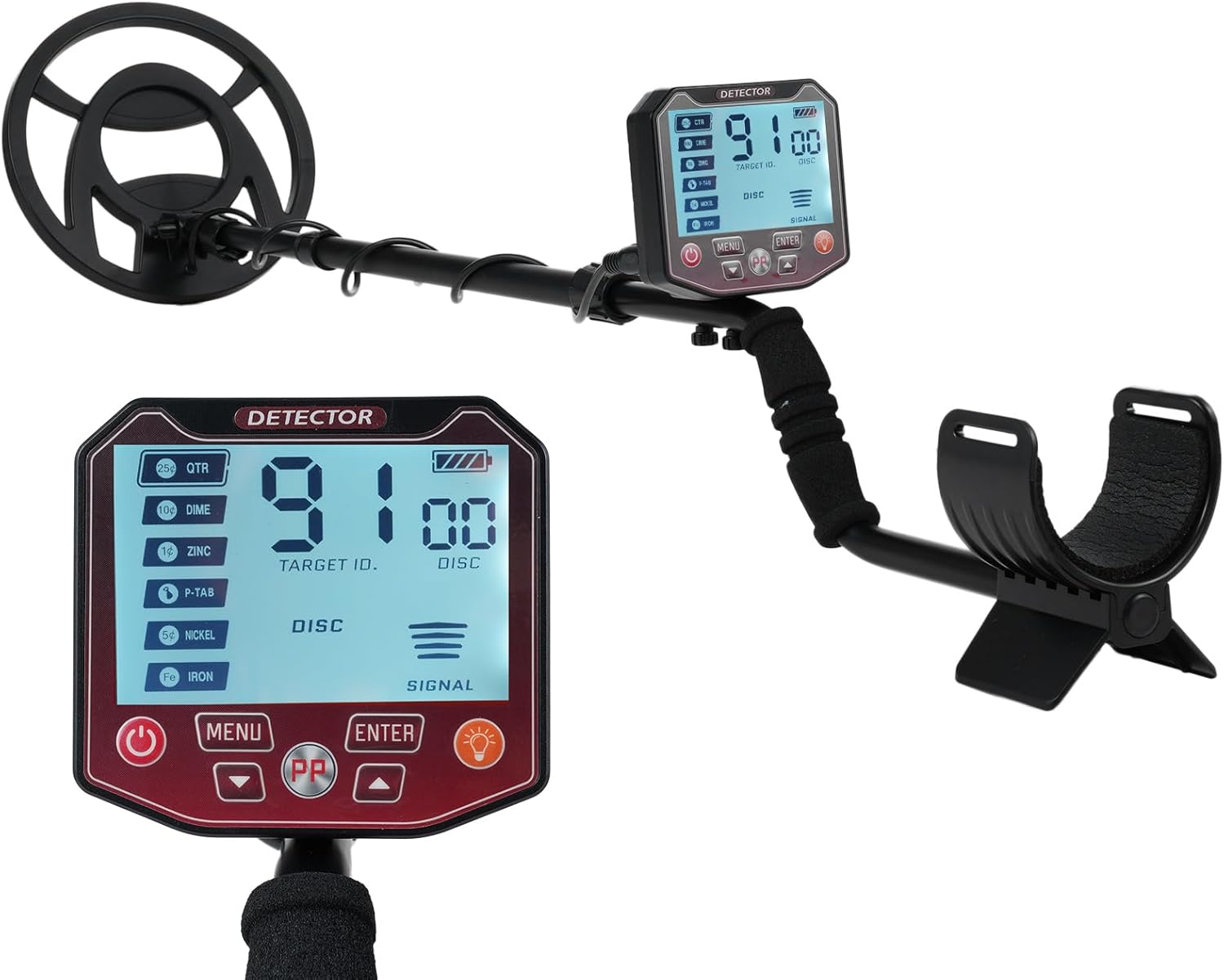
Image: The metal detector showing its adjustable height feature. The left side shows the detector extended, and the right side shows it in a more compact form, indicating adjustability.
- Mount the Controller Unit: Slide the controller unit onto the upper stem. Ensure it is securely fastened.

Image: An exploded view diagram illustrating the main components of the metal detector, including the search coil assembly, controller unit, adjustable height mechanism, and armrest stem.
- Install Batteries: Open the battery compartment on the controller unit. Insert two 9V batteries, ensuring correct polarity. Close the compartment securely.

Image: A close-up view of the metal detector's control unit, highlighting the battery compartment and explicitly stating that 2x 9V batteries are required and not included.
- Wrap the Cable: Carefully wrap the search coil cable around the stem, ensuring it is not too tight or loose, and connect the cable to the controller unit.
- Adjust Armrest: Adjust the armrest to a comfortable position for prolonged use.
Operating Instructions
Powering On/Off
- Press the Power button to turn the detector ON.
- Press and hold the Power button to turn the detector OFF.
Understanding the LCD Display
The LCD provides visual feedback on detected targets and current settings.
- Metal Types: Icons or indicators for different metal categories.
- Signal Strength: Bar graph indicating the strength of the detected signal.
- DISC/NOTCH Settings: Displays current discrimination and notch settings.
- SENS Level: Shows the current sensitivity level.
- Battery Condition: Indicates remaining battery life.
- Target ID: A numerical value that helps identify the type of metal.

Image: A detailed view of the metal detector's LCD screen, illustrating the various indicators for metal types, signal strength, DISC and NOTCH settings, sensitivity, battery status, and target ID.
Operating Modes and Functions
The GT972 offers multiple operating modes to optimize your search.
- DISC (Discrimination): Use this mode to eliminate unwanted targets. By setting a specific DISC value, the detector will ignore metals below that value. This is useful for filtering out junk metal.
- NOTCH: The NOTCH function allows you to selectively accept or reject specific categories of metals. This is more precise than DISC for targeting or ignoring particular items.
- PINPOINTER: Once a target is detected, activate the PINPOINTER mode to narrow down its exact location. Move the coil slowly over the detected area until the signal is strongest and most stable.
- Audio Discrimination: The detector provides three distinct audio tones:
- Low Tone: Typically indicates ferrous metals or small, low-conductivity items.
- Medium Tone: Often indicates medium-conductivity metals like some jewelry or older coins.
- High Tone: Usually signifies high-conductivity metals such as silver or copper.

Image: The metal detector with an overlay highlighting its key features: 5 Operating Modes, 10-inch Waterproof Coil, Precise Positioning, and Type-C Interface.
Searching Techniques
- Sweep Pattern: Hold the search coil parallel to the ground and sweep it slowly from side to side in overlapping arcs.
- Coil Height: Keep the search coil as close to the ground as possible without touching it.
- Water Searching: The 10-inch search coil is waterproof, allowing for detection in shallow water. Ensure the control unit remains dry.

Image: A close-up of the 10-inch round search coil partially submerged in water, demonstrating its waterproof capability for shallow water detection.

Image: A person operating the metal detector in a desert landscape. Insets show examples of items that can be detected, such as gold coins, detection cables, and items found at archaeological sites.

Image: A person using the metal detector in a green grassy area. Insets display different types of metals that can be found, including gold nuggets, rings, coins, and various relics.
Maintenance and Care
- Cleaning: Wipe the detector with a damp cloth after each use. Avoid abrasive cleaners or solvents.
- Storage: Store the detector in a dry, cool place when not in use. Remove batteries if storing for extended periods to prevent leakage.
- Search Coil: The search coil is waterproof, but the control unit is not. Avoid submerging the control unit in water.
- Battery Replacement: Replace batteries when the low battery indicator appears on the LCD.
Troubleshooting
| Problem | Possible Cause | Solution |
|---|---|---|
| No power | Dead or incorrectly installed batteries. | Replace batteries with new 9V batteries, ensuring correct polarity. |
| Erratic signals or false readings | High sensitivity setting, electromagnetic interference, or mineralized ground. | Reduce sensitivity. Move away from power lines or other electronic devices. Perform ground balance if available (refer to advanced settings in full manual). |
| Detector not finding targets | Incorrect discrimination settings, too low sensitivity, or target is too deep. | Adjust DISC/NOTCH settings to accept more metal types. Increase sensitivity. Sweep slower and closer to the ground. |
| Weak or no audio | Low battery, volume too low, or faulty headphones (if used). | Check battery level. Increase volume. Test with/without headphones. |
Specifications
| Feature | Detail |
|---|---|
| Model | GT972 |
| Brand | Irfora |
| Material | ABS |
| Detected Metal Size (Example) | 18cm (for φ25mm US coin) |
| Power Supply | 2 * 9V batteries (Not included) |
| Search Coil | 10-inch round, waterproof |
| Display | LCD with Target ID, DISC/NOTCH, SENS, Battery Indicator |
| Operating Modes | 5 modes (including DISC, NOTCH, PINPOINTER) |
| Audio Tones | 3 distinct tones (Low, Medium, High) |
Product Videos
No official product videos from the seller were found for this model.
Warranty and Support
For warranty information and technical support, please refer to the documentation provided at the time of purchase or contact Irfora customer service directly. Specific warranty terms may vary by region and retailer.