
Introduction
The TheStack™ Radar is a portable golf launch monitor designed to provide precise data for improving your golf swing. It measures swing speed, ball speed, estimated carry distance, and smash factor. This device integrates seamlessly with TheStack App for a comprehensive training experience, including speed training, wedge practice, and putting analysis.

Image: TheStack Radar device shown with its companion mobile application, illustrating its compact design and digital display alongside app screens for training and data analysis.
Setup
Initial Setup
To begin using your TheStack Radar, ensure it is charged.
Charging the Device
Connect the provided charging cable to the charging port on the device and a suitable USB power source. The device's indicator light will show charging status.
Pairing with TheStack App
- Download TheStack App from the Apple App Store (requires iOS 15.0 or later).
- Open TheStack App on your iOS device.
- Power on your TheStack Radar device by pressing the power button.
- Follow the in-app instructions to connect the Radar via Bluetooth. The app will automatically detect the device.
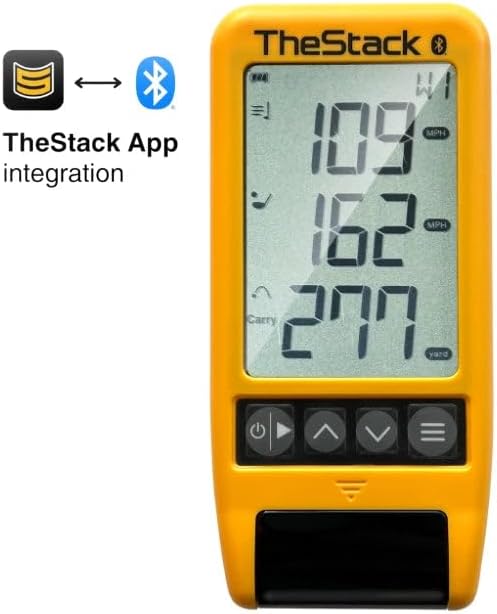
Image: TheStack Radar device highlighting its Bluetooth connectivity for integration with TheStack App.
Operating Instructions
Using TheStack Radar
TheStack Radar is designed for both indoor and outdoor use. Proper positioning is crucial for accurate readings.
Device Placement
Place the TheStack Radar on a flat surface at least at the same level as your golf ball position. Ensure there are no obstructions between the device and your swing path.
Taking Measurements
- Once paired with TheStack App, select your desired training mode (e.g., speed training, wedge practice).
- Perform your golf swing. The Radar will automatically detect the swing and display data on its screen and transmit it to the app.
- The device measures swing speed and ball speed, then calculates estimated carry distance and smash factor.

Image: A golfer demonstrating the outdoor use of TheStack Radar, positioned on the ground to capture swing data.

Image: A golfer demonstrating the indoor use of TheStack Radar, positioned on a golf mat to capture swing data.
App Features and Modes
Enhancing Your Training with TheStack App
Stack Wedging
The Stack Wedging feature provides gamified, skill-specific wedge practice sessions. It helps you dial in your distances with various wedges. A 1-month free trial is included with your purchase.

Image: TheStack Wedge app interface displayed on a smartphone, alongside the TheStack Radar device, illustrating the dedicated wedge practice mode.
Stack Putting
This bonus app delivers guided putting practice sessions and detailed insights into your tendencies, helping you improve your performance on the greens.

Image: A close-up of a smartphone screen showing the Stack Putting app, demonstrating its interface for guided putting practice.
Maintenance
Care and Storage
- Keep the device clean by wiping it with a soft, dry cloth. Avoid using abrasive cleaners or solvents.
- Store the device in a cool, dry place away from direct sunlight and extreme temperatures.
- Ensure the charging port is free of debris.
Troubleshooting
Common Issues and Solutions
| Issue | Possible Cause | Solution |
|---|---|---|
| Device not powering on | Low battery | Charge the device fully. |
| Cannot connect to app | Bluetooth off; device out of range; app issue | Ensure Bluetooth is enabled on your phone. Bring device closer. Restart app and device. |
| Inaccurate readings / Missed swings | Improper device placement; environmental interference | Adjust device position to be level with the ball. Ensure clear line of sight. Avoid strong electromagnetic interference. |
Specifications
Technical Details
- Item Package Dimensions: 6.89 x 3.23 x 1.34 inches
- Item Weight: 0.12 Kilograms
- Brand Name: The Stack System
- Style: Stack Radar
- Sport Type: Golf
- ASIN: B0D824SCQJ
- Date First Available: November 12, 2024
Warranty and Support
Product Support
For warranty information and further support, please refer to the official The Stack System website or contact their customer service directly.
Visit the The Stack System Store for more products and information.


