
Vyvo m96561653633
Vyvo Smartwatch vista+ User Manual
Model: m96561653633
Introduction
Welcome to the user manual for your new Vyvo Smartwatch vista+. This guide provides essential information on setting up, operating, maintaining, and troubleshooting your device. Please read this manual thoroughly before using your smartwatch to ensure optimal performance and longevity.
Package Contents
Please verify that all items listed below are included in your package:
- Vyvo Smartwatch vista+ (Main Unit)
- USB Charging Cable
- Charging Base
- WOVEN Band Set (Additional bands)
- User Manual (This document)

Figure 1: Illustrated packing list from the manual, showing the smartwatch, USB cable, charging base, and instructions.
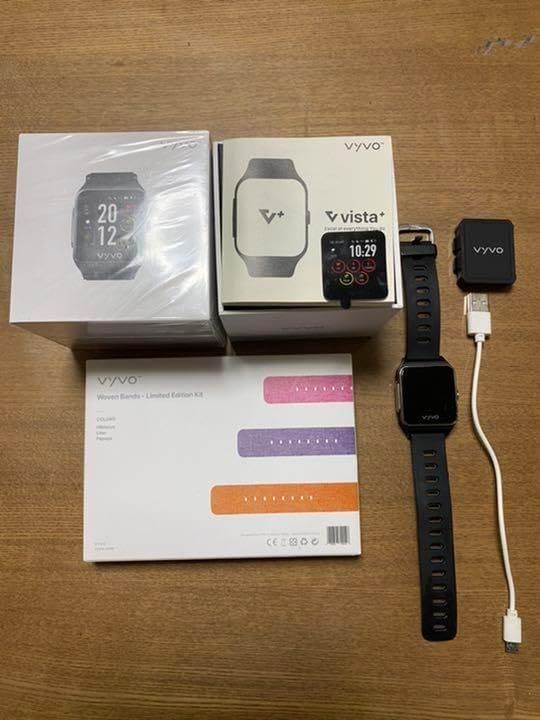
Figure 2: Overview of the Vyvo Smartwatch vista+ package contents, including the smartwatch, charging accessories, and additional WOVEN bands.

Figure 3: The WOVEN band set packaging, showing three different colored bands.
Setup
1. Charging the Smartwatch
Before first use, fully charge your Vyvo Smartwatch vista+.
- Connect the USB charging cable to the charging base.
- Place the smartwatch onto the charging base, ensuring the charging pins align correctly.
- Connect the USB end of the cable to a power adapter (not included) or a computer's USB port.
- The watch display will indicate charging status. A full charge typically takes 2-3 hours.

Figure 4: The smartwatch connected to its charging cable, ready for power input.

Figure 5: The smartwatch alongside its charging cable and base, illustrating the components used for charging.
2. Powering On/Off
- To Power On: Press and hold the side button for a few seconds until the Vyvo logo appears.
- To Power Off: Press and hold the side button, then select "Power Off" from the options on the screen.
3. Pairing with Your Smartphone
To unlock the full features of your smartwatch, pair it with the Vyvo app on your smartphone.
- Download the official Vyvo app from the App Store (iOS) or Google Play Store (Android).
- Enable Bluetooth on your smartphone.
- Open the Vyvo app and follow the on-screen instructions to create an account or log in.
- Select "Add Device" or "Pair New Device" within the app.
- Choose "Vyvo Smartwatch vista+" from the list of available devices.
- Confirm the pairing request on both your smartphone and the smartwatch.
Operating Your Smartwatch
Basic Navigation
- Swipe Up/Down: Scroll through menus and notifications.
- Swipe Left/Right: Access different widgets or quick settings.
- Tap: Select an item or confirm an action.
- Press Side Button: Return to the home screen or wake the device.
Key Features
- Activity Tracking: Monitors steps, distance, calories burned, and active minutes.
- Heart Rate Monitoring: Provides real-time heart rate data.
- Sleep Tracking: Analyzes sleep patterns and quality.
- Notifications: Receives call, message, and app notifications from your paired smartphone.
- Water Resistance: Designed to be dustproof and waterproof for daily use (refer to specifications for depth and duration limits).
Maintenance and Care
- Cleaning: Wipe the smartwatch and band regularly with a soft, damp cloth. Avoid harsh chemicals or abrasive materials.
- Water Exposure: While waterproof, avoid prolonged submersion in water, hot water, or steam. Dry the watch thoroughly after exposure to water.
- Storage: Store the device in a cool, dry place when not in use.
- Band Care: The WOVEN band can be gently hand-washed with mild soap and water. Ensure it is completely dry before reattaching to the watch.
Troubleshooting
- Smartwatch not turning on:
- Ensure the device is fully charged. Connect it to the charger for at least 30 minutes.
- Cannot pair with smartphone:
- Make sure Bluetooth is enabled on your smartphone.
- Ensure the smartwatch is within Bluetooth range (approx. 10 meters).
- Restart both the smartwatch and your smartphone.
- Check if the Vyvo app is updated to the latest version.
- Forget the device in your phone's Bluetooth settings and try pairing again.
- Inaccurate data readings:
- Ensure the smartwatch is worn snugly on your wrist, about one finger's width above the wrist bone.
- Clean the sensors on the back of the watch.
- Calibrate the device through the Vyvo app if available.
Specifications
| Feature | Detail |
|---|---|
| Model Number | m96561653633 |
| Connectivity | Bluetooth |
| Water Resistance | Dustproof and Waterproof (Specific IP rating not provided, refer to product page for details) |
| Band Material | WOVEN |
| Brand | Vyvo |
Warranty and Support
For warranty information, technical support, or service inquiries, please refer to the official Vyvo website or contact their customer service directly. Keep your proof of purchase for warranty claims.
Online Support: Visit the official Vyvo support page for FAQs, troubleshooting guides, and software updates.
Customer Service: Contact details can typically be found on the Vyvo website or in the product packaging.
Related Documents - m96561653633
 |
VYVO Life Watch User Manual - Features, Maintenance, and Safety Comprehensive user manual for the VYVO Life Watch, covering operation, features like heart rate monitoring and ECG, device maintenance, waterproofing, and important safety information. |
 |
VYVO Watch Lite Edition Quick Start Guide This guide provides essential information for setting up and using your VYVO Watch Lite Edition, including charging, navigation, and key features like heart rate monitoring and swimming tracking. |
 |
Vyvo BioSense Health Smartband Quick Start Guide A quick start guide for the Vyvo BioSense health smartband, covering packing list, operation, features, maintenance, safety information, and legal disclaimers. |
 |
Vyvo BioSense Ring Quick Start Guide Get started with your Vyvo BioSense Ring. This guide covers packing, charging, setup, usage, functions, safety, and legal information for the Vyvo BioSense smart ring. |
 |
VYVO WATCH LITE EDITION: Advanced Smartwatch for Health and Wellness Monitoring Discover the VYVO WATCH LITE EDITION, a sleek smartwatch designed to monitor your vital signs, track your health metrics, and enhance your wellbeing with advanced features like SpO2, HR, sleep analysis, and smart alerts. |
 |
VYVO: AI Life Sensing Technology Business Opportunity Presentation Explore the groundbreaking AI Life Sensing Technology from VYVO, a Silicon Valley company revolutionizing health and wellness. Discover business opportunities, global collaborations, and innovative health monitoring solutions. |