Introduction
The ePlus Mirai EMR310 is a compact and highly portable power station designed to provide reliable power for various outdoor activities and emergency situations. Weighing approximately 2kg, it offers a substantial 200Wh capacity and a rated output of 200W, making it an ideal companion for camping, fishing, mountain climbing, and as a backup power source during outages.
Equipped with durable and safe Lithium Iron Phosphate (LiFePO4) battery cells, the EMR310 ensures a long lifespan of over 3000 cycles to 80% capacity. Its advanced Battery Management System (BMS) and triple monitoring chip regulate and protect both the battery and connected devices, ensuring stable and safe operation.

Figure 1: ePlus Mirai EMR310 Portable Power Station, front view.
Product Overview
The EMR310 features a total of 9 output ports, allowing you to charge multiple devices simultaneously. It also supports pass-through charging, enabling you to power devices while the unit itself is being charged.
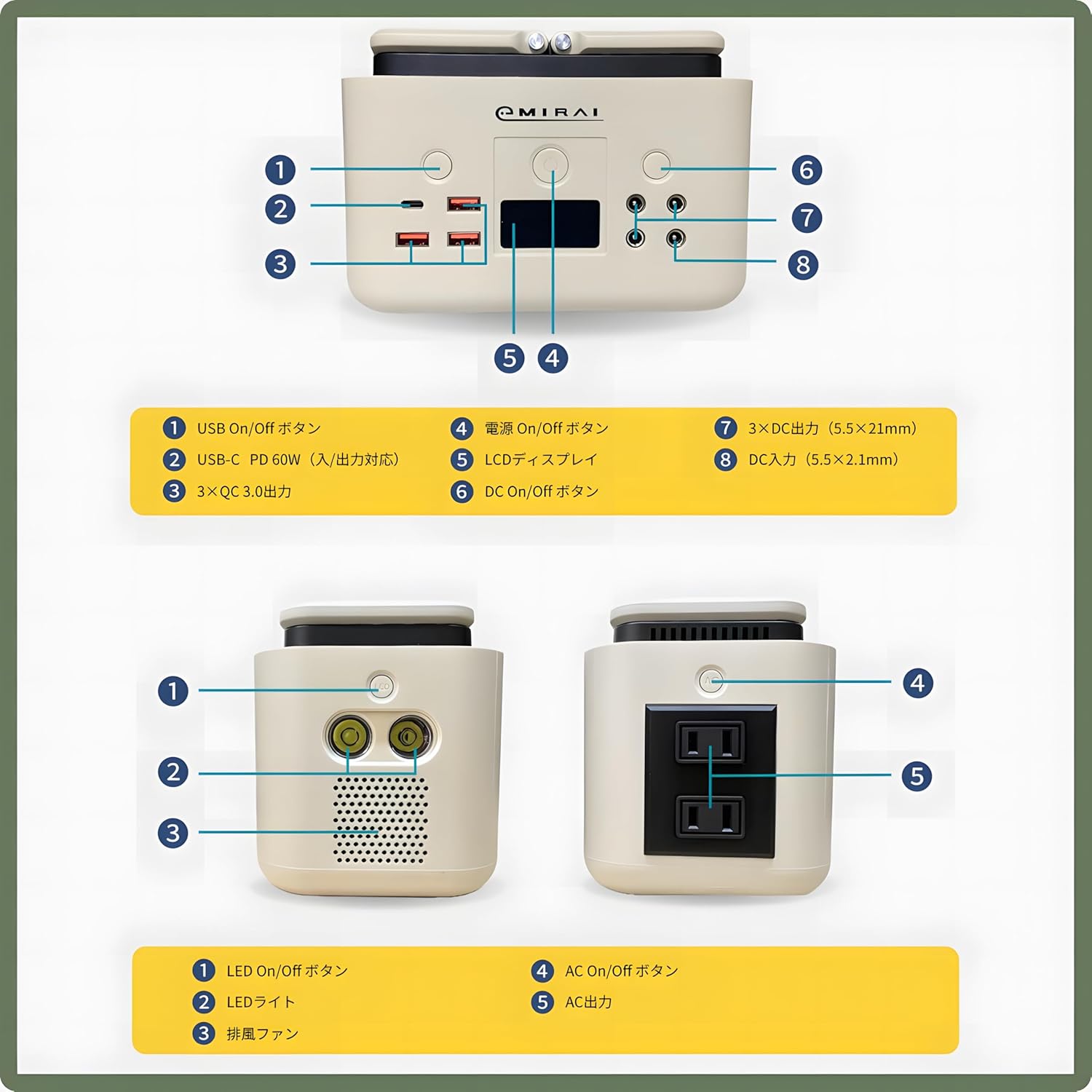
Figure 2: Front and side views of the EMR310 with numbered components.
Front Panel Components:
- USB On/Off Button: Activates/deactivates USB output ports.
- USB-C PD 60W Port: Supports both input and output.
- 3 x QC 3.0 Output Ports: Quick Charge 3.0 compatible USB-A ports.
- Power On/Off Button: Main power control for the unit.
- LCD Display: Shows battery level, output status, and other indicators.
- DC On/Off Button: Activates/deactivates DC output ports.
- 3 x DC Output Ports (5.5×2.1mm): Standard DC barrel jack outputs.
- DC Input Port (5.5×2.1mm): For charging the unit via power adapter or car charger.
Side Panel Components:
- LED On/Off Button: Controls the built-in LED light.
- LED Light: High-brightness LED for illumination.
- Heat Dissipation Fan: Ensures proper cooling during operation.
- AC On/Off Button: Activates/deactivates AC output ports.
- AC Output Ports: Two Japanese A-type AC outlets (100V).
Setup and Charging
Before first use, it is recommended to fully charge the EMR310. The unit can be charged using various methods:
- Power Adapter: Connect the included power adapter to the DC Input Port (8) and a wall outlet.
- USB-C PD 60W: Use a compatible USB-C PD charger and cable with the USB-C PD port (2).
- Car Charger: Connect the car charger to the DC Input Port (8) and your vehicle's 12V accessory outlet.
- Solar Panel: The EMR310 is compatible with solar panel charging (Max 100W). Connect a compatible solar panel to the DC Input Port (8).
The LCD display (5) will show the charging status and current battery level. A full charge typically takes approximately 2.0 hours.

Figure 3: EMR310 being charged via a wall outlet.
Operating Instructions
To begin using the EMR310, press and hold the Power On/Off Button (4) until the LCD display illuminates. You can then activate specific output sections as needed.
Using Output Ports:
- USB Outputs (USB-C PD, QC 3.0): Press the USB On/Off Button (1) to enable these ports. Connect your smartphones, tablets, or other USB-powered devices.
- DC Outputs: Press the DC On/Off Button (6) to enable the DC ports (7). These are suitable for devices requiring 12V DC power.
- AC Outputs: Press the AC On/Off Button (4 on side panel) to enable the AC outlets (5 on side panel). Ensure your device's power consumption does not exceed the 200W rated output. The EMR310 provides a pure sine wave output, suitable for sensitive electronics.
Simultaneous Use Limitations:
When using multiple output ports simultaneously, please observe the following maximum output limitations:
- When using USB-C PD (2) and one QC 3.0 port (3) simultaneously, the maximum combined output is limited to 30W.
- When using two QC 3.0 ports (3) simultaneously, the maximum combined output is limited to 30W.
- When using all four USB ports (1 USB-C PD, 3 QC 3.0) simultaneously, the maximum combined output is limited to 90W.
- When using DC outputs (7) simultaneously, the maximum combined output is limited to 60W.
- When using both AC outputs (5 on side panel) simultaneously, the maximum combined output is limited to 200W.
Note: When charging the EMR310 from the DC input port, pass-through charging is not supported for the USB-C PD port and the rightmost QC3.0 port.

Figure 4: Diagram illustrating the 9 output ports and their capabilities.
LED Light Operation:
Press the LED On/Off Button (1 on side panel) to turn the LED light (2 on side panel) on or off. This high-brightness LED can be used for illumination in dark environments.
Maintenance and Care
The EMR310 utilizes Lithium Iron Phosphate (LiFePO4) batteries, known for their superior durability and safety compared to traditional lithium-ion batteries. This technology provides a significantly longer lifespan and stable performance.

Figure 5: Illustration of LiFePO4 battery technology and its extended lifespan.
General Care:
- Store the unit in a cool, dry place away from direct sunlight and extreme temperatures.
- Avoid dropping or subjecting the unit to strong impacts.
- Keep the unit away from water and high humidity.
- Clean the exterior with a soft, dry cloth. Do not use abrasive cleaners or solvents.
- Ensure the heat dissipation fan (3 on side panel) is not obstructed during use.
Battery Longevity:
For optimal battery health, it is recommended to fully charge the unit at least once every 3-6 months if not in regular use. Avoid completely draining the battery for extended periods.
Troubleshooting
The EMR310 is equipped with a comprehensive Battery Management System (BMS) and MPPT protection to ensure safe and reliable operation. These systems protect against various electrical issues.

Figure 6: Diagram illustrating the BMS & MPPT protection features.
Common Protections and Indicators:
- Short Circuit Protection: Automatically shuts off output if a short circuit is detected.
- Over Voltage Protection: Prevents damage from excessive input voltage.
- Overload Protection: Shuts down output if connected devices draw more power than the unit's rated capacity. Reduce load and restart.
- Overcharge Protection: Prevents battery damage from overcharging.
- Over-discharge Protection: Prevents battery damage from being fully depleted.
- Overheat Protection: Shuts down if internal temperature exceeds safe limits. Allow unit to cool down.
- NTC Protection: (Negative Temperature Coefficient) Provides temperature monitoring for safety.
- Reverse Charge Protection: Prevents damage from incorrect charging polarity.
If the unit is not functioning as expected, check the LCD display for any error indicators. If an issue persists after checking connections and reducing load, please refer to the warranty and support information.
Specifications

Figure 7: Detailed product specifications table.
| Model Number | EMR310 |
| Capacity | 200Wh (3.2V/62500mAh) |
| Battery Type | Lithium Iron Phosphate (LiFePO4) |
| Battery Life Cycles | ≥3000 cycles (to 80% capacity) |
| Dimensions (Main Unit) | 186 × 108 × 127 mm |
| Weight (Main Unit) | 2 Kg |
| LED Light | High-brightness LED × 2 |
| Input (DC Input Size: 5.5×2.1mm) |
|
| Output |
|
Warranty and Support
The ePlus Mirai EMR310 Portable Power Station comes with the following warranty:
- Main Unit: 1 year from the product arrival date.
- Accessories: 30 days from the product delivery date.
Important Notice:
Please refrain from using the portable power station for purposes that exceed its stated capacity. Before use, always verify the specifications and rated power consumption of your devices. Damage to equipment or the product resulting from overload or incorrect use is not covered under warranty.
For further support or inquiries, please contact ePlus Mirai customer service.


