
1. Product Overview
The Heartsea 10" Bluetooth PA Party Speaker is a versatile 3-way portable DJ and karaoke system designed for various events, from outdoor gatherings to home parties. It features a 10-inch bass driver, 4-inch midrange, and 3-inch tweeter for crystal-clear, tri-frequency audio, covering areas up to 750 square feet. Equipped with Bluetooth 5.0, TWS connectivity, and multiple wired input options, this system offers robust sound and flexible usage.

Figure 1.1: Heartsea 10" Bluetooth PA Party Speaker with included accessories.
Video 1.1: An overview of the portable PA system with microphone, showcasing its features and portability.
2. What's in the Box
Upon unboxing your Heartsea PA Party Speaker, please ensure all the following items are present:
- 1 × PA System
- 2 × Wireless UHF Microphones
- 1 × Remote Control
- 1 × Power Adapter

Figure 2.1: Detailed view of the package contents, including the speaker, microphones, remote, and power adapter.
3. Setup
Follow these steps to set up your PA Party Speaker for first use:
- Power Connection: Connect the included power adapter to the DC input port on the speaker and plug it into a standard electrical outlet. The speaker can operate while charging.
- Initial Charge: For optimal battery life, fully charge the speaker before its first portable use. The battery indicator will show charging status.
- Microphone Batteries: Insert the required batteries into the UHF wireless microphones. The microphones are not rechargeable via the speaker.
- Positioning: Place the speaker on a stable, flat surface. The speaker features 360-degree rotatable wheels for easy movement and locking mechanisms to secure its position.
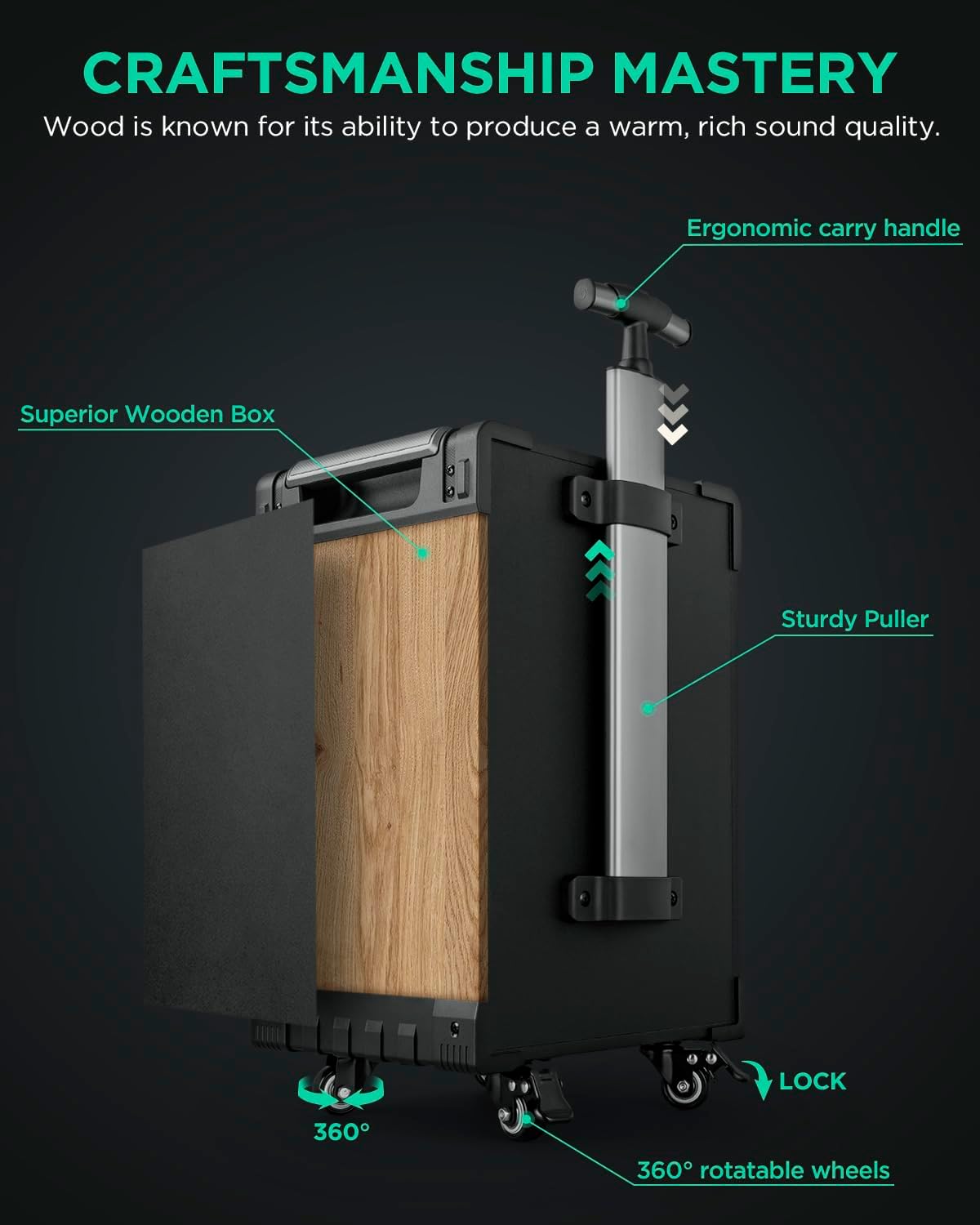
Figure 3.1: The speaker's design features, including the ergonomic carry handle, sturdy puller, and lockable universal wheels for easy transport and stability.
4. Operating Instructions
4.1. Control Panel Overview
Familiarize yourself with the main control panel located on the side of the speaker:

Figure 4.1: The speaker's control panel, highlighting various inputs and adjustment knobs for volume, bass, treble, echo, and individual microphone/guitar levels.
- Volume Knob: Adjusts the master volume of the speaker.
- Mode Button: Cycles through input modes (Bluetooth, FM, USB, AUX, Line).
- Bass/Treble Knobs: Adjusts the overall bass and treble levels of the audio output.
- Echo/Delay Knobs: Controls the echo effect for microphones.
- Mic Volume/Bass/Treble Knobs: Individual controls for microphone audio.
- Guitar Volume Knob: Individual volume control for the guitar input.
- USB Port: For USB drive playback and recording.
- Audio In/Out (RCA/3.5mm): For connecting external audio sources or outputting audio.
- Mic 1/Mic 2 Inputs (1/4 inch): For wired microphones.
- GT In (1/4 inch): Dedicated input for guitar or other instruments.
4.2. Bluetooth Connectivity
To connect your device via Bluetooth:
- Power on the speaker.
- Press the 'Mode' button until the display shows 'BLUE' or 'Bluetooth'.
- On your smart device (phone, tablet, etc.), enable Bluetooth and search for available devices.
- Select 'FTSK10-3' (or similar name) from the list to pair. A confirmation sound will indicate successful pairing.

Figure 4.2: Steps for connecting your mobile device to the speaker via Bluetooth.
4.3. True Wireless Stereo (TWS) Pairing
If you have two Heartsea FTSK10-3 speakers, you can pair them for a stereo sound experience:
- Ensure both speakers are powered on and in Bluetooth mode.
- On one speaker (this will be the master), press and hold the 'TWS' button. You will hear a prompt indicating TWS pairing mode.
- The speakers will automatically connect to each other. A confirmation sound will indicate successful TWS pairing.
- Now, connect your smart device to the master speaker via Bluetooth as described in Section 4.2. Audio will play through both speakers in stereo.

Figure 4.3: Illustration of two speakers connected wirelessly using the TWS feature for enhanced stereo sound.
4.4. Wired Connections
The speaker supports various wired inputs for maximum compatibility:
- RCA/3.5mm Audio In: Connect devices like TVs, projectors, or other audio players using the RCA or 3.5mm AUX input ports.
- USB Input: Insert a USB flash drive containing audio files (WAVE, MP3, WMA, APE, FLAC) into the USB port for direct playback. You can also record audio to the USB drive.
- Microphone Inputs: Use the two 1/4 inch MIC inputs for additional wired microphones.
- Guitar Input: Plug in your guitar or other instruments into the dedicated 1/4 inch GT IN port.

Figure 4.4: Connecting external devices like TVs or projectors via RCA audio input, and connecting to active speakers or subwoofers via RCA audio output.

Figure 4.5: The dedicated guitar input (GT IN) allows connection of guitars, pianos, basses, DJ sets, and drums.

Figure 4.6: The USB port supports direct playback of audio files from a USB drive.
4.5. Microphone Usage
The included UHF wireless microphones offer clear sound and a wide range:
- Ensure the microphones have fresh batteries.
- Power on the microphones. They should automatically pair with the speaker.
- Adjust the individual microphone volume, bass, and treble using the dedicated knobs on the control panel.
- Use the Echo and Delay knobs to add vocal effects for karaoke or performances.
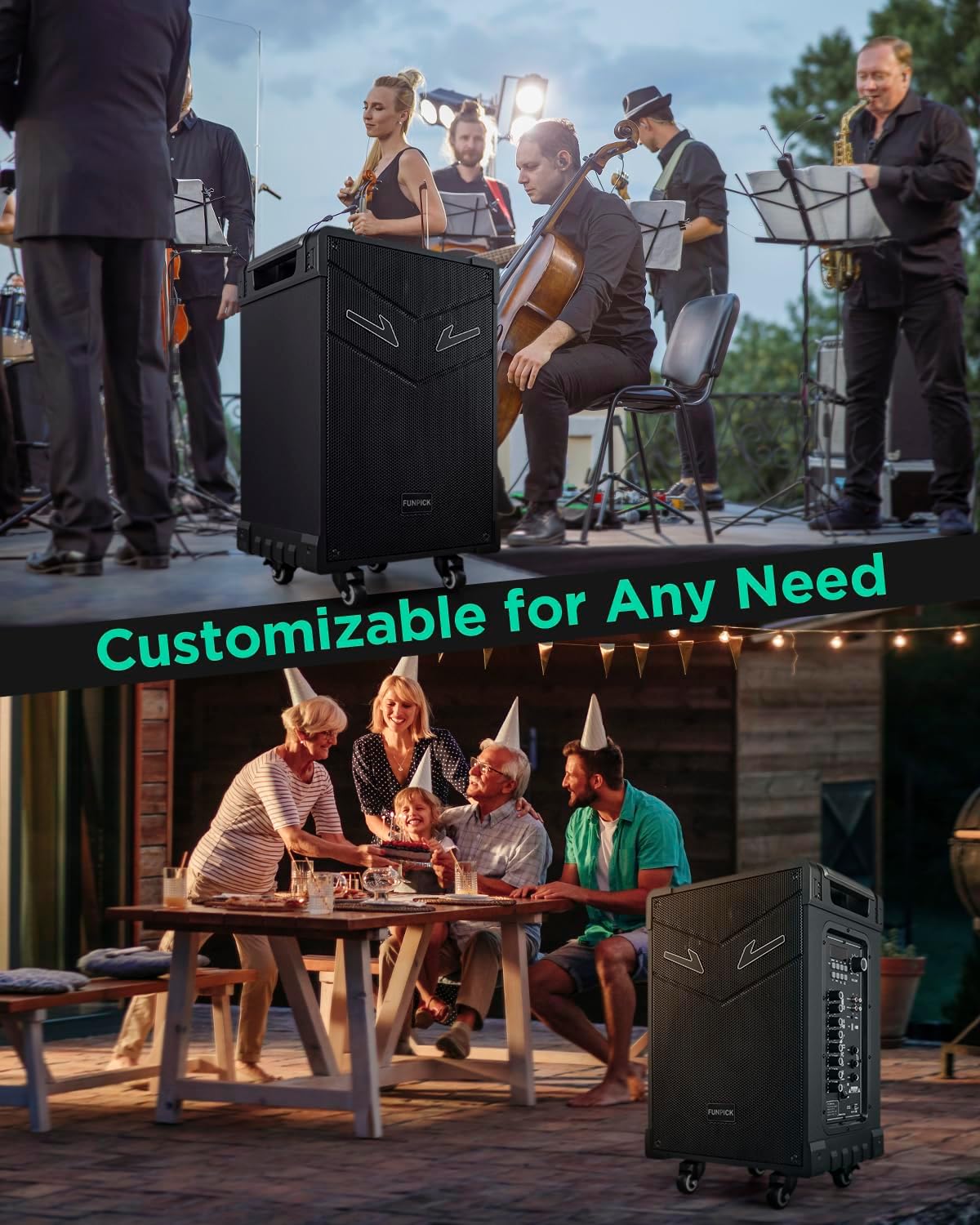
Figure 4.7: The speaker can be mounted on a stand (not included) for enhanced stage presence, ideal for performances and events.
5. Maintenance
To ensure the longevity and optimal performance of your Heartsea PA Party Speaker:
- Cleaning: Wipe the exterior with a soft, dry cloth. Do not use abrasive cleaners or solvents.
- Storage: Store the speaker in a cool, dry place away from direct sunlight and extreme temperatures when not in use.
- Battery Care: If storing for extended periods, charge the battery every 3-6 months to maintain its health.
- Avoid Moisture: Keep the speaker away from water and high humidity to prevent damage to internal components.
6. Troubleshooting
If you encounter issues with your speaker, refer to the following common problems and solutions:
| Problem | Possible Cause | Solution |
|---|---|---|
| No sound output | Volume too low; incorrect input mode; loose cable connection; device not paired (Bluetooth) | Increase volume; select correct input mode; check all cable connections; re-pair Bluetooth device |
| Microphone not working | Microphone off; low/dead batteries; microphone volume too low; out of range | Ensure microphone is on; replace batteries; increase mic volume; move closer to speaker |
| Bluetooth connection unstable | Too far from speaker; interference; multiple devices trying to connect | Move device closer; remove obstacles; turn off other Bluetooth devices; try re-pairing |
| Speaker not charging | Power adapter not connected properly; faulty outlet; damaged adapter | Check adapter connection; try a different outlet; contact support if adapter is faulty |
If the issue persists after trying these solutions, please contact customer support.
7. Specifications
Detailed technical specifications for the Heartsea 10" Bluetooth PA Party Speaker:
| Feature | Specification |
|---|---|
| Model Number | FTSK10-3 |
| Output Wattage | 40 Watts (RMS) |
| Product Dimensions | 13 x 10 x 22 inches |
| Item Weight | 24.9 pounds |
| Power Source | Battery Powered |
| Batteries | 1 Lithium Ion battery (included) |
| Mounting Type | Tabletop |
| Material | Wood |
| Number of Channels | 5 |
| Audio Input | Microphone/Line in/Aux |
| Connector Type | RCA, USB, 1/8 inch, 1/4 inch |
| Impedance | 4 Ohm |
| Compatible Devices | iPhone, iPad, iMac, smartphone, PC, Projector |
| Recommended Uses | Outdoor activities, party, karaoke, events with wireless microphones |
8. Warranty and Support
Heartsea is committed to providing high-quality products and excellent customer service.
- Warranty: Your Heartsea PA Party Speaker comes with a 365-day warranty from the date of purchase.
- Customer Service: We aim to respond to all inquiries within 24 hours. Our support model ensures a 1-on-1 interaction with a customer service employee for personalized assistance.
- Protection Plans: Extended protection plans are available for purchase to cover your product beyond the standard warranty period. Options include 2-Year and 3-Year Protection Plans, as well as a Complete Protect plan.
For support, please visit the official Heartsea store on Amazon or contact us directly through the platform where you purchased the product.