
KORKIE Korkie 2000W
KORKIE 2000W Pure Sine Wave Inverter Instruction Manual
Model: Korkie 2000W | Brand: KORKIE
1. Introduction
The KORKIE 2000W Pure Sine Wave Inverter converts 12V DC power from your vehicle battery or other 12V DC source into 110V AC power, along with USB and Type-C outputs. This device is designed to provide clean, stable electricity for a wide range of electronic devices and appliances, making it suitable for home use, camping, RV trips, and various outdoor activities.
2. Safety Information
WARNING: Please read carefully, as the following may result in personal injury or damage to the inverter.

Flammable Gas: Ensure no flammable gases are present. Avoid storing in areas where flammable gases may accumulate.
No Parallel with Grid: Do not connect the output in parallel with the grid, as this may damage the inverter and cause electric shock.
Not for Use by Minors: The inverter produces high voltage, creating a risk of electric shock.
Ground Wire: For safety, please ground the wire to prevent electric shock or injury.
No Disassembly: Unauthorized disassembly or modification may lead to safety incidents.
No Metal Objects: Do not put rods or metal in the openings or jacks of the inverter.
Avoid Wet Hands: No touch inverter with wet hands, a risk of electric shock.
Waterproof and Damp Proof: Pay attention to moisture and water. Inverter may cause short circuit.
Keep Out of Fire: Operation in fire and hot places can lead to fire and explosion.
No Wrestling: Dropping or hitting the inverter can cause harm and create safety risks.
Installation: Evaluate the battery and cables before installation.
Please Insert Fully: Insert the plug into the output of the inverter completely.
3. Product Overview
The KORKIE 2000W Pure Sine Wave Inverter is designed for reliability and versatility. It features multiple output ports, advanced safety protections, and an intelligent cooling system.
Key Features:
- Pure Sine Wave Output: Delivers clean and stable power (less than 3% harmonic distortion) suitable for sensitive electronics like laptops, medical equipment, and high-end audio devices.
- High Power Output: Provides 2000W continuous power and 4000W peak surge power, capable of running various heavy-duty appliances.
- Multiple Output Ports: Includes 3 AC outlets, 1 Type-C port, and 2 USB ports (5.2V/2.4A) for simultaneous charging of multiple devices.
- 6-Layer Safety Protection: Built-in safeguards against overload, over-temperature, short-circuit, reverse polarity, input undervoltage, and high voltage.
- Smart Dual Cooling Fans: Features intelligent fans that adjust speed based on temperature and load, ensuring efficient cooling and quiet operation.
- Durable Design: Constructed with industrial-grade aluminum housing for resilience in extreme conditions.
- LCD Display: Provides real-time status indication for input voltage, output power, temperature, and fault codes.
- Wireless Remote Control: Allows convenient operation from up to 66 feet away (without obstruction).

Figure 1: KORKIE 2000W Pure Sine Wave Inverter with included battery cables, fuses, and remote control.
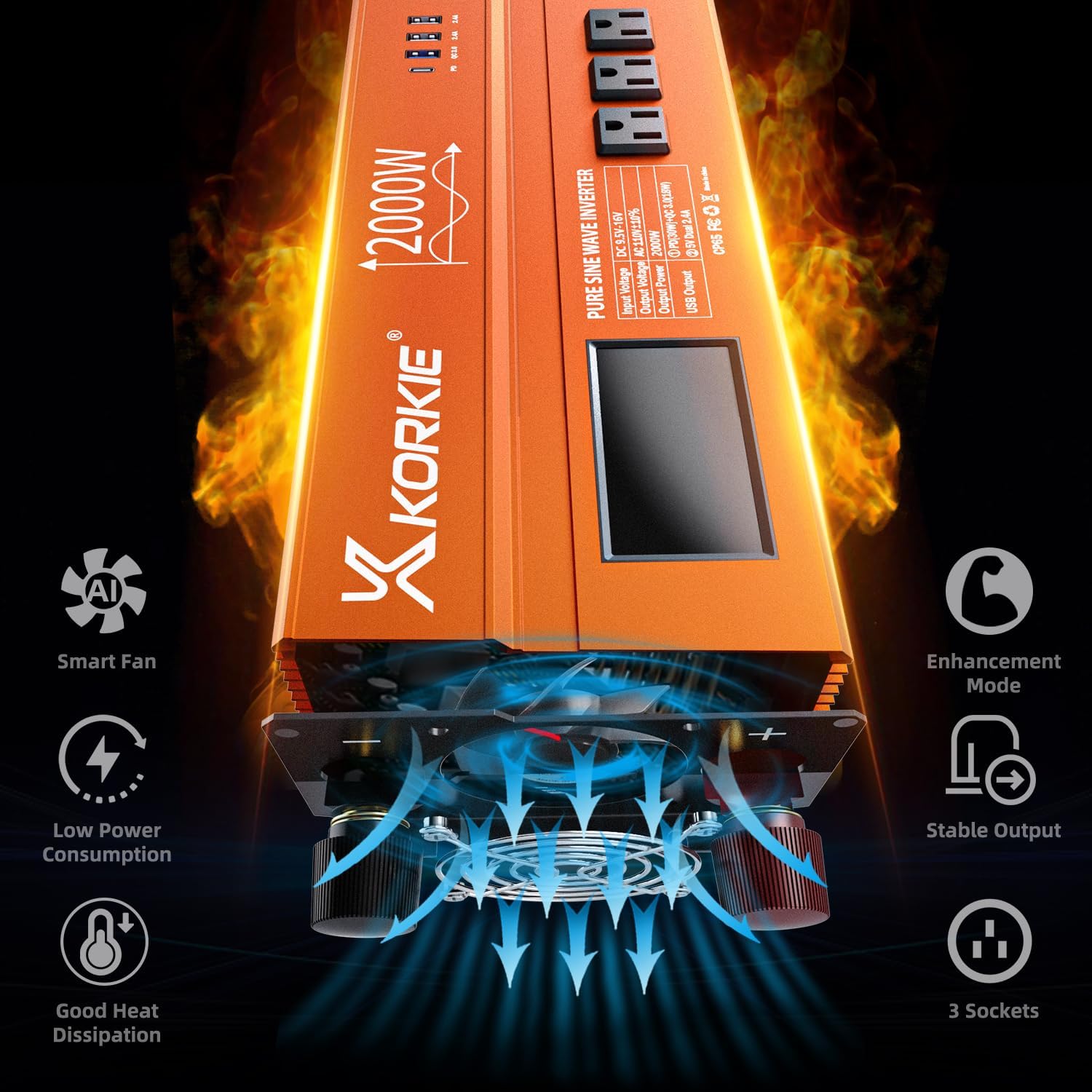
Figure 2: Diagram illustrating the smart dual cooling fans and heat dissipation within the inverter.

Figure 3: Visual representation of the 6-layer safety protection features, including input undervoltage, over voltage, low voltage, full load, overload, short circuit, overtemp, overcurrent, high temperature, and battery low voltage alarms.
4. Setup and Installation
Proper installation is crucial for the safe and efficient operation of your KORKIE 2000W Pure Sine Wave Inverter. Ensure the inverter is placed in a well-ventilated area, away from direct sunlight, heat sources, and moisture.
Connecting to a 12V DC Power Source:
- Prepare the Cables: Use the provided heavy-duty battery cables. Ensure the red cable is for positive (+) and the black cable is for negative (-).
- Connect to Inverter: Loosen the terminal nuts on the back of the inverter. Connect the red cable to the red (+) terminal and the black cable to the black (-) terminal. Tighten the nuts securely.
- Connect to Battery: Connect the other end of the red cable to the positive (+) terminal of your 12V DC battery. Connect the other end of the black cable to the negative (-) terminal of your 12V DC battery. Ensure all connections are tight to prevent arcing or overheating.
- Alternative Connection (Cigarette Lighter): For lower power applications (up to 150W), you can use the included cigarette lighter adapter. Plug the adapter into the inverter's DC 12V input and then into your vehicle's cigarette lighter socket.

Figure 4: The inverter connected to a 12V battery using the provided cables.

Figure 5: The inverter installed in a vehicle, showing easy access to all ports.
Video 1: Official KORKIE video demonstrating the Pure Sine Wave Power Inverter, including its features and potential applications.
5. Operating Instructions
Turning On/Off:
- Power On: After connecting the inverter to a 12V DC source, press the ON/OFF switch on the inverter's front panel. The LCD display will illuminate, indicating the inverter is active.
- Power Off: Press the ON/OFF switch again to turn off the inverter.
- Remote Control: Use the provided wireless remote control to turn the inverter ON or OFF from a distance. Ensure the remote is within range (up to 66ft without obstruction).
Using AC Outlets:
Plug your 110V AC appliances directly into the 3 AC outlets on the inverter. Ensure the total continuous power draw of your appliances does not exceed 2000W.
Using USB and Type-C Ports:
Connect your USB-powered devices (smartphones, tablets, etc.) to the dual 5.2V/2.4A USB ports or the Type-C port for charging.
Monitoring the Display:
The LCD display provides real-time information:
- Input Voltage: Shows the current 12V DC input voltage from your battery.
- Output Power: Displays the current AC power output in watts.
- Temperature: Indicates the internal temperature of the inverter.
- Fault Codes: In case of an error, a specific fault code will be displayed (refer to Troubleshooting section).
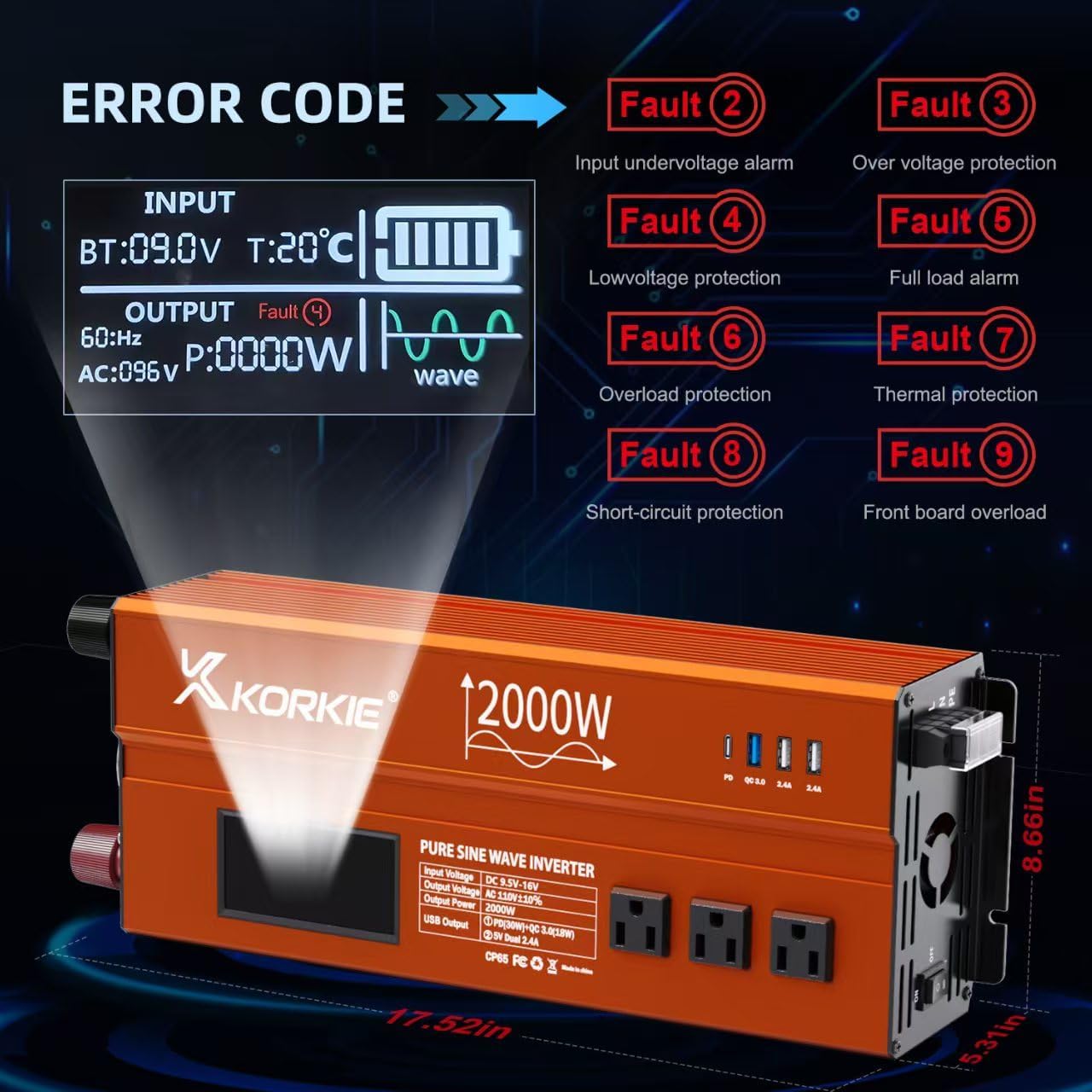
Figure 6: The inverter's LCD display showing various fault codes and operational parameters.

Figure 7: The inverter with its wireless remote control, highlighting the remote operation capability.
6. Applications and Use Cases
The KORKIE 2000W Pure Sine Wave Inverter is versatile and can be used in numerous scenarios where reliable AC power is needed from a DC source.
Common Applications:
- Camping and RVs: Power mini-fridges, rice cookers, coffee makers, laptops, and charge mobile phones and cameras.
- Outdoor Work: Operate power tools like electric drills and chainsaws.
- Home Backup: Provide emergency power during outages for essential appliances.
- Vehicles: Use in trucks and vans to power various electronics on the go.
- Sensitive Electronics: Safely power laptops, medical equipment, and other devices requiring clean power.
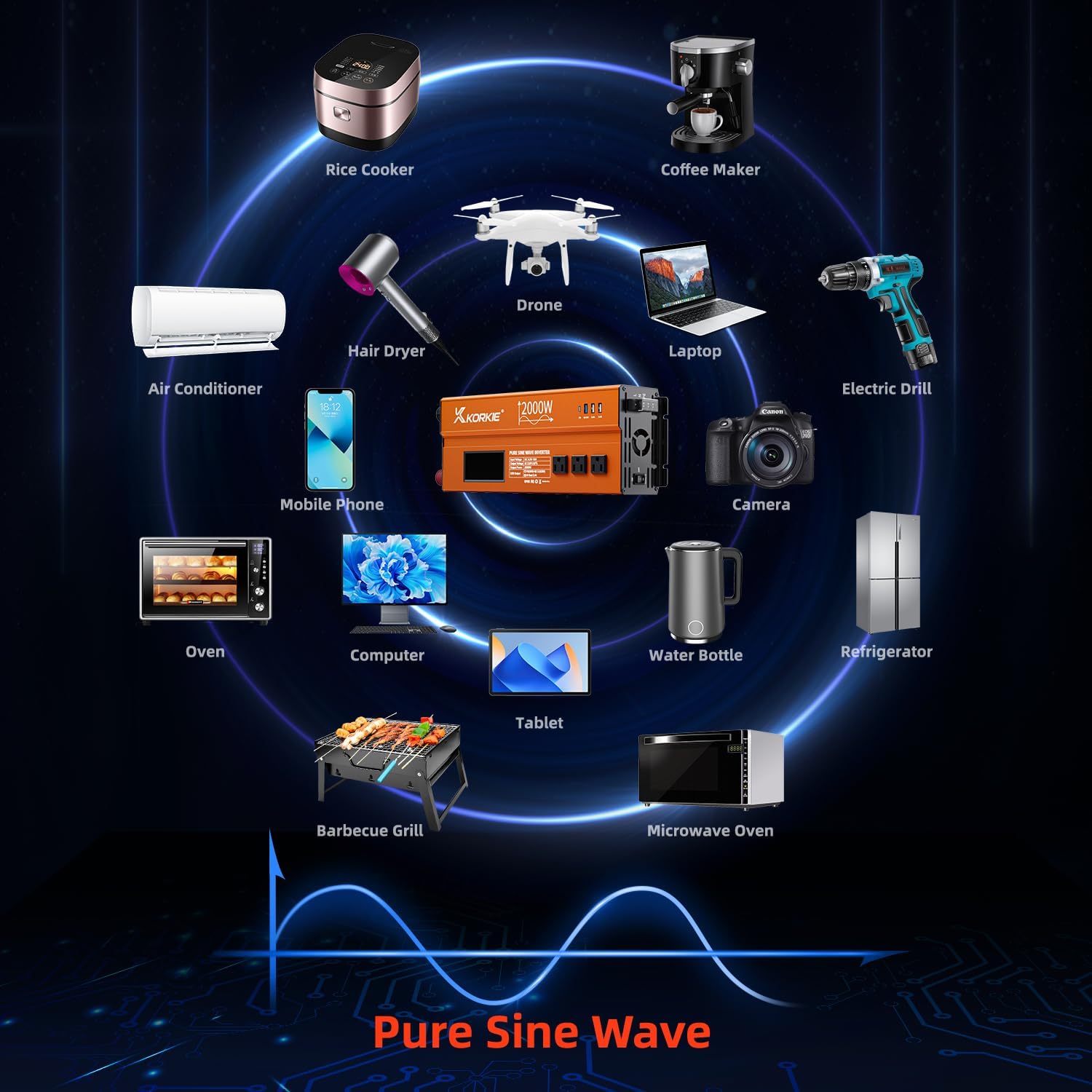
Figure 8: Illustration of the inverter powering a range of appliances including rice cooker, coffee maker, hair dryer, drone, laptop, electric drill, mobile phone, camera, oven, computer, tablet, water bottle, refrigerator, barbecue grill, and microwave oven.

Figure 9: The inverter being used in different outdoor scenarios such as camping, with solar panels, for home working, and outdoor working.
7. Maintenance
Regular maintenance ensures the longevity and optimal performance of your inverter.
- Keep Clean: Periodically clean the exterior of the inverter with a dry, soft cloth. Ensure ventilation openings are free from dust and debris.
- Check Connections: Regularly inspect all cable connections to ensure they are tight and free from corrosion. Loose connections can cause overheating and damage.
- Ventilation: Ensure the inverter is always placed in an area with adequate airflow to prevent overheating. Do not block the cooling fans.
- Storage: When not in use for extended periods, store the inverter in a cool, dry place. Disconnect it from the battery.
8. Troubleshooting
The LCD display provides fault codes to help diagnose issues. Refer to the table below for common fault codes and their solutions.
| Fault Code | Description | Possible Cause | Solution |
|---|---|---|---|
| Fault 2 | Input Undervoltage Alarm | Battery voltage is too low. | Recharge or replace the 12V DC battery. |
| Fault 3 | Over Voltage Protection | Input voltage exceeds safe limits. | Check the 12V DC source voltage. Disconnect if too high. |
| Fault 4 | Low Voltage Protection | Battery voltage is critically low. | Immediately disconnect and recharge the battery. |
| Fault 5 | Full Load Alarm | Output power is at maximum capacity. | Reduce the connected load. |
| Fault 6 | Overload Protection | Connected load exceeds inverter's capacity. | Reduce the load. Inverter will automatically shut down. |
| Fault 7 | Thermal Protection | Inverter is overheating. | Ensure proper ventilation, reduce load, or allow to cool down. |
| Fault 8 | Short-Circuit Protection | Short circuit detected in output. | Disconnect all loads and check for short circuits. |
| Fault 9 | Front Board Overload | Overload on front panel ports (USB/Type-C). | Reduce load on front panel ports. |
9. Specifications
| Feature | Detail |
|---|---|
| Model Name | Korkie 2000W ultra |
| Wattage | 2000 Watt-hours (Continuous) |
| Peak Surge Power | 4000W |
| Power Source | Battery Powered (12V DC) |
| Output Voltage | 110V AC |
| USB Output | Dual 5.2V/2.4A USB ports, 1 Type-C port |
| Product Dimensions | 17.52 x 8.66 x 5.31 inches |
| Item Weight | 8.58 pounds |
| Manufacturer | KORKIE |
10. Warranty and Support
The KORKIE 2000W Pure Sine Wave Inverter is backed by a 1-year warranty from the manufacturer.
For technical support, troubleshooting assistance, or warranty claims, please contact KORKIE customer service through the retailer where the product was purchased.