Introduction
This instruction manual provides essential information regarding the Laptop Motherboard, Part Number 5B21L45518 / 8S5B21L45518. This component is designed as a compatible replacement spare part for specific Lenovo Yoga Book 9 13IRU8 Series laptops. It is intended for use by qualified technicians or experienced users with a thorough understanding of laptop hardware installation and repair procedures. Please read this manual carefully before attempting any installation or maintenance.
Product Overview
The motherboard is the central printed circuit board (PCB) in a laptop, housing the primary components and providing connectivity for all other hardware. This specific motherboard integrates an Intel Core i7-1355U processor and 16GB of DDR5 RAM, along with various other essential chipsets and connectors.
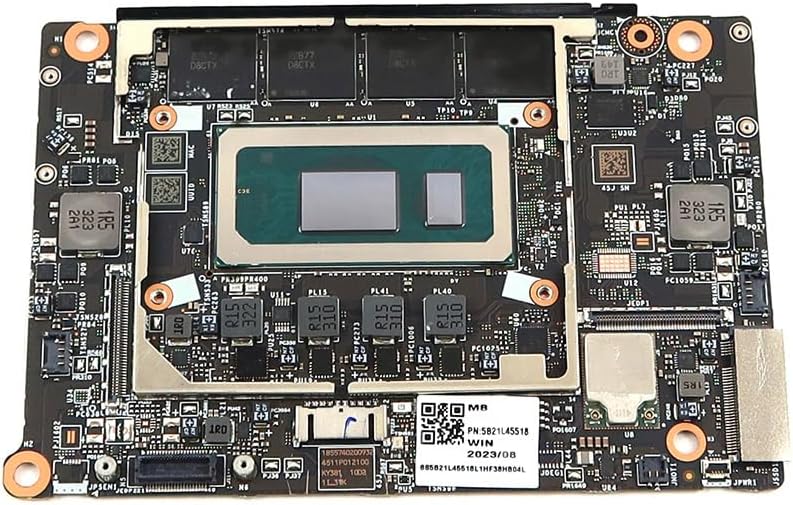
Figure 1: Front view of the Laptop Motherboard (Part Number 5B21L45518 / 8S5B21L45518). This image displays the top side of the motherboard, featuring the central Intel Core i7-1355U processor, integrated 16GB DDR5 RAM modules (labeled 2ZB77 D8CTX and 3AB77 D8CTX), and various surface-mounted components, heat sinks, and connectors. A QR code and part number label (8S5B21L45518L1HF38HB04L) are visible on the board.
For more information on the part number, visit: Lenovo Support
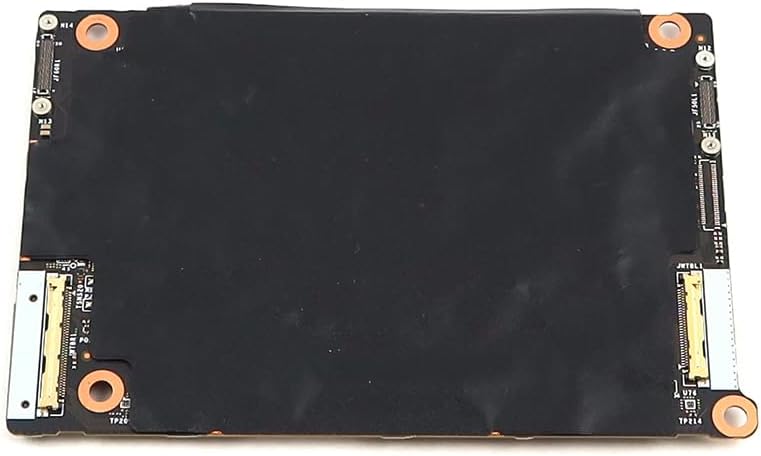
Figure 2: Back view of the Laptop Motherboard (Part Number 5B21L45518 / 8S5B21L45518). This image shows the underside of the motherboard, which is largely covered by a black protective film or insulation. Visible elements include mounting points and several flex cable connectors along the edges, indicating where other laptop components would connect.
Installation and Setup
Installation of a laptop motherboard is a complex procedure that requires specialized tools and technical expertise. It is highly recommended that this component be installed by a certified technician to prevent damage to the motherboard or other laptop components.
General Installation Guidelines:
- Safety First: Always disconnect the laptop from all power sources (AC adapter and battery) before beginning any work.
- Static Discharge: Use an anti-static wrist strap and work on an anti-static mat to prevent electrostatic discharge (ESD), which can severely damage electronic components.
- Documentation: Refer to the specific service manual for your Lenovo Yoga Book 9 13IRU8 Series laptop model for detailed disassembly and reassembly instructions.
- Tools: Ensure you have the correct tools, including precision screwdrivers, spudgers, and tweezers.
- Component Transfer: Carefully transfer any necessary components from the old motherboard to the new one, such as the CPU cooler, M.2 SSDs, and Wi-Fi card, if they are not integrated or provided with the replacement.
- Connections: Double-check all ribbon cables, power connectors, and data cables to ensure they are securely and correctly seated.
After physical installation, reassemble the laptop and connect the AC adapter. The system should power on and detect the new motherboard. Operating system reinstallation or driver updates may be necessary depending on the specific scenario.
Compatibility and Operation
This motherboard is specifically designed for compatibility with the Lenovo Yoga Book 9 13IRU8 (82YQ) Series. It features an integrated Intel Core i7-1355U processor and 16GB of DDR5 RAM, ensuring seamless operation within the specified laptop models.
Upon successful installation, the motherboard functions as the core of your laptop, managing all data flow between components. Its integrated Intel Wi-Fi 6E AX211 and Bluetooth 5.3 modules provide advanced wireless connectivity. No specific user operation is required for the motherboard itself beyond ensuring proper installation and system boot-up.
Maintenance
Motherboards generally require minimal maintenance once installed. However, adhering to the following practices can help prolong the lifespan of your laptop and its components:
- Keep Clean: Regularly clean the laptop's cooling vents to prevent dust buildup, which can lead to overheating. Use compressed air for this purpose.
- Avoid Liquids: Keep liquids away from the laptop to prevent spills that can cause irreparable damage to the motherboard and other electronics.
- Proper Ventilation: Ensure the laptop is used on a hard, flat surface to allow for proper airflow and prevent heat accumulation.
- Software Updates: Keep your operating system and drivers updated to ensure optimal performance and compatibility with the hardware.
Do not attempt to clean the motherboard directly with liquids or abrasive materials. If internal cleaning is required, it should be performed by a professional.
Troubleshooting
If you encounter issues after installing the replacement motherboard, consider the following troubleshooting steps:
- No Power/No Boot:
- Verify that the AC adapter is correctly connected and functioning.
- Ensure the laptop battery is properly connected or removed for testing.
- Check all internal power connectors to the motherboard.
- No Display:
- Confirm the display cable (e.g., eDP cable) is securely connected to both the motherboard and the display panel.
- If an external monitor is available, test with it to rule out a display panel issue.
- System Instability/Crashes:
- Ensure all components (SSD, Wi-Fi card, etc.) are properly seated.
- Check for overheating; ensure the CPU cooler is correctly installed and thermal paste is applied.
- Run diagnostic tools if the system boots to the operating system.
- Peripheral Issues (USB, Audio, etc.):
- Verify that all flex cables and connectors for these peripherals are correctly attached to the motherboard.
- Check device manager for driver issues in the operating system.
If troubleshooting steps do not resolve the issue, it is advisable to seek assistance from a professional laptop repair service or contact the seller for further support.
Specifications
The following are the key specifications for the Laptop Motherboard 5B21L45518 / 8S5B21L45518:
| Feature | Detail |
|---|---|
| Part Number | 5B21L45518, 8S5B21L45518 |
| Compatible Part Numbers | 4511P01210G |
| Compatible Models | Lenovo Yoga Book 9 13IRU8 (82YQ) Series |
| Processor/CPU | Intel Core i7-1355U (SRMLY) |
| Processor/CPU Speed | 1.70GHz (5.00GHz Max Turbo) |
| Memory Capacity | 16GB |
| Memory Type | DDR5 SDRAM (2ZB77 D8CTX, 3AB77 D8CTX) |
| Memory Speed | 6400MHz |
| Wireless LAN Support | 802.11ax (Intel Wi-Fi 6E AX211 AX211D2W) |
| Bluetooth Standard | Bluetooth 5.3 |
| Type | Laptop Motherboard |
| Item Weight | 2 pounds |
| Manufacturer | Lenovo |
Warranty and Support
Specific warranty terms for this replacement part are typically provided by the seller at the time of purchase. This manual does not include detailed warranty information. For any warranty claims, technical support, or further assistance, please contact the original seller or the manufacturer directly.
It is recommended to retain your proof of purchase for warranty purposes.