
ESR AC-GAN-101
ESR for MagSafe Charger Stand, 3 in 1 Charging Station with CryoBoost
Brand: ESR
Model: AC-GAN-101
1. Introduction
Thank you for choosing the ESR 3-in-1 MagSafe Charger Stand with CryoBoost. This innovative charging station is designed to power your iPhone (12 series and later), AirPods (Pro/3/2), and Apple Watch (all series) simultaneously, providing a fast, safe, and organized charging experience. Featuring Qi2 certification and advanced CryoBoost cooling technology, it ensures optimal charging speeds while protecting your devices from overheating.

Figure 1: The ESR 3-in-1 MagSafe Charger Stand in white, showcasing its ability to charge an iPhone, Apple Watch, and AirPods simultaneously. A cooling fan is visible on the iPhone charging pad.
2. Product Features
- Certified Fast Charging with CryoBoost: Officially Qi2-certified 15W MagSafe iPhone charging provides safer, faster, and more reliable charging. CryoBoost technology actively cools your phone, maintaining maximum charging speed and preventing overheating.
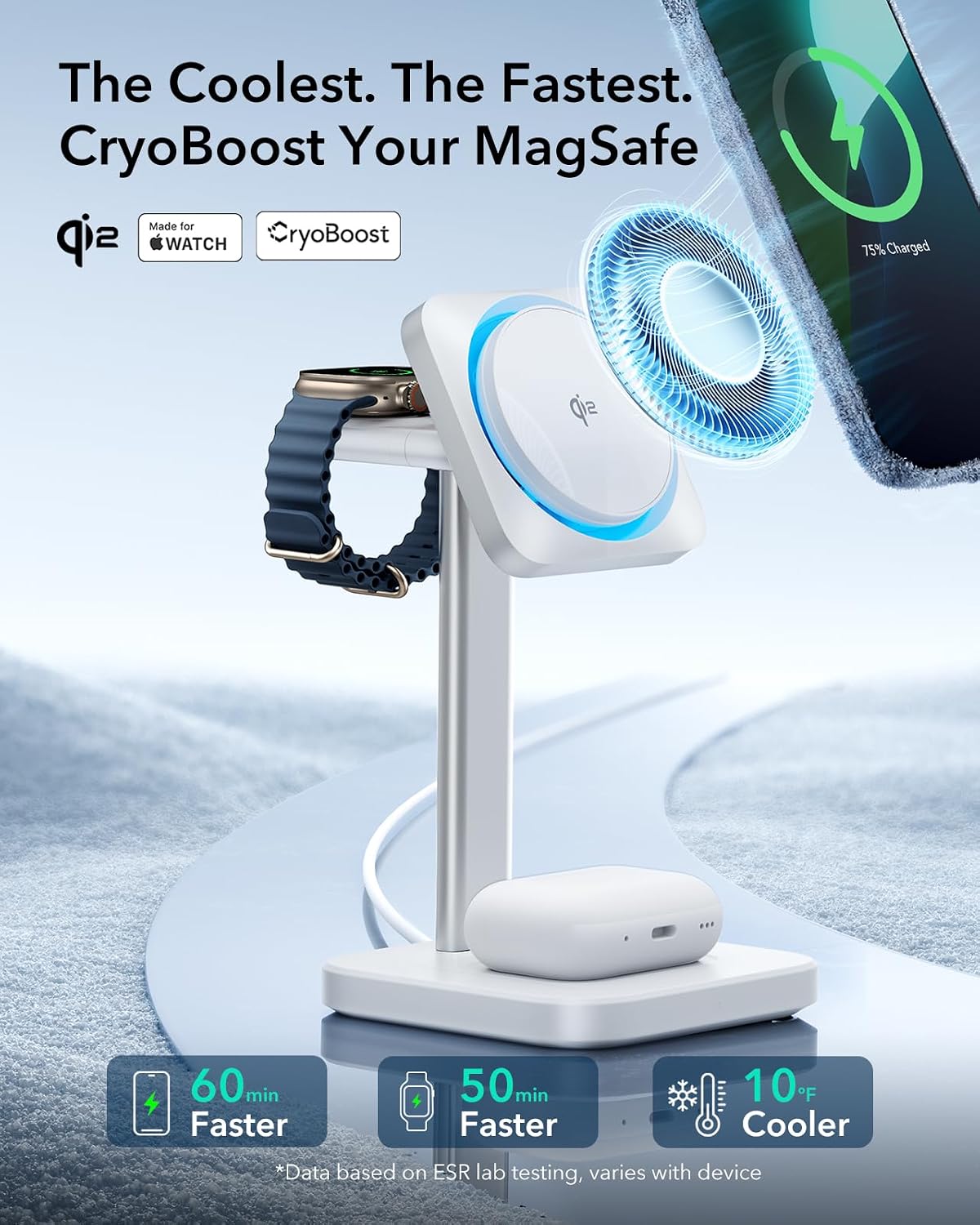
Figure 2: Visual representation of CryoBoost technology, emphasizing 60 minutes faster iPhone charging, 50 minutes faster Apple Watch charging, and 10°F cooler operation compared to standard charging.
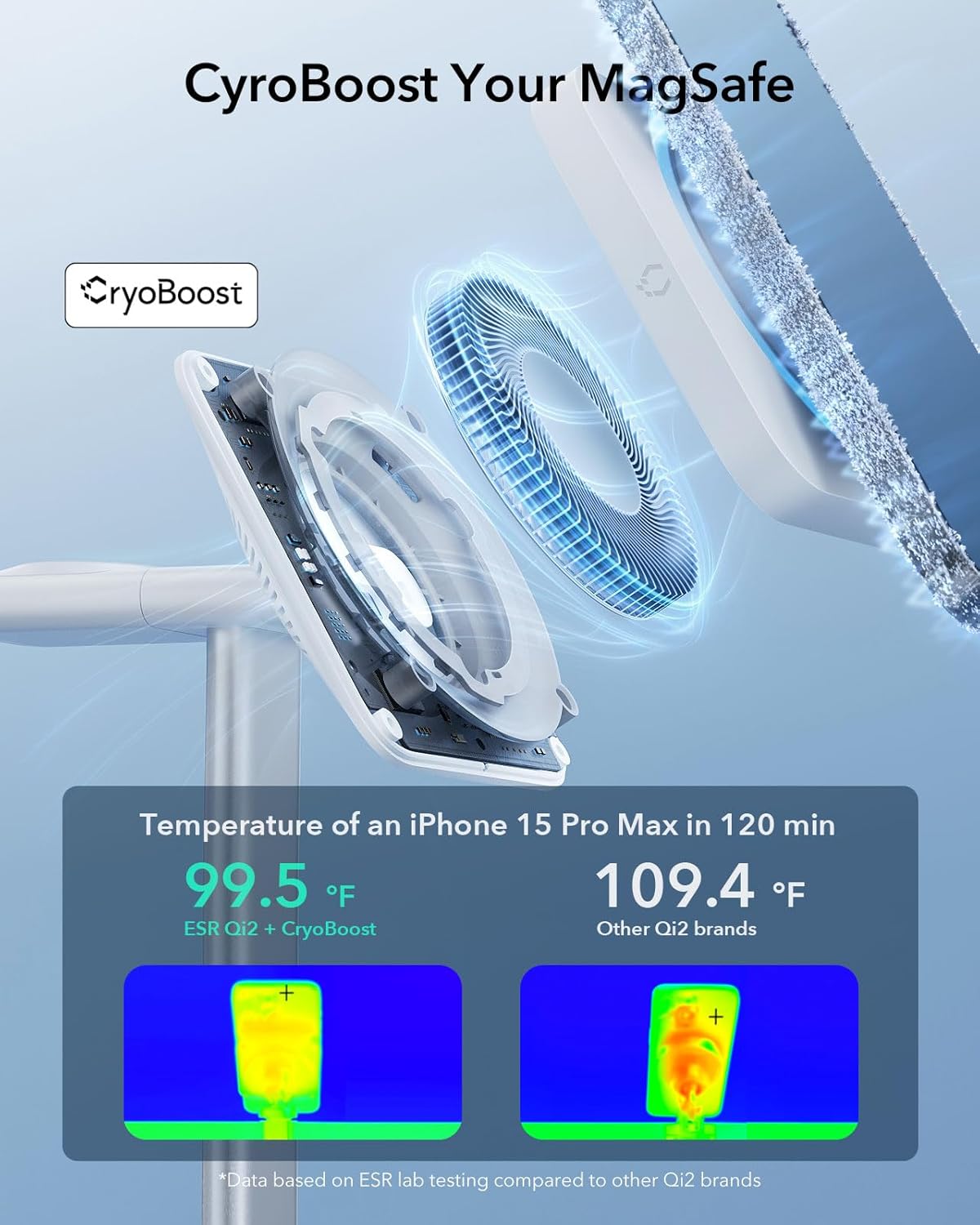
Figure 3: Thermal imaging comparison showing an iPhone 15 Pro Max at 99.5°F with ESR Qi2+CryoBoost after 120 minutes, versus 109.4°F with other Qi2 brands, demonstrating superior cooling.
- 3-in-1 MagSafe Charger Stand: Power all three of your essential Apple devices simultaneously. This design helps declutter your desk or nightstand and simplifies your daily charging routine. Compatible with iPhone 16/15/14/13/12 series, AirPods Pro/3/2, Apple Watch Ultra, and Apple Watch Series 8/7/6/5/4/3/2/1, and Apple Watch SE 2/1.

Figure 4: A user interacting with the 3-in-1 charging stand, illustrating the dedicated charging spots for iPhone, Apple Watch, and AirPods.
- Certified Made for Apple Watch: The integrated Apple Watch charger is officially certified, ensuring safe and reliable fast charging that remains unaffected by watchOS updates.

Figure 5: A graph illustrating that the ESR Apple-certified charger charges an Apple Watch Series 9 to 75% in 1 hour 10 minutes, significantly faster than non-Apple-certified brands.
- Strong Magnetic Lock: A powerful 1,000 g magnetic force securely holds your iPhone in place during charging. Built-in magnets in the Watch charger and AirPods pad ensure instant and precise alignment.
- Portable Apple Watch Charger: The small, lightweight USB-C charger for your Apple Watch allows for easy magnetic wireless charging on the go via various devices.
- Complete Compatibility: The charger is designed to be compatible with all iOS and watchOS updates, ensuring stable and full charging without compatibility issues.

Figure 6: A comparison showing ESR's stable charging and full compatibility with all iOS and watchOS updates, unlike other brands that may experience unstable charging or incompatibility.
3. Setup Guide
- Unpack Contents: Carefully remove all components from the packaging. You should find:
- 1x Qi2 CryoBoost Wireless Charging Station
- 1x 30W USB-C Charger
- 1x 59ft (1.5m) USB-C to USB-C Cable
- 1x Welcome Guide
- Connect Power: Insert one end of the provided USB-C to USB-C cable into the USB-C port located at the back of the charging stand's base.
- Plug into Outlet: Connect the other end of the USB-C cable to the 30W USB-C charger, then plug the charger into a wall outlet.
- Placement: Place the charging stand on a flat, stable surface such as a desk or nightstand. The non-slip base will help keep it secure.
4. Operating Instructions
- Charging iPhone: Align your MagSafe-compatible iPhone with the magnetic charging pad on the stand. The strong magnetic lock will snap it into place, and charging will begin automatically. The CryoBoost fan will activate to keep your phone cool.
The iPhone charging pad can be adjusted to hold your phone vertically for StandBy mode or horizontally for media consumption.
- Charging Apple Watch: Place your Apple Watch onto the dedicated charging puck on the side arm of the stand. Ensure it aligns magnetically for charging to start.
The Apple Watch charging puck is detachable and features a USB-C connector, allowing it to be used independently for portable charging with compatible USB-C power sources.
- Charging AirPods: Place your AirPods (Pro/3/2) charging case onto the wireless charging pad located at the base of the stand. Charging will begin automatically.
- CryoBoost Activation: The CryoBoost fan automatically activates when an iPhone is placed on the MagSafe charging pad to ensure optimal cooling during fast charging.
Video 1: Official ESR demonstration of the Qi2 3-in-1 MagSafe Charger Stand with CryoBoost, showing device placement and charging activation.
Video 2: Official ESR demonstration of the Qi2 3-in-1 Wireless Charging Station with CryoBoost, highlighting its features and ease of use.
5. Maintenance
- Cleaning: Disconnect the charger from the power source before cleaning. Use a soft, dry, lint-free cloth to wipe down the surfaces. Do not use abrasive cleaners, solvents, or aerosol sprays.
- Storage: Store the charger in a cool, dry place away from direct sunlight and extreme temperatures when not in use for extended periods.
6. Troubleshooting
| Problem | Possible Cause | Solution |
|---|---|---|
| Device not charging. |
|
|
| Slow charging speed. |
|
|
| CryoBoost fan not activating. |
|
|
7. Specifications
| Model Number | AC-GAN-101 |
| Package Dimensions | 8.7 x 4.61 x 4.29 inches |
| Item Weight | 1.41 pounds |
| Connectivity Technology | USB |
| Connector Type | USB Type C |
| Input Voltage | 9 Volts |
| Mounting Type | Tabletop Mount |
| Color | White |
| Compatible Devices | iPhone 16/15/14/13/12 series, AirPods Pro/3/2, Apple Watch Ultra, Apple Watch Series 8/7/6/5/4/3/2/1, Apple Watch SE 2/1 |
8. Warranty & Support
ESR provides comprehensive customer support for your product. This includes:
- Detailed setup videos and FAQs available online.
- A comprehensive 12-month protection plan.
- Lifetime support for your product.
- Personalized help from the ESR support team.
For further assistance, please refer to the Welcome Guide included in your package or visit the official ESR support website.