
Introduction
This manual provides essential instructions for the setup, operation, and maintenance of your Carrera Wireless 2.0 Duo Controllers and Receiver. This system is designed to enhance your Carrera DIGITAL 132 and DIGITAL 124 slot car racing experience by providing wireless control.

Image: The Carrera Wireless 2.0 Duo Controllers and Receiver set, showing two controllers and one receiver unit.
The Wireless 2.0 system utilizes 2.4-GHz radio technology, ensuring an interruption-free connection and a range of up to 15 meters. This allows for greater freedom of movement around your racetrack. The controllers operate on standard AAA 1.5-V batteries (not included).
Setup
1. Unpacking and Components
Carefully unpack all components. The package should contain:
- 2 Wireless 2.0 Speed Controllers
- 1 Wireless 2.0 Receiver
2. Battery Installation (Controllers)
Each Wireless 2.0 Speed Controller requires one (1) AAA 1.5-V battery (not included).
- Locate the battery compartment on the back of each controller.
- Open the battery compartment cover.
- Insert one AAA battery, ensuring correct polarity (+/-).
- Close the battery compartment cover securely.
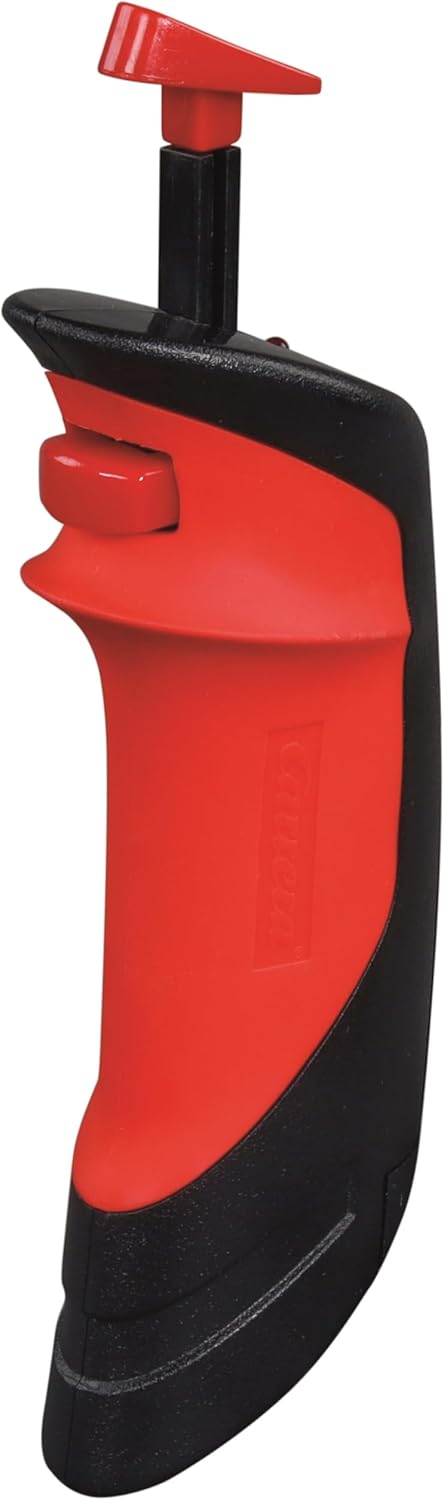
Image: A single Carrera Wireless 2.0 Speed Controller, showing its ergonomic design. The battery compartment is located on the underside/back.
3. Receiver Connection
The Wireless 2.0 Receiver connects to your Carrera Digital Control Unit.
- Locate an available port on your Carrera Digital Control Unit.
- Insert the connector cable from the Wireless 2.0 Receiver into the designated port on the Control Unit.
- Ensure the connection is firm.

Image: The Carrera Wireless 2.0 Receiver unit with its connection cable, displaying the 'CHANNEL' indicator and 'SET' button.
4. Pairing Controllers with Receiver
After connecting the receiver and installing batteries in the controllers, you must pair the controllers with the receiver. The specific pairing process is detailed in the instruction manual for your Carrera Digital Control Unit. Generally, this involves:
- Activating pairing mode on the Control Unit.
- Pressing a designated button on the Wireless 2.0 controller to initiate pairing.
- Confirming successful pairing via an indicator light or display on the Control Unit or receiver.
Important: Ensure that vehicle addresses are not assigned twice if operating multiple wireless systems (e.g., Wireless 2.0 and Wireless+).
Operating Instructions
Basic Operation
Once the controllers are paired and the system is powered on, you can control your slot cars wirelessly.
- Throttle Control: Use the trigger on the controller to adjust the speed of your assigned vehicle.
- Lane Change: Utilize the lane change button (if applicable to your track system and vehicle) to switch lanes.
- Range: The 2.4-GHz radio technology provides a reliable connection up to 15 meters from the receiver, allowing for flexible positioning around your track.
Compatibility Notes
The Carrera Wireless 2.0 system has specific compatibility requirements:
- Wireless 2.0 hand-held controllers are exclusively compatible with a Wireless 2.0 receiver.
- Previous Wireless+ hand-held controllers are only compatible with Wireless+ receivers.
- Parallel Operation: It is possible to operate both Wireless 2.0 and Wireless+ systems simultaneously. To do this, both a Wireless 2.0 receiver (Model 20010122) and a Wireless+ receiver (Model 20010112) must be connected to the Carrera Digital Control Unit. Ensure that the addresses assigned to the vehicles are unique and not duplicated across the systems.
Maintenance
Battery Replacement
When the controller's performance diminishes or it fails to connect, it is likely time to replace the AAA battery. Follow the battery installation steps outlined in the Setup section. Always use fresh, high-quality AAA 1.5-V alkaline or rechargeable batteries.
Cleaning
To maintain the longevity and appearance of your controllers and receiver:
- Wipe surfaces with a soft, dry cloth.
- Avoid using abrasive cleaners, solvents, or harsh chemicals.
- Do not immerse the controllers or receiver in water or any other liquid.
Troubleshooting
| Problem | Possible Cause | Solution |
|---|---|---|
| Controller not responding |
|
|
| Receiver not recognized by Control Unit |
|
|
| Intermittent connection |
|
|
| Cannot use Wireless 2.0 and Wireless+ simultaneously |
|
|
Specifications
| Brand | Carrera |
| Model Number | 20010120 |
| Included Components | 2 Wireless 2.0 Speed Controllers, 1 Wireless 2.0 Receiver |
| Power Source | Battery Powered |
| Battery Type | AAA 1.5-V Alkaline (2 required, not included) |
| Radio Technology | 2.4 GHz |
| Operating Range | Up to 15 meters (approx. 49 feet) |
| Item Weight | 0.31 Kilograms (approx. 0.68 lbs) |
| Item Dimensions (L x W x H) | 11 x 7 x 2 inches (approx. 27.9 x 17.8 x 5.1 cm) |
| Material Type | Plastic |
| Recommended Age Range | 8 years old and up |
| UPC | 050227109246 |
Warning: Contains small parts. Not suitable for children under 3 years.
Warranty Information
Specific warranty details for the Carrera Wireless 2.0 Duo Controllers and Receiver are typically provided with the product packaging or can be found on the official Carrera website. Please retain your proof of purchase for warranty claims.
Customer Support
For further assistance, technical support, or to inquire about replacement parts, please visit the official Carrera website or contact their customer service department.
Official Carrera Website: www.carrera-toys.com


