Introduction
This instruction manual provides essential information for the safe and effective use of your YUER 200W RGB LED Spot Moving Head Light, Model YRYX200WJLSMD. This versatile lighting fixture is designed for professional applications in DJ setups, stage productions, and party environments. It features a powerful 200W white light bead complemented by 21 SMD 5050 RGB LEDs, offering a wide spectrum of colors and dynamic effects. Please read this manual thoroughly before operating the device.
Package Contents
Upon unpacking, please verify that all items listed below are included and in good condition:
- 1x YUER 200W RGB LED Spot Moving Head Light
- 1x Instruction Manual
- 1x Power Cable
- 1x DMX Cable

Image: The YUER 200W RGB LED Spot Moving Head Light shown with its carton packaging and included accessories.
Product Overview
The YUER 200W RGB LED Spot Moving Head Light is engineered for dynamic lighting displays. It combines a powerful beam with a variety of color and pattern options, along with extensive pan and tilt capabilities.

Image: Front and rear views of the moving head light, highlighting its design and connectivity.

Image: Detailed view of the lens, LCD display, and DMX connections.

Image: Internal component diagram, illustrating the prism, light source, power supply, gobo wheel, color disc, and fan.
Setup
Follow these steps to set up your moving head light:
- Unpacking and Inspection: Carefully remove the light from its packaging. Inspect for any signs of damage during transit. Retain packaging for future transport or storage.
- Placement: Position the light on a stable, flat surface or mount it securely using appropriate clamps and safety cables (not included) if suspending. Ensure adequate ventilation around the unit.
- Power Connection: Connect the provided power cable to the light's power input and then to a compatible AC110-220V, 50-60Hz power outlet.
- DMX Connection (Optional): For DMX control, connect a DMX cable from your DMX controller's output to the light's DMX INPUT. If linking multiple units, connect from the first light's DMX OUTPUT to the next light's DMX INPUT, and so on.
Operation
The YUER 200W RGB LED Spot Moving Head Light offers multiple control modes and features for dynamic lighting effects.
Control Modes:
- DMX Control: Allows precise control over all functions (Pan, Tilt, Color, Gobo, Prism, Dimmer, Strobe) via a DMX controller. Refer to the DMX channel chart (not provided in this general manual) for specific channel assignments.
- Auto Mode: The light operates through pre-programmed sequences and patterns.
- Sound Active Mode: The light reacts to ambient sound or music, changing patterns and colors in sync with the beat.
- Master/Slave Mode: Link multiple units where one acts as the master, controlling the others (slaves) to synchronize effects.
- Voice Control: Similar to Sound Active mode, responding to audio input.
Key Features and Adjustments:
- Colors: Features 8 distinct colors and a 6-color rainbow effect.
- Patterns (Gobos): Includes 12/13 built-in patterns for various projections.
- Prism: Equipped with 18 prisms to create multi-faceted beam effects.
- Movement: Offers 540° X-axis (Pan) and 200° Y-axis (Tilt) rotation for wide coverage.

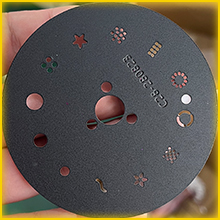
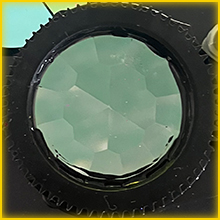
Images: Components for color, gobo patterns, and prism effects.

Image: Examples of diverse light patterns and effects.

Image: Demonstration of various beam colors.

Image: A selection of gobo patterns available.

Image: Multiple moving head lights creating a dynamic stage effect.
Product Videos:
Video: This video demonstrates various beam and spot effects, showcasing the color changes, patterns, and movement capabilities of the YUER 200W LED Moving Head Light.
Video: This video shows the YUER 200W RGB LED Spot Moving Head Light in a club environment, highlighting its performance and visual impact with various light patterns and colors.
Maintenance
Regular maintenance ensures the longevity and optimal performance of your moving head light:
- Cleaning: Periodically clean the exterior casing and optical lenses with a soft, lint-free cloth. For stubborn dirt, use a mild cleaning solution specifically designed for electronics. Ensure the unit is powered off and unplugged before cleaning.
- Ventilation: Ensure that the ventilation openings are clear of dust and debris to prevent overheating.
- Storage: When not in use, store the light in a dry, dust-free environment, preferably in its original packaging or a protective case.
Troubleshooting
If you encounter issues with your YUER 200W RGB LED Spot Moving Head Light, refer to the following common problems and solutions:
| Problem | Possible Cause | Solution |
|---|---|---|
| No Power | Power cable disconnected; no power from outlet; fuse blown. | Check power cable connection; test outlet; replace fuse if necessary. |
| No Light Output | Dimmer at 0%; light source failure; DMX signal issue. | Increase dimmer setting; check DMX connection and address; contact support if light source is faulty. |
| No DMX Control | Incorrect DMX address; faulty DMX cable; DMX controller issue. | Verify DMX address and channel mode; test DMX cable; check DMX controller functionality. |
| Erratic Movement | Interference; loose connections; internal fault. | Ensure stable power and DMX connections; avoid strong electromagnetic fields; contact support if problem persists. |
Specifications
Detailed technical specifications for the YUER 200W RGB LED Spot Moving Head Light:

Image: Product dimensions.
| Feature | Detail |
|---|---|
| Model Number | YRYX200WJLSMD |
| Light Source | 1x 200W White LED Bead + 21x SMD 5050 RGB LEDs |
| Power Consumption | 280W |
| Voltage | AC110-220V, 50-60Hz |
| Colors | 8 Colors + 6-color Rainbow Effect |
| Patterns (Gobos) | 12/13 Built-in Patterns |
| Prism | 18 Prisms |
| Control Modes | DMX, Voice Control, Master-Slave, Auto |
| DMX Channels | 13/15CH |
| X-Axis Rotation (Pan) | 540° |
| Y-Axis Rotation (Tilt) | 200° |
| Material | Plastic |
| Product Dimensions | 9"L x 6"W x 14"H (22.86cm L x 15.24cm W x 35.56cm H) |
| Item Weight | 9 pounds (4.08 kg) |
| Mounting Type | Floor Mount |
Warranty and Support
For warranty information and technical support, please refer to the documentation provided with your purchase or contact the manufacturer directly. Keep your proof of purchase for any warranty claims.