
Forcovr LY54AX8MA
4COVR 4K PoE Security Camera User Manual
Model: LY54AX8MA
Introduction
This manual provides comprehensive instructions for the installation, operation, and maintenance of your 4COVR 4K PoE Security Camera (Model: LY54AX8MA). This 8MP UHD vandal-proof dome IP camera is designed for both indoor and outdoor surveillance, featuring a built-in microphone, IK10 vandal-proof and IP67 weatherproof ratings, AI human/vehicle detection, and 100ft night vision. Please read this manual thoroughly before using the product to ensure proper setup and functionality.

Image: Front view of the 4COVR 4K PoE Security Camera, a white dome-shaped camera with a dark lens and infrared LEDs visible.
Package Contents
Verify that all items listed below are included in your package. If any items are missing or damaged, please contact customer support.
- 1x Dome 8MP/4K Wired IP Camera
- 1x Waterproof Lid
- 1x Screw Package (includes mounting screws and wall anchors)
- 1x Allen Wrench
- 1x User Manual (this document)

Image: A visual representation of the package contents, showing the dome camera, waterproof lid, Allen wrench, mounting screws, and a quick user guide.
Setup and Installation
The 4COVR 4K PoE Security Camera is designed for easy installation. It supports Power over Ethernet (PoE), requiring only a single Ethernet cable for both power and data transmission.
1. Power and Connection Modes
The camera offers flexible connection options:
- PoE NVR Connection: Connect the camera directly to a PoE NVR using an Ethernet cable. The NVR provides both power and data.
- PoE Switch Connection: Connect the camera to a PoE switch, then connect the switch to your network. This setup also provides power and data over a single cable.
- Standard Network Connection with DC 12V Power: If not using PoE, connect the camera to your network via an Ethernet cable and power it using a separate DC 12V power adapter (not included).
Image: Diagram illustrating three connection methods: A) PoE Camera to PoE NVR, B) PoE Camera to PoE Switch to PC/NVR, C) PoE Camera with DC 12V power to PC/NVR.

Image: A simplified diagram showing a PoE IP Camera connected via an Ethernet cable to a PoE NVR, highlighting the plug-and-play nature of PoE.
2. Mounting
The camera supports both ceiling and wall mounting. Choose a location that provides the desired viewing angle and is within range of your network connection.
- Ceiling Mount: Ideal for wide area coverage from above.
- Wall Mount: Suitable for monitoring specific entry points or areas along a wall.
Use the included screw package and Allen wrench for secure installation. Ensure the mounting surface is strong enough to support the camera's weight.

Image: Two illustrations showing the dome camera mounted on a ceiling and on a wall, demonstrating its versatile installation options.
Operating Instructions
Once installed and connected, your 4COVR camera is ready for operation. Access and manage the camera through a compatible NVR, PC software, or smartphone application.
1. Video Quality and Viewing Angle
The camera features an 8MP 4K resolution (3840 × 2160 Ultra HD) and a 2.8mm fixed lens, providing a 110° super wide viewing angle. This ensures clear and expansive coverage of your monitored area.
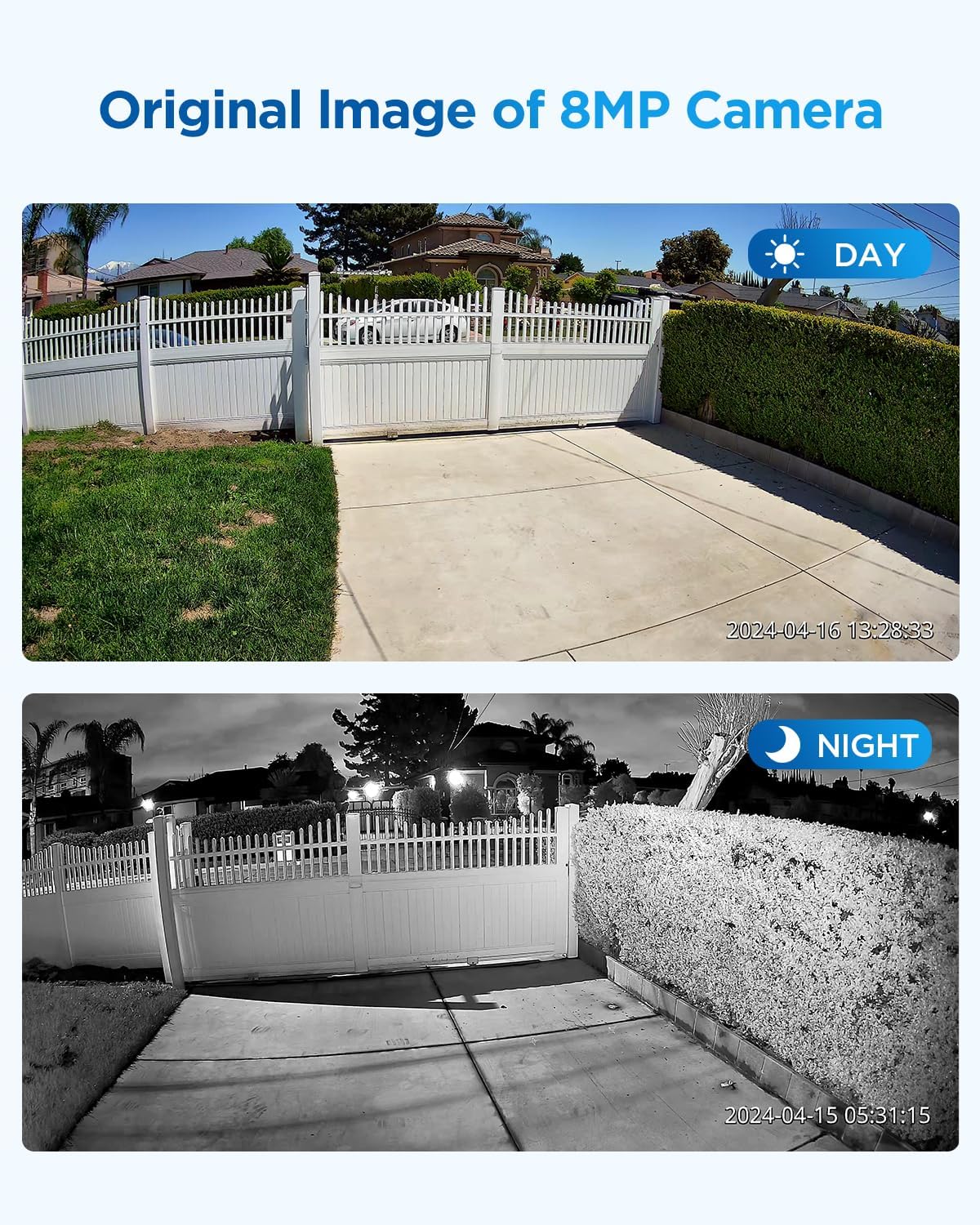
Image: A split image showing the original image quality of the 8MP camera during the day (color) and at night (black and white infrared), demonstrating clarity in both conditions.

Image: A wide-angle view of a residential street, illustrating the 110-degree ultra-wide viewing capability of the camera.
2. Night Vision
Equipped with high-efficiency infrared light, the camera provides up to 100ft of clear black and white night vision, ensuring surveillance even in complete darkness.
Image: A side-by-side comparison of day vision (color) and night vision (black and white infrared) from the camera, demonstrating its low-light capabilities.
3. Audio Capability
The built-in microphone enables one-way audio pickup, allowing you to hear sounds from the monitored area alongside the video feed.

Image: An illustration highlighting the built-in microphone feature of the camera, with sound waves emanating from it.
4. Intelligent AI Detection
The camera supports intelligent AI human and vehicle detection, allowing for more accurate alerts and reduced false alarms. This feature is recommended to be used with a 4COVR NVR for optimal performance.

Image: A surveillance image with red boxes highlighting a person and a vehicle, demonstrating the AI human and vehicle detection capabilities.
5. Video Compression
The camera utilizes H.265 video compression, which reduces bandwidth usage and saves storage space for recordings without compromising video quality.
Maintenance
To ensure optimal performance and longevity of your 4COVR security camera, follow these maintenance guidelines:
- Cleaning: Regularly wipe the camera lens and housing with a soft, damp cloth to remove dust and dirt. Avoid using harsh chemicals or abrasive materials that could scratch the lens or finish.
- Cable Inspection: Periodically check all cables for any signs of wear, damage, or loose connections. Secure or replace damaged cables promptly.
- Firmware Updates: Check the official 4COVR website or your NVR/software interface for available firmware updates. Keeping the firmware updated ensures the latest features, security patches, and performance improvements.
- Environmental Protection: While the camera is IP67 waterproof and IK10 vandal-proof, extreme environmental conditions (e.g., prolonged exposure to direct sunlight in very hot climates, or severe ice buildup) can still affect performance. Ensure proper installation to minimize such exposure.

Image: An illustration showing the camera in a rainy environment, with temperature ranges (-20°C/-4°F to 50°C/122°F) indicating its IP67 weatherproof durability.
Troubleshooting
If you encounter issues with your 4COVR security camera, refer to the following common troubleshooting steps:
| Problem | Possible Cause | Solution |
|---|---|---|
| No video feed | No power; Loose network cable; Incorrect network settings; NVR/software issue. | Check power connection (PoE or DC 12V). Ensure Ethernet cable is securely connected. Verify network settings (DHCP enabled). Restart NVR/PC software. |
| Poor image quality | Dirty lens; Insufficient lighting; Network bandwidth issues. | Clean the camera lens. Ensure adequate lighting for optimal day vision. Check network connection for stability and bandwidth. |
| Night vision not working | IR LEDs obstructed or faulty; Insufficient power. | Ensure nothing is blocking the IR LEDs. Verify stable power supply to the camera. |
| AI detection not accurate | Incorrect sensitivity settings; Environmental factors (e.g., moving trees); Not paired with 4COVR NVR. | Adjust detection sensitivity in camera settings. Ensure clear line of sight. For best results, use with a 4COVR NVR. |
| No audio | Microphone disabled in settings; Software/NVR audio settings. | Check camera settings to ensure the microphone is enabled. Verify audio output settings on your NVR or viewing software. |
If the problem persists after attempting these solutions, please contact 4COVR customer support.
Specifications
| Feature | Detail |
|---|---|
| Model Name | LY54AX8MA |
| Video Capture Resolution | 3840 × 2160p (8MP 4K UHD) |
| Lens | 2.8mm fixed lens |
| Viewing Angle | 110 Degrees |
| Night Vision Range | Up to 100 Feet (B/W) |
| Audio | Built-in Microphone (One-way audio) |
| Detection | AI Human & Vehicle Detection |
| Video Compression | H.265 |
| Power Source | PoE Powered (802.3af) or DC 12V (adapter not included) |
| Connectivity | Wired Ethernet |
| Indoor/Outdoor Usage | Indoor, Outdoor |
| Weather Resistance | IP67 Waterproof |
| Vandal Resistance | IK10 Vandal-Proof |
| Material | Heavy Duty Metal Housing |
| Dimensions (L x W x H) | 3.83 x 3.83 x 3.83 inches |
| Item Weight | 14.1 ounces |
| UPC | 657381532813 |
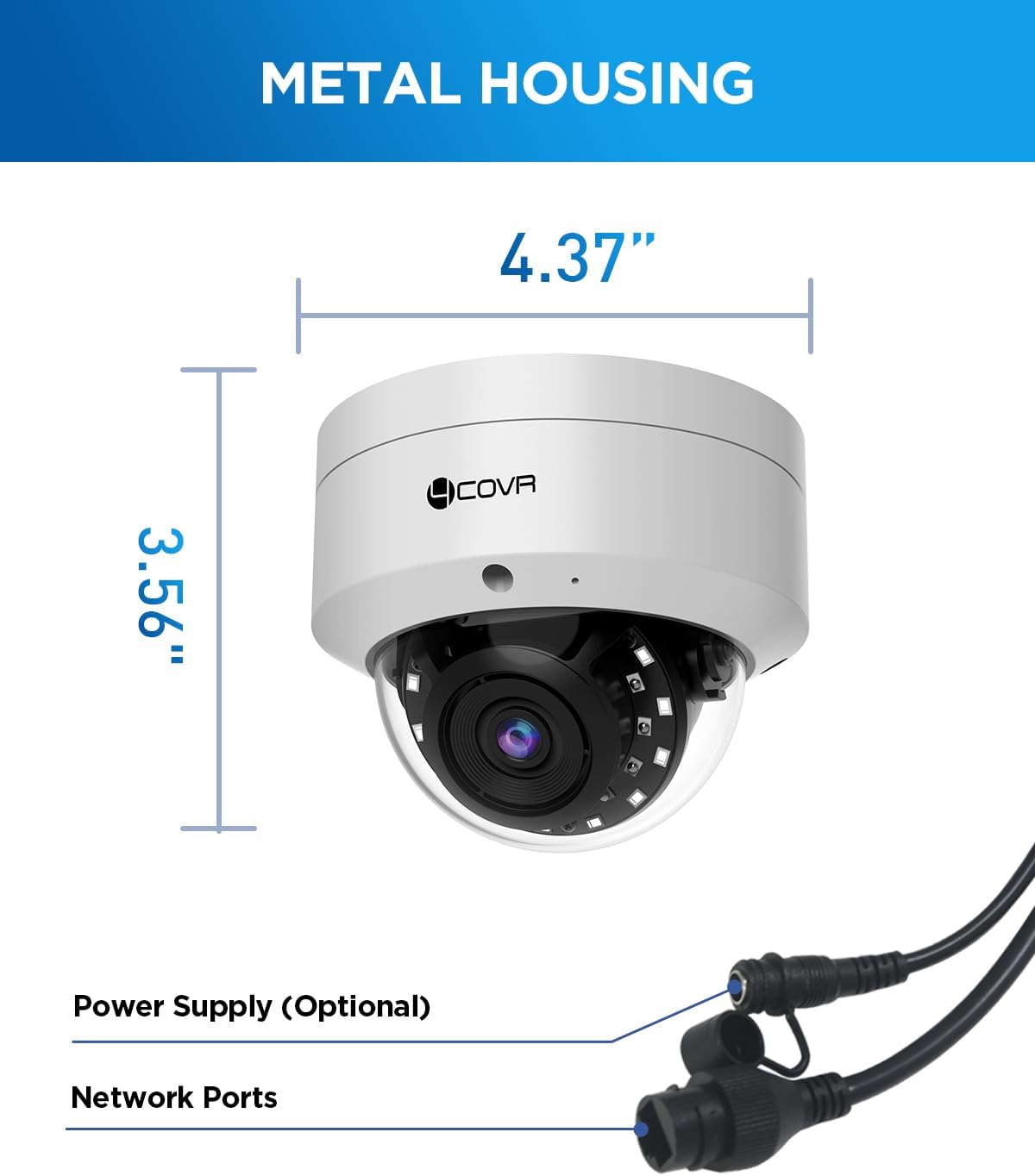
Image: A diagram showing the dimensions (4.37" width, 3.56" height) of the camera's metal housing and indicating the locations of the power supply (optional) and network ports.
Warranty and Support
4COVR is committed to providing reliable security solutions and excellent customer service.
Customer Support
For any questions regarding installation, operation, or troubleshooting, please contact our local service team in the United States. We are available to assist you and ensure your PoE system is up and running smoothly.
Support Hours: 9:00 AM - 5:00 PM PST

Image: A graphic depicting a customer service representative with a phone, indicating the availability of local technical support from 9:00 AM to 5:00 PM PST.
Product Authenticity
To proactively prevent counterfeits, each 4COVR product includes a unique Transparency code. You can scan this code with the Transparency app for authenticity verification.
no relevant documents
Ask a question about this manual
Ask about setup, troubleshooting, compatibility, parts, safety, or missing instructions. Manuals+ will review the question and use this page’s manual context to help answer it.