
XGODY S200 Mobile Phone User Manual
Model: S200
Introduction
The XGODY S200 is a user-friendly mobile phone designed with seniors and visually impaired individuals in mind. It features large buttons, a clear 2.4-inch color display, and a high-volume speaker to ensure ease of use and clear communication. This manual provides essential information on setting up, operating, and maintaining your S200 mobile phone.
Key features include a durable 1300 mAh battery, Type-C charging, dual SIM support, SD card expansion, a flashlight, FM radio, Bluetooth, and an important SOS emergency call function.
Package Contents
Please check the box for the following items:
- XGODY S200 Mobile Phone
- USB Charging Cable
- Phone Case
- Screen Protector
- User Manual (this document)
Product Overview
Familiarize yourself with the physical components of your XGODY S200 phone.

Figure 1: Front, side, and back views of the XGODY S200 Gold Flip Phone. The front view shows the open phone with a color display and large keypad. The side view shows the phone in a closed, compact form. The back view highlights the external display and camera area.

Figure 2: Detailed view of the XGODY S200, illustrating the 1300mAh battery capacity, the Type-C charging port, the 3.5mm headphone jack, and the integrated flashlight. This image helps identify key physical features for connectivity and utility.
Key Components:
- Display Screen: 2.4-inch color screen for clear viewing of menus, contacts, and messages.
- Large Keypad: Ergonomically designed with large, easy-to-press buttons for comfortable dialing and navigation.
- High-Volume Speaker: Ensures clear audio for calls and ringtones, especially beneficial for users with hearing impairments.
- SOS Button: Dedicated button for emergency calls (refer to SOS Function section).
- Type-C Charging Port: Modern and convenient port for charging the device.
- 3.5mm Headphone Jack: For connecting wired headphones.
- Flashlight: Built-in light for convenience in low-light conditions.
Setup
1. Installing SIM and SD Cards
The S200 supports dual SIM cards and one SD card for expanded storage. Ensure the phone is powered off before installation.
- Gently remove the back cover of the phone.
- Locate the SIM card slots and the SD card slot.
- Insert your SIM card(s) into the designated slots with the gold contacts facing down.
- If using, insert the SD card into its slot until it clicks into place.
- Replace the back cover securely.
2. Charging the Battery
Before first use, fully charge the phone's battery.
- Connect the Type-C end of the USB cable to the charging port on the phone.
- Connect the other end of the USB cable to a compatible USB power adapter (not included) or a computer's USB port.
- The charging indicator on the screen will show the charging status.
- Once fully charged, disconnect the cable.
Note: A full charge typically takes approximately 2-3 hours. The 1300 mAh battery provides up to 200 hours of standby time and 6 hours of talk time.
3. Powering On/Off
- To Power On: Press and hold the Power/End Call button (red button) until the screen lights up.
- To Power Off: Press and hold the Power/End Call button until the power off options appear, then select "Power Off" or simply continue holding until the phone shuts down.
Operating Instructions
1. Making and Receiving Calls
- To Make a Call:
- Enter the phone number using the keypad.
- Press the Call button (green button) to dial.
- To Answer a Call: When the phone rings, press the Call button (green button).
- To End a Call: Press the End Call button (red button).

Figure 3: An elderly woman holding the XGODY S200 phone, with visual cues indicating the loud and clear call volume feature, designed to assist seniors with hearing difficulties.
2. SOS Emergency Function
The S200 features a dedicated SOS button for emergencies. You can set up to 5 emergency contacts.
- Setting Up SOS Contacts:
- Navigate to the "SOS Settings" in the phone's menu.
- Add up to 5 emergency contact numbers from your phonebook or by entering them manually.
- Using the SOS Function:
- In an emergency, press and hold the SOS button located on the back of the phone.
- The phone will automatically dial the emergency contacts in sequence until one answers.
- An emergency SMS message will also be sent to the contacts.

Figure 4: A visual representation of the SOS emergency call feature, demonstrating how the phone can be configured with up to five emergency contacts (e.g., family members, doctor, first aid) to ensure rapid assistance in critical situations.
3. Flashlight
The S200 includes a convenient built-in flashlight.
- To Turn On/Off: Press and hold the dedicated flashlight button (often located on the side or top of the phone) for approximately 3 seconds.
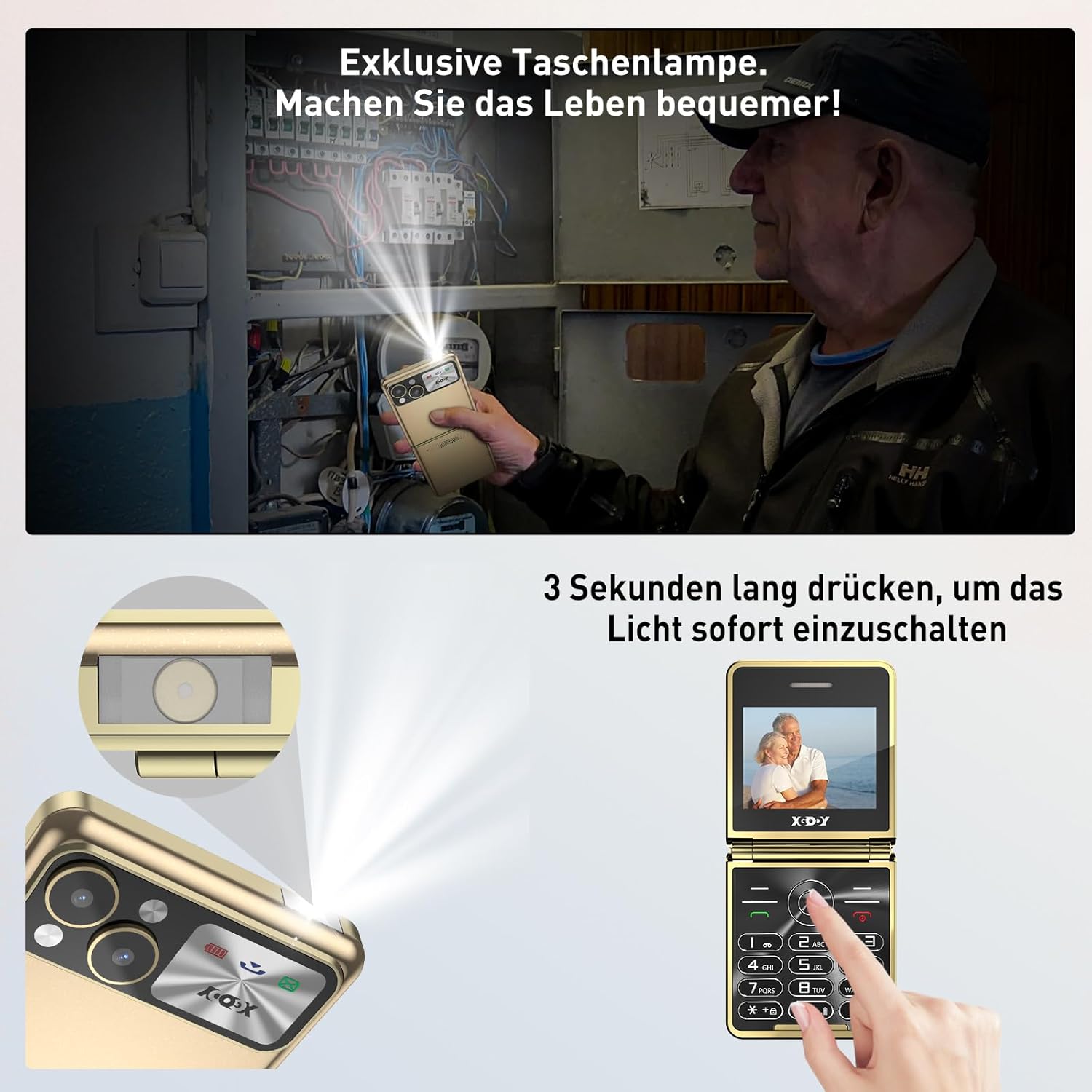
Figure 5: An illustration of the XGODY S200's flashlight function, showing a user activating the light in a dimly lit environment. The image highlights the ease of use with a simple press-and-hold action for 3 seconds to turn the flashlight on or off.
4. FM Radio
Enjoy your favorite radio stations on the go.
- Plug in wired headphones (not included) to act as an antenna.
- Navigate to the "FM Radio" application in the menu.
- Use the navigation keys to scan for stations or manually tune to a frequency.
5. Bluetooth Connectivity
Connect your S200 to Bluetooth-enabled devices like headsets or car kits.
- Go to "Settings" > "Bluetooth".
- Turn Bluetooth "On".
- The phone will search for available devices. Select your desired device from the list to pair.
- Enter the pairing code if prompted (usually "0000" or "1234").
Maintenance
1. Cleaning Your Phone
- Use a soft, lint-free cloth to wipe the screen and body of the phone.
- Avoid using harsh chemicals, cleaning solvents, or abrasive materials.
- Do not expose the phone to excessive moisture.
2. Battery Care
- To prolong battery life, avoid extreme temperatures.
- Do not leave the phone charging for extended periods after it is fully charged.
- If the phone will not be used for a long time, charge it to about 50% before storing.
3. Storage
Store your phone in a cool, dry place away from direct sunlight and extreme temperatures.
Troubleshooting
| Problem | Possible Cause | Solution |
|---|---|---|
| Phone does not power on. | Low battery; faulty battery; power button issue. | Charge the phone for at least 30 minutes. Ensure the battery is properly inserted. Try pressing the power button firmly. |
| Cannot make or receive calls. | No SIM card; SIM card not properly inserted; no network signal; incorrect network settings. | Ensure SIM card is inserted correctly. Check for network signal strength. Restart the phone. Contact your service provider if issues persist. |
| Poor call quality. | Weak network signal; interference; speaker/microphone issue. | Move to an area with better signal. Avoid using near other electronic devices. Check if speaker/microphone is obstructed. |
| Battery drains quickly. | Excessive usage; background applications; aging battery. | Reduce screen brightness. Close unused applications. Limit talk time. Consider replacing the battery if it's old. |
| SOS function not working. | No emergency contacts set; incorrect numbers; network issue. | Verify that emergency contacts are correctly set in the SOS settings. Ensure there is network coverage. |
Specifications
| Feature | Detail |
|---|---|
| Brand | Xgody |
| Model Name | S200 |
| Form Factor | Flip Phone |
| Color | Gold-S200 |
| Screen Size | 2.4 Inches |
| Wireless Network Technology | GSM |
| Connectivity Technology | Bluetooth |
| Memory Storage Capacity | 32 MB |
| Battery Type | Lithium-ion (1300 mAh) |
| SIM Card Support | Dual SIM |
| SD Card Support | Yes (for expansion) |
| Included Components | Phone Case, USB Cable, Screen Protector |
Warranty and Support
XGODY products are designed for reliability and performance. For warranty information and technical support, please refer to the warranty card included with your product or visit the official XGODY website. Keep your purchase receipt as proof of purchase for warranty claims.
For further assistance, you may contact XGODY customer service through the contact information provided on their official website or the product packaging.