
Itaar B0D7Q3FDJM
Itaar Farmhouse L Shaped Desk User Manual
Model: B0D7Q3FDJM
1. Introduction
Thank you for choosing the Itaar Farmhouse L Shaped Desk. This manual provides essential information for the safe assembly, operation, and maintenance of your new desk. Please read these instructions thoroughly before beginning assembly and retain them for future reference.
Important Safety Information
- Always unplug the power strip when not in use.
- Do not overload the desk with items heavier than the recommended weight limit of 300 pounds.
- Ensure the desk is properly assembled and stable before use.
- Keep all small parts and packaging materials away from children.
- Use only the provided hardware for assembly.
2. Product Overview
The Itaar Farmhouse L Shaped Desk is designed for home office environments, offering a spacious work surface and integrated storage solutions. It features a durable engineered wood construction with a grey wood finish.
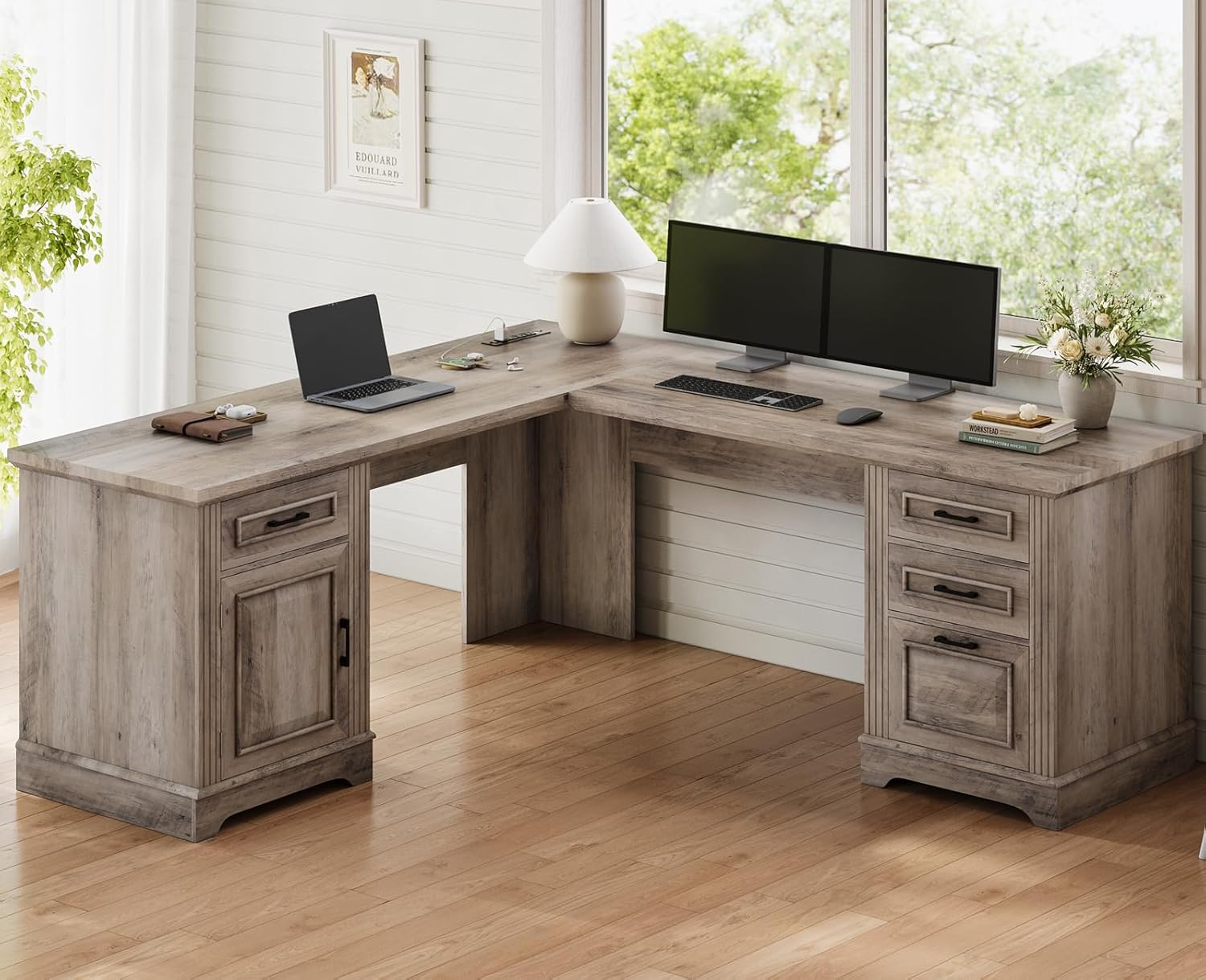
Image: The Itaar Farmhouse L Shaped Desk, showcasing its L-shape configuration and integrated storage.
Key Features:
- Spacious L-Shaped Desktop: Provides ample room for multiple monitors, laptops, and office accessories.
- Integrated Storage: Includes four drawers and one storage cabinet for organizing files, books, and supplies.
- File Drawer: Accommodates letter, A4, and legal-sized files.
- Built-in Power Outlet: Features 4 AC outlets and 2 USB ports with a safety switch for convenient device charging.
- Adjustable Shelves: The storage cabinet includes adjustable shelves to customize storage height.
- Durable Construction: Crafted from high-quality engineered wood with a 1.2-inch thick tabletop.
3. Setup and Assembly
Assembly of the Itaar Farmhouse L Shaped Desk requires careful attention to detail. It is recommended that two people participate in the assembly process to ensure stability and ease of handling. Please ensure all parts are present before beginning.
Required Tools (Not Included):
- Phillips head screwdriver
- Hammer (optional, for dowels)
Assembly Steps:
- Unpack and Identify Parts: Carefully unpack all components and hardware. Refer to the included assembly diagram (not provided in this manual) to identify each piece.
- Assemble Base Units: Begin by assembling the base units for the drawer cabinet and the storage cabinet according to the diagrams.
- Attach Side Panels: Secure the side panels to the base units.
- Install Drawers and Cabinet Door: Assemble the drawers and install them into their respective slides. Attach the cabinet door to the storage unit.
- Connect Desktop Sections: Carefully align and connect the L-shaped desktop sections to the assembled base units. Ensure all connections are secure.
- Install Power Outlet: Integrate the power strip into the designated cutout on the desktop.
- Final Adjustments: Verify all screws and fasteners are tightened. Ensure the desk is level and stable.

Image: Detailed dimensions of the desk and its components, indicating a maximum load capacity of 300 lbs.
4. Operating Instructions
Using the Drawers and Cabinet:
- The desk features four drawers. The bottom drawer is designed as a file cabinet, capable of holding letter, A4, and legal-sized files.
- Each drawer is equipped with smooth-gliding rails for effortless opening and closing.
- The storage cabinet includes adjustable shelves. To adjust, remove the shelf, reposition the shelf pins to the desired height, and reinsert the shelf.
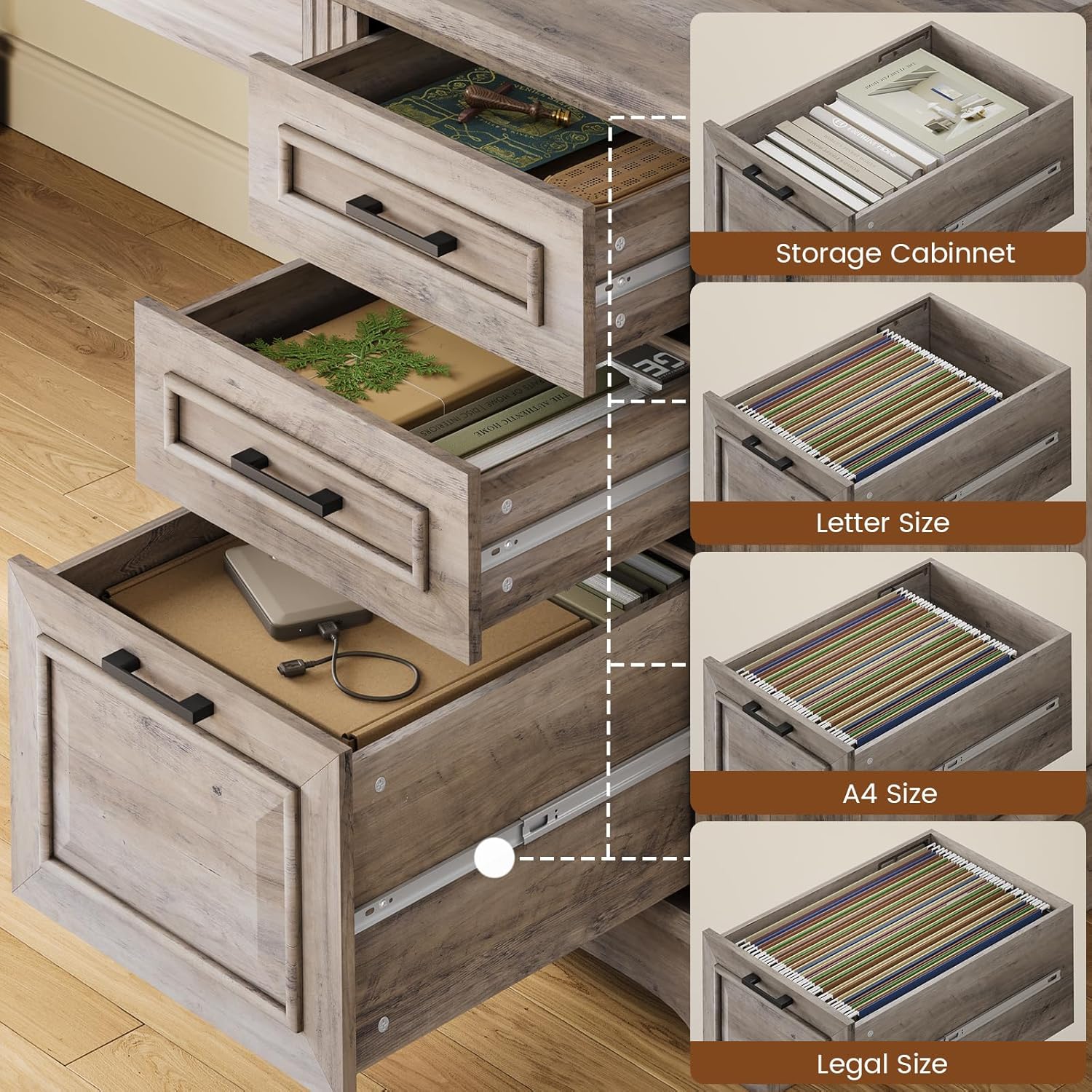
Image: Illustration of the drawer storage capabilities, including options for letter, A4, and legal-sized files, and a general storage cabinet.

Image: A visual guide demonstrating the three adjustable shelf levels within the storage cabinet, allowing for customized storage height.
Using the Power Outlet:
- The built-in power strip provides 4 AC outlets and 2 USB ports for charging electronic devices.
- To activate the power strip, ensure it is plugged into a wall outlet and then use the integrated on/off switch located on the strip.
- Always turn off the power strip using the switch when not in use to ensure electrical safety.
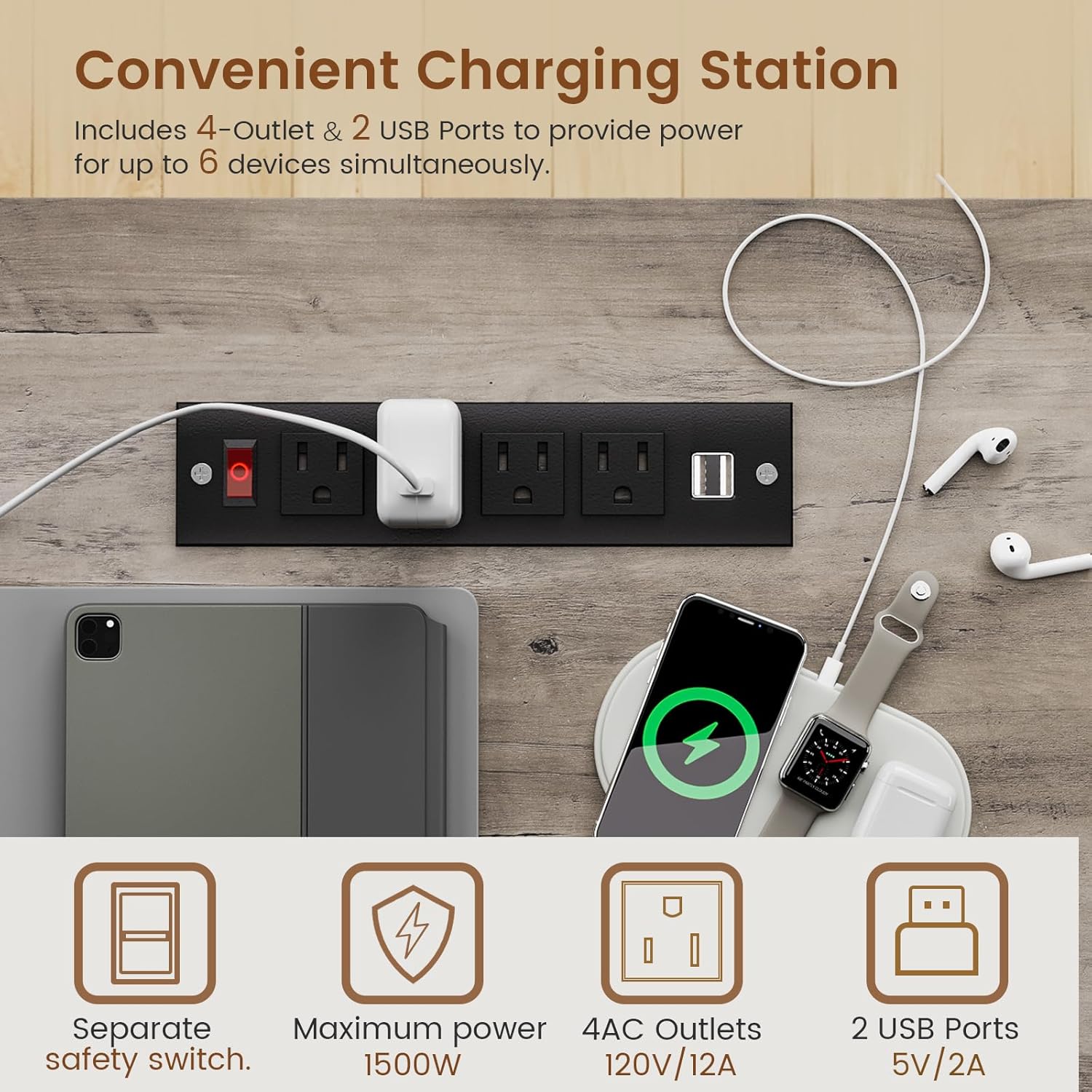
Image: The convenient charging station featuring 4 AC outlets and 2 USB ports, along with a separate safety switch, for powering multiple devices.
5. Maintenance
Proper maintenance will extend the life and appearance of your Itaar Farmhouse L Shaped Desk.
Cleaning:
- Wipe surfaces with a soft, damp cloth. Avoid abrasive cleaners or harsh chemicals that may damage the finish.
- For spills, wipe immediately with a dry cloth to prevent staining.
Care for Wood Finish:
- Avoid placing hot items directly on the desktop. Use coasters or protective pads.
- Keep the desk away from direct sunlight and extreme temperature changes to prevent warping or fading.
- Periodically check and tighten all hardware to ensure the desk remains stable.
6. Troubleshooting
This section addresses common issues you might encounter with your desk.
Desk is Wobbly:
- Solution: Check all assembly screws and fasteners. Tighten any loose connections. Ensure the desk is on a flat, even surface.
Drawers Do Not Slide Smoothly:
- Solution: Ensure the drawer slides are properly aligned and free of obstructions. Verify that the drawers are not overloaded.
Power Outlet Not Working:
- Solution: Confirm the power strip's main plug is securely inserted into a functional wall outlet. Check that the on/off switch on the power strip is in the 'on' position. If issues persist, test the wall outlet with another device.
7. Specifications
| Feature | Detail |
|---|---|
| Brand | Itaar |
| Model | B0D7Q3FDJM |
| Product Dimensions | 21.6"D x 69"W x 29.5"H |
| Color | Grey |
| Style | Farmhouse |
| Base Material | Engineered Wood |
| Finish Type | Wood |
| Special Features | 4 drawers, 1 storage cabinet, built-in power outlet (4 AC, 2 USB) |
| Number of Drawers | 4 |
| Number of Cabinets | 1 |
| Tabletop Thickness | 1.2 Inches |
| Maximum Weight Recommendation | 300 Pounds |
| Required Assembly | Yes |
| Recommended People for Assembly | 2 |
8. Warranty and Support
Warranty Information:
The Itaar Farmhouse L Shaped Desk comes with a Limited Warranty. For specific details regarding warranty coverage, terms, and conditions, please refer to the documentation included with your purchase or visit the official Itaar website.
Customer Support:
If you encounter any issues during assembly, operation, or require replacement parts, please contact Itaar customer support. Contact information can typically be found on the product packaging, the manufacturer's website, or through your point of purchase.
Please have your model number (B0D7Q3FDJM) and purchase date available when contacting support.
Ask a question about this manual
Ask about setup, troubleshooting, compatibility, parts, safety, or missing instructions. Manuals+ will review the question and use this page’s manual context to help answer it.