
1. Introduction
This manual provides detailed instructions for the assembly, operation, and maintenance of your BEXEVUE 47-inch Gaming Desk. Please read this manual thoroughly before beginning assembly or using the product to ensure proper setup and safe operation. Retain this manual for future reference.
2. Safety Information
Warning: This desk requires proper assembly. Handle with care, as some components may have sharp edges. Always follow the assembly instructions carefully to ensure stability and safety. Failure to assemble correctly may result in instability or injury. Do not overload the desk or shelves beyond their stated weight capacities.
3. Package Contents
Before assembly, verify that all components listed below are present and undamaged. If any parts are missing or damaged, please contact customer support.
- Desktop Panel
- Desk Frame Components (Legs, Support Bars)
- Monitor Stand/Upper Shelf
- Lower CPU Shelf
- Fabric Storage Drawer
- Side Storage Bag
- Integrated Power Outlet Strip
- LED Light Strip with Remote Control
- Assembly Hardware (Screws, Allen Wrench, etc.)
- Adjustable Foot Pads
- Earphone Hooks
4. Setup and Assembly Instructions
Assembly of the BEXEVUE Gaming Desk is designed to be straightforward. Please follow the step-by-step instructions provided in the included assembly guide. Ensure all parts are correctly oriented and all screws are tightened securely for optimal stability.
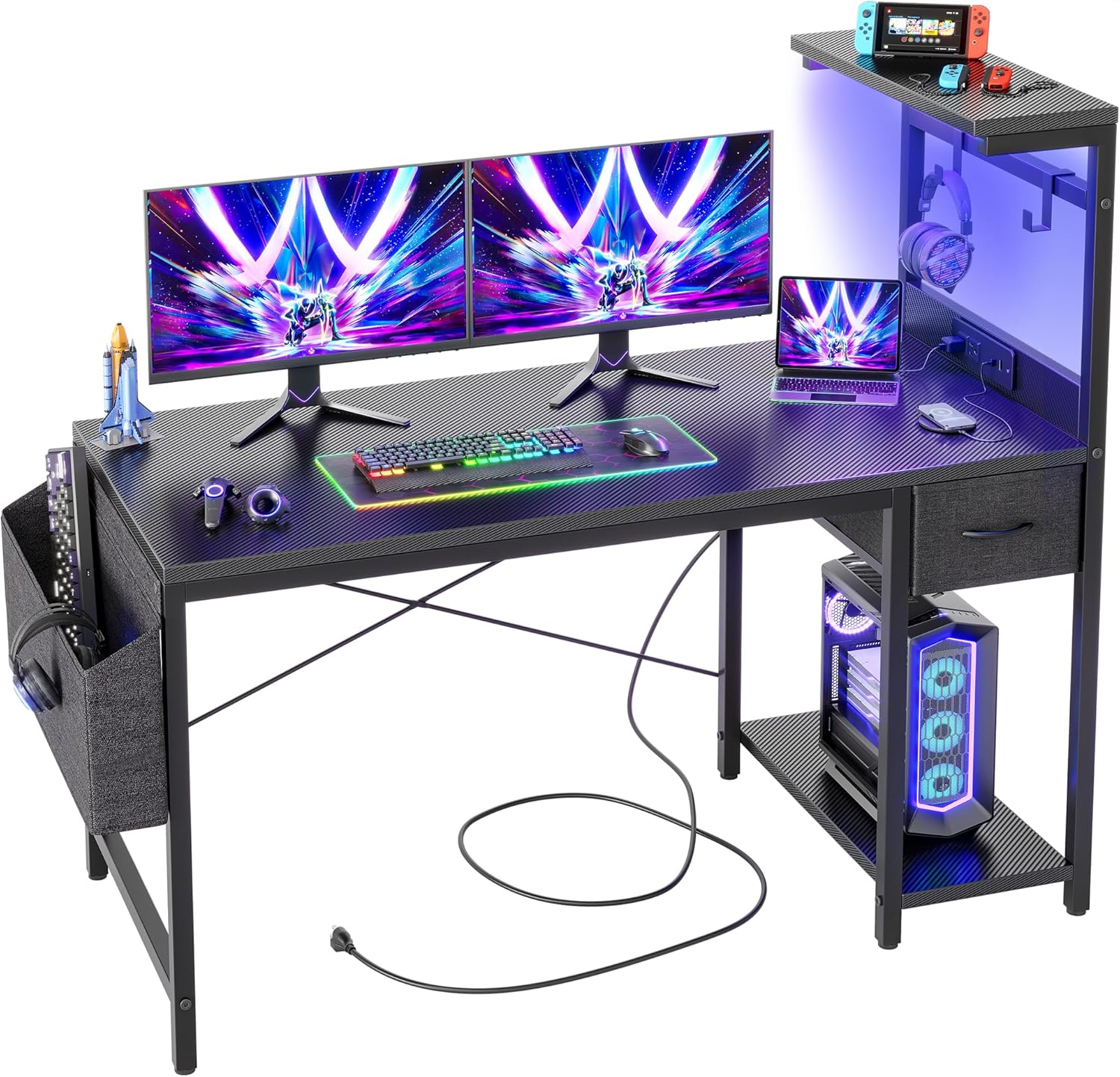
An overview of the BEXEVUE 47-inch Gaming Desk, showcasing its spacious desktop, integrated LED lighting, and various storage options, including a side bag and a lower shelf for a PC tower.

A diagram illustrating the key dimensions of the BEXEVUE 47-inch Gaming Desk, including its 47-inch width, 15.6-inch height of the monitor stand, and 28.6-inch desk height.
Key Assembly Tips:
- Lay out all parts and hardware before starting.
- Do not fully tighten all screws until the entire frame is assembled to allow for minor adjustments.
- The monitor stand and lower shelf are reversible, allowing you to configure the desk to your preference (left or right side).
- Attach the adjustable foot pads to the bottom of the desk legs to ensure stability on uneven surfaces.
5. Features Overview
5.1 Integrated Power Outlet
The desk features a built-in power strip for convenient access to electricity. This helps reduce cable clutter and keeps your devices charged and ready.

A detailed view of the desk's integrated power strip, featuring two AC outlets, a USB-A port, and a USB-C port for convenient device charging and power access.
- 2 AC Outlets (220-240V/16A)
- 1 USB-A Port (5V/3A)
- 1 USB-C Port (5V/3A)
- 1.5m Power Cord
5.2 RGB LED Light Strip
Enhance your gaming or work environment with the integrated RGB LED light strip. It offers customizable lighting options to suit your mood or setup.

An illustration of the desk's RGB LED lighting system, highlighting its features such as speed control, adjustable brightness, 20 static colors, 21 dynamic modes, and wireless remote control for customization.
- Speed Control
- Adjustable Brightness
- 20 Static Colors
- 21 Dynamic Modes
- Wireless Remote Control
5.3 Reversible Shelves and Storage
The desk is designed with flexibility in mind, featuring reversible shelves and various storage solutions.
- Monitor Stand: Provides an elevated surface for monitors, improving ergonomics.
- Lower CPU Stand: A dedicated shelf to keep your PC tower off the floor.
- Fabric Storage Drawer: A soft-sided drawer for storing small accessories, documents, or personal items.

An image showing the fabric storage drawer, ideal for small accessories, and the dedicated lower shelf designed to accommodate a CPU tower, keeping the desktop clear.
- Side Storage Bag: A removable fabric bag attached to the side of the desk, perfect for organizing books, headphones, or other frequently accessed items.

The removable side storage bag attached to the desk, providing additional space for books, headphones, or other items, contributing to a tidy workspace.
- Earphone Hooks: Convenient hooks for hanging headphones, keeping them within reach and off the desktop.
6. Operating Instructions
6.1 Using the Power Outlet
Plug the desk's main power cord into a standard wall outlet. You can then use the integrated AC outlets and USB ports to power and charge your electronic devices.
- Ensure the total power draw of connected devices does not exceed the power strip's maximum capacity.
- Do not expose the power strip to liquids.
6.2 Controlling the LED Lights
The LED light strip is controlled via the included wireless remote. Point the remote at the LED receiver (usually located near the light strip) to operate.
- Power Button: Turns the LED lights on or off.
- Color Buttons: Select from 20 static colors.
- Mode Buttons: Cycle through 21 dynamic lighting effects.
- Brightness Buttons: Adjust the intensity of the lights.
- Speed Buttons: Adjust the speed of dynamic lighting effects.
7. Maintenance
- Cleaning: Wipe the desk surfaces with a soft, damp cloth. Avoid harsh chemicals or abrasive cleaners that could damage the finish.
- Hardware: Periodically check all screws and fasteners to ensure they remain tight. Re-tighten as necessary to maintain desk stability.
- Electrical Components: Keep the power outlet and LED strip dry. Do not attempt to repair electrical components yourself.
- Fabric Parts: The fabric drawer and storage bag can be spot cleaned with a mild detergent and water. Allow to air dry completely.
8. Troubleshooting
| Problem | Possible Cause | Solution |
|---|---|---|
| Desk is wobbly/unstable | Loose screws; uneven floor; incorrect assembly. | Ensure all assembly screws are fully tightened. Adjust the foot pads on the bottom of the legs to level the desk. Review assembly steps. |
| LED lights not working | Loose connection; remote battery dead; faulty LED strip. | Check that the LED strip is securely plugged into the power source. Replace the remote control battery. If issues persist, contact customer support. |
| Power outlets not functioning | Desk power cord unplugged; circuit breaker tripped; faulty outlet. | Ensure the desk's main power cord is securely plugged into a working wall outlet. Check your home's circuit breaker. Test the wall outlet with another device. |
| Parts do not align during assembly | Incorrect orientation of parts; manufacturing defect. | Double-check the assembly diagrams to ensure parts are oriented correctly. Loosen screws slightly to adjust alignment, then re-tighten. If a defect is suspected, contact customer support. |
9. Specifications
| Feature | Detail |
|---|---|
| Brand | BEXEVUE |
| Model | 47 Inch Gaming Desk |
| Product Dimensions (Overall) | Approx. 119.38 cm (47 inches) Width x 50 cm (19.7 inches) Depth x 72 cm (28.3 inches) Height |
| Material | Metal Frame, Carbon Fiber Laminated Desktop |
| Item Weight | 14.7 kg (32.4 lbs) |
| Special Features | Reversible Shelves, Integrated Power Outlet (2 AC, 1 USB-A, 1 USB-C), RGB LED Light Strip, Fabric Storage Drawer, Side Storage Bag, Earphone Hooks, Adjustable Foot Pads |
| Power Outlet Input | 220-240V/16A |
| USB Output | 5V/3A (USB-A & USB-C) |
10. Warranty and Support
For warranty information or technical support, please refer to the documentation included with your purchase or contact BEXEVUE customer service directly. Please have your purchase receipt and product model information available when contacting support.